Settings Editor Overview
The Settings Editor is used for the configuration of all location specific settings including hardware, peripherals, employees, and menus.
- Brands, Cash Drawers & Charities
- Customer Attributes, Day Parts & Deposit Types
- Destinations
- Discount Groups & Discounts
- Email Templates, Gift Card Filters & Images
- Item Availability, Item Groups & Item Size Groups
- Items
- Items Bulk Price Update, Key Ingredients & Keyboard Shortcuts
- Kitchen Displays, Kitchen Key Ingredient Summaries & Kitchen Keypads
- Kitchen Queues
- Kitchen Views
- Labels, Formatting Tags & Replaceable Parameters
- Labor Groups & Lanes
- Layout
- Adding New Controls & Button Behaviors
- Marketing Campaigns
- Menus, Menu Categories & Menu Items
- Modifier Code Pricing & Modifier Codes
- Modifier Groups & Modifier Tiers
- Options
- Petty Accounts, Price Changes & Price Levels
- Printer Groups & Printer Messages
- Printers
- Promotions
- Refund Reasons & Registers
- Revenue Centers, Scales, Scheduled Events & Screens
- Script Functions, Sections & Shift End Reasons
- Smart Groups & Sounds
- Surcharges
- Tables, Tares & Taxes
- Tenders
- Video Groups & Void Reasons

The Settings Editor toolbar contains the following controls:
- Location drop-down list: Lists all locations available to the current user, configuration for the selected location is visible in the Settings Editor.
- Refresh button: Reverts all changes made to the selected location since the last Save or Publish.
- Save button: Saves all changes, for the selected location, since the last time a save or publish was performed.
- Publish button: Saves and publishes all changes, for the selected location, since the last time a publish was performed.
- Delete Changeset button: Permanently deletes the currently saved changeset for the selected location.
- Changeset Publisher button: Opens the Changeset Publisher window.
- Close Settings Editor button: Exits Settings Editor and returns you to Administrator Portal.
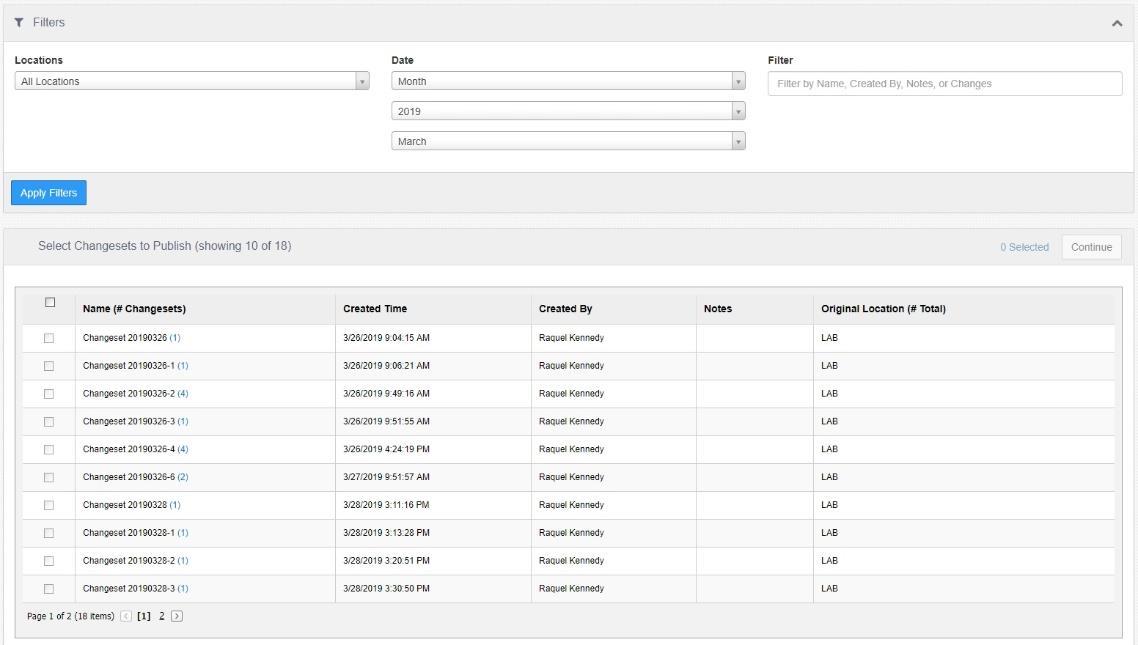
The Changeset Publisher displays published changes, optionally filtered by date range, location, and detail text. Selecting a changeset row, then selecting the Show Changeset Locations link near the bottom of the screen will expand a windowpane listing the locations that the changes have been published to. To publish a changeset to another location, or multiple locations, select the changeset row, check the target locations in the pane to the right, then click the Publish button at the bottom.
