Modifier Groups & Modifier Tiers
Modifier Groups
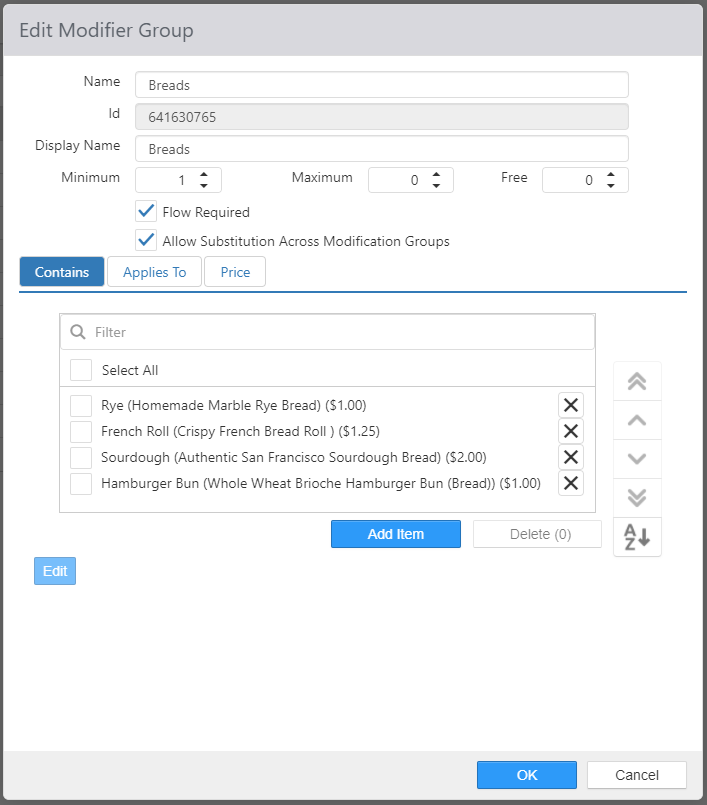
Modifier groups are a group of modifier choices available when ordering a particular item. To create a new modifier group, click Add. To edit an existing modifier group, click its name in the list. Item Description is now displayed in addition to Item Name.
-
Name: Name of the modifier group.
-
Display Name: Alternate name to be displayed in Register and Customer Portal.
-
Minimum: Minimum number of required selections.
-
Maximum: Maximum number selections allowed.
-
Free: Number of selections that are allowed free of charge.
-
Flow Required: Forces the `Modify' screen to appear when item that the group is applied to is ordered.
- NOTE: If Flow Required is not set but there is a Minimum that is not met, the Modify screen will automatically appear.
-
Allow Substitution Across Modification Groups: Allows modifiers from other modifier groups to be substituted for modifiers in this group. Also allows modifiers in this group to be substituted for modifiers in other groups.
-
Contains tab: Items that are available as selections.
- Add Item: Clicking Add Item will open a dialog box allowing you to select relevant items. Item Description is now displayed in addition to Item Name.
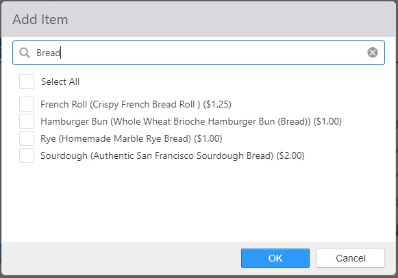
- Add Item: Clicking Add Item will open a dialog box allowing you to select relevant items. Item Description is now displayed in addition to Item Name.
-
Applies To tab: Items to which the modifier group is associated.
-
Price tab:
- Use Tiered Pricing: Modifier price is determined by the number of modifiers selected from the group.
Modifier Tiers
Modifier tiers are used to determine if a substituted item should carry a charge. Substituting a modifier for another of equal or lesser modifier tier level does not carry a charge, whereas substituting for a modifier with a high tier does. See Items.
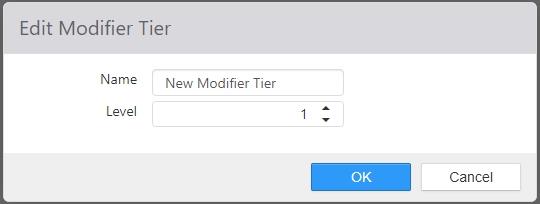
- Name: Name of the modifier tier
- Level: Level of the modifier tier, relative to other tiers.
