Campaign Performance Page
The Campaign Performance Page is a contemporary solution for monitoring the success of a campaign. This page offers details and metrics on active and completed campaigns (those with the status Processed or Active.)
Expand the following sections for details on how the Campaign Performance Page is constructed:
Campaign Types and Length
The Campaign Performance page currently supports the following campaign types:
- Anniversary Campaign
- Challenge Campaigns
- Compression Campaign
- Coupon Campaign
- Profile Update Campaign
- Post Checkin Message Campaign
- Post Checkin Offer Campaign
- Post Purchase Campaign
- Post Redemption Message Campaign
- Post Redemption Offer Campaign
- Promo Campaign
- Recall Campaign
- Referral Campaign
- Mass Offer Campaign
- Signup Campaign
- Social Cause Campaign
Within each campaign type, the campaign can be configured to reward users with different types of gift types:
- No Gift: Campaigns that are intended to deliver a message
- Points: Campaigns that disburse points to guests.
- Redeemables: Campaigns that disburse offers to guests.
- Currency: Campaigns that disburse a currency gift to guests.
- Fuel Discount: Campaigns that disburse a fuel discount offer to guests.
- Amount Discount: Campaigns that disburse an amount discount off an item(s) to guests.
- Percent Discount: Campaigns that disburse an amount discount off an item(s) to guests.
- Derived Rewards: Campaigns that disburse a reward (gift redeemables, points, or currency as applicable) along with defined criteria or overall percentage probability for the reward to be given to the guest upon completion of a campaign qualification.
- Incentivized Checkin: Campaigns that disburse extra points/punches or a redeemable to guests upon making a purchase and performing a loyalty checkin.
The two campaign-run categories have the following overall characteristics:
Short/Non-Perpetual Campaigns: A short campaign has activity within 28 days from the start date of the campaign. Activity can include the targeting of guests and/or the expiry of the rewards distributed.
-
Are No Gift or Point Based, and run for less than or equal to 28 days.
-
Gift Redeemables, which run for less than or equal to 28 days and have a redeemable expiry within 28 days from the last run date of the campaign.
-
These campaigns have the following Campaign analysis periods:
- Pre: 28 days before the start date of the campaign
- During: 28 days after the start of the campaign or the effective expiry date of the redeemable, whichever occurs earlier
- Post: 28 days after the end of the During period for the campaign
-
When it comes to the length of the "during" campaign analysis period,
- For No Gift and Point Based Campaigns, it is always 28 Days.
- For Gift Type Redeemables, it is the number of days between the start date of the campaign and the expiry of the redeemable.
Long/Perpetual Campaigns: Any campaign that is not short is a long campaign. It includes any campaign that has campaign activity over 28 days OR is classified as an Ongoing campaign on the Punchh Platform (e.g.: Signup Campaign, Recall Campaign, Compression Campaign, etc.)
- Are No Gift or Points, which run for more than 28 days.
- Gift Redeemables, which run for more than 28 days or have effective redeemable expiry exceeding 28 days from the last run date of the campaign.
- Are of any gift type and the end date of the campaign is empty, meaning that the campaign can go on forever.
- These campaigns only have a During analysis period and will have a date range filter.
Note: Empirical evidence suggests that the effect of a reward or campaign notification is always less than or equal to 28 days before the reminder slips from the user's mind.
When it comes to segments, time frames play a key role with the Customers Participated, depending on whether it is a Short/Non-Perpetual campaign or a Long/Perpetual campaign:
- Short/Non-Perpetual campaign: This is the group of users among the customers targeted who made a transaction on a given day in any of the campaign analysis periods (pre, during, or post)
- Long/Perpetual campaign: This is the group of users among the customers who were Targeted 28 days prior, who made a transaction on a given day
Groups
In order to analyze the campaign performance, the following groups are used:
Treatment Group: This is the group of users targeted by a campaign with an offer or points or a notification to induce a change in behavior. (This group does not apply to all campaign types.)
Control Group: This is the group of users under watch in a campaign with no offer or points given. The behavioral metrics of Treatment and Control group are compared to understand if the campaign was effective. (This group does not apply to all campaign types.)
Referrer: This is applicable only for Referral campaigns. This is the group of users who referred another user into the program
Referee: This is applicable only for Referral campaigns. This is the group of users who got referred to become loyalty members of the program
Segments
Within each group, the following segments are possible:
Customers Targeted:
This is the group of users who got targeted by a campaign.
For some campaigns, this segment is not applicable.
Ex: Post Checkin campaigns, Signup campaigns, Profile Update campaigns.
The targeting can happen in a staggered manner.
Ex: 100 users could be targeted on Day 1, remaining 50 users could be targeted on Day 2. This information is stored in one of the KPI columns.
Customers Participated:
This is the group of users among the Customers Targeted/Qualified who made a transaction in the During period of the campaign.
For Post Checkin/Signup/Profile Update campaign, this is the group of users among the Customers Qualified who made a transaction during the campaign period.
If a user makes a loyalty transaction but does not necessarily redeem the offer disbursed by the campaign (if any), this user is also considered as part of the Customers Participated segment.
Customers Redeemed:
This is applicable only for campaigns with redeemable attached.
This is the group of users among the Customers Targeted, who actually redeem the offer they received through the campaign until the expiry of the offer.
For Post Checkin campaign/Signup campaign/Profile Update campaign, this is the segment of users who redeemed the offer they received when they qualify for a campaign (with or without prior information) until the expiry of the offer.
For Long/Perpetual campaigns, this is the group of users who redeemed the offer until the expiry of the offer.
Customers Qualified:
This applies to Post Checkin campaigns, Signup campaigns, and Profile Update campaigns.
This is the group of users who got enrolled into the campaign by qualifying certain criteria set by the campaign, with or without any prior intimation.
Users can be qualified anytime between the start and end date of the campaign
Users can also qualify multiple times, depending on the campaign setting.
To navigate to the Campaign Performance Page, click Marketing Automation > Campaign Management. Choose the campaign you want to view from the campaign list and click "View Summary".
Campaign Information
First on the Campaign Performance Page is the overall campaign information including the title, status, created by, created date, and the last modified date.

Click on
 in the upper right-hand corner to view all options available for your campaign.
Note: The available options may differ due to permissions and brand configuration.
- Duplicate: Used to duplicate the current campaign. Most configurations will be copied, such as Email Template, SMS settings, Push Notification Settings, etc. though items such as Title, and Start/End Date will need to be re-configured.
- Export Report: The details of the campaign show page can be delivered as needed. Once you click on this option, you'll be redirected to schedule your export.
- Status Tracker: Click to view the delivery details on the Campaign Status Tracker page.
- Delete: Click to delete the campaign completely from your campaigns list.
- Activate: This option will display if your campaign is not yet active. Click to activate.
- Deactivate: Click to deactivate the campaign. This campaign still remains in the campaign list.
- Audit Log: The event log from creation - present for the current campaign. Audit logs are handy tools to find who did what and at what point, on top of other technical occurrences.
- Classic Performance Page: Click to open the previous version view of the Performance Page
- Directly below Options, you'll find the date and time stamp of the last time that the current campaign data was refreshed.
Repeating Mass Campaigns
If you have a repeating Mass Offer or Notification Campaign, you will have further options at the top of the page:

Use the date drop-down menu to view the specific data by each day, week, or month your campaign repeats.
Click Aggregate performanceto compare/contrast each instance of the repeating campaign.
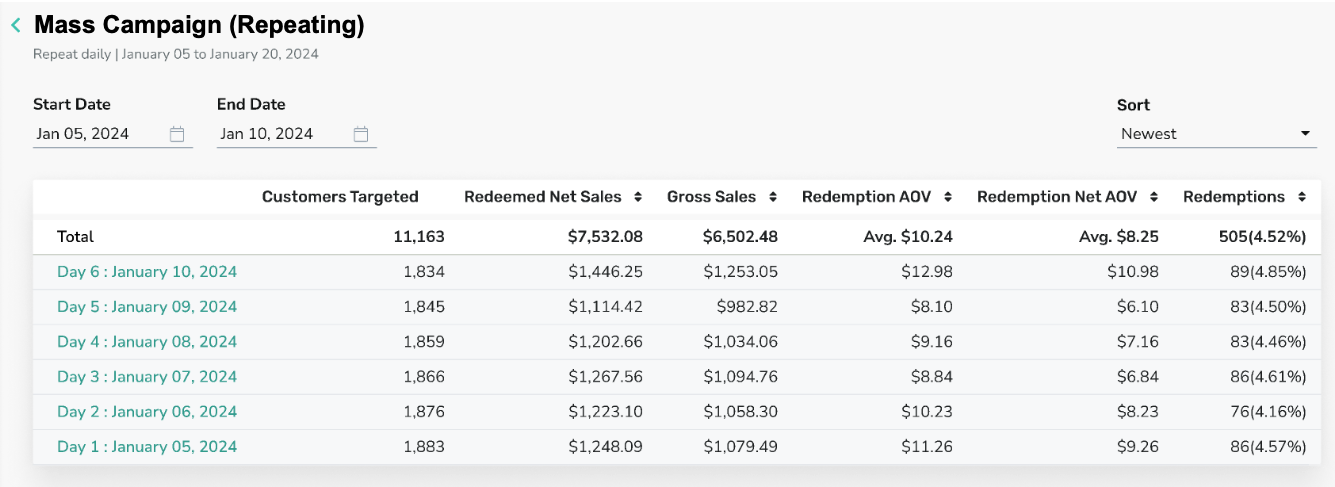
A table opens in a new window that displays each instance's data for comparison. You can scroll to the right to view all relevant metrics, depending on the campaign type.
Note: Each metric includes data for the instance as well an overall Total (average). However, the Conversion metric will not have a Total available. Based on how Conversion is calculated for campaigns, it is not a metric that can be rolled into an average or total.
You can filter further by using the Start and End Date options at the top, or by sorting with the up/down arrows next to each KPI name.
Click the instance name in the first column to be taken to that specific campaign performance page.
Campaign Summary
The Campaign Summary lists further data about your campaign. Note that next to "+ Campaign Summary" lists the start/end date of your campaign as well as the Analytics End Date which is based on the campaign's start date and whether it is classified as short or long.
Click the + to the left of the Campaign Summary to display additional data regarding your campaign.
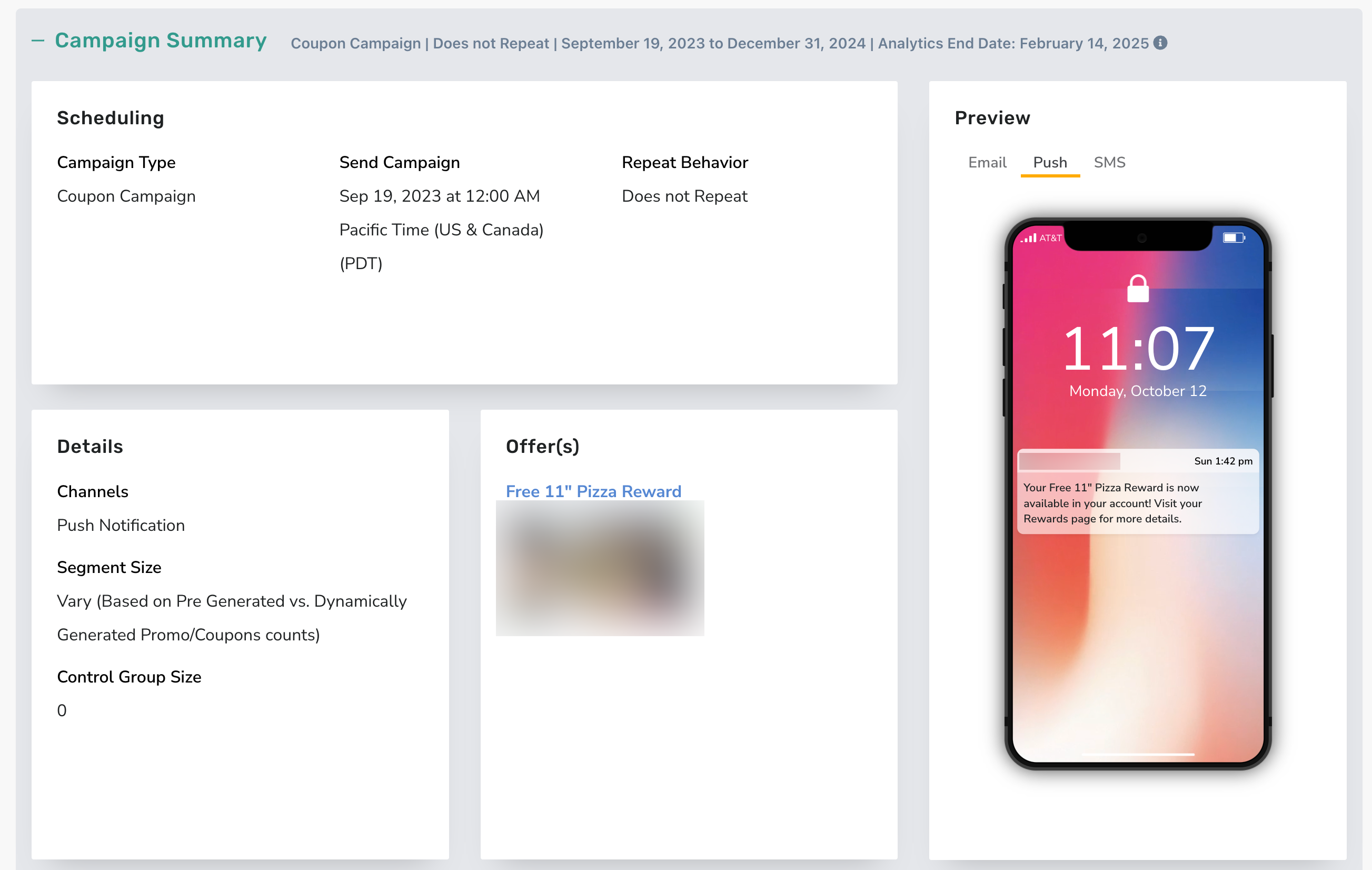
Campaign Type: The type of campaign configured, e.g. Mass Gifting, Challenge, Anniversary, Mass Notification, etc.
Send Campaign: The time and date that the campaign is/was scheduled to be sent out. The date will, in most cases, match your start date, though not always.
Repeat Behavior: If your campaign runs on a repeating frequency, details of the frequency will be displayed here.
Details: The campaign details will include the segment that you are using, if one is being used, and any control group configurations as well.
Offer(s): If your campaign is gifting a reward or points, these details will be displayed in this section.
Preview: This shows you the Email, Push Notification and SMS currently configured with a view of the current configuration.
Campaign Metrics
Transaction data shown in the Campaign Metrics and Performance sections is captured using receipt time. (If the receipt time comes through blank or null, no data would be reported.)
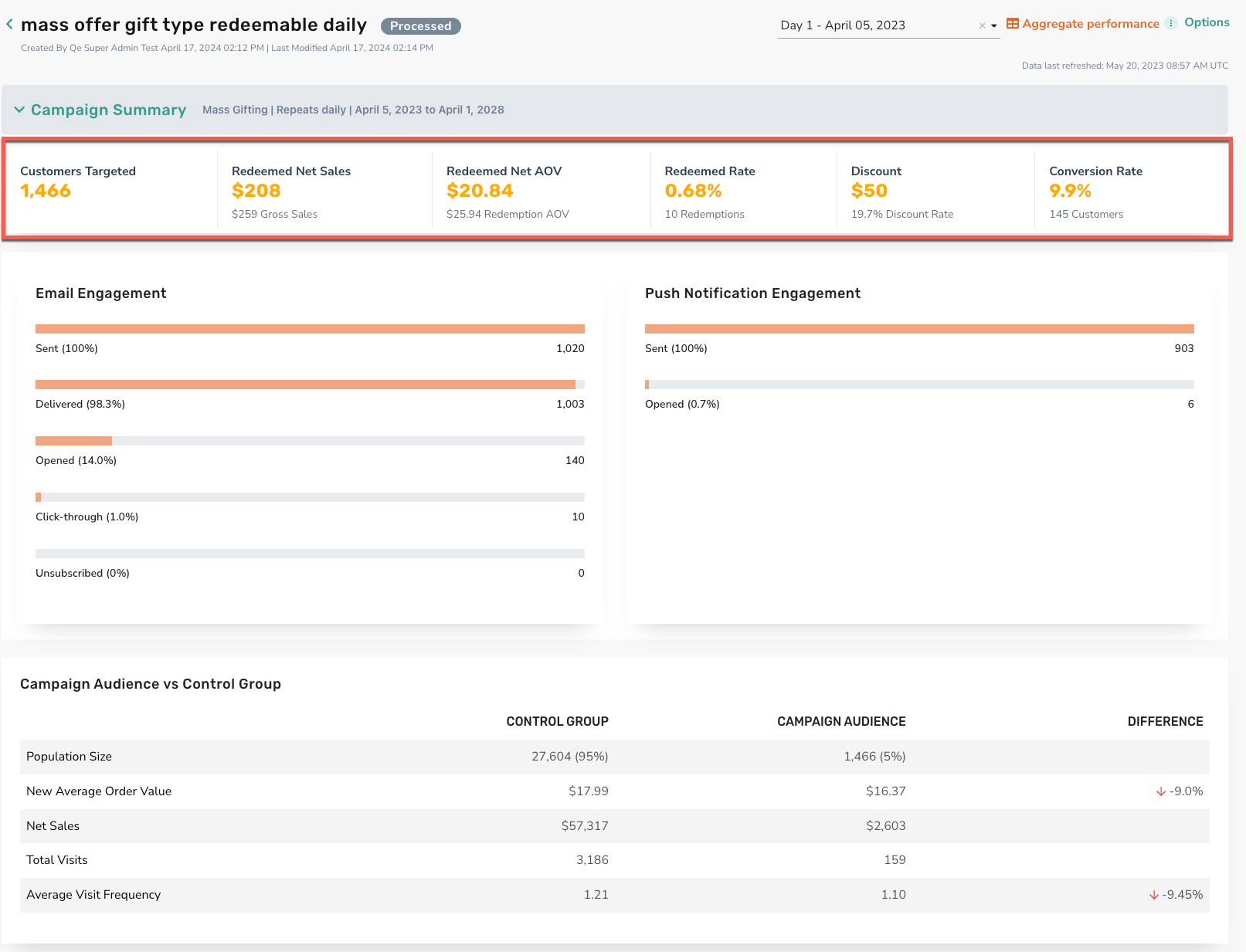
The key metrics of a campaign can be found below the Campaign Summary. These metrics offer quick, at-a-glance data for your campaign.
Note: The metrics displayed differ depending on your campaign type.
Engagement Metrics
Email Engagement
If your campaign contains email messaging, the engagement stats will display in this bar graph.
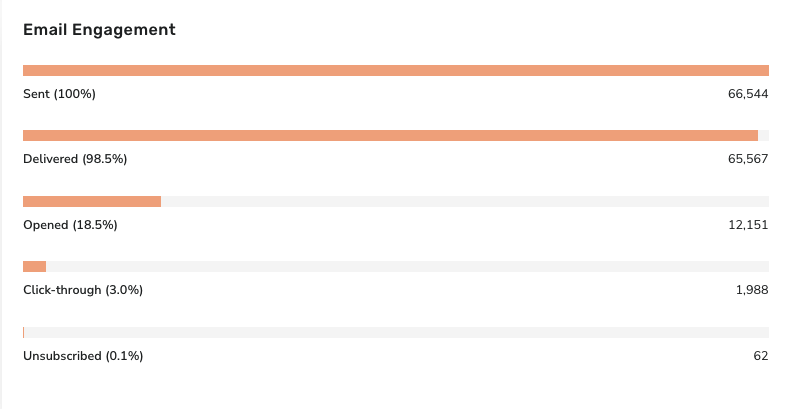
Note: You may notice a discrepancy between the email metrics on the classic CPP page and the new CPP page. This is due to the new CPP utilizing newer, enhanced logic meant to reflect genuine user engagement. We recommend you utilize the new CPP for the most up-to-date data.
Sent: The number of emails that were sent from this campaign.
Delivered: The number of emails delivered from those sent. Note that this number can be different from "Sent" since some user emails may bounce or get blocked in some way.
Opened: The number of emails opened from those delivered.
Click-through: The number of emails that registered a click action.
Unsubscribed: The number of users who unsubscribed from your program's emails as a result of this campaign.
Note: Per the new Apple Privacy Policy, the email engagement data source has been updated to only show human opens vs. machine opens. Engagement metrics may appear lower than previously. All changes have been backdated to Jan. 1st, 2022.
Push Notification Engagement
If your campaign contains Push Notification messaging the engagement stats will display in this bar graph.
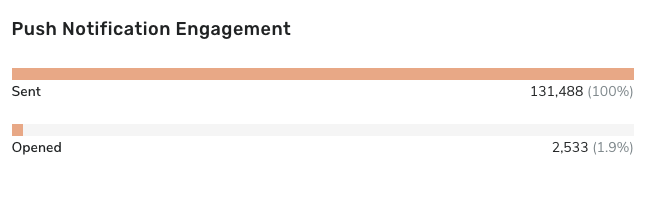
Sent: The number of Push Notifications sent
Opened: The number of Push Notifications opened from this campaign.
Note: The number of Push Notifications Sent can differ from the total amount in the segment. This can happen if the number of users in the segment is different from those currently opted-in to receive Push notifications.
Campaign Audience vs. Control Group
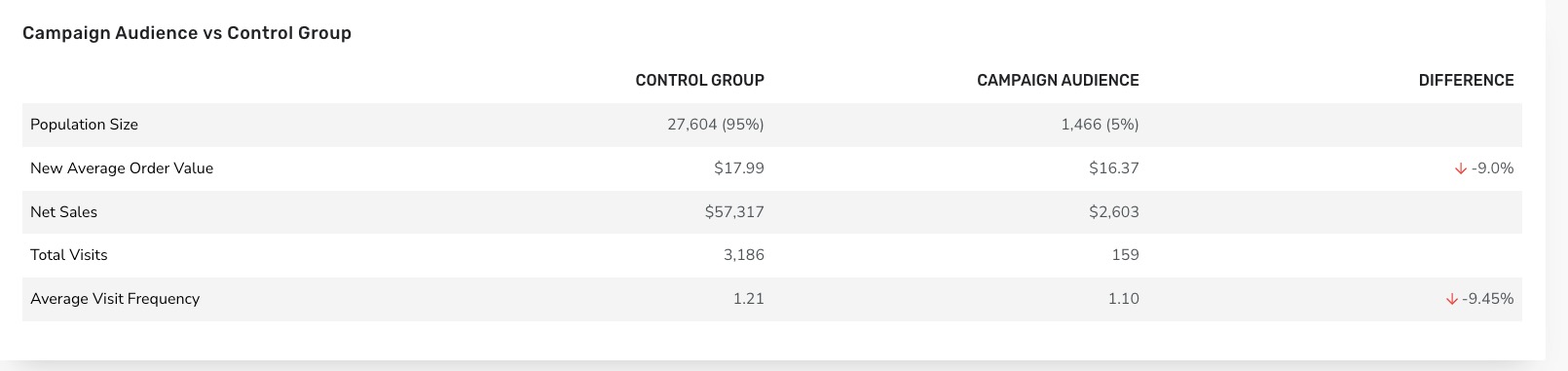
The Campaign Audience vs. Control Group shows the differences in Population Size, New Average Order Value, Net Sales, Total Visits, and Average Visit Frequency between each segment. This data is available only for campaigns that have a redeemable/offer attached* because it has redemption-specific fields (such as Net Sales).
*With the exception of Compression Campaigns. For these campaign types, the control group data will be visible anytime a control group is configured, regardless of whether an offer is attached.
Note: Average Visit Frequency data is not available for Long/Perpetual campaigns see "Campaign Types and Length". (This includes any campaign that has campaign activity over 28 days OR is classified as an Ongoing campaign on the Punchh Platform (Signup Campaign, Recall Campaign, Compression Campaign, etc.)
Campaign Performance
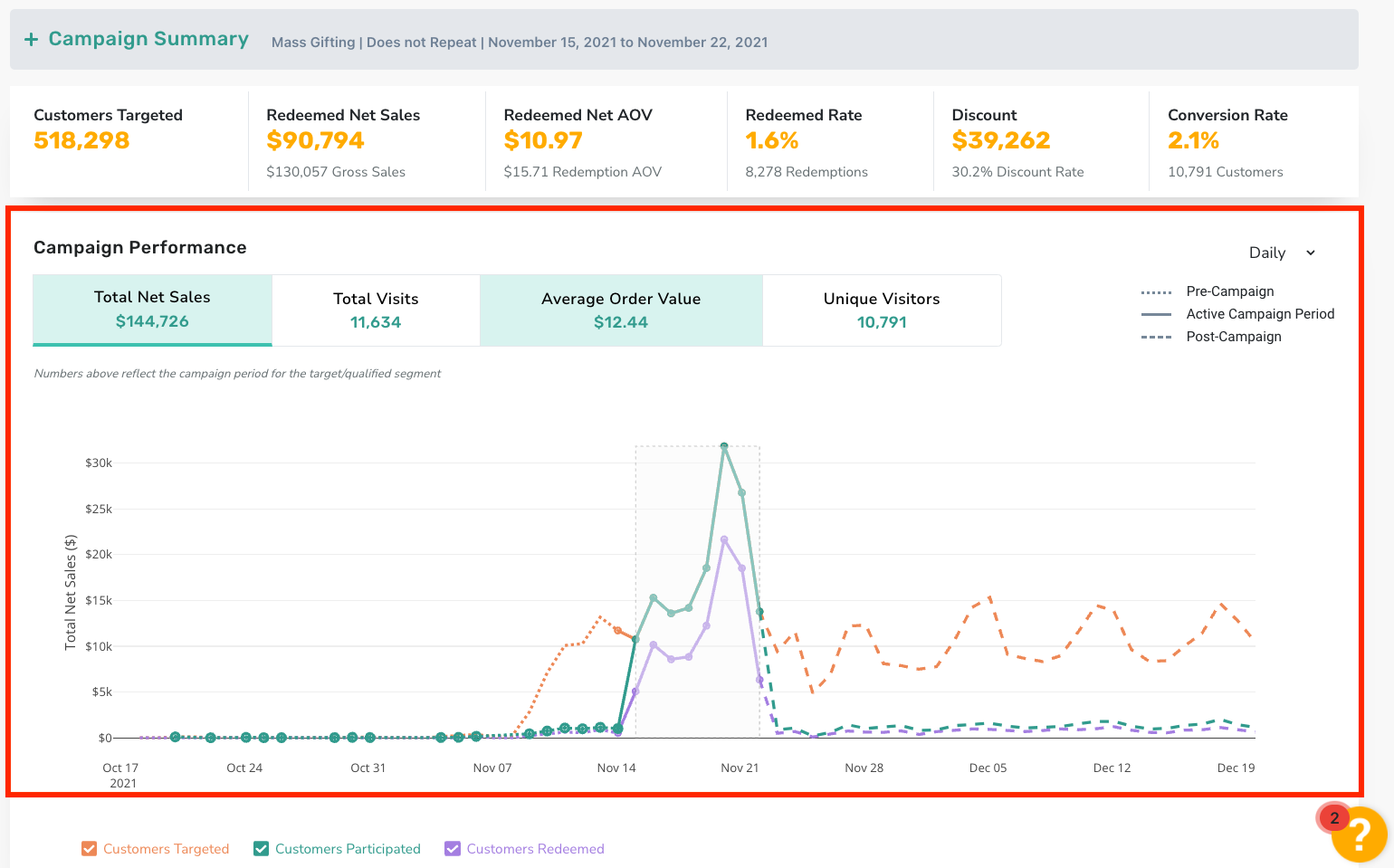
The Campaign Performance section shows the behavior of Customers Targeted / Participated / Redeemed in the pre / during / post periods of the campaign. The metrics in the top line of the Campaign Performance section show the overall metrics of Customers Targeted / Qualified for the active campaign period
Total Sales: Total sales from customers targeted for the campaign regardless of redemption status.
Total Visits: Total times that someone within the segment visited the locations relevant for the campaign.
Average Order Value: Average amount each customer spends per transaction (Gross).
Unique Visitors: The number of customers that visited during a given period, counted only once regardless of how often they visit.
To the right side of the Campaign Performance, you'll find the following items as well:
Timeframe: You're able to view your campaign statistics on a Daily, Weekly, or, for continuous campaigns, Monthly period.
Graph Key: This key gives different visuals for interpreting the graph performance.
Campaign Examples
Click to expand the following campaign types for information on how to interpret the metrics and performance data shown for each.
Mass Notification Campaign
Short Non-Perpetual: One Day Mass Notification Campaign
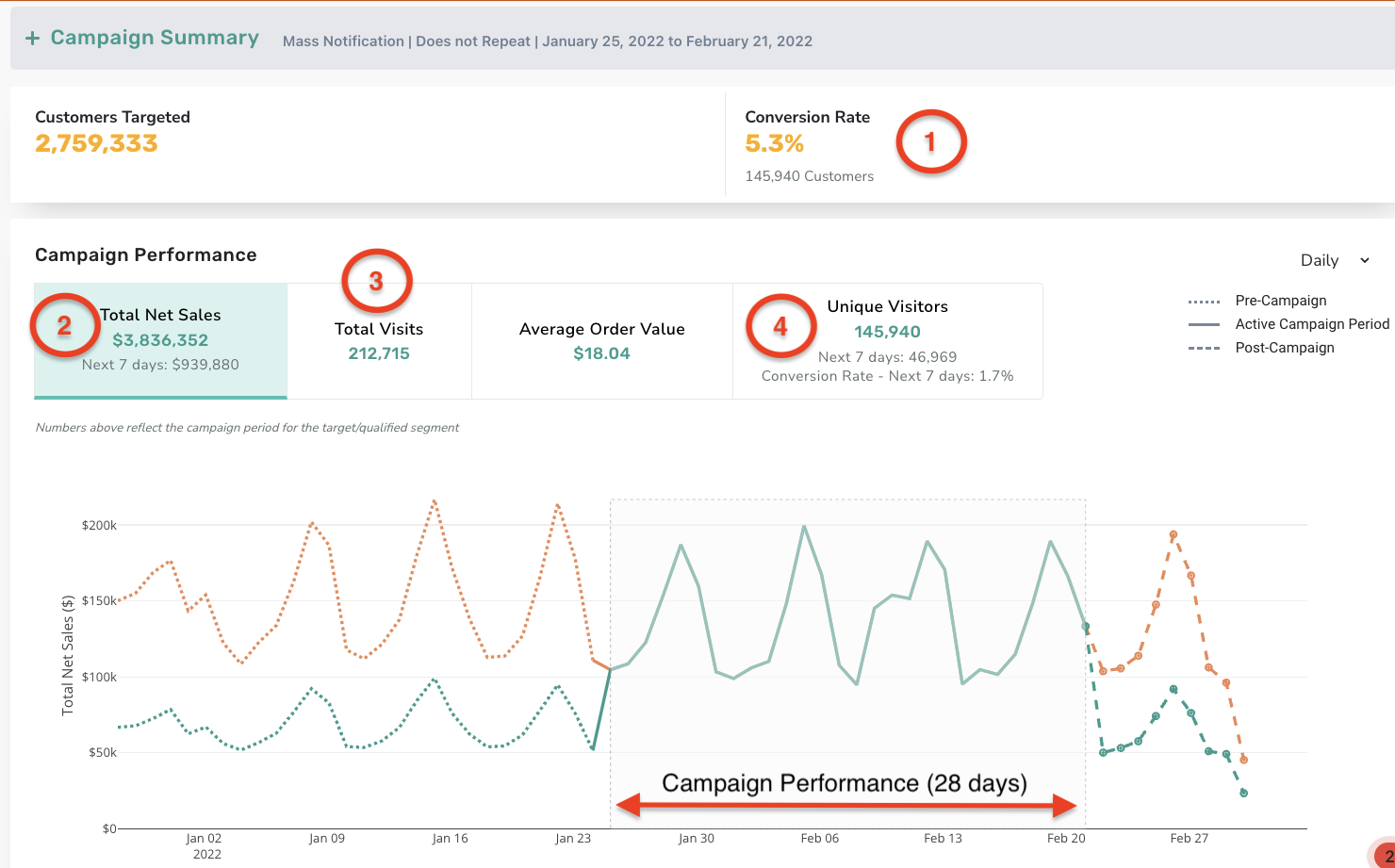
- This campaign had 145,940 unique users checkin during the campaign period of 28 days.
- The 46,969 users who visited within the next 7 days, had a Total Net Sales of $939,880 in the Next 7 Days. These stats will remain the same after the 7 day period.
- From the 145,940 unique users that made a checkin, a few users made multiple visits within the 28 days resulting in 212,715 total visits.
- Of the targeted users, 46,969 unique users visited in the next 7 days after the campaign was triggered with a 1.7% conversion rate in the first week.
Mass Offer Campaign
Short Non-Perpetual: One Time Mass Offer Campaign that gifts a redeemable valid for seven days
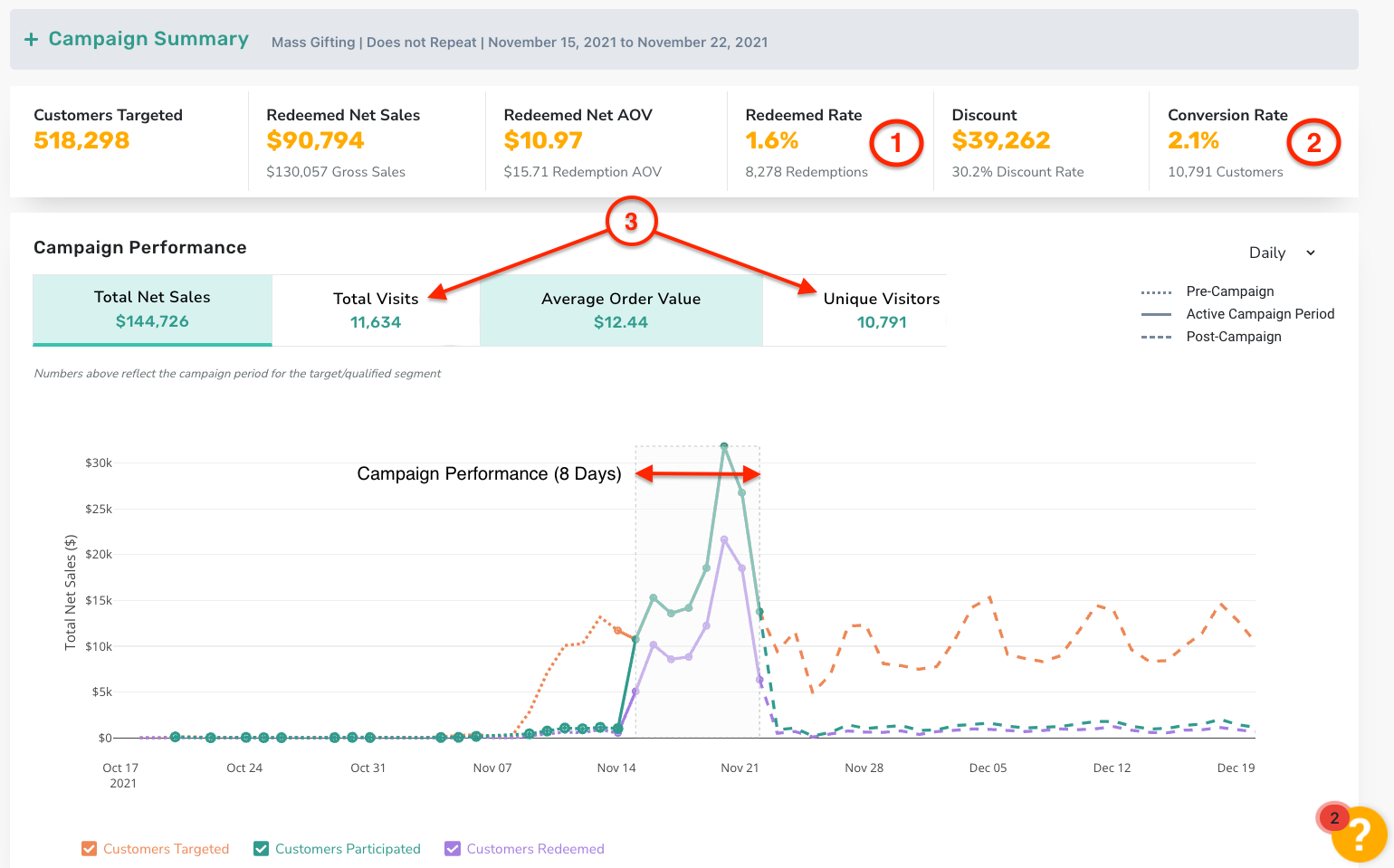
- Of these users, 8,278 redeemed the offer from the 518k gifted resulting in a 1.6% redeemed rate.
- This campaign had 10,791 users checkin during the campaign period of 8 days.
- From the 10,791 users that made a checkin, some users made multiple visits within the 8 days resulting in 11,634 Total Visits.
Long Perpetual: Ongoing Mass Offer Campaign
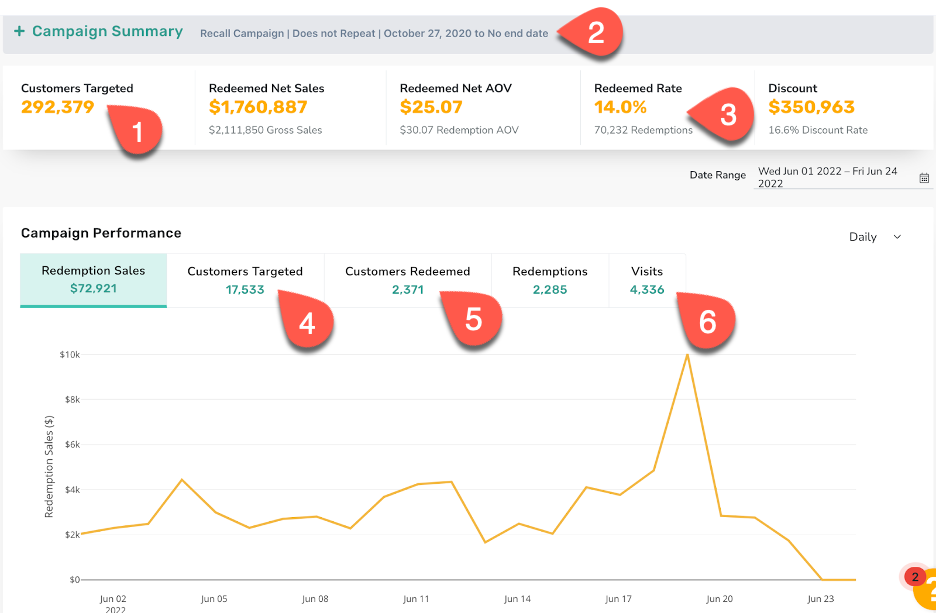
- 292,379 customers have been targeted by this campaign since activation.
- Due to the lack of an end date, this is a long perpetual campaign and will only have a during analysis. This is the case for any campaign that is 28 days or longer.
- Redemption rate for the campaign since activation.
- Sum of the Unique Customers targeted each day during the selected date range. If customers are targeted more than once in one day, they will only be counted one time that day.
- Sum of the Unique Customers redeemed each day during the selected Date Range. They may have not been gifted during the same range.
- Sum of visits made on each day during the selected Date Range. In Ongoing Campaigns, this metric shows visits made by users who were targeted by the campaign 28 days prior for every day in the selected date range.
Post Checkin Gifting Campaign
Short Non-Perpetual: Seven Day Post Checkin Offer Campaign that gifts a redeemable valid for 14 days
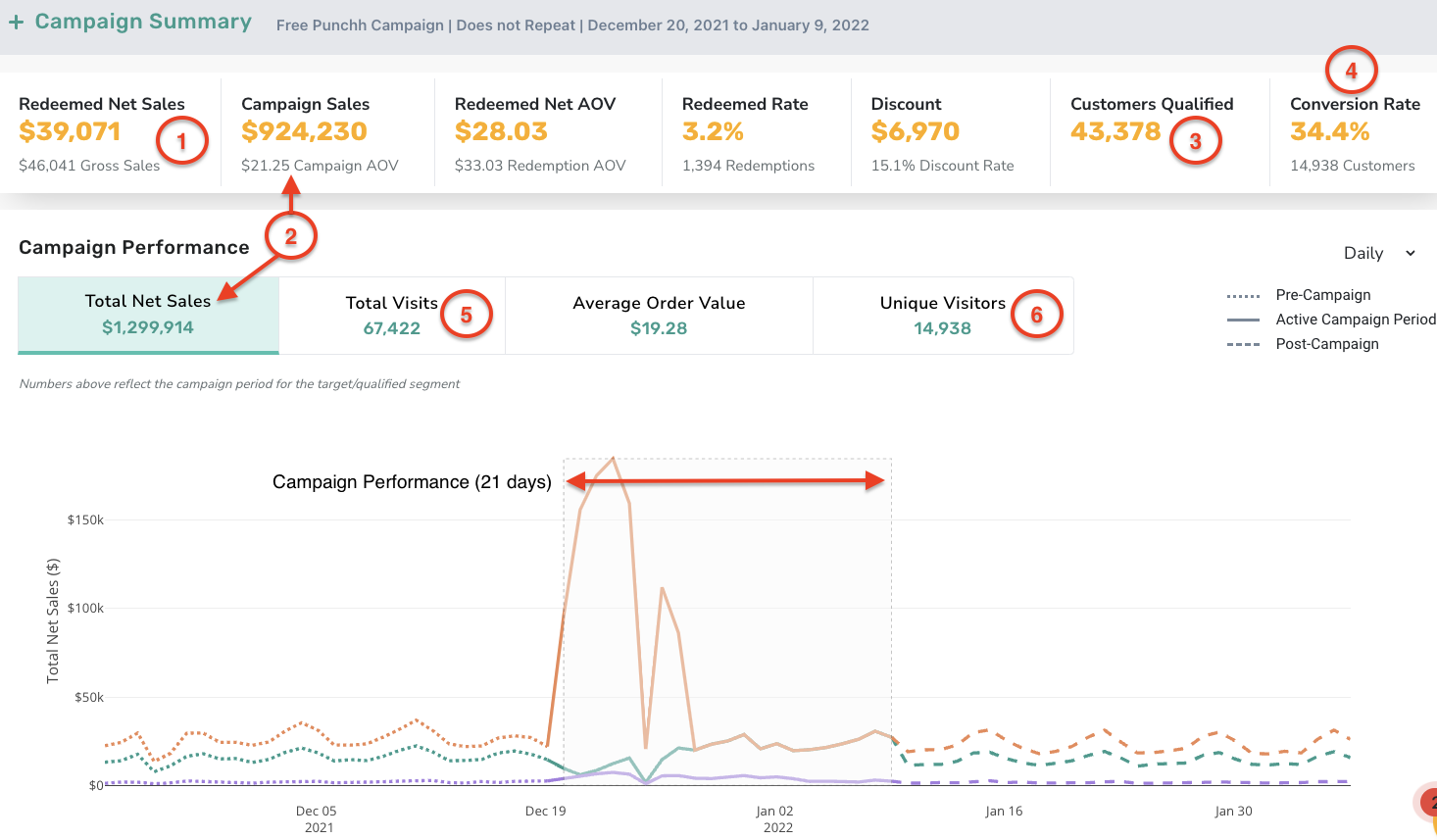
- Redeemed Net Sales displays the Net Sales from the transaction with the reward.
- Campaign Sales is the net sales from the qualifying purchase. Total Net Sales is revenue from the active period for those users who visited after their qualifying checkin.
- This campaign had 43,378 Customers Qualify (at least 1 checkin) during the campaign gifting period of 7 days.
- The campaign Conversion Rate only counts checkins post qualifying checkin.
- Some of the 14,938 users who made an additional visit, made multiple checkins within the 21-day period resulting in 67,422 Total Visits.
- Unique Visitors are those users that visited after the initial qualifying checkin during the active campaign period. (Note that with ongoing campaigns this is daily unique visitors)
Long Perpetual: Ongoing Post Checkin Campaign
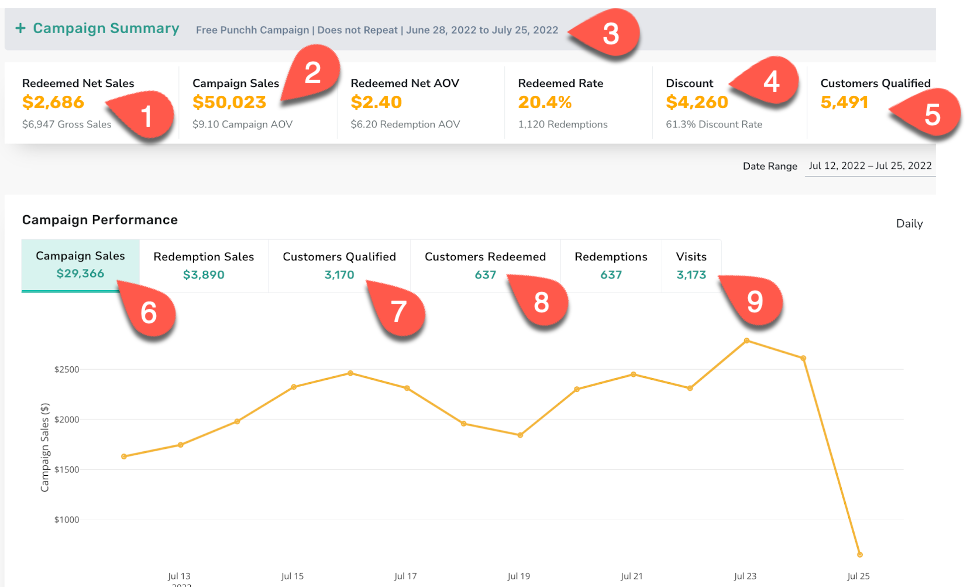
- Sales (pre-discount) generated through receipts in which the gifted redeemables were redeemed.
- $50,023 is the total Campaign Sales generated on the checkin that qualified the 5,491 customers for the campaign.
- The campaign duration itself is 28 days, however, the redeemable gifted has a 7-day expiry which makes this a long campaign.
- Discount applied on the check in which the gifted offer was redeemed.
- Customers Qualified are those customers who made a checkin during the active campaign period and received the offer.
- The sum of loyalty sales generated for a given day through the campaign qualifying event, in the date range selected, by the customers who qualified for the campaign.
- The sum of the number of unique customers who qualified for the campaign each day in the duration selected. If a customer qualifies more than one time a day, they will only be counted once for that day.
- The sum of the number of customers who redeemed each day in the duration selected. They may have not been gifted during the same range.
- The number of loyalty visits generated each day through the qualifying event, in the date range selected, by the customers who qualified.
Post Checkin Point Gifting Campaign
Short Non-Perpetual: Five Day Double Points Post Checkin Campaign
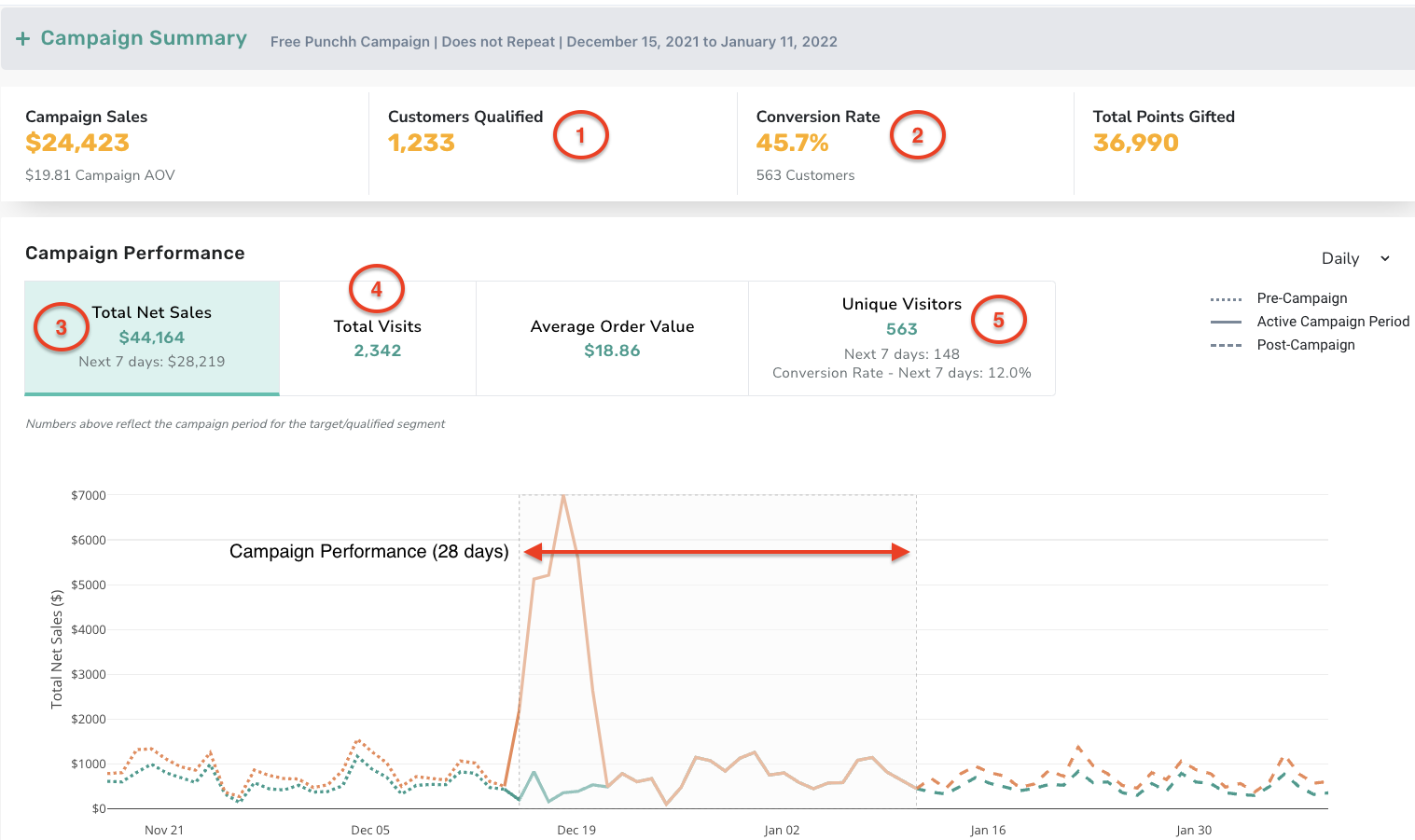
- This campaign had 1,233 Customers Qualify (at least 1 checkin) during the 5 day qualifying period.
- Conversion Rate is customers who qualified and made at least one subsequent visit during the campaign period.
- The Total Net Sales in the Next 7 Days was $28,219 with $44,164 for the entire 28 day campaign period.
- From the 563 users that made at least 1 additional checkin, a few users made multiple visits within the 28 day period resulting in 2,342 total visits.
- Unique Visitors within the next 7 days are customers who qualified and made at least one subsequent visit in the next 7 days from the start of the campaign.
Long Perpetual: Ongoing Post Checkin Campaign
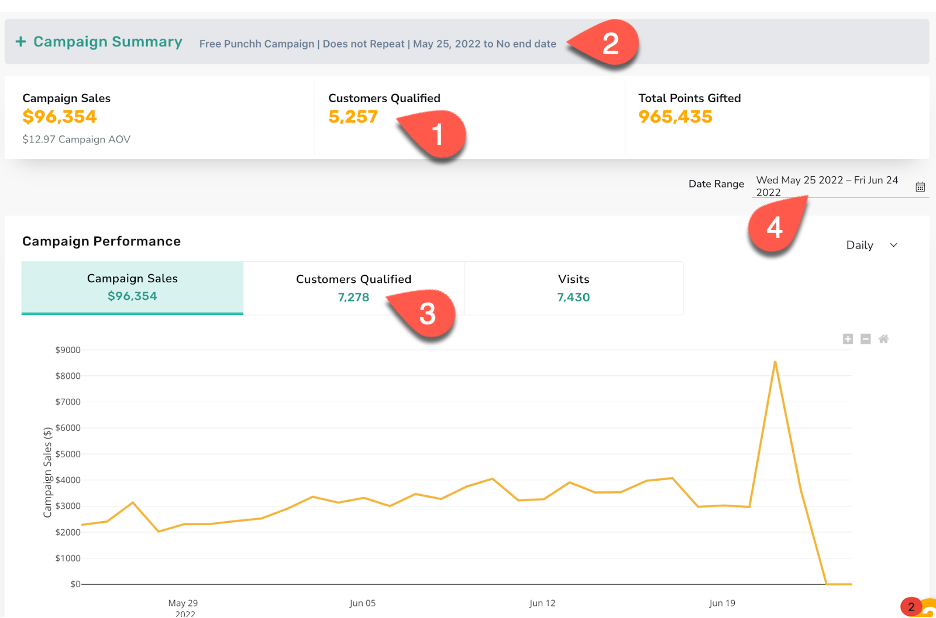
- This campaign has 5,257 Unique Customers Qualify qualify to date.
- Due to the lack of an end date, this is a long perpetual campaign and will only have a during analysis. This is the case for any campaign that is 28 days or longer.
- The sum of unique guests who qualify each day during the selected duration. When looking at the lifetime of the campaign, this will typically be higher than the Campaign Summary.
- Because this is a long campaign, you can filter by date and adjust Campaign Performance as desired.
Recall Campaign with Incentivize Checkin
| Short Campaign Key Metrics | Long Campaign Key Metrics |
|---|---|
| Net Campaign Sales Average Order Value (Net) Customers Targeted Conversion Rate Customers Participated | Net Campaign Sales Average Order Value (Net) Customers Targeted |
Long Recall Campaign with Incentivize Checkin:
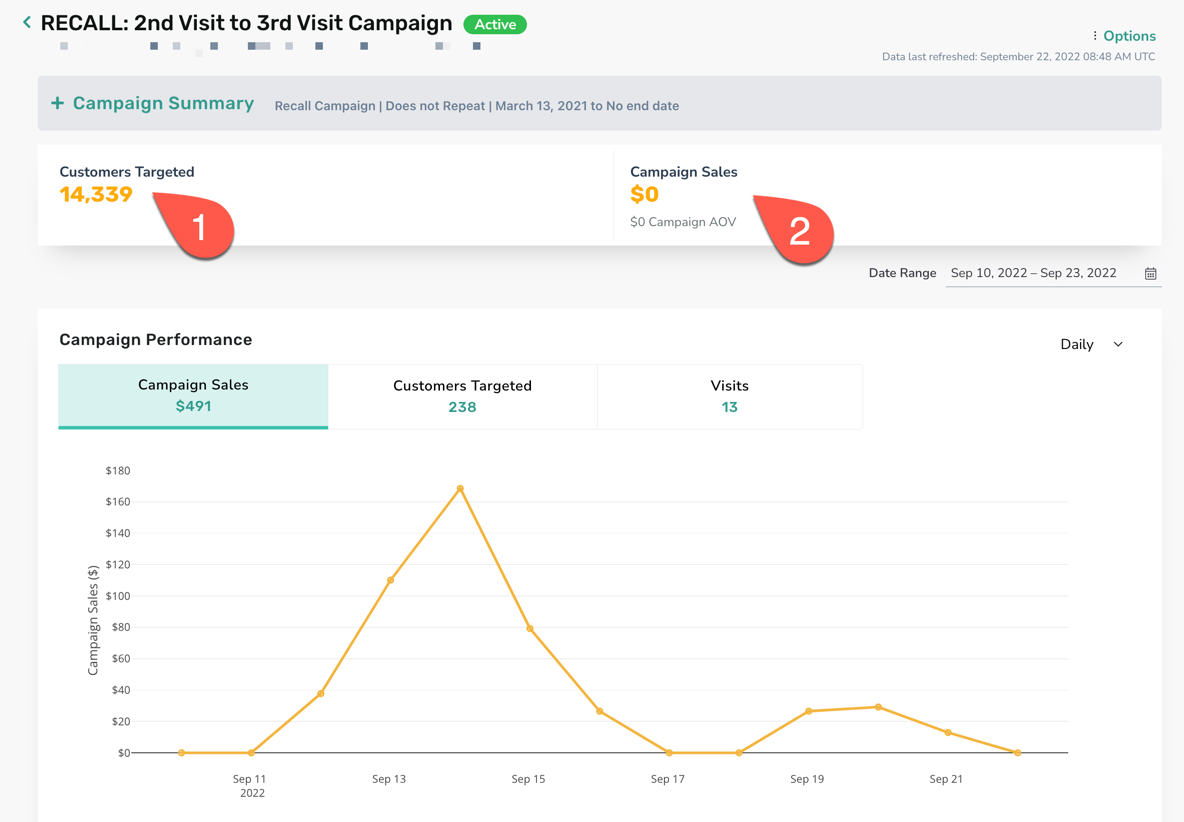
- Customers Targeted is the number of users targeted by the Recall campaign.
- Campaign Sales is the sales from the Redeemables if it is attached to the campaign.
Note: Currently the Recall campaigns with incentivized checkin gift types on the platform do not have redeemables attached. Therefore this number is zero for almost all campaigns with this gift type.
Post Checkin Campaign Associated with the Recall Campaign:
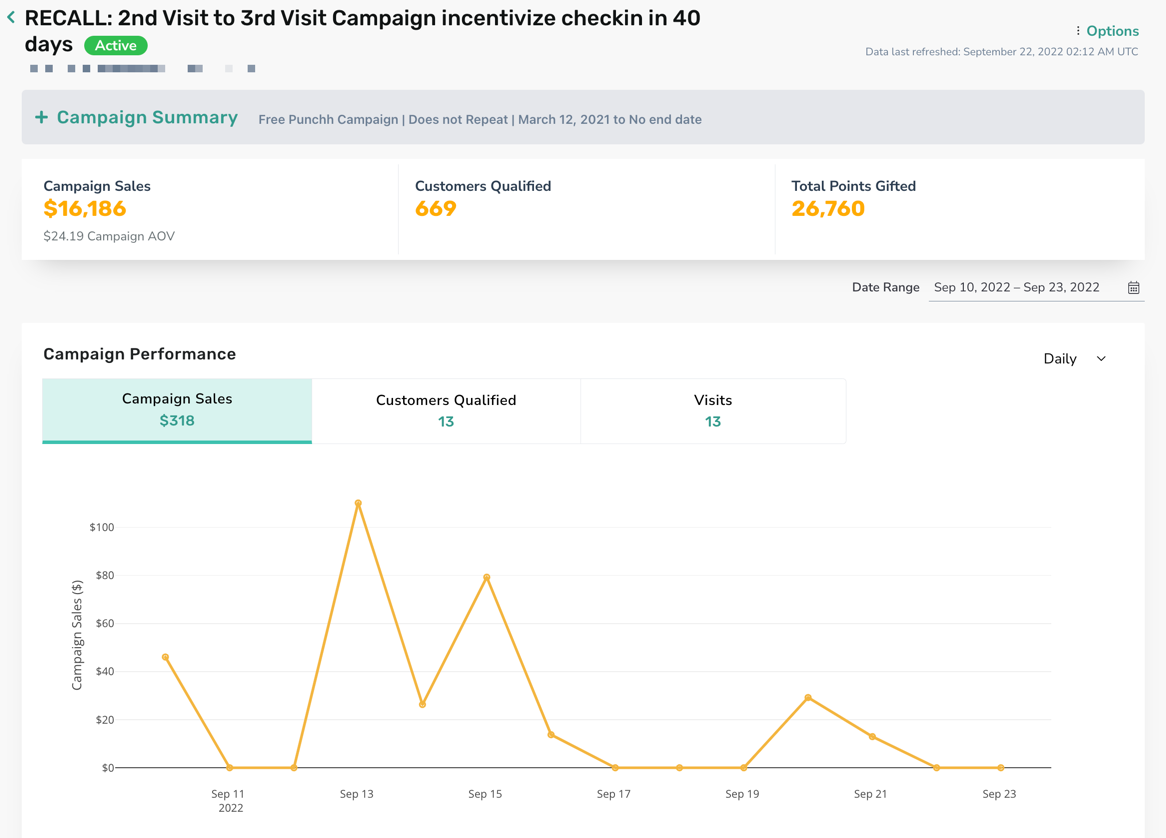
The metrics are exactly the same as the ones you would find in a stand-alone Post Checkin Campaign
Gift Currency Campaigns
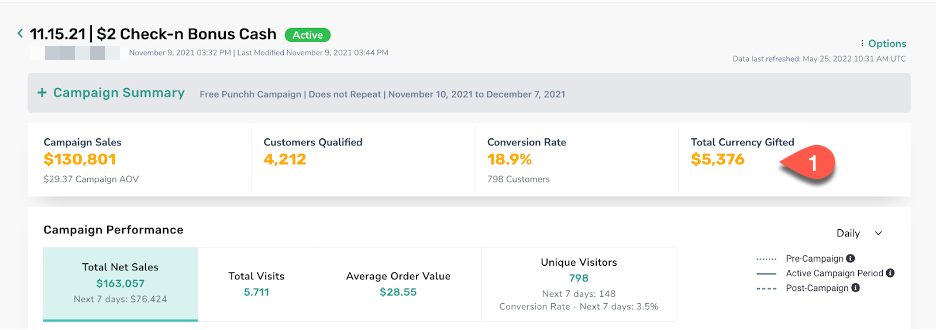
- $5,376 is the Total Currency Gifted to qualified guests during the campaign period.
Challenge Campaign with Gift Currency
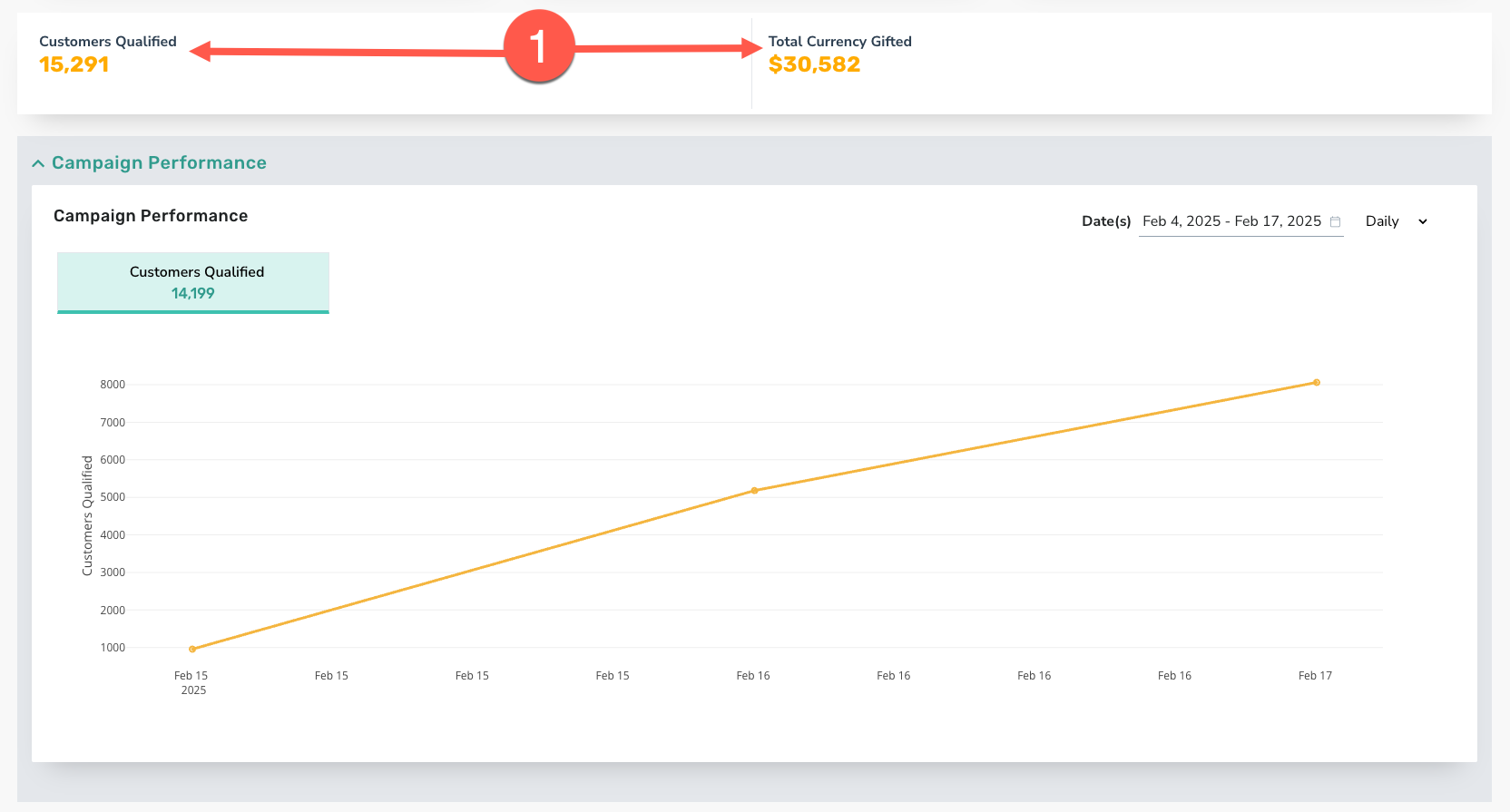
- With this specific campaign + gift type, the only metrics available are Customers Qualified and Total Currency Gifted.
Other Gifting Type Campaigns
Fuel Discount Campaign
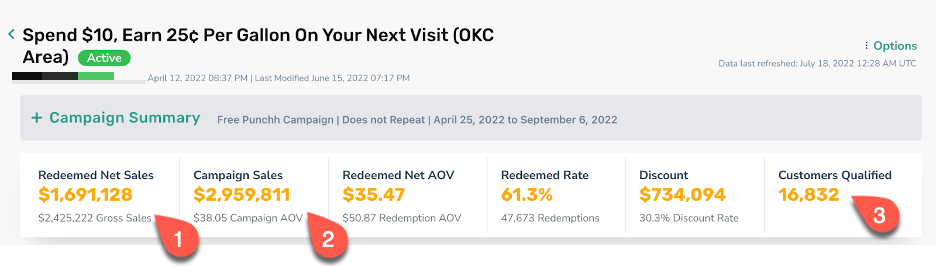
- Sales (pre-discount) generated through receipts in which the gifted redeemables were redeemed.
- $2,959,811 is the total Campaign Sales generated by the 16,832 customers that qualified for the campaign.
- Customers Qualified are those customers who spent at least $10 **(**per the campaign criteria) during the active campaign period and received the offer.
Gift Derived Reward
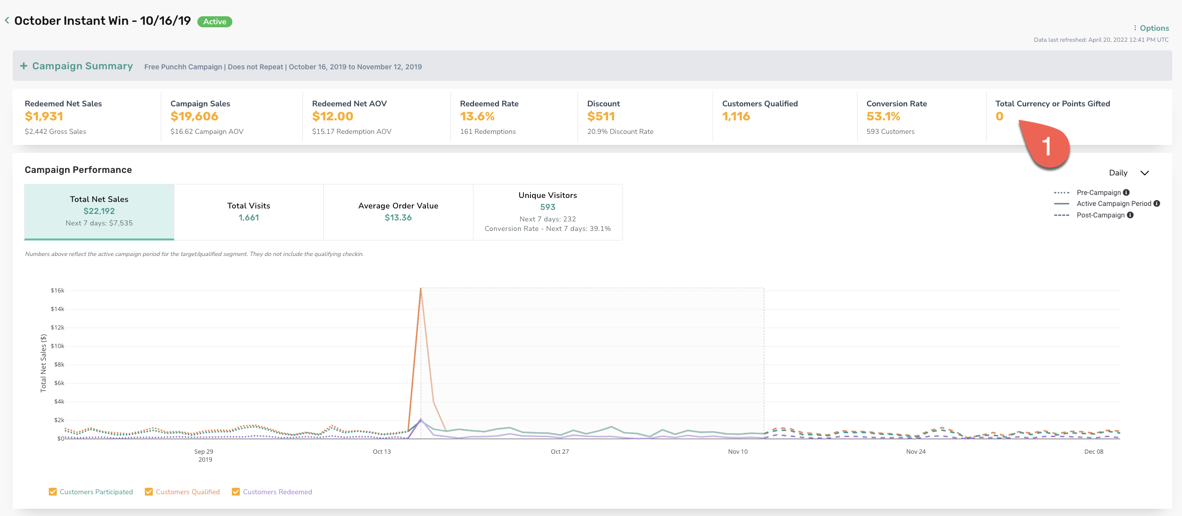
- A campaign with a Gift Derived Reward can give a user either a Redeemable or Points or Gift Currency. Therefore the Key Metrics section will report Total Points or Currency gifted along with Redemption related metrics.
Other Metrics and Visuals
Offer Redemptions vs. Sales
This section depicts the comparison of overall sales of the brand/locations and sales from redemptions relevant to these metrics for your campaign. If your campaign doesn't have a reward this section will not show.
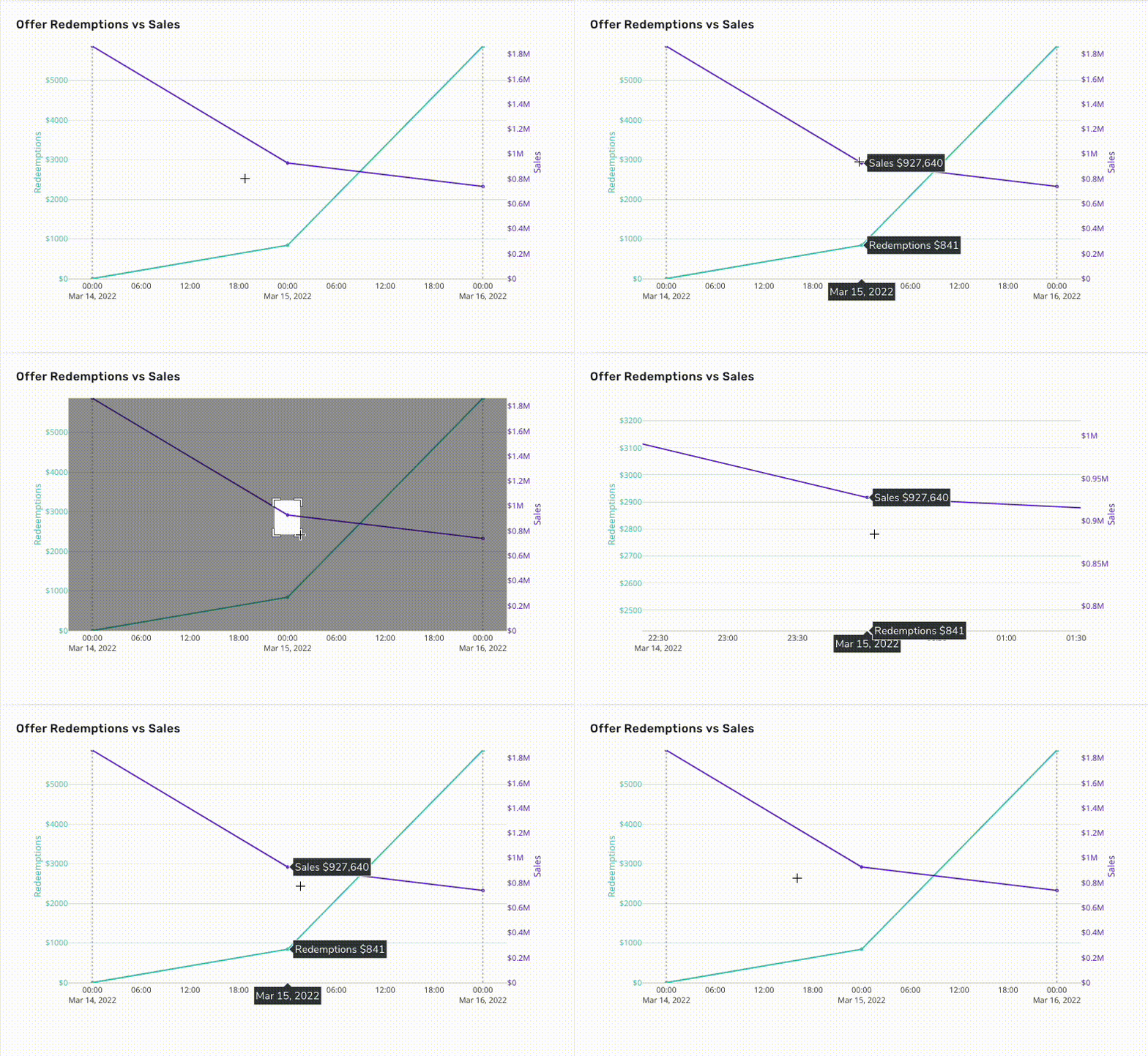
In this graph you'll see two lines: green for redemption sales and purple for overall sales.
Click and drag a section of the graph to zoom in; double-click to zoom out.
Redemptions by Channel
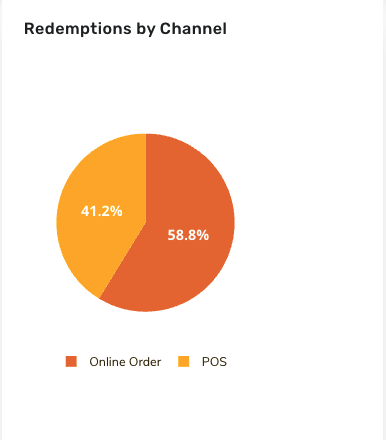
The number of receipts that the offer from the campaign received based on the channel of the receipt.
Note: The channel represents the channel on which the redemption code is generated. The only exception is Online Orders which represents that the redemption channel is Online irrespective of the device on which the redemption code is generated.
Available receipt channels are:
Online Orders
Point Of Sale (POS)
Web
Mobile
Chatbot
Kiosk
Average Order Value
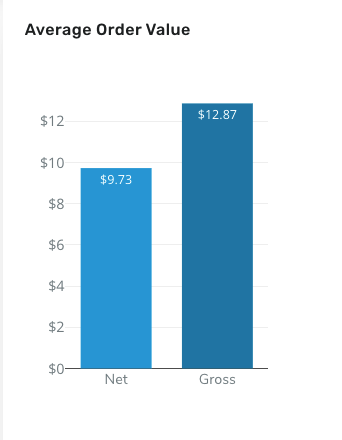
The average receipt size (Net and Gross) for all of the receipts based on offer redemption.
Glossary of Terms
| Term | Definition |
|---|---|
| Campaign Sales | The total loyalty sales generated by the customers targeted by the campaign OR customers qualified for the campaign |
| Redeemed Net AOV | Average amount (post-discount) each customer spends per transaction This is calculated by subtracting the discount amount from the receipt gross amount (gross amount = final receipt subtotal) |
| Redemptions AOV | Average amount (pre-discount) each customer spends per transaction |
| Redeemed Sales | The total sales (pre-discount) generated through the receipts on which the offer disbursed by the campaign is redeemed |
| Average Order Value | The average receipt size per loyalty transaction done by the customers targeted by the campaign OR customers qualified for the campaign |
| Average Order Value (Redeemed) | The average receipt size (pre-discount) for all the receipts on which the offer disbursed by the campaign is redeemed |
| Discount | Total amount of discount availed by customers targeted by the campaign or customers qualified for the campaign over the receipts on which the offer disbursed by the campaign is redeemed |
| Discount Rate | % of the total sales (pre-discount) from the receipts that the associated redeemable resulted in. |
| Number of Redemptions | The number of receipts holding a redeemable applicable to the campaign |
| Total Points Gifted | The total number of points/visits given as the result of the campaign |
| Customers Targeted | The number of users that have qualified to receive the campaign/gift/message |
| Customers Participated | The number of users targeted by the campaign that have processed a redemption checkin coupon or other activity related to the campaign. |
| Customers Redeemed | The number of users among the ones targeted by the campaign who redeemed the offer disbursed by the campaign |
| Customers Qualified | The number of users who were enrolled into the campaign by meeting certain criteria set by the campaign |
| Number of Referrers Qualified | The number of users whose referrals made their first loyalty transaction. |
| Number of Signups through referrals | The number of users who were sent referral invitations and subsequently signed up with the loyalty program (this can be users that both have and have not made their first loyalty transaction) |
| Number of Successful Referrals | The number of users who were sent referral invitations signed up and made their first loyalty transaction |
| Number of signups | The number of users who fulfilled the campaign criteria and signed up |
| Unique Visitors | The total users targeted by the campaign counted only once who made loyalty transactions. |
| Cumulative Daily Customers Targeted | The number of users targeted daily in the campaign counted once. |
| Cumulative Daily Customers Qualified | The number of users who qualified for the campaign counted only once. |
| Cumulative Daily Customers Participated | The sum of loyalty users counted once who were targeted by the campaign OR qualified for the campaign. This metric looks back 28 days and focuses on those who made a loyalty transaction each day in the date range selected. |
| Cumulative Daily Customers Redeemed | The sum of the number of unique users who redeemed the offer provided by the campaign each day in the date range selected |
| Cumulative Daily Signups | The sum users counted once who fulfilled the criteria of the segment attached to the campaign and successfully signed up with the loyalty program each day for the date range selected |
| Cumulative Daily Referrers Qualified | The number of existing loyalty users counted once who sent out referrals and the referred users who signed up and made their first loyalty transaction each day in the date range selected |
| No.of Signups through Referrals | The number of unique users who were sent a referral and subsequently signed up with the loyalty program (but not necessarily made their first loyalty transaction) each day in the date range selected |
| No.of successful Referrals | The number of unique users who were sent referral invitations and subsequently signed up with the loyalty program AND made their first loyalty transaction each day in the date range selected |
| No of total opens | The total number of messages that were sent through the campaign that were opened including both email and push notifications |
| Open Rate | The % of the total number of messages that were sent through the campaign that were opened including both email and push notifications. |
| Redemption Rate | % of total users who were targeted by the campaign counted once and redeemed an offer. |
| Participation Rate | % of total users who were targeted by the campaign (incl. Notifications Points Offers) and eventually made a transaction within the campaign period |
| % Transactions (Campaign Audience) | The % of total transactions generated by the entire campaign target base that were done by the campaign audience |
| % Transactions (Control Group) | The % of total transactions generated by the entire campaign target base that were done by the control group. |
| Average Order Value (Campaign Audience) | The average receipt size per loyalty transaction by the customers targeted from the campaign by means of Notification Points or Offers. |
| Average Order Value (Control Group) | The average receipt size per loyalty transaction by the loyalty users within the control group. |
| Population Size (Campaign Audience) | The number of users enrolled in the test group (These are the users who are targeted by the campaign with a Notification Points or Offers) |
| Population Size (Control Group) | The number of users enrolled in the control group |
