Punchh Platform Release Notes - 26 May 2026 Deployment
The updates described in these release notes and the affected/linked documentation will not be available in the Punchh platform until the target deployment date.
PAR Games
Branded Cover Images for PAR Games
Brands can now upload a branded cover image for each PAR Game directly in the Game Configuration page. Cover images appear on the Games list and Game details screens in the mobile app, giving loyalty members a visual preview before they play. This feature is supported for Mobile and Mobile + Web channel games. Upload a PNG or JPG (up to 5MB) to get started. (CAM-7286, CAM-7360, PDOC-4008)
This will be available within the Mobile Framework by the end of Q2.
See the following article(s) for more details:
- PAR Games: How to Set Up a Game (Support Portal)
- PAR Games: Campaign Distribution (Support Portal)
Smart Passes
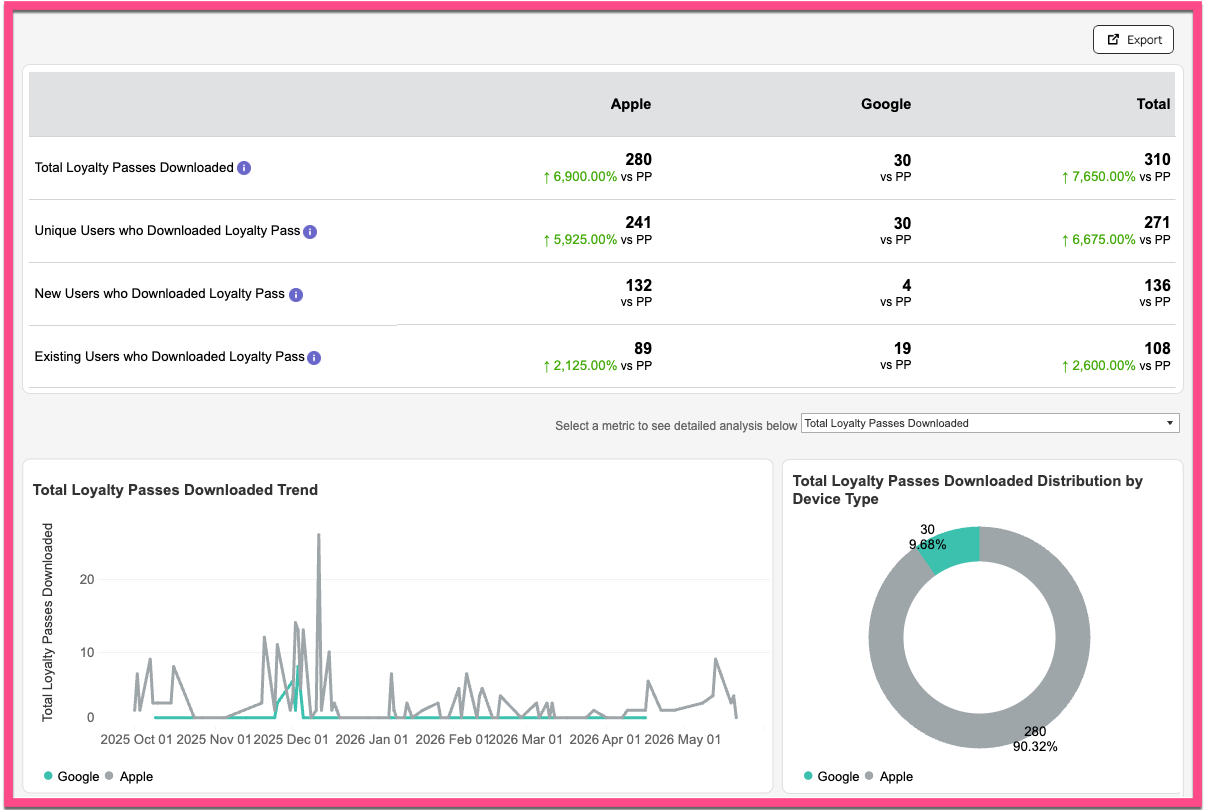
Smart Pass Analytics Dashboard
Smart Pass Analytics is a new reporting dashboard that gives brands a unified view of guest engagement across Apple and Google Loyalty Passes, all in one place within the Punchh Dashboard. Key metrics are available in real time and can be exported directly from the dashboard. Smart Pass Analytics is available to brands with Smart Passes enabled under Wallet & Passes > Analytics & Reporting > Smart Pass Analytics. (CAM-7079, PDOC-3847)
See the following article(s) for more details:
- Smart Pass Analytics (Support Portal)
Reward Notifications for Apple Loyalty Pass
Guests with an Apple Loyalty Pass will now receive reward notifications directly in their Wallet when a reward is earned or gifted. This update introduces wallet-native reward messaging using the custom Reward Message field. Google Loyalty Pass support is planned for a future release. (CAM-7208, CAM-7206, PDOC-3983)
See the following article(s) for more details:
- Apple Passes (Support Portal)
Display Name Field for Coupon and Promo Campaigns
Brands can now add a Display Name to Coupon and Promo Campaigns for a more polished, guest-friendly experience in Apple Wallet and Google Wallet. Instead of showing a raw coupon or promo code on the front of the pass, guests will see a clear, human-readable offer description — such as "$5 Off Your Next Visit" — making it immediately obvious what the offer is. The code remains accessible on the back of the pass whenever needed. There are no changes to redemption or scanning behavior. (CAM-7251, PDOC-4003)
See the following article(s) for more details:
- How to Distribute Offer Passes Using Campaigns (Support Portal)
- Apple Passes (Support Portal)
- Google Passes (Support Portal)
Smart Pass URL for Third-Party Messaging
Brands can now automatically include Apple and Android loyalty and offer pass URLs in their third-party messaging campaigns to boost guest engagement. Refer to Loyalty and Offer Pass URLs in Webhook Events for the technical details. (INT1-2158, EC-815, CAM-6899)
See the following article(s) for more details:
- Smart Passes: Overview (Support Portal)
Campaigns
Rich Media and Deep Link Support for Push Notifications
Brands can now send richer, more engaging push notifications directly from the campaign builder. Marketers can attach images, GIFs, or videos to any push notification and include a deep link that takes guests directly to a specific page in the app — such as Rewards, Offers, or a Product Detail page — rather than the default home screen. If media or deep linking is not supported on a guest's device or app version, the notification will be delivered without those elements to ensure broad reach. (CAM-7270, CAM-7216, PPT-673, PDOC-4004)
See the following article(s) for more details:
- Campaign Message Options (Support Portal)
Referral Reward Limit Notification Template
Brands running referral campaigns with a reward cap can now keep guests informed. A new System Message notification template is available to automatically notify guests when they have reached the maximum number of referral rewards they can earn. The default message reads: "You've reached the maximum number of referral rewards you can earn for this campaign right now. You'll be able to earn more once the current timeframe resets." The message is fully customizable to match your brand's voice. (CAM-7212, PDOC-3949)
See the following article(s) for more details:
- System Messages: General (Support Portal)
- Referral Campaign (Support Portal)
Archiving for Recurring Mass Offer Campaigns
You can now archive a recurring Mass Offer Campaign as soon as it's deactivated, without waiting for the schedule end date to pass. The Deactivate button is also automatically hidden once a campaign is deactivated, and the campaign list now correctly reflects its deactivated status right away. (EPS-11439)
See the following article(s) for more details:
- Mass Offer Campaign (Support Portal)
Loyalty
Program Rules Page Under Administration
A new Program Rules page is now available under the Administration tab, accessible from both new and legacy dashboard navigation. It consolidates key loyalty program configurations across six sections: Earnings, Redemptions, Gift Cards, Currency Expiry, and Miscellaneous. Two new permissions control access: Program Rules Restricted Access (view-only) and Program Rules Full Access (edit). These permissions can be managed through the standard Roles & Permissions settings. (LPE-2021, LPE-2073, PDOC-3988)
Action Required: Contact your Punchh Representative to activate this page in your platform.
See the following article(s) for more details:
- Program Rules (Support Portal)
Consumer Experience
Social SSO Support for PAR Punchh SSO Iframe
Social login options — including Google, Apple, and Facebook — are now supported within the PAR Punchh SSO iframe when Guest Identity is enabled, providing a more streamlined sign-in experience for guests. (CX-3006)
Option to Hide Custom Profile Fields in the Loyalty Web Iframe
The Edit Preferences screen, where custom profile fields are collected, can now be hidden from the loyalty web iframe — during both sign-up and while logged in. Contact your Punchh representative for assistance enabling or disabling this feature. (CX-2990, CX-3004)
Offers
Redemption Wait Period Setting for Multiple Redemptions
Brands now have additional control over how frequently guests can redeem offers at the basket level. A new Redemption Wait Period Setting for Multiple Redemptions (Redemptions 2.0) allows brands to define how many baskets a guest can redeem within a specified time window, configured in hours and minutes. This logic applies to both loyalty and non-loyalty guests, and all offers within a basket are counted as a single redemption event. (OMM-1893, PDOC-3831)
Action Required: Contact your Punchh Representative to enable this setting.
See the following article(s) for more details:
- Redemption Wait Period for Multiple Redemptions (Support Portal)
Reporting and Analytics
Updated Analytics Report for Your Loyalty Program
We’ve refreshed the former Transaction Analytics report in the Punchh platform to make your data easier to find, understand, and act on. The previous two-tab view (Transaction Analytics and Fraud Analytics) has been redesigned and split out into multiple reports under Loyalty Program:
- The Transaction Analytics Report now stands on its own page without the extra tabs.
- The Fraud Analytics Report now appears as a separate option in the left side navigation, so you can jump directly into the insights you need.
- A new stand-alone report, the Device Analytics Report, has been separated from Fraud Analytics to give you a high-level overview of device registration patterns across your loyalty guest base.
We’ve also enhanced the UI for both reports to improve readability and make it easier to navigate, filter, and interpret your data. These updates make it faster and simpler to get to the metrics that matter, so your teams can spend less time clicking through reports and more time turning insights into actions. (INT-2099, PDOC-3817, INT1-2104, PDOC-3818, INT1-2178, PDOC-3819)
See the following article(s) for more details:
- Transaction Analytics Report (Support Portal)
- Fraud Analytics Report (Support Portal)
- Device Analytics Report (Support Portal)
Platform Integrations
Validation for PAR Pay Payment Flows
Address Verification System (AVS) and Card Verification Value (CVV) validation has been added as an enhancement to the PAR Pay Payment integration across user-initiated payment flows, including Gift Card Purchase, Gift Card Reload, Gift a Card, saving a new payment card, and Scan to Pay or Loyalty Pay flows.(INT-3696, INT-3734, INT-3730)
This will be available within the Mobile Framework by the end of Q2.
Developers Corner
API Enhancements for PAR Games
This release introduces API enhancements to support branded game cover images. A new response parameter, cover_img, has been added to the game object in the Fetch Games API (GET /api2/mobile/par_games). This parameter specifies the URL of the branded cover or intro image for a game. The URL is used to display images on the Games list and details screens in the mobile app. The parameter returns null if no cover image has been uploaded, or if the game's channel is set to Web only. It is only populated for games with a channel of Mobile or Mobile + Web. (PDOC-4009, CAM-7287)
See the following article(s) for more details:
- Fetch Games (Developer Portal)
Loyalty and Offer Pass URLs in Webhook Events
This release introduces support for including Apple and Android loyalty and offer pass URLs in outbound webhook event payloads when pass support is enabled for the business in the Punchh platform. These URLs are available to integrated third-party messaging platforms (Braze, mParticle, SFMC) and custom outbound webhooks. Brands using these messaging platforms can seamlessly include loyalty and offer pass URLs in their campaigns to improve guest engagement with Smart Passes. (PDOC-4011, INT1-2158)
Loyalty Pass URLs
Loyalty pass URLs are added to the user object for events that include user details except wallet-related events (wallet_activated, wallet_deactivated, wallet_generated) and redeemables events. Guests can use these URLs to save their Apple Wallet or Google Wallet loyalty pass. The payload now includes the following attributes:
- apple_loyalty_pass_url
- android_loyalty_pass_url
Loyalty pass URLs are included in:
- Guest Create/Update events
- Loyalty Check-in events
- Redemption events
- Transactional and Marketing Notification events
- Reward events
- Gift Check-ins events
For User Notification, Email Confirmation, and Reset Password Instruction events, the loyalty pass URLs are added at the root level of the user object.
Offer Pass URLs
Offer pass URLs are included only in Reward events when a reward is issued to a user. The payload includes the following attributes:
- apple_offer_pass_url
- android_offer_pass_url
Guests can use these URLs to save their Apple Wallet or Google Wallet offer pass.
See the following article(s) for more details:
- Braze Event - Guest (Developer Portal)
- Braze Event - Rewards (Developer Portal)
- mParticle Event - Guest (Developer Portal)
- mParticle Event - Rewards (Developer Portal)
- Event - Guest (Developer Portal)
- Event - Rewards (Developer Portal)
- Event - Redemptions (Developer Portal)
- Event - User Notification (Developer Portal)
- Event - Email Confirmation (Developer Portal)
- Event - Reset Password Instruction (Developer Portal)
- Event - Check-in - Gift and Loyalty (Developer Portal)
Bring Your Own Identity Provider (BYOIDP) Support for OIDC and SAML Authentication
This release introduces Bring Your Own Identity Provider (BYOIDP) support, enabling brands to integrate their existing identity provider with Punchh authentication flows using industry-standard OIDC and SAML protocols. With this feature, brands can allow guests to authenticate using their preferred identity provider, such as Auth0, Azure AD, OneLogin, AWS Cognito, or other standards-compliant providers, while still receiving Punchh-compatible user tokens for accessing Punchh APIs and resources. (INT2-3075)
What’s New
Brands can now configure external identity provider integrations using:
- OIDC — Supports OpenID Connect-based authentication flows for providers that expose standard OIDC discovery, authorization, token, and user info endpoints.
- SAML — Supports SAML-based single sign-on (SSO) flows using configured metadata, certificates, and callback URLs.
How It Works
When BYOIDP is enabled, the app initiates authentication through Punchh, and then Punchh redirects the user to the configured identity provider for login or sign-up. After successful authentication, the user is redirected back to Punchh, where the identity is resolved and Punchh-compatible user tokens are issued. These tokens can then be used by the app to access Punchh APIs and resources.
Fetch Collectible Details API
This release introduces a new API endpoint, Fetch Collectible Details (GET /api2/mobile/collectibles/{collectible_id}), which allows brands to fetch detailed information for a specific collectible by providing a mandatory collectible_id. The response includes collectible details such as name, image, category, description, sequence, disappear date, and share message. It also returns associated campaign details, including campaign name, description, type, start date, and end date, providing a complete view of the collectible and its related engagements. (LPE-1908, PDOC-3987)
The API enforces the following validations and business rules:
- Only one
collectible_idis allowed per request. - Responses are limited to collectibles associated with the requesting business.
- Only active campaigns are included in the response.
- Campaigns are sorted by start date in ascending order, with the earliest starting campaign displayed first.
See the following article(s) for more details:
- Fetch Collectible Details (Developer Portal)
User Challenge Listing API for Mobile Apps
We’re excited to introduce the List User Challenges API endpoint (GET /api2/mobile/users/challenges_listing), which enables mobile apps to fetch and display challenges for a logged-in user in a structured format. Challenges are grouped into Available, Active, and Past categories to support intuitive challenge listing experiences. The API provides user-specific details, including enrollment status, progress tracking, and key challenge metadata. With built-in pagination support, the API ensures efficient performance while helping deliver richer and more engaging loyalty experiences on mobile. (LPE-1775, LPE-1862, PDOC-3843)
See the following article(s) for more details:
- List User Challenges (Developer Portal)
Sign-up Indicator in Advanced Auth Verify OTP Response
We have introduced a new boolean response parameter, is_signup, in the Advanced Auth Verify OTP endpoint (POST /api2/password_less/verify). (INT2-3145, PDOC-4031)
The is_signup parameter indicates whether successful OTP verification resulted in:
- A new user sign-up (true), or
- An existing user sign-in (false)
This enhancement helps client applications determine the appropriate post-authentication experience, such as onboarding flows for new users or direct app access for existing users, without requiring additional profile look-up calls or custom logic.
See the following article(s) for more details:
- Verify Token (Developer Portal)
Enhanced Recipient Identification Support for P2P Transfers
We have introduced a new request parameter, recipient_identifier, in the P2P (peer-to-peer) loyalty transfer APIs. This parameter supports both email addresses and phone numbers for identifying the recipient of the transfer. With this enhancement, users can now enter a recipient’s email address or mobile number in the app for P2P transfers. Previously, recipient identification was supported only through the recipient_email parameter. The system automatically detects whether the provided value is an email address or a phone number. When both recipient_identifier and recipient_email are provided, recipient_identifier takes precedence. (LPE-2010, LPE-2083, PDOC-4036)
This enhancement is backward-compatible, and the existing recipient_email parameter continues to function as before.
See the following article(s) for more details:
- Transfer Loyalty Points (Developer Portal)
- Transfer Loyalty Currency (Developer Portal)
- Transfer Loyalty Reward (Developer Portal)
