Punchh Platform Release Notes - 20 August 2024 Deployment
The updates described in these release notes and the affected/linked documentation will not be available in the Punchh platform until the target deployment date.
Loyalty
Restrict Guest Redemptions at Disapproved Locations
With this enhancement, users will no longer be able to redeem rewards at disapproved locations. A new Punchh platform configuration allows brands to customize the error message displayed to users when they attempt to redeem at these locations. This provides greater flexibility and control over the user experience during redemption attempts at disapproved sites. Contact your Punchh representative for more information about this configuration. (LPE-929, PDOC-2597)
See the following article(s) for more details:
- Locations (Support Portal)
Reward Transfer for Deleted Guest
When a reward transfer is made for a user who has been deleted from the system, retrieving the donor user's account history resulted in an error because the system attempts to fetch details of the deleted user. To prevent this issue, instead of attempting to retrieve details of the deleted user, we will display "Deleted User" to indicate the user's absence. We can check this change on the user account history page in the platform or via API. (EPS-8488)
Redeemable Recurrence
The maximum recurrence duration for a redeemable has been reduced from 10 years to 13 months. (TD-670, PDOC-2582)
See the following article(s) for more details:
- Redeemables (Support Portal)
Campaigns
Campaigns in Separate Tabs
We have learned that a primary reason users need to toggle back to the classic campaigns page is the inability to open campaigns, summaries, and performance in separate tabs/windows. This release enables that functionality via a right-click or keyboard shortcut. (CAM-5406, PDOC-2584)
See the following article(s) for more details:
- Campaign Management (Support Portal)
Campaign Management Tool - Filter by Message Type
The Campaign Management Tool (CMT) now has a filter for "message type". This allows users to further filter their campaigns based on the type(s) of content that accompanied the campaign. (CAM-5325, PDOC-2583)
See the following article(s) for more details:
- Campaign Management (Support Portal)
Recall Campaign - Breakdown Jobs on Hourly Basis
As part of ongoing investments in platform scalability, we have made updates to campaign bulking enhancement for points/currency/fuel for anniversary campaigns and enhanced job scheduling for recall campaigns. (CAM-5396)
Segments
Card Type Attribute for Saved Payments Segment (Punchh Wallet)
Punchh Wallet users can segment guests based on the saved payment types in their wallet. A new 'Card Type' segment attribute has been added to the 'Saved Payment' segment. This feature is available only to Punchh Wallet users. (SB-3111. PDOC-2532)
See the following article(s) for more details:
- Segment Types, Attributes, and Timeframe Definitions (Support Portal)
Segment Guest Profile Based on Age Verification Status
A new attribute allows segmentation of guest profiles based on their age verification status. Brands with age verification integrator capability can now create segments using the Age Verification Status attribute. (SB-2884. PDOC-2590)

See the following article(s) for more details:
- Segment Types, Attributes, and Timeframe Definitions (Support Portal)
Segment Filter Based on Segment ID
We have introduced new search capability for segments based on segment ID. You can now quickly locate a specific segment in the segment list page with this search enhancement. (SB-3107)
Segment Type for Single Scan Flow
We have introduced segmentation of guests based on their engagement with the Scan and Pay via Single Scan Flow process. This enhancement allows you to create more targeted and effective marketing campaigns by leveraging insights from guest interactions at the time of purchase. (SB-3086, PDOC-2589)
See the following article(s) for more details:
- Segment Types, Attributes, and Timeframe Definitions (Support Portal)
Reporting & Analytics
Enhancements to Reports
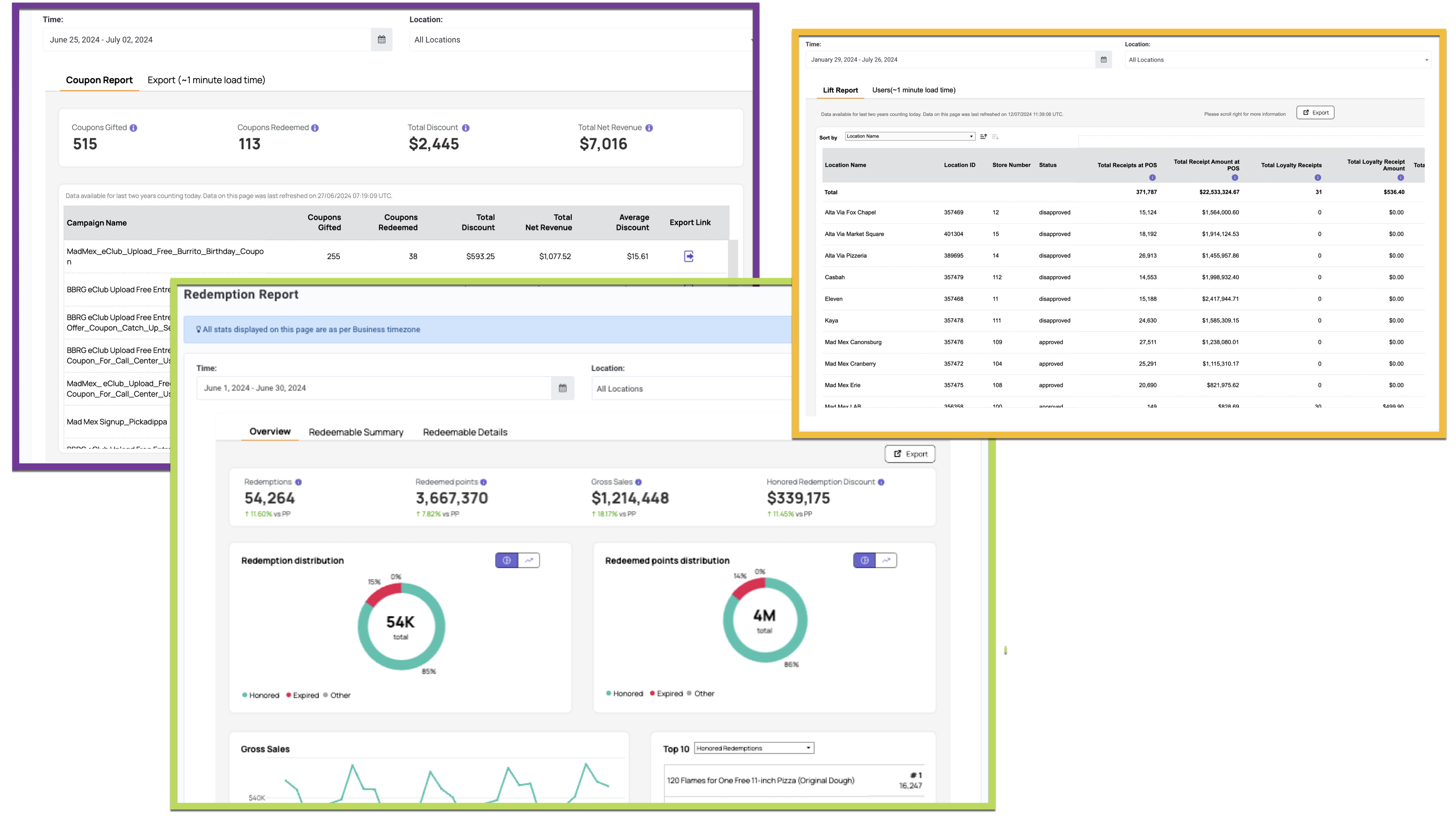
Many of the reports in the Punchh platform have been enhanced to improve the look and feel as well as load time and performance. Additionally, the look-back period for reporting has been extended to two years. (DP1-1272, PDOC-2513)
Additionally, some further changes include:
- The Redemption Report now has two new sub-reports Redeemable Performance Summary and Redeemable Performance Details. The new sub-reports will display additional metrics around redeemables and appear as separate tabs under the Redemption Report.
- Improvements have been made to the exporting options on the Coupon Report, under the Exporting tab.
- The Liability Report now has two tabs, Business and By Location, to help you understand liabilities associated with your business as a whole as well as specific locations.
- Within the Liability Report, a change has been made to the Banked Rewards metrics (for brands with the Point Convert to Currency program type). These metrics will now be calculated based on loyalty earnings only, as opposed to loyalty + non-loyalty.
- This change also impacts two Data Exports: Location Level Liability Data Fields and User Level Liability Data Fields (also for brands with the Point Convert to Currency program type).
- For brands that previously had the Activity Report enabled, you will now find that same reporting data under Liability Report > By Location.
See the following article(s) for more details:
- Admin Activity Report (Support Portal)
- Coupon Report (Support Portal)
- Dumpster Diver Report (Support Portal)
- Liability Report (Support Portal)
- Lift Report (Support Portal)
- Location Report (Support Portal)
- Location Scoreboard (Support Portal)
- Payments Report (Support Portal)
- POS Stats (Support Portal)
- Promotional Report (Support Portal)
- Redemption Report (Support Portal)
- Data Export (Support Portal)
Developers Corner
Location Settings for Alternate Store Number and Additional URL
To support mobile app development, we have introduced the option for additional URLs on store locations in the Punchh platform, and an alternate store ID field that can be used for integrations. The additional_url and alternate_store_number parameters have been added to the following API endpoints: Get Locations List, Get Location Details, Create Location, and Update Location. Contact your Punchh representative for more information about this configuration. (CX-2332, PDOC-2520)
See the following article(s) for more details:
- Get Locations List (Developer Portal)
- Get Location Details (Developer Portal)
- Create Location (Developer Portal)
- Update Location (Developer Portal)
Generate Single Scan Code Using Subscriptions
We have updated the scope of single scan code generation to include subscriptions. With this update, guests will be able to generate a single scan code for active subscriptions in their account. This single scan code can be used by supporting point of sale (POS) systems to make a redemption call for subscription(s) in line with other entities such as rewards. The api2/mobile/single/scan/tokens API endpoint has been updated to include subscriptions in this scope. (LS-494, PDOC-2433, PDOC-2593)
See the following article(s) for more details:
- Generate a Single Scan Code (Developer Portal)
- Single Scan Flow (Developer Portal)
- Punchh Wallet: Subscriptions (Support Portal)
POS User Look-up Endpoint Includes Subscriptions
We have updated the POS user look-up endpoint to include subscriptions selected by a guest. This has been done to support subscriptions in the single scan flow. POS systems for businesses that want to use single scan flow will have to be updated to accommodate the enhancement. When user look-up is done using "single_scan_code", the response will include the "selected_subscriptions" object. (LS-495, PDOC-2517)
See the following article(s) for more details:
- User Look-up and Fetch Balance (Developer Portal)
- Single Scan Flow (Developer Portal)
- Punchh Wallet: Subscriptions (Support Portal)
Restrict Guest Redemptions at Disapproved Locations
With this enhancement, users will no longer be able to redeem rewards at disapproved locations. A new platform configuration allows brands to customize the error message displayed to users when they attempt to redeem at these locations. This provides greater flexibility and control over the user experience during redemption attempts at disapproved sites. The error message is displayed in the 422 error response of the api/pos/redemptions API endpoint. Contact your Punchh representative for more information about this Punchh platform configuration (LPE-929, PDOC-2597)
See the following article(s) for more details:
- Create Redemption (Redemptions 1.0) (Developer Portal)
