Fraud Metrics
This article was previously titled "Dumpster Diver Report."
Attempts of fraud, scamming, and abuse are unfortunate eventualities of any customer rewards program, but that doesn't mean you're powerless to stop them. The Fraud Metrics report shows you a list of guests whose activity indicates the possibility of abuse. When a guest scans multiple receipts within a short amount of time (and especially if the guest attempts to scan previously-used receipts) their behavior can be flagged in this report, allowing you to identify potential abusers, investigate their activity by checking out their receipt barcodes, and take action if necessary.
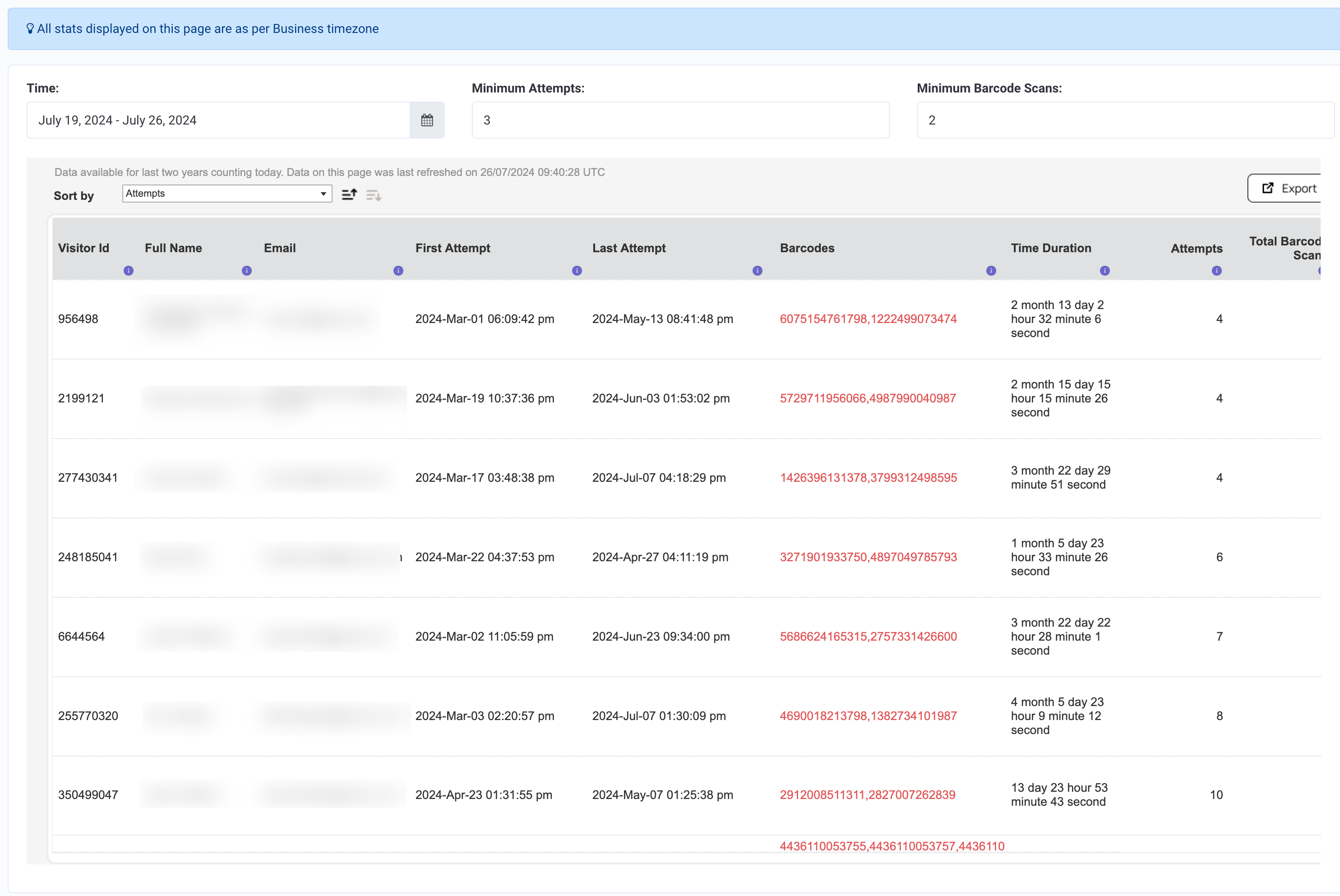
View Fraud Metrics
To view and configure your Fraud Metrics report:
- Navigate to Fraud > Fraud Metrics.
- Select a time frame to focus the scope of the report.
- Adjust the Minimum Attempts (number of attempts made to scan a barcode, including multiple unsuccessful attempts) and Minimum Barcode Scans (number of unique barcodes scanned) to what you consider to be particularly suspicious.
- Your report will populate with a list of guests who match this suspicious activity. From here, you can choose one of the guests to perform the following three actions:
- Identify a potential fraudster,
- Investigate the case using the barcodes in question, and
- If necessary, Take Action such as sending a warning message or banning a fraudulent guest.
Date Range Available
Data is made available for the last two years not counting today. For example, if today is 2024-Jul-24, the data from 2022-Jul-24 to 2024-Jul-23 is made available in the report.
Data Refresh Frequency
Data is reported from a live data source and it has a ~10-minute lag from actual data.
Terms and Metric Definitions
| Term/Metric | Definition |
|---|---|
| Attempts | Total number of attempts completed by the visitor (user). |
| Barcodes | The list of barcodes involved in the first and last attempts. Refer to these barcodes to find the SKUs of items on the receipt. |
| The email address of the visitor (user) | |
| First Attempt | The timestamp of the visitor's first checkin attempt which resulted in a checkin failure. |
| Full Name | The full name of the visitor (user) |
| Last Attempt | The timestamp of the visitor's last checkin attempt which resulted in a checkin failure. |
| Time Duration | The time difference between the last and first attempt. |
| Total Barcode Scans | Total number of barcodes scanned by the visitor which resulted in a checkin failure. |
| Visitor ID | The unique ID of the visitor (user) |
Dealing with Suspicious Activity
Identify
Multiple receipt scans in a short amount of time may indicate that a guest is trying to scan the receipts of other guests (as if they dug them out of a dumpster). For example, you could see that a guest attempted to scan 6 unique barcodes a total of 7 times over the course of 8 minutes.
Now, this could be the case of someone who simply collected their receipts over a period of time and then scanned them all at once, or it could be someone who dug a bunch of receipts out of the trash and tried to scan them all right away. We won't know for sure unless we investigate.
Investigate
Once you've identified a suspicious guest, you'll want to investigate their receipts to determine whether the activity constitutes fraud or is merely an innocent mistake. Using the barcode SKUs shown in your Fraud Metrics report, you can perform a Barcode Lookup to view the receipts in greater detail.
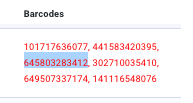
- Copy a barcode from the list of the guest's suspicious barcodes.
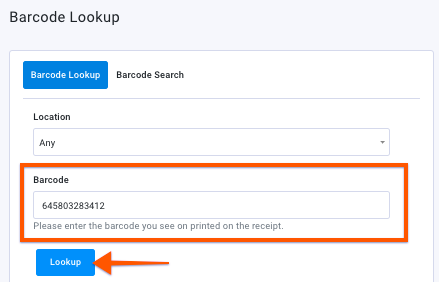
- Navigate to Diagnostics > Barcode Lookup in the left navigation toolbar.
- Paste the barcode into the Barcode field and select Lookup.
-
Repeat these steps for as many barcodes as you need to determine the validity of the guest's activity. In this case, we've looked up 4 barcodes to compare.
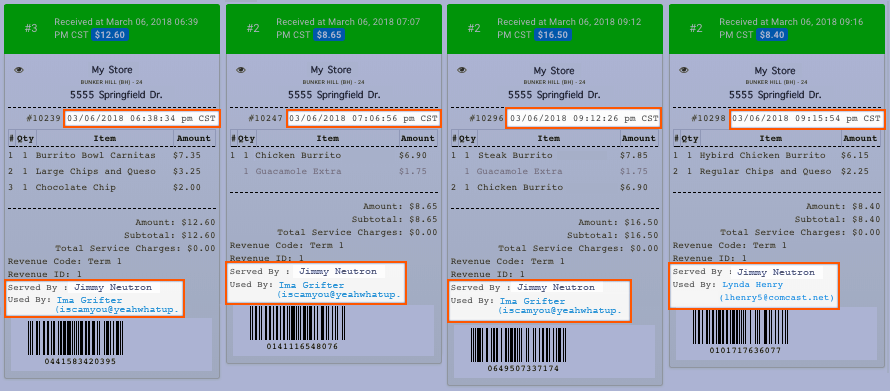
In the above example, we see that the guest scanned in receipts from transactions that took place on the same day, March 6th, at 6:38 PM, 7:06 PM, 9:12 PM, and 9:15 PM. And of those receipt scans, one of them (the 9:15 pm transaction) had already been scanned by another guest. At this point, it's pretty clear this is a case of abuse by the guest.
Take Action
If you've determined a guest has committed fraudulent activity, you have two options:
- Send a warning message
Message a user through their guest profile, warning them of the consequences of fraud/abuse of the program. - Ban the user
Banning a guest prevents them from participating in your loyalty program via checkins, points, and redemptions. Online ordering will continue to function as usual.
Exporting
From the Fraud > Fraud Metrics page, click the Export button at the top right. A CSV file containing all your report information will be downloaded immediately to your local machine.
