Data Export
Data Exports is the latest update in exporting robust custom reports directly to your inbox. Exporting POS, campaign, guest, and other dashboard data from Punchh is fast, easy to schedule, and incredibly flexible. You can create custom report templates to include any (or all) of over 170 data metrics collected and tracked by Punchh.
Note: Data exports plus their corresponding emails are often disabled in sandbox environments. Please contact your Punchh representative with questions.
Data Field Types
The following is a list of all available data field types and metrics you can include in your data export template. Choose as many or as few as you want. When you export your report, each of these types will be included as a separate CSV file. The Data Types are organized into two categories: Data Exports and Data Exports with Optional Modified Records.
Data Exports
These exports will pull data created and modified during your selected date range.
Migration Guest Data Fields
Note: The Location filter will not be applicable on these Data Fields.
| Field Name | Description | Notes |
|---|---|---|
| First Name | First name of the guest. | |
| Last Name | Last name of the guest. | |
| Email of the guest. | ||
| Phone | Phone number of the guest. | |
| User ID | Unique ID created by Punchh once guest gets migrated. | Column renamed from *User *to User ID |
| Original Membership No | Membership number before migrating to Punchh. | |
| Original Points | Points associated with original membership number. | |
| Gifted Value | Points that are gifted by Punchh to the guest once the user migrates to Punchh. | |
| Updated At | Date and time when guest was migrated to Punchh. | |
| Birthday | Birthday date of guest. | |
| City | City entered by guest. | |
| State | State entered by guest. | |
| Zip code | Zip code entered by guest. | |
| Migration User ID | The ID of the user associated with the data. This value will only be present to those users who have migrated to the program. | |
| Migrated Rewards | The total migrated reward count. | |
| Created At | The timestamp of record creation for business migration users. | |
| Gift Card | The most recent gift card associated with the migrated guest account. | |
| ePin | The ePin tied to the most recent gift card associated with the migrated guest account. | |
| Initial Points | The original points balance associated with the user. | |
| Details | Additional data points associated with the migrated guest. |
Guest Awaiting Migration Data Fields
Note: These data fields provide the total number of guests pending migration to loyalty as of the current date. The date range and location filter will not be applicable to these data fields.
| Field Name | Description | Notes |
|---|---|---|
| First Name | First name of the guest. | |
| Last Name | Last name of the guest. | |
| Email of the guest. | ||
| Phone | Phone number of the guest. | |
| Migration ID | Unique ID created by Punchh once the guest migrates. | |
| Original Membership No | Membership number before migrating to Punchh. | |
| Original Points | Points associated with original membership number. | |
| Birthday | Birthday date of guest. | |
| City | City entered by guest. | |
| State | State entered by guest. | |
| Zip code | Zip code entered by guest. | |
| Migration User ID | The ID of the user associated with the data. This value will only be present to those users who have migrated to the program. | |
| Migrated Rewards | The total migrated reward count. | |
| Created At | The timestamp of record creation for business migration users. | |
| Gift Card | The most recent gift card associated with the migrated guest account. | |
| ePin | The ePin tied to the most recent gift card associated with the migrated guest account. | |
| Initial Points | The original points balance associated with the user. | |
| Details | Additional data points associated with the migrated guest. |
Campaign Data Fields
Note: The Location filter will not be applicable on these Data Fields.
| Field Name | Description | Notes |
|---|---|---|
| Campaign ID | Unique campaign ID | |
| Campaign Type | Type of campaign | |
| Campaign Name | Name of the campaign | |
| Campaign Sub Type | The sub type of the campaign. | |
| Location ID | Location id if campaign is running for a specific location | |
| Location Group ID | Location group id if campaign is running for a specific group of locations. | |
| Admin ID | The admin id who has created the segment. | |
| Segment Definition ID | The id of the segment attached to a campaign. | |
| Redeemable ID | The id of the redeemable that is attached to a campaign. | |
| Redeemable Type | The type of redeemable attached to a campaign. | |
| Redeemable Name | The name of the redeemable attached to a campaign. | |
| Redeemable Valid Days | The number of days for which the redeemable is valid. | |
| Effective Expiration Date | The date of the expiry. | |
| Status | Status of the redeemable gifted. | |
| Gift Reason | The reason of the gifting. | |
| Gift Type | The type of gifting of the redeemable. | |
| Gift Count | The gift count gifted via the campaign. | |
| Start Date | The start date of the campaign | |
| End Date | The end date of the campaign | |
| Analytics End Date | The end date of the campaign after that analysis won't be considered. | |
| Control Group Percent | Represents whether the control group is present or not. | |
| Created At | The date and time when the campaign is created. | |
| Root Campaign ID | The root campaign id if campaign is created under some campaign or set up as recurring. | |
| Root Campaign End Date | The end date of the root or parent campaign. This value is present only when Root Campaign ID is not blank. | |
| Qualification Criterion ID | The qualification criteria id that is attached to the campaign. | |
| Coupon Campaign ID | The coupon campaign id that is attached to the campaign. | |
| Usage Type | The usage type of the campaign. | |
| Dynamic Code Generation | Represents whether the dynamic URL generation is enabled or not. | |
| Multi Use | If the campaign is set up for multi use. | |
| Promo Code | The promo code attached to the campaign if applicable. |
Coupon Data Fields
Note: The Location filter will not be applicable on these Data Fields.
| Field name | Description | Notes |
|---|---|---|
| Coupon ID | The unique id for the coupon | |
| Campaign ID | The campaign id for the coupon campaign that is created. | |
| User ID | The user id for which a unique code is generated. | |
| The email id for which a coupon code is generated. | ||
| Coupon Code | The unique coupon code that is generated via the campaign | |
| Created At | The date and time of the coupon code generation |
Redeemable Data Fields
Note: The Location filter will not be applicable on these Data Fields.
| Field name | Description | Notes |
|---|---|---|
| Redeemable ID | Unique ID for every redeemable. | |
| Redeemable Type | The type of redeemable | |
| Redeemable Name | The name of the redeemable | |
| Valid Days | Number of days the redeemable is valid for | |
| Expiring On | The explicit date of expiry on which redeemable will expire. | |
| Published At | The date and time when redeemable is published for use. | |
| Admin ID | The admin id who has created that redeemable | |
| Redeeming Criterion ID | The qualification criteria id which is attached to the redeemable. | |
| Redeemable Tag ID | The tag id for the redeemable if applicable. | |
| Created At | The date and time when the redeemable is created in the system | |
| Updated At | The date and time when the redeemable is updated in the system |
Coupon Redemption Data
Note: Applying the Location will fetch only POS coupons data redeemed at that location.
| Field Name | Description | Notes |
|---|---|---|
| User ID | This is the user Id of the guest who has redeemed the coupon. | Column renamed from User to User ID |
| Campaign ID | Unique campaign ID relative to the campaign delivering the coupon. | Column renamed from Campaign to Campaign ID |
| Guest | Guest ID for the user that received the coupon as the result of the campaign. | |
| Location ID | Unique location ID where the redemption occurred. | Column renamed from Location to Location ID |
| Location name | Name of Location on which the redemption occurred. | |
| Store Number | Store number of the redemption location. | Column renamed from Store number to Store Number |
| Campaign Name | The name of the campaign that delivered the coupon. | |
| Status |
The status of the rewards:
|
|
| Coupon Type |
This relates to the type of coupon configured originally between:
|
|
| Coupon ID | The specific coupon code received by the campaign. | Column renamed from Coupon to Coupon ID |
| Redemption Receipt Number | The receipt ID, from the POS, where the coupon was processed. | |
| Discount | The amount of the discount applied as a result of the coupon redemption. | |
| Receipt Payable | Total receipt amount received by the business' POS. | |
| Subtotal Amount | The subtotal amount for the entire receipt where a coupon was redeemed. | Column renamed from Subtotal amount to Subtotal Amount |
| Processed At | The timestamp of the coupon redemption. |
Data Exports with Optional Modified Records
These data exports are designed to pull data created during your selected date range. To include modified data, check Include records modified in the above date range.
Redemption Data Fields
| Field Name | Description | Notes |
|---|---|---|
| First Name | First name of the user | New field added from Redemption List Export (Previously located under Support > Redemption Codes) |
| Last Name | Last name of the user | |
| User Email | User’s email address | |
| Points/Amount Requested | Points associated with this redemption transaction | |
| Removed 27 MAY 2025 | ||
| Redemption Id | Unique Id associated with redemption. | |
| Redemption Code Number | Internal tracking code for redemption. | |
| Latitude | Latitude of the location. | |
| Longitude | Longitude of the location. | |
| GPS Accuracy | GPS Accuracy of the location. | |
| IP Address | IP address of the device. | |
| User Agent | Defines the device type from which a guest did redemption - Web/Android/iOS. | |
| Redeemable ID | Unique ID of redeemable. | |
| Redeemable Name | Name Of Redeemable. | |
| Reward Id | Unique Id of reward gifted. | |
| Redemption Code Status |
Status of the redemption code:
|
|
| Transaction Number | Transaction number of receipt. | Column renamed from Redemption Receipt Number to Transaction Number |
| Receipt Date Time | Date and time when the transaction took place (UTC time zone). | |
| Employee ID | ID of the employee doing the transaction at the POS. | Column renamed from Employee Id to Employee ID |
| Amount | Total receipt amount. | Previously named “Receipt Payable” |
| Subtotal Amount |
Subtotal amount on the receipt, excluding tax and all other amounts (as sent by business). Note: The Subtotal amount in the Redemption Data Export reflects the value sent in the Redemption API call, while the subtotal shown on the receipt is based on the Check-in API call. Any discrepancies between these subtotals are due to differences in the payload calculations provided by the brand for each call. |
Column renamed from Receipt Subtotal to Subtotal Amount |
| Additional Properties | Any additional information. | |
| Date | Date of redemption. | |
| Location Id | Unique location ID where the redemption occurred. | |
| Store Number | Store number of the redemption location. | |
| Discount Amount | Discount amount provided on the receipt. | Previously named “Amount” |
| Status |
The status of the rewards:
|
|
| Expiring On | Date the redemption expires. | |
| Location Name | Name of the location in which redemption is done. | |
| Redemption Type |
Type of redemptions:
|
|
| Channel |
Defines the channel for the checkin.
|
|
| User ID | Unique ID for guest. | Column renamed from User to User ID |
| Reward Origin |
Defines the origin of the reward:
|
User Feedback Data Fields
| Field Name | Description | Notes |
|---|---|---|
| First Name | First Name of Guest. | |
| Last Name | Last Name of Guest. | |
| Location ID | Location on which checkin has been done. | |
| User ID | Unique ID for guest leaving feedback. | Column renamed from Guest ID to User ID |
| Location name | Name of Location on which feedback is given. | |
| Feedback ID | Unique ID for the feedback provided by the guest. | |
| Feedback | Message/feedback left by guest. | |
| Feedback Rating | Rating left on feedback. | |
| Negative Feedback | In case value of the field is NULL, then feedback is positive. Other, the feedback is negative. | |
| Feedback Reply | Reply given on feedback left by guest. | |
| Store Number | Store number of location. | Column renamed from Store No. to Store Number |
| Date of Feedback | When feedback was given. | |
| Date of Reply | When a reply was given on feedback. | |
| Requires Response | Whether a response is required or not. (A configuration to enable feedback screen on iFrame.) |
*The UserId field/column was removed from User Feedback Data.
Checkin Data Fields
| Field Name | Description | Notes |
|---|---|---|
| Checkin ID | Checkin ID. | Column renamed from Checkin to Checkin ID |
| Approved |
This field has two values:
|
|
| Bar Code | Barcode on the receipt. | |
| Expired At | Date and time on which checkin became expired. | |
| External uid | Unique ID received from the POS. | |
| First Punchh at Business | When a guest performs their first checkin at the business (any location or online). | |
| First Punchh at Location | When a guest performs their first checkin at the location. | |
| Checkin type |
Types of Checkins:
|
|
| IP Address | IP Address of a guest's mobile device. | Column renamed from Ip address to IP Address |
| Latitude | Latitude of the location. | |
| Store Number | Store Number. | Column renamed from Store number to Store Number |
| Longitude | Longitude of the location. | |
| QR Decoded | QR Code present at the location that guest scan to earn the checkin. | |
| Receipt Url | URL of Receipt (image-based). | |
| User Agent | Defines the device type from which a guest did redemption (Web/ Android/ iOS). |
|
| Checkin scan time | The date and time the receipt was scanned. | |
| State | State of checkin; i.e, Pending for Verification. | |
| Location Name | Name of the location on which checkin is done. | |
| Scheduled Expiry on | Date of expiry of redemption. | |
| Channel |
Defines the channel for the checkin.
|
|
| User ID | User ID of the guest. | Column renamed from User to User ID |
| Count as Visit | For Hybrid businesses, a visit is also gifted with points. | |
| Location ID | Location ID of the guest checkin. | Column renamed from Location to Location ID |
| Points Earned | Points earned by the guest for a checkin. | |
| Points Spent | Points spent for any redemption. | |
| Receipt Amount | Amount present on the receipt. | |
| Receipt Date | The date and time of receipt (in UTC). | |
| Transaction Number | Transaction number present on the receipt. | Column renamed from Receipt number to Transaction Number |
| Status | Status of the checkin (Gift/ Loyalty/ Referral). | |
| Gift Reason | Reason for which the guest was rewarded. | Column renamed from Gift reason to Gift Reason |
| Earnable Amount | This is the amount calculated by the system on which the guest will earn the points after processing through Punchh qualifiers (if any). | |
| Gifted for ID | Displays the campaign id through which gifting was done in case of gift checkin. | |
| Gifted for Type |
Defines the type of campaign gifting. There are 8 different gift types:
|
Checkin Failure Data Fields
| Field Name | Description | Notes |
|---|---|---|
| User ID | Unique ID of the user which indicates which user has received an error on checkin. | Column renamed from User to User ID |
| Bar Code | Bar code of the receipt on which user has received an error. | |
| Error Type | The error description or error populated to the user. | |
| Location ID | The location user has received an error. | Column renamed from Location to Location ID |
| Location Name | Name of location on which location user has received an error. | |
| Failure Date | Date and time of the error. | |
| Store Number | Store number of location on which location user has received an error. | Column renamed from Store number to Store Number |
| IP Address | IP address of the device from where we have received an error. | Column renamed from Ip address to IP Address |
| Error Code | The unique error code for the error. |
Referral Data Fields
| Field Name | Description | Notes |
|---|---|---|
| Referral Type | Automatic or manual referral. | |
| User ID | Loyalty ID for the referrer. | Column renamed from *Referring Guest ID *to User ID |
| Referred Guest ID | Loyalty ID for the referred guest. | |
| Sign Up Date of Referred Guest | Date the referred guest created their loyalty account. | |
| Gift Received by Referring Guest | Reward received by the referrer, if you have set up a gift-giving Referral campaign. | |
| First Loyalty Checkin Date of Referred Guest | Date the referred guest performed their first loyalty checkin action. | |
| First Loyalty Checkin Spend by Referred Guest | The receipt amount of the referred guest's initial spend. | |
| First Loyalty Checkin Location ID | Location ID where the referred guest's first checkin occurred. | |
| First Loyalty Checkin Location Name | Location name where the referred guest's first checkin occurred. | |
| Store Number | Store number where the referred guest's first checkin occurred. | Column renamed from *First Loyalty Checkin Location Store Number *to Store Number |
| Referral Creation Date | If automatic, the date the referrer sent out an invitation. If manual, the date the referred guest signed up. |
*The UserId field/column was removed from Referral Data.
Receipt Item Data Fields
| Field Name | Description | Notes |
|---|---|---|
| Transaction Number | Unique Receipt ID. | Column renamed from Receipt ID to Transaction Number |
| Bar Code | Barcode on the receipt. | |
| Guest ID | Guest who has performed the checkin. | |
| Location ID | Unique ID of the location visited. | |
| Checkin ID | Unique ID through which a checkin was done. | |
| Receipt DateTime | Date and Time on receipt (UTC time zone). | |
| Employee ID | Employee ID who did the transaction. | |
| Employee Name | Name of the employee who did the transaction. | |
| Revenue ID | Unique ID corresponding to the type of order (Online, POS, etc.). | |
| Revenue Code | Type of Order; Restaurant, Bar, Drive Thru, Take Out, etc. | |
| Last 4 CC | Last 4 digits of the credit card associated with the transaction. | |
| Location Name | Name of Location. | |
| Store Number | Store number of location. | |
| Menu Item ID | Unique ID of the menu item provided by business. | |
| Menu Item Name | Name of a menu item. | |
| Amount | Master price of a menu item. | |
| Menu Item Type | Type of menu item; Discount, Main, etc. | |
| Menu Item Family | Family to which the menu item belongs (provided by business). | |
| Menu Item Group | Group to which menu item belongs (provided by business). | |
| Quantity | Quantity of menu items sold. | |
| Rate | Master price of the menu item. |
Tipping Data Fields
| Field Name | Description | Notes |
|---|---|---|
| Tipping ID | Unique ID of the tip that is generated. | |
| Checkin ID | The checkin id for which the tip is given. | Column renamed from System Identifier for Checkin to Checkin ID |
| Location ID | Location ID of the checkin on which the tip is given. | |
| Location Name | Name of location for which the tip is given. | |
| Store Number | Store number of location of the checkin on which the tip is given. | Column renamed from Store No. to Store Number |
| Gift Card ID from which Tip was given | If the tip is given by Gift card then the gift card number is stored. | |
| User ID | Unique ID of the guest that left a tip. | Column renamed from *ID of guest who tipped *to User ID |
| Currency value of the tip | The value of tip. | |
| Time when Tip was given | Date and time when the tip is given. | |
| External Transaction Id from Guide Care Provider | The transaction id of the external service provider. |
Guest Data Fields
Data is pulled automatically from the created date. Select Fetch by ‘Loyalty Guest Signup Date’ instead of ‘Created At’ date to change this. This field overrides the ‘Include records modified in the above date range’ filter. It is recommended to have only one of these filters selected for the most accurate data.
Note: The Location filter will not be applicable on these Data Fields.
| Field Name | Description | Notes |
|---|---|---|
| Secondary Email | An additional email address distinct from the email associated with the account, provided voluntarily by the guest. | |
| Membership Level | Guest's current membership level. | |
| Device Type | Is the guest using an Android or iOS device? | |
| Total Points | Total points earned by guest from purchases, referrals, or checkins. | |
| First Checkin | Date of first checkin done by guest. | Column changed from date to timestamp |
| Last Checkin | Date of most recent checkin done by guest. | Column changed from date to timestamp |
| Total Checkins | Total checkins done by guest (includes gift/loyalty/referral). | |
| Total Spend | Total gross amount spent by the guest. | |
| SMS Subscription Status | Shows whether or not the user has opted into receiving SMS messages. | |
| Favorite Location ID | The guest's favorite location ID (if provided). | |
| Favorite Location Name | The guest's favorite store (by name entered for the location in Settings >Locations), if provided by the guest. | |
| Store Number | The guest's favorite store (by store number entered for the location in Settings >Locations), if provided by the guest. | Column renamed from Favorite Location Store Number to Store Number |
| Phone | Guest's provided phone number. | |
| Address | Physical address of the guest. | |
| Zip Code | Zip code of the guest's address. | |
| Loyalty Points Earned | When a guest visits store premises or does online order, then points earned through that loyalty transaction are counted in this field. | |
| Total Banked Rewards | The dollar amount currently present in the guest's wallet which can be later redeemed. | |
| Total Card Based Redemptions | When a guest achieves the pre-defined target to complete a card and receive a reward. This is counted as a card based redemption once that guest redeems their completed card. | |
| Push Notification Token Available | Has the guest accepted to receive push notifications? | |
| User Status |
Status types include active, banned, and deactivated. Active guests can participate in your loyalty program by completing checkins/redemptions. Banned or deactivated guests cannot. |
Definition updated as of 01 JULY 2025 |
| Email Confirmed At | Date and time when the guest confirmed their email address. | |
| First Name | Guest's first name. | |
| Last Name | Guest's last name. | |
| Guest's email address. | ||
| Gender | Gender of the guest (if provided). | |
| Marketing Email Subscription Status | Is guest subscribed to email? (Value will be 1 for "yes" or 2 for "no") | |
| Marketing PN Subscription Status | Is guest subscribed to push notifications? (Value will be 2) | |
| Anniversary | The date the guest signed up for the program (for annual gifting, points reset, etc.) | |
| Birthday | Birth date of the guest. | |
| Guest Type | We have three types of guests: eClub, Loyalty, Non-Loyalty. | |
| Created At | Date when guest is uploaded in Punchh database through information from a third party (usually through eClub). This guest has not yet signed on Punchh loyalty app. | |
| Updated At | Date when the user is updated in the system. | |
| Signup Channel |
For businesses that have enabled the eClub module, this field will capture and display the method through which the guest signed up (or "onboarded") your loyalty program. These sources include:
For all future exports, this field will be automatically added to the "selected fields". For existing exports, it will be shown in "available fields". |
|
| Loyalty Guest Signup Date | The date the guest signed up on your mobile app. | Column renamed from Guest Signup Date to Loyalty Guest Signup Date |
| Date of Last Earned Points | The most recent checkin date where guests earned points. | |
| User ID | Unique ID for guests. |
|
| Referral Code | Unique code guests use for inviting or refer friends to the brand | The referral code is generated based on the guest’s name at the time of sign up. |
| External Source | Identifies the external system or platform from which the data originates. The external/third-party sources currently tracked by Punchh are Salesforce, mParticle, Azure, and AWS Cognito. | For sources or entries not included in the specified list, the External Source and External Source ID fields will remain empty. |
| External Source ID | Represents the unique identifier associated with the record in the specified external source. This ID is used to maintain data consistency and enable cross-referencing between our system and the external platform. |
Reward Data Fields
Note: The Location filter will not be applicable on these Data Fields.
| Field Name | Description | Notes |
|---|---|---|
| Reward ID | ID of the reward being gifted. This is a unique ID for each reward. | |
| Date | Date on which the reward is gifted. | |
| Campaign Type |
Gifted for type:
|
|
| Amount | Discount amount on a gifted redeemable. | |
| Points | Points on redeemable gifted. | |
| Redemption ID | Unique redemption ID for a gifted reward. | |
| Gift Reason | Reason for the gifted reward. | |
| Redeemable Name | Name of the redeemable gifted. | |
| Gifted for ID |
The gifted ID through which the user has received the reward.
|
|
| User ID | Unique ID for guest. |
Column renamed from UserId to User ID Order changed (User ID now the last column on the export file) |
Archived Reward Data Fields
Date range selection for the Archive Rewards Data considers the creation date of the reward, rather than the date of expiry or archival.
Note: The Location filter will not be applicable on these Data Fields.
| Field Name | Description | Notes |
|---|---|---|
| Reward ID | ID of the reward being gifted. This is a unique ID for each reward. | |
| Date | Date on which the reward is gifted. | |
| Campaign Type |
Gifted for type:
|
|
| Amount | Discount amount on a gifted redeemable. | |
| Points | Points on redeemable gifted. | |
| Redemption ID | Unique redemption ID for a gifted reward. | |
| Gift Reason | Reason for the gifted reward. | |
| Redeemable Name | Name of the redeemable gifted. | |
| Gifted for ID |
The gifted ID through which the user has received the reward.
|
|
| User ID | Unique ID for guest. |
Column renamed from UserId to User ID Order changed (User ID now the last column on the export file) |
Gift Card Data Fields
Note: The Location filter will not be applicable on these Data Fields.
| Field Name | Description | Notes |
|---|---|---|
| Masked Card Number | A partially obscured card number. | |
| Card Balance | Money remaining on the gift card. | |
| Unmasked Card Number | The full gift card number. | |
| Gift Card Type | Rewards card or gift card. | |
| Owner Email | The cardholder's email address. | |
| Card Added Date | Date the card was first activated. |
User Subscriptions Data Fields
Note: The Location filter will not be applicable on these Data Fields.
| Field Name | Description | Notes |
|---|---|---|
| User Subscription ID | Unique ID for user subscription | |
| User ID | Unique ID for guest | |
| Subscription Plan ID | Unique ID for subscription plan | |
| Subscription Plan Name | Name of the subscription plan | |
| User Subscription Plan Price | Purchase price of the subscription plan | |
| Parent User Subscription ID | Parent user subscription ID is populated with user subscription ID of the previous purchase, only in case of auto renewals | |
| User Subscription Created Datetime (UTC) | Date and time when the user subscription was created in the database | |
| User Subscription Start Datetime | Start date and time of the subscription plan | |
| User Subscription End Datetime | End date and time of the subscription plan. Plan will not be available past end date time | |
| Time Zone of Start and End | Timezone for the subscription plan | |
| User Subscription Auto Renewal Flag | This field has two values: 0 - Auto renewal is not enabled, 1 - Auto Renewal is enabled | |
| User Subscription Cancellation Datetime (UTC) | The date and time when the subscription plan is cancelled | |
| User Subscription Cancellation Reason | Reason for cancellation of the subscription plan. | |
| User Subscription Cancelled By ID | The ID of the user or admin that cancelled the user subscription | |
| User Subscription Cancelled by Type | Represents the person that cancelled the subscription plan (eg: user , Admin) | |
| User Subscription Status | Represents the status of user subscription. It has three possible values - active, soft cancelled and hard cancelled. Active means that the user subscription is active. As of now, there is no rolling expiry; need to look at the end time of the plan to determine plan expiry | |
| User Subscription Migration Flag | Represents user migration status. This field has two values : 0 - user is not migrated, 1 - user is migrated | |
| Transition Plan ID | The ID number for the transition plan | |
| Gift Reason | Reason for gifting the user subscription | |
| Transition Subscription Plan ID | The ID number for the transition subscription plan |
Subscription Discounts Data Fields
Note: The Location filter will not be applicable on these Data Fields.
| Field Name | Description | Notes |
|---|---|---|
| Subscription Discount ID | Unique ID for subscription discount | |
| User ID | Unique ID for guest | |
| User Subscription ID | Unique ID for user subscription | |
| Subscription Plan ID | Unique ID for subscription plan | |
| Subscription Plan Name | Name of the subscription plan | |
| Subscription Discount Created Datetime (UTC) | Date and time when the subscription discount was created in the database | |
| Threshold | Threshold is the maximum quantity that can be discounted for a particular subscription. | |
| Threshold Order (0 is 1st Threshold, 1 is 2nd Threshold) | Threshold order is based on priority defined by discounting rules | |
| Discount Amount per Unit of Threshold | Amount is the rate to be discounted | |
| Actual Discounted Quantity | Total discounted quantity for that subscription program benefits | |
| Total Discount Amount | Total discount amount for that subscription program benefits | |
| Discounting Rule ID | Unique ID of the discounting rule | |
| Program Benefit ID | Unique ID of the program benefit | |
| Subscription Benefit Type | Subscription program benefit type |
Subscription Credits Data Fields
Note: The Location filter will not be applicable on these Data Fields.
| Field Name | Description | Notes |
|---|---|---|
| Reward Credit ID | Unique ID for reward credit | |
| User ID | Unique ID for guest | |
| User Subscription ID | Unique ID for user subscription | |
| Subscription Plan ID | Unique ID for subscription plan | |
| Subscription Plan Name | Name of the subscription plan | |
| Subscription Discount ID | Unique ID for subscription discounts | |
| Reward Credit Type | Type of reward credit | |
| Banked Reward Value | Reward amount credited | |
| Reward Credit Created Datetime (UTC) | Reward credited date time | |
| Reward Credit Reason | Reason for crediting the reward | |
| Reward Credit Expiration Datetime (UTC) | Reward credit expiration date time |
Subscription Debits Data Fields
Note: The Location filter will not be applicable on these Data Fields.
| Field Name | Description | Notes |
|---|---|---|
| Reward Debit ID | Unique ID for reward debit | |
| User ID | Unique ID for guest | |
| Honored Reward Value | Reward amount debited | |
| Reward Credit ID | Unique ID for reward credit | |
| Redemption ID | Unique redemption ID for a gifted reward | |
| Reward Debit Created Datetime (UTC) | Reward debited date time | |
| Reward Debit Type | Type of reward debit |
Locations Data Fields
Note: The "Loyalty Checkins with Dashboard Channel" and " Loyalty Checkins with Kiosk Channel" metrics are not currently included in this data export.
| Field Name | Definition | Notes |
|---|---|---|
| Location ID | ID of the location on Punchh Platform | |
| Location Name | Name of the location | |
| Store Number | Store Number of the location | |
| Address | The physical address of the location | |
| State | Indicates the state of the location | |
| City | Indicates the city of the location | |
| Zip Code | Indicates the zip code of the location | |
| Total Spend | Refers to the sum of earnable amount (the amount on which the user is eligible for earning loyalty points) associated with the loyalty checkins done for the location. | Shown as “Loyalty Sales (Checkin Earnable Amount)” in the Locations Channels report |
| Average Redemptions Per User | Honored Redemptions/Unique Redemption Users at the selected location(s). | Shown as “Average Loyalty Redemptions per User” in the Locations Channels report |
| Average Spend Per Guest | Loyalty Sales (Checkin Earnable Amount)/Unique Loyalty Users at the selected location(s). | Shown as “Average Loyalty Spend per User” in the Locations Channels report |
| Redeemable | The discount amount associated with successful redemptions at the location. | Shown as “Honored Redemption Discount” in the Locations Channels report |
| Average Checkins Per User | Total Loyalty Checkins/Unique Loyalty Users at the selected location(s). | Shown as “Average Loyalty Checkins per User” in the Locations Channels report |
| Loyalty Checkins | Refers to the number of loyalty checkins for the location. | Shown as “Total Loyalty Checkins” in the Locations Channels report |
| Console Checkins | Refers to the number of loyalty checkins done using the Web Console Channel for the location. | Shown as “Loyalty Checkins with Web Console Channel” in the Locations Channels report |
| System Checkins | Refers to the number of loyalty checkins done using the POS Channel for the location. | Shown as “Loyalty Checkins with POS Channel” in the Locations Channels report |
| Barcode Checkins | Refers to the number of loyalty checkins done using the Mobile Channel for the location. | Shown as “Loyalty Checkins with Mobile Channel” in the Locations Channels report |
| Online Checkins | Refers to the number of loyalty checkins done using the Online Order Channel for the location. Note that irrespective of whether a mobile device is used for checkin, if it is an Online Order it is always counted under Online Order | Shown as “Loyalty Checkins with Online Order Channel” in the Locations Channels report |
| Users With Checkins | Total number of total unique guests who made a checkin at the selected location(s). | Shown as “Unique Loyalty Users” in the Locations Channels report |
| Feedback Count | Total amount of unique feedback given through the mobile app during the checkin process at this location. | Shown as “Total Feedback” in the Locations Channels report |
| First Loyalty Checkins | Total number of unique loyalty users, who made their very first loyalty checkin at the selected location(s). | Shown as “Unique Loyalty Users with First Checkin” in the Locations Channels report |
| Users With Failed Checkin Attempts | Total number of unique loyalty users, who experienced a checkin failure at the selected location(s). | Shown as “Unique Loyalty Users that Experienced Checkin Failures” in the Locations Channels report |
| Favorites | Total number of unique loyalty users, who tagged the location under consideration as their favorite location, and who made a loyalty checkin at the selected location(s). | Shown as “Favorite Location Tagging” in the Locations Channels report |
| Redemption Count | Successful redemptions at the location during the time frame selected, based on the date-time stamp of the redemption in the business time zone. | Shown as “Honored Redemptions” in the Locations Channels report |
| Users With Redemptions | Total number of unique loyalty users who made a redemption at the selected location(s). | Shown as “Unique Redemptions Users” in the Locations Channels report |
Payments Report Data Fields
| Field Name | Definition | Notes |
|---|---|---|
| Location Name | Name of the Location | |
| Location ID | ID of the Location on Punchh Platform | |
| Store Number | Store Number of the Location | |
| Guest Name | Guest Name | |
| Guest Email | Guest Email Address | |
| Amount | Amount associated with the transaction | |
| Payment Mode |
The method of payment for a transaction.
|
Punchh does not directly process or record transactions made with a gift card, therefore "Gift Card" is not an available option under Payment Mode. |
| Transaction Type |
The specific method through which the transaction occurred. If this field is blank, then no specific method was used, i.e. a regular POS or online order.
|
|
| Transaction Type Identifier | Unique ID for transaction type | |
| Transaction ID | Unique ID for transaction | |
| Paid At | Date and time of the transaction | |
| Status |
Payment Status:
|
Location Level Liability Data Fields
This report is based on your brand’s program type.
The Location Level Liability pulls data As of date1. It is calculated using the location at which points earning/gifting are registered and not the location at which points are utilized.
1To access Location Level Liability Data for a specific date range, please contact your Punchh Representative to activate the Fetch Data Between Dates feature. Once enabled, this feature allows you to retrieve data for your specified start and end dates. The export output file will include two additional fields not visible on the selection screen:
-
Beginning Total Points Available: Represents points from inception to one day before the start date.
-
Ending Total Points Available: Represents points from inception to the end date.
These fields provide a comprehensive view of point liability over the selected period.
| Location Level Liability – Points-based Currency Program | ||
|---|---|---|
| Field Name | Definition | Notes |
| Location ID | ID of the Location on Punchh Platform | |
| Location Name | Name of the Location | |
| Store Number | Store Number of the Location | |
| Store Status | Store status (Approved or Disapproved) | |
| Total Points Earned | Total Points Earned at the Location | |
| Loyalty Points | Loyalty Points Earned at the Location | |
| Gift Points | Gift Points Disbursed at the Location | |
| Referral Points | Referral Points Disbursed at the Location | |
| Total Points Debited | Total Points debited at the Location through banking of points to convert to rewards, expiry of points and force redemption of points | |
| Banked Points | Points earned at the Location that got banked into rewards/amount | |
| Expired Points | Points earned at the Location that got expired | |
| Force Redeemed Points | Points earned at the Location that were forcefully redeemed | |
| Total Points Available | Total Points Earned - Total Points Debited | |
| Banked Amount2 | Total amount that was banked using Points earned at the Location | |
| Redeemed Amount2 | The amount out of the Total amount that was banked using Points earned at the Location that was redeemed. The redemption may have happened at the same location or different location. | |
| Expired Amount2 | The amount out of the Total amount that was banked using Points earned at the Location that was expired. | |
| Force Redeemed Amount2 | The amount out of the Total amount that was banked using Points earned at the Location that was forcefully redeemed. | |
| Amount Available2 | Banked Amount - (Redeemed Amount + Expired Amount + Force Redeemed Amount) | |
| Location Level Liability – Points-based Rewards Program | ||
|---|---|---|
| Field Name | Definition | Notes |
| Location ID | ID of the Location on Punchh Platform | |
| Location Name | Name of the Location | |
| Store Number | Store Number of the Location | |
| Store Status | Store status (Approved or Disapproved) | |
| Total Points Earned | Total Points Earned at the Location | |
| Loyalty Points | Loyalty Points Earned at the Location | |
| Gift Points | Gift Points Disbursed at the Location | |
| Referral Points | Referral Points Disbursed at the Location | |
| Total Points Debited | Total Points debited at the Location through banking of points to convert to rewards, expiry of points and force redemption of points | |
| Banked Points | Points earned at the Location that got banked into rewards/amount | |
| Expired Points | Points earned at the Location that got expired | |
| Force Redeemed Points | Points earned at the Location that were forcefully redeemed | |
| Total Points Available | Total Points Earned - Total Points Debited | |
| Banked Rewards | No. of Rewards that were banked using Points earned at the Location | |
| Redeemed Rewards | The Rewards out of the Banked rewards that were redeemed. The redemption may have happened at the same location or different location. | |
| Expired Rewards | The Rewards out of the Banked rewards that were expired. | |
| Force Redeemed Rewards | The Rewards out of the Banked rewards that were forcefully redeemed. | |
| Available Rewards | Banked Rewards - (Redeemed Rewards + Expired Rewards + Force Redeemed Rewards) | |
| Location Level Liability – Points Unlock Redeemables Program | ||
|---|---|---|
| Field Name | Definition | Notes |
| Location ID | ID of the Location on Punchh Platform | |
| Location Name | Name of the Location | |
| Store Number | Store Number of the Location | |
| Store Status | Store status (Approved or Disapproved) | |
| Total Points Earned | Total Points Earned at the Location | |
| Loyalty Points | Loyalty Points Earned at the Location | |
| Gift Points | Gift Points Disbursed at the Location | |
| Referral Points | Referral Points Disbursed at the Location | |
| Total Points Debited | Total Points debited at the Location through banking of points to convert to rewards, expiry of points and force redemption of points | |
| Banked Points | Points earned at the Location that got banked into rewards/amount | |
| Expired Points | Points earned at the Location that got expired | |
| Force Redeemed Points | Points earned at the Location that were forcefully redeemed | |
| Total Points Available | Total Points Earned - Total Points Debited | |
| Location Level Liability – Visit-based Program | ||
|---|---|---|
| Field Name | Definition | Notes |
| Location ID | ID of the Location on Punchh Platform | |
| Location Name | Name of the Location | |
| Store Number | Store Number of the Location | |
| Store Status | Store status (Approved or Disapproved) | |
| Total Points Earned | Total Points Earned at the Location | |
| Redeemed Visits | Visits earned at the Location that were redeemed | |
| Expired Visits | Visits earned at the Location that got expired | |
| Force Redeemed Visits | Visits earned at the Location that were forcefully redeemed | |
| Total Visits Available | Total Points Earned - Total Points Debited | |
User Level Liability Data Fields
This export is accessible to brands that have Business Liability Reporting enabled.
This report is based on your brand’s program type.
Note: The User Level Liability pulls data 'As of date'. The Location filter will not be applicable to these data fields.
*The following events are considered an ‘activity’ per the Last Activity Date field:
-
POS / auth transaction: A transaction (check-in, redemption) performed at the POS.
-
UserCreate pos/auth: A new user was created at the POS.
-
User registers auth API: A new user created via mobile app sign-up.
-
Checkin: Check-in completion (zero-dollar check-in included).
-
eClub guest creation: A new eClub guest is uploaded.
-
Redemption: A redemption is performed.
-
Migration: Guest migration from "Awaiting Migration" to loyalty sign-up.
-
Password update: When the password is updated.
| User Level Liability – Points-based Currency Program | ||
|---|---|---|
| Field Name | Definition | Notes |
| User ID | ID of the User on Punchh Platform | |
| User Email | Email of the User | |
| User Signup Date | Date of joining of Loyalty Program for the User | |
| Last Activity Date* | Date of last activity of user. | See note above |
| Total Points Earned |
Total Points earned or Received by the User as of the Date selected. Total Points Earned = Loyalty Points + Gift Points + Referral Points |
|
| Loyalty Points | Loyalty Points earned by the User as of the Date selected | |
| Gift Points | Gift Points received by the User as of the Date selected. Includes Admin Gifting | |
| Referral Points | Points received by the User through successful Referrals as of the Date selected | |
| Total Points Debited | Total Points debited from the User’s account through banking of points to convert to rewards, expiry of points and force redemption of points as of the Date selected | |
| Banked Points | Points earned by the User that got banked into rewards/amount as of the Date selected | |
| Expired Points | Points earned by the User that got expired as of the Date selected | |
| Force Redeemed Points | Points earned by the User that were forcefully redeemed as of the Date selected | |
| Total Points Available | Total Points Earned - Total Points Debited | |
| Banked Amount* | Total amount that was banked using Points earned/received by the User as of the Date selected | |
| Redeemed Amount* | The amount out of the Total amount that was banked using Points earned/received by the User that was redeemed as of the Date selected. | |
| Expired Amount* | The amount out of the Total amount that was banked using Points earned/received by the User that was expired as of the Date selected. | |
| Force Redeemed Amount* | The amount out of the Total amount that was banked using Points earned/received by the User that was forcefully redeemed as of the Date selected. | |
| Available Amount* | Banked Amount - (Redeemed Amount + Expired Amount + Force Redeemed Amount) | |
*As of August 20th, 2024, Banked Rewards metrics (Banked Amount, Redeemed Amount, Force Redeemed Amount, Expired Amount, Available Amount) are now calculated exclusively in loyalty earnings (only those amounts which were banked from points). Previously, Banked Rewards was a summary of both loyalty (points converted to a banked currency amount) and non-loyalty events (amounts gifting from campaigns and admin gifting). Data will differ from previous historical values for these metrics (there is no impact to the points-related metrics).
| User Level Liability – Points-based Rewards Program | ||
|---|---|---|
| Field Name | Definition | Notes |
| User ID | ID of the User on Punchh Platform | |
| User Email | Email of the User | |
| User Signup Date | Date of joining of Loyalty Program for the User | |
| Last Activity Date* | Date of last activity of user. | See note above |
| Total Points Earned |
Total Points earned or Received by the User as of the Date selected. Total Points Earned = Loyalty Points + Gift Points + Referral Points |
|
| Loyalty Points | Loyalty Points earned by the User as of the Date selected | |
| Gift Points | Gift Points received by the User as of the Date selected. Includes Admin Gifting | |
| Referral Points | Points received by the User through successful Referrals as of the Date selected | |
| Total Points Debited | Total Points debited from the User’s account through banking of points to convert to rewards, expiry of points and force redemption of points as of the Date selected | |
| Banked Points | Points earned by the User that got banked into rewards/amount as of the Date selected | |
| Expired Points | Points earned by the User that got expired as of the Date selected | |
| Force Redeemed Points | Points earned by the User that were forcefully redeemed as of the Date selected | |
| Total Points Available | Total Points Earned - Total Points Debited | |
| Gifted Rewards | Number of Rewards that were banked using Points earned/received by the User as of the Date selected (in other words, Loyalty Rewards) | |
| Redeemed Rewards | The Rewards out of the Banked rewards that were redeemed as of the Date selected | |
| Expired Rewards | The Rewards out of the Banked rewards that were expired as of the Date selected. | |
| Force Redeemed Rewards | The Rewards out of the Banked rewards that were forcefully redeemed as of the Date selected. | |
| Available Rewards | Banked Rewards - (Redeemed Rewards + Expired Rewards + Force Redeemed Rewards) | |
| User Level Liability – Points Unlock Redeemables Program | ||
|---|---|---|
| Field Name | Definition | Notes |
| User ID | ID of the User on Punchh Platform | |
| User Email | Email of the User | |
| User Signup Date | Date of joining of Loyalty Program for the User | |
| Last Activity Date* | Date of last activity of user. | See note above |
| Total Points Earned |
Total Points earned or Received by the User as of the Date selected. Total Points Earned = Loyalty Points + Gift Points + Referral Points |
|
| Loyalty Points | Loyalty Points earned by the User as of the Date selected | |
| Gift Points | Gift Points received by the User as of the Date selected. Includes Admin Gifting | |
| Referral Points | Points received by the User through successful Referrals as of the Date selected | |
| Total Points Debited | Total Points debited from the User’s account through banking of points to convert to rewards, expiry of points and force redemption of points as of the Date selected | |
| Banked Points | Points earned by the User that got banked into rewards/amount as of the Date selected | |
| Expired Points | Points earned by the User that got expired as of the Date selected | |
| Force Redeemed Points | Points earned by the User that were forcefully redeemed as of the Date selected | |
| Total Points Available | Total Points Earned - Total Points Debited | |
| User Level Liability – Visit-based Program | ||
|---|---|---|
| Field Name | Definition | Notes |
| User ID | ID of the User on Punchh Platform | |
| User Email | Email of the User | |
| User Signup Date | Date of joining of Loyalty Program for the User | |
| Last Activity Date* | Date of last activity of user. | See note above |
| Total Visits Earned |
Total Visits earned or Received by the User as of the Date selected. Total Visits Earned = Loyalty Visits + Gift Visits + Referral Visits |
|
| Loyalty Visits | Loyalty Visits earned by the User as of the Date selected | |
| Gift Visits | Gift Visits received by the User as of the Date selected. Includes Admin Gifting | |
| Referral Visits | Visits received by the User through successful Referrals as of the Date selected | |
| Total Visits Debited | Total Visits debited from the User’s account through banking of visits to convert to rewards, expiry of visits and force redemption of visits as of the Date selected | |
| Redeemed Visits | Visits earned by the User that got banked into rewards/amount as of the Date selected | |
| Expired Visits | Visits earned by the User that got expired as of the Date selected | |
| Force Redeemed Visits | Visits earned by the User that were forcefully redeemed as of the Date selected | |
| Total Visits Available | Total Visits Earned - Total Visits Debited | |
Create a New Data Export Template
First, you must create the type of report template you want to export. These custom report templates are saved, allowing you to choose when, how often, and to whom each report will be sent.
To create a new Data Export Template:
- Navigate to Data Sharing > Data Exports in the left navigation toolbar.
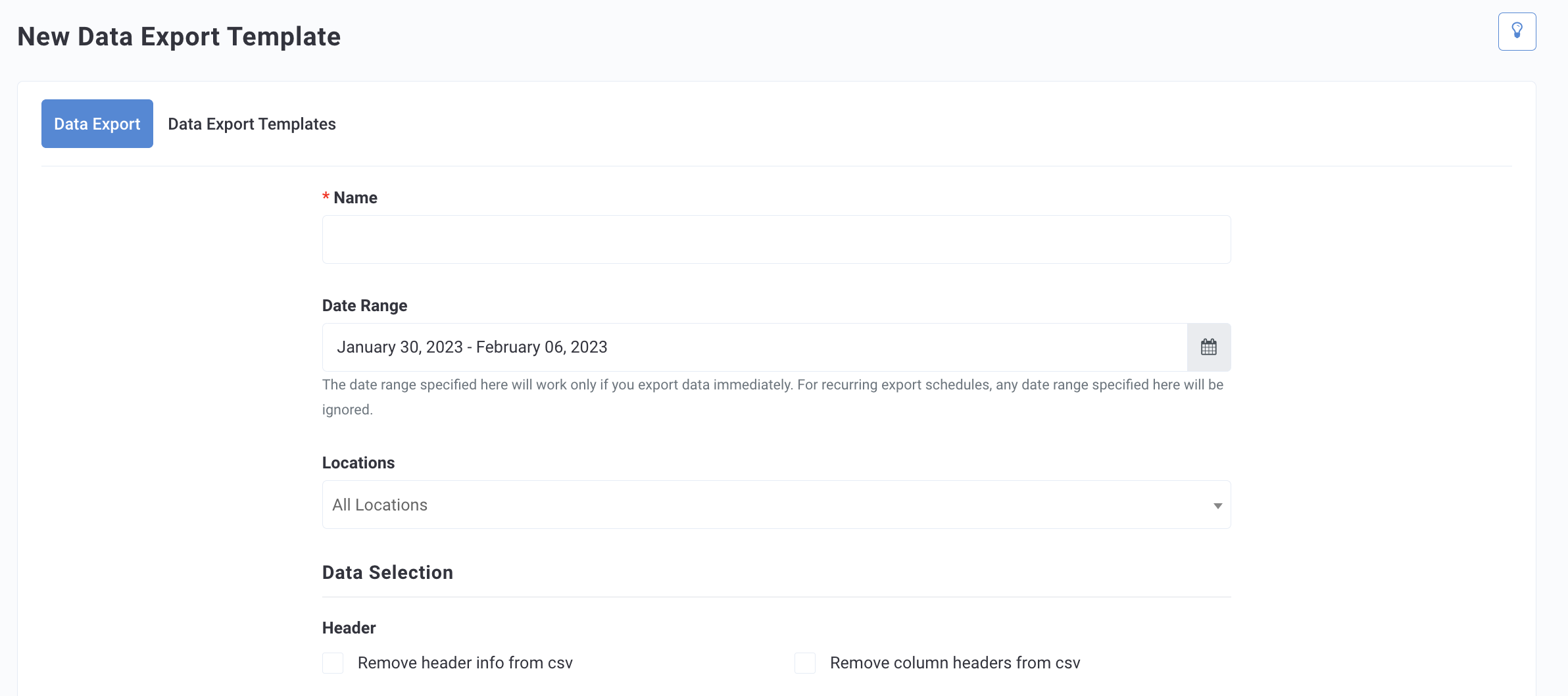
- On the New Data Export Template page, choose a name for your new report such as "User Feedback Report".
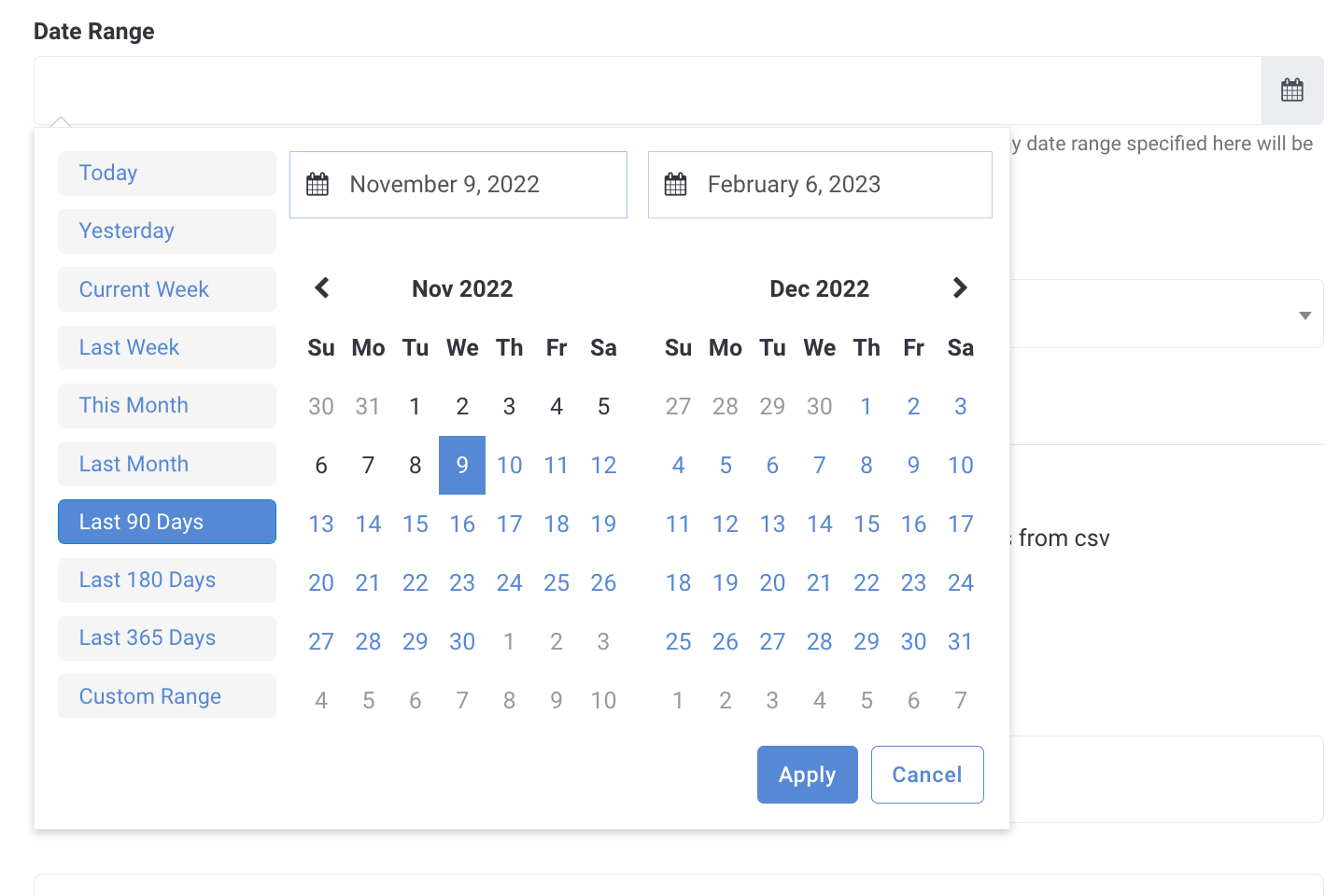
- Select a specific Date Range, if you want to export the report one time, immediately. If this is a recurring report, select a time frame, such as "Last 90 Days".
- Select a specific Location if desired. Otherwise, leave as All Locations.
- Under Data Selection, select the appropriate box if you want to remove the header info or column headers from the CSV file. Headers are automatically included if left unchecked.

- Select the data field types you want to include. (see Data Field Types)
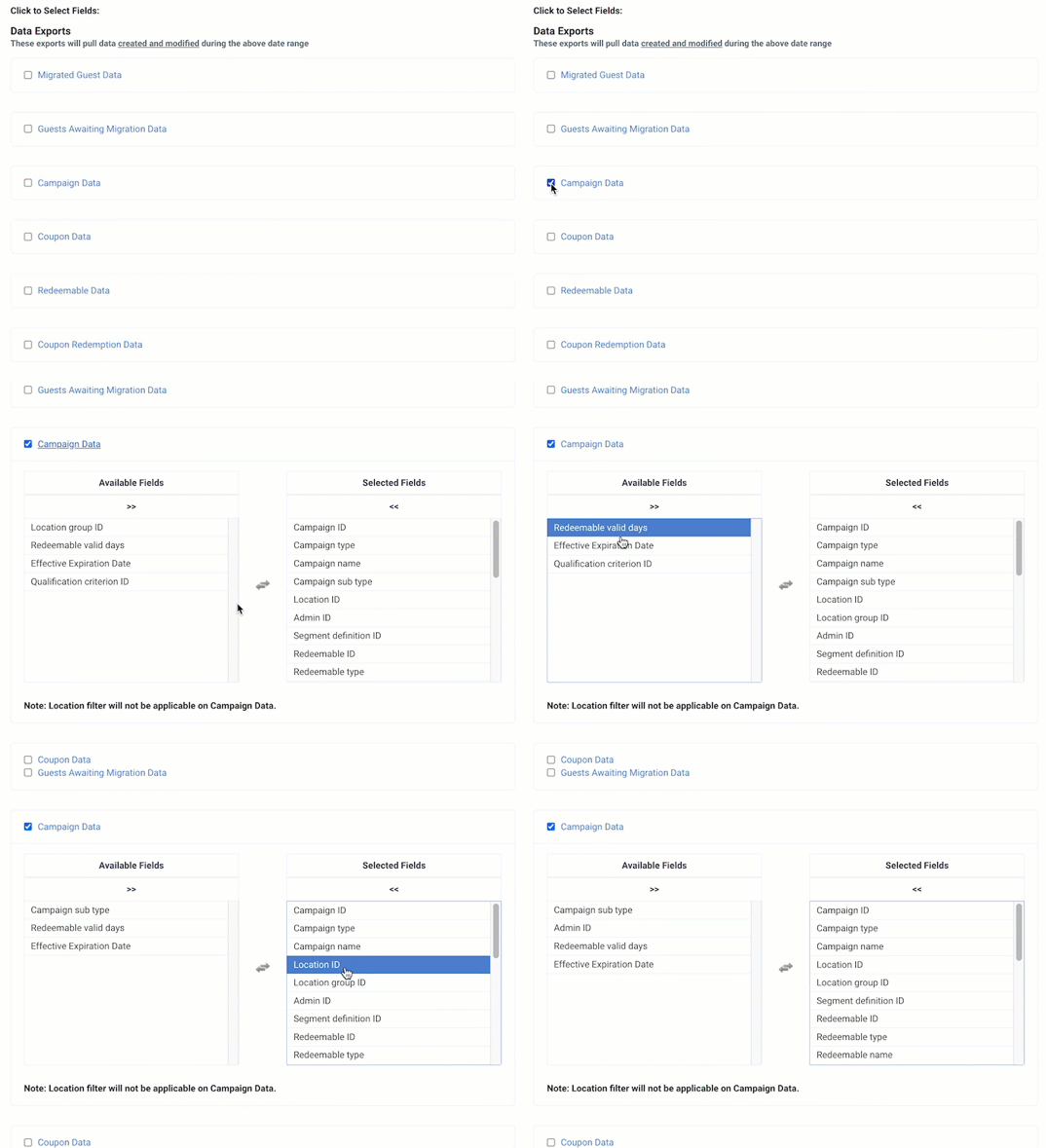
- Select the box next to the data field type's name to include it in the report.
- To modify the content of the report, click the data field type's name. Selected Fields indicate fields that are automatically included. Available Fields indicate other field types that can be selected. Click on the field names in each column to move them as needed.
- When finished, click Save and Create Schedule. You'll be taken to the Diagnostic > Schedules page to further edit your scheduling settings. You must schedule your report for it to export.
Schedule Data Exports
Once you've created a new Data Export Template, you must schedule it before it will be exported. To do this:
- Find your data export template in the list of templates.
- Click Add New Schedule. You'll be taken to the Diagnostic > Schedules page for this export template.
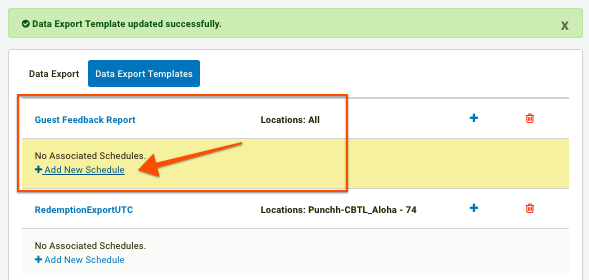
- Source indicates the name of the data export template you selected.
- Using the Frequency drop-down, select how often the report will be generated and sent out.
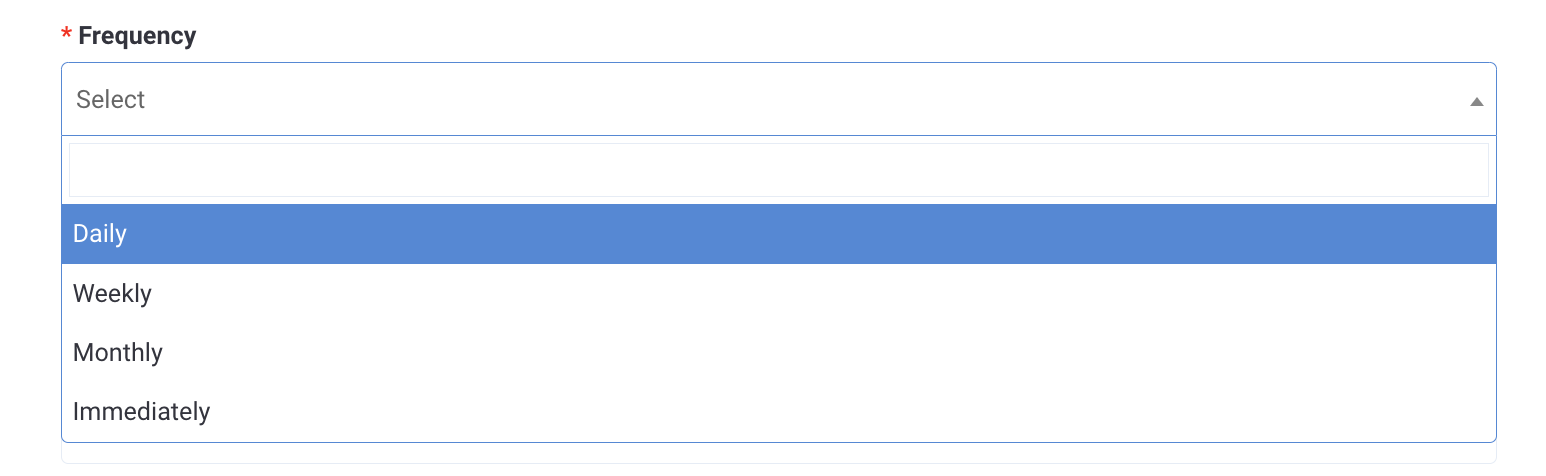
- Immediately will export the report one time as soon as you save the schedule. This export option will not recur, though you can edit the schedule later if you want to change it to recurring.
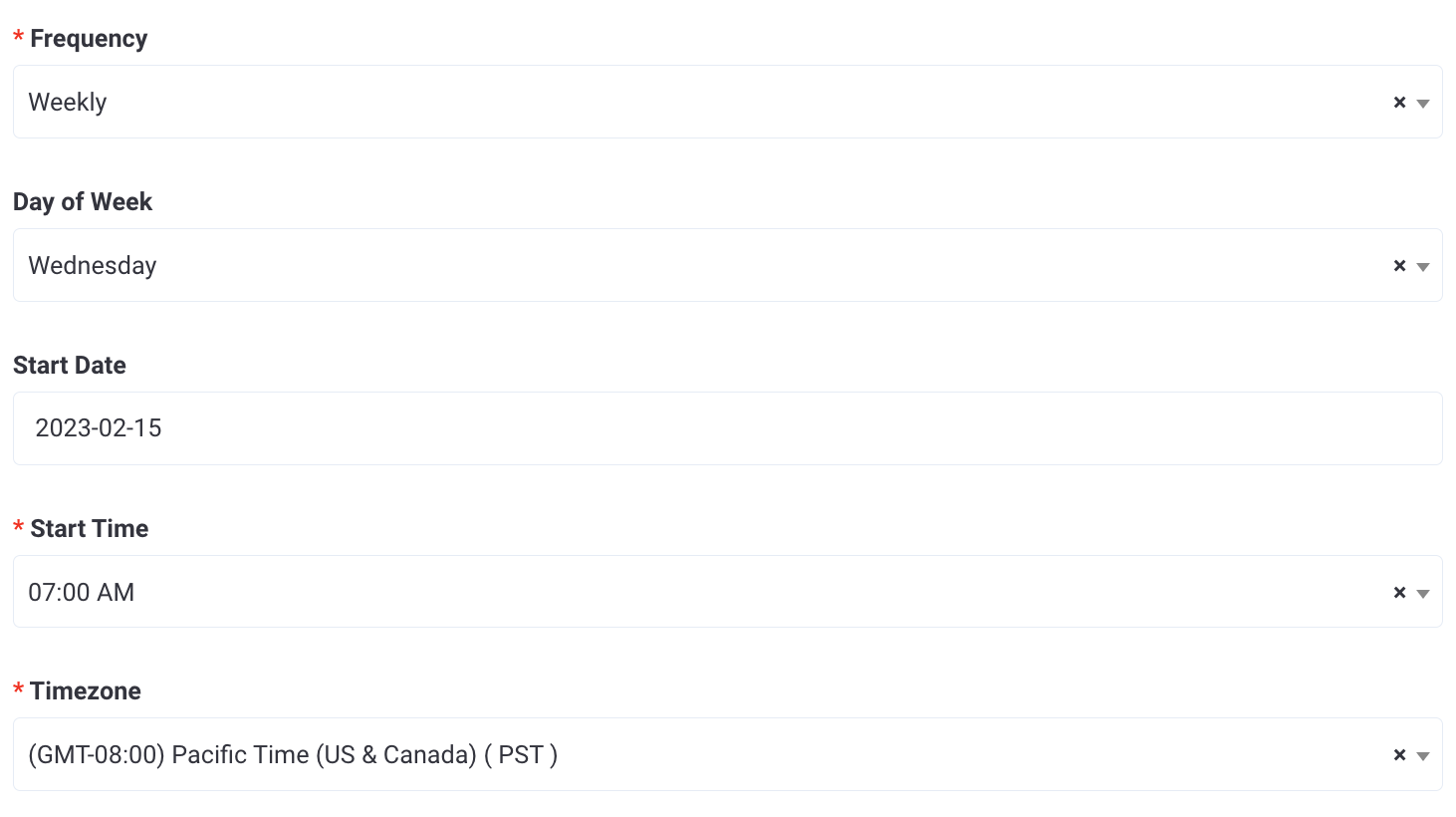
- Daily, Weekly, and Monthly are all recurring, so you will need to provide additional information such as the start date and day of the week/month (Step 5).
- Choose a Start Date, Day of the Week, or Day of the Month if needed, based on your frequency choice.
- Select a Start Time(the time of day the report will be exported), and select the appropriate Time Zone.
- In the Email Recipients field, enter the addresses of all the people who will be sent the report.
- If needed, click the FTP Endpoint drop-down to select an outbound FTP site where the report will be automatically uploaded once exported.
- Enter a custom file name in Export File Prefix to apply to the report. If left blank a default file name will be applied.
- Click Save Schedule to activate your export template. If you're exporting immediately, the report will be sent out at this time.

- After you set the schedule, you'll land on the Diagnostic > Schedules page. You'll have to navigate back to Data Sharing > Data Export > Data Export Templates to view your changes.
Download your CSV report
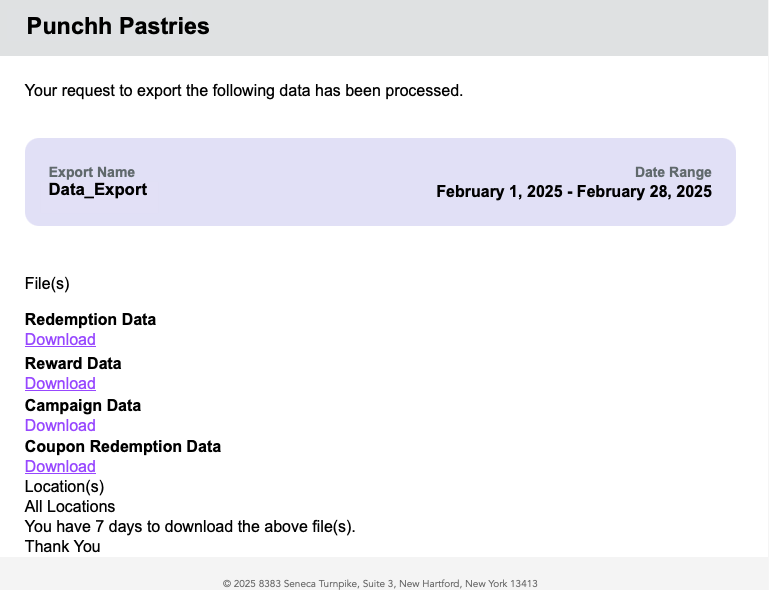
Whether scheduled or exported immediately, your report template will be generated and sent to the email addresses of your chosen recipients as a CSV file. To download it:
- In your email inbox, locate the email titled "(Your company name) Data Export" from data-exports-support@partech.com.
(Do not reply to this email address. If you need assistance, please contact Punchh Support.) - Each of the data report types you selected will be included as separate CSV files. Click the link for each one to download.
When opening CSV exports in Excel, you may see formatting issues. For example, values over 999.9 appearing as text instead of numbers. This occurs due to Excel’s auto-formatting and row limits, not the export itself. For accurate results, we recommend using data tools like Power BI, BigQuery, or Snowflake instead of Excel to view and analyze data export files.
Additional Scheduled Export
Within the Punchh Platform there are additional, non-recurring, or dynamic reports don’t follow the same template structure as the typical Data Export reports described above. These reports have a dedicated Additional Scheduled Export tab that can handle both template-driven and context-driven reports in a unified manner. (Previously these reports where found only within the Schedules page of the platform.)
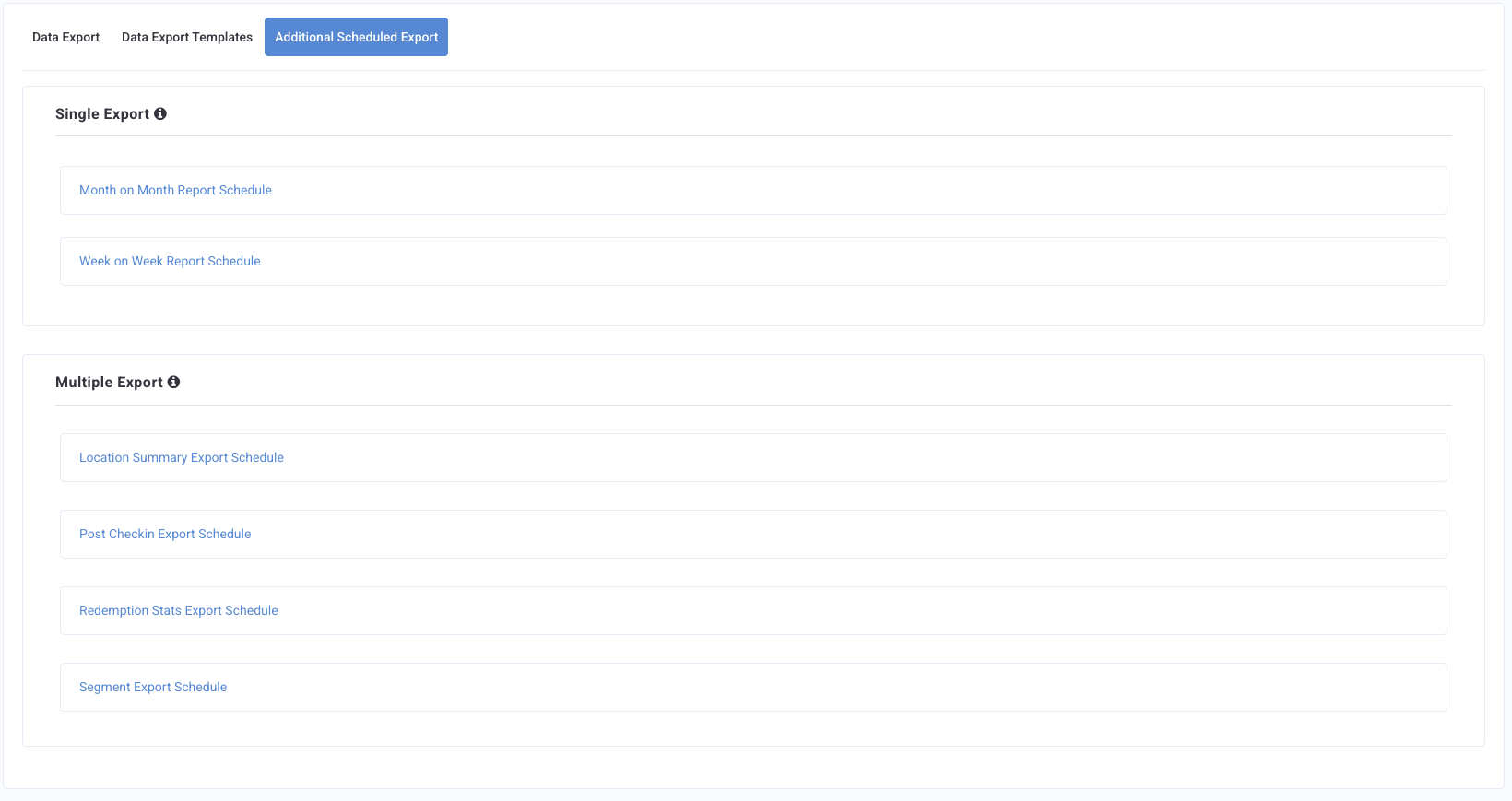
Note: The reports available on this page are dependent upon your brand's platform configurations.
There are two types of export options: Single Export and Multiple Export. Each behaves slightly differently depending on how often you need the export and how it is used.
-
A Single Export is designed for a one-time scheduled export.
Example: MOM and WOW reports
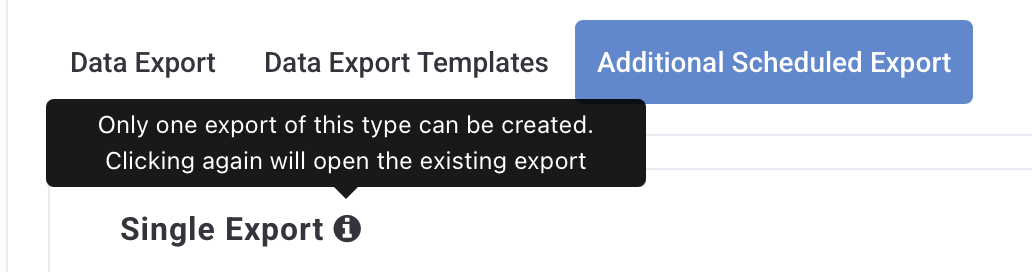
- When you click a Single Export option for the first time, you will be taken to a page where you can set up the schedule.
- When you click it again in the future, you will see the details of the export you previously created instead of creating a new schedule.
-
Multiple Export allows you to create as many schedules as you need.
Example: Location Summary Export Schedule, Post Checkin Export Schedule, Redemption Stats Export Schedule and Segment Export Schedule
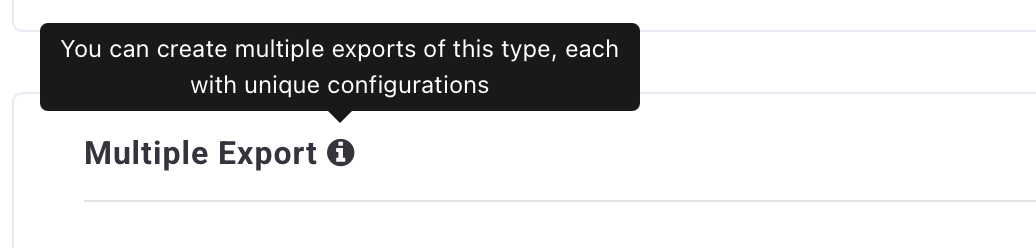
- Every time you click a Multiple Export option, you will be taken to the schedule creation page to set up a new export.
