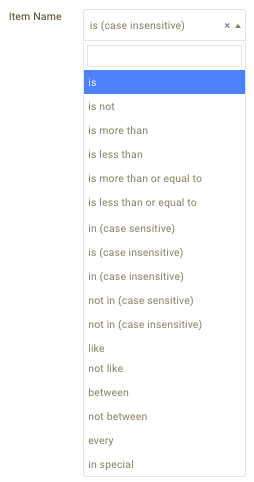
Data Operators and Input Examples

Data Operators may be used to characterize and specify quantities, value ranges, and unique items or item groups in many parts of the Punchh Dashboard, such as when creating Line Item Selectors or Qualification Criteria. The following table contains descriptions and example input values for each of the available Data Operators:

Operator Input Examples Description
  • is
  • is not
  • is (case insensitive)
  • Burger
  • 53
Must/must not match the exact input value.
Not case sensitive unless specified.
  • is more than
  • is less than
  • is more than or equal to
  • is less than or equal to
  • 1
  • 10000
  • 4
  • n > input
  • n < input
  • n >= input
  • n <= input
  • in (case sensitive)
  • in (case insensitive)
  • not in (case sensitive)
  • not in (case insensitive)
  • Drinks, Appetizers
  • 1001,2001,3001
  • Turkey Burger, Veggie Burger, Steak Burger
  • 13,204,18,97,10002,Burgers
  • "In" means that the item may match any of the specific input values exactly or belong to the Item Group, Item Family, etc. specified by the value.
  • "Not in" means the items may not match or belong to the underlying group matching any of the input values.
"In" and "Not in" operators, in general, may be used for every kind of Line Item Selector. However, we do not recommend using "in (case insensitive)" with a receipt qualifier.
  • like
  • not like
Burger
  • Includes items that contain/do not contain the input word somewhere in the name.
  • Example: "Turkey Burger", "Burger Fries", "Cheeseburger"
  • between
  • not between
1..100 (must be in this syntax)
  • The value must/must not fall between the number range.
  • Example: For input value "1..100" this includes 2, 3, 4, and so on, up to 99.
  • every
10
  • Each number determined by the input interval.
  • Example: 10, 20, 30, 40, 50, and so on.
  • in special
Happy
  • This allows for spaces, "-", or "_" to appear in the input value.
  • Example: "H a p p y", "Hap-py", "H a-p-p y", "H_appy", "h APPY"