August Release - v4.77
Personalization & Recommendations
Individual Product Suggestion Display
Brands now have greater control over how product-specific recommendations are presented to users. Cross-sell suggestions can appear within the cart or as a more prominent prompt immediately after an eligible product is added, helping brands create more engaging upsell experiences.
See the following article(s) for more details:
Improved Cross-Sell Configuration
Cross-sell settings are now consolidated into a centralized configuration experience in the Management Center, making it easier for brands to manage product recommendations and cross-sell behavior from one place.
See the following article(s) for more details:
Loyalty & Ordering Rules
Improved Loyalty Earning Accuracy
We've improved loyalty processing for online orders to prevent users from accidentally earning points twice for the same purchase when they later scan their receipt. This ensures loyalty points are awarded accurately and consistently.
Item-Based Order Limits
Brands can now configure minimum and maximum quantity requirements for individual products across standard and catering orders. This provides greater control over product-specific ordering rules, such as minimum quantities for catering items or maximum quantities for promotional products.
See the following article(s) for more details:
Split Tips
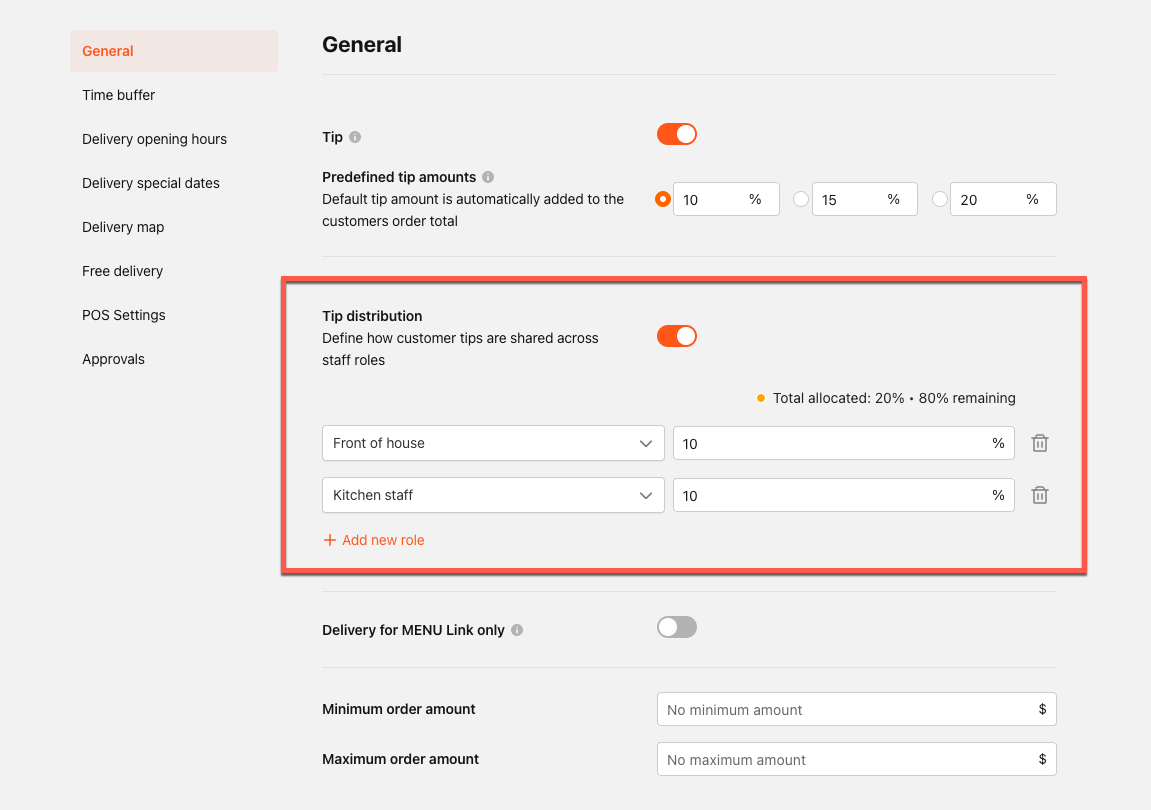
Brands can now configure how tips are distributed across front-of-house staff, kitchen teams, and delivery drivers, providing greater flexibility and transparency in how gratuities are allocated across operational roles.
See the following article(s) for more details:
Menu Management
Enhanced Virtual Container Experience
We've redesigned the Virtual Container experience to create a smoother, more intuitive product selection flow. Users can now easily navigate between available sizes and options without closing and reopening the selection experience.
See the following article(s) for more details:
Simplified Modifier Management for Containers
Brands can now attach modifier groups at the container level and automatically apply them across all associated products. This reduces repetitive configuration and makes it easier to manage modifiers consistently across product sizes.
See the following article(s) for more details:
Container-Level Content Propagation
Brands can now manage shared content—including names, descriptions, images, and modifier groups—at the container level and apply it across associated size products. This simplifies menu configuration, reduces duplicate setup, and helps maintain consistency across product variations.
See the following article(s) for more details:
Menu Builder – Import with Containers
Menu Builder now offers an Import with Containers option that automatically groups size-related POS items into Virtual Containers during menu import. This reduces manual setup and allows operators to begin configuring products at the container level immediately after import.
See the following article(s) for more details:
Easier Menu Preview Navigation
Menu Builders can now collapse and expand categories and product containers in Menu Preview, making large and complex menus easier to navigate and manage.
See the following article(s) for more details:
Bulk Marketplace Menu & Hours Sync
Operators can now sync menus, prices, and store hours across multiple locations at once directly from the Link Status page. New bulk actions, store-level status information, and live progress tracking make it easier to manage marketplace updates across multi-location brands.
See the following article(s) for more details:
AI & Automation
AI-Powered Hours Configuration
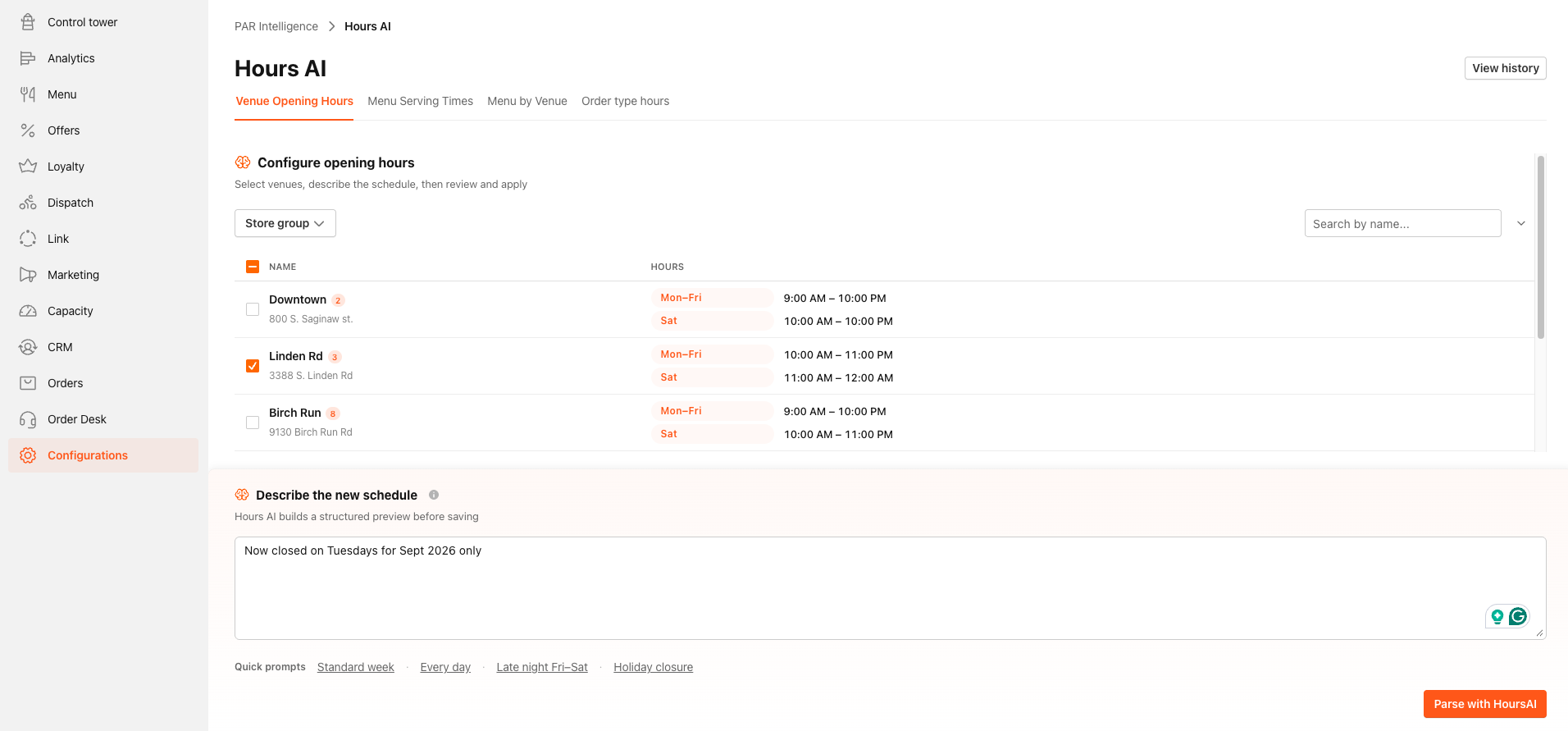
Operators can now configure venue, menu, and delivery serving hours using simple, natural-language instructions. AI Hours interprets the requested schedule, provides a preview of proposed changes, and allows updates to be applied across selected locations in bulk—making hours management faster and reducing manual configuration.
See the following article(s) for more details:
Capacity & Order Control
Order Pause from Management Center
Operators can now temporarily pause online ordering at the brand or individual store level directly from the Management Center. Brands can also provide a customer-facing message explaining why ordering is temporarily unavailable, creating a clearer experience for users.
See the following article(s) for more details:
Quick Order Pause from Tablet
Kitchen teams can now quickly pause incoming online orders directly from the Ordering tablet, helping stores respond faster when kitchen capacity is constrained without needing to access the Management Center.
See the following article(s) for more details:
Tablet to POS Stock Availability Sync
Kitchen teams can now update item availability directly from the PAR tablet and synchronize those changes with the POS. Items marked out of stock or available on the tablet are reflected in the POS, helping teams keep availability consistent across in-store and digital ordering channels while reducing manual updates.
See the following article(s) for more details:
Enhanced Order Search
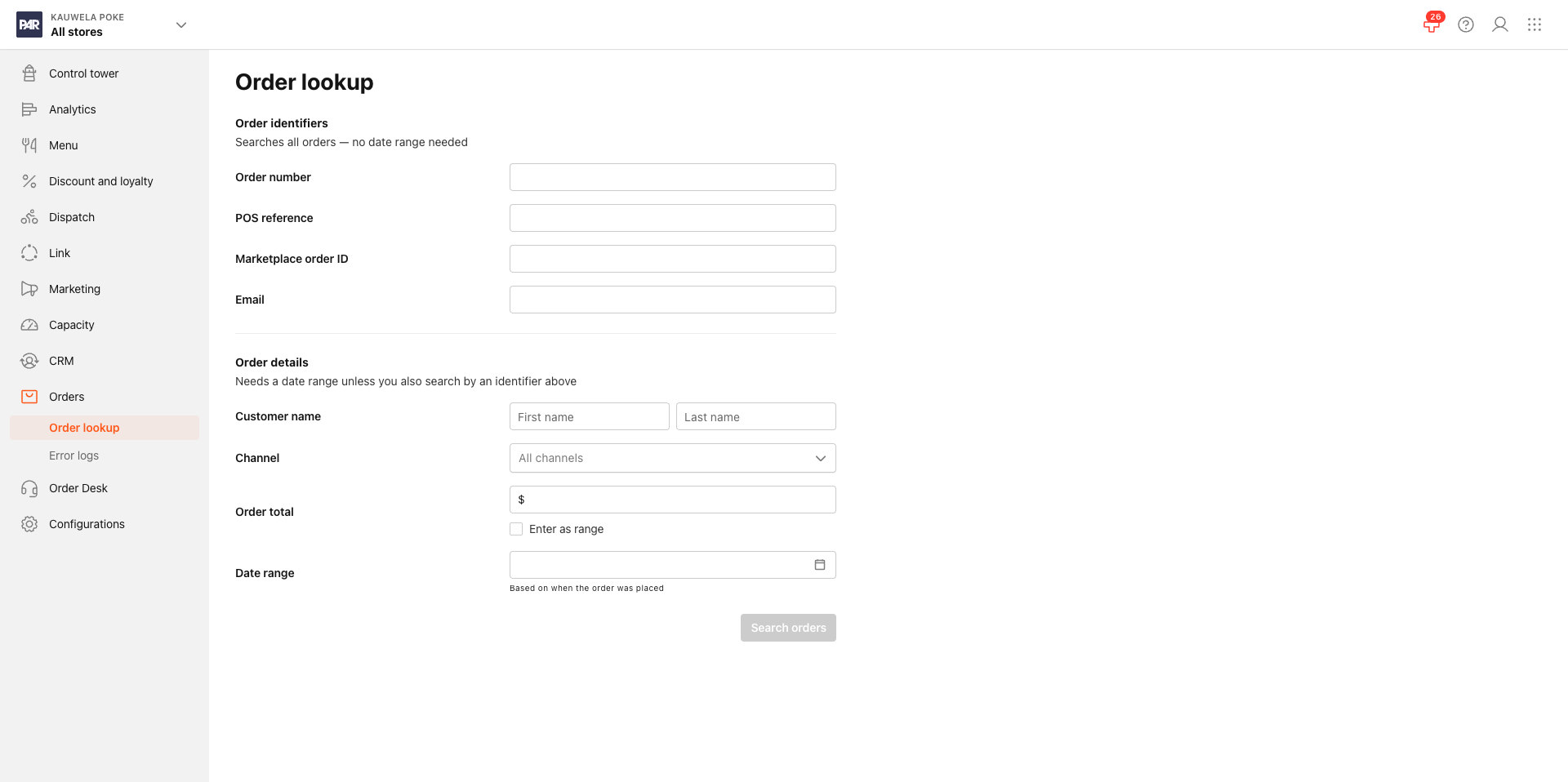
We've expanded order search capabilities in the Management Center to make it easier for operators to quickly locate orders and assist customers. Orders can now be searched using customer name, marketplace, order code, POS ID, order amount, partial payment card information, and time ranges, providing greater flexibility when managing refunds, cancellations, and other order inquiries.
See the following article(s) for more details:
Catering & Delivery
Select a Delivery Partner for Catering Orders
Catering Managers can now select a specific delivery partner when dispatching an individual catering order or continue using automatic provider selection. This provides greater flexibility and control over catering delivery assignments.
See the following article(s) for more details:
Confirm Delivery Times Before DSP Assignment
Catering Managers can now review a delivery partner's estimated pickup and delivery times before assigning a catering order. This additional confirmation step provides greater visibility into expected delivery timing and allows managers to select a different provider when needed.
See the following article(s) for more details:
Catering Delivery Driver SMS Notifications
Catering delivery drivers can now receive SMS notifications in addition to email when an order is assigned or unassigned, as well as a reminder approximately one hour before pickup. Messages include key order information, helping drivers stay informed and reducing the risk of missed delivery updates.
See the following article(s) for more details:
Reporting & Analytics
Enhanced Discount Reporting for PAR POS
Brands using PAR POS can now configure separate Discount IDs by channel and discount type, including Punchh and marketplace discounts. This provides greater visibility into where discounts originate and improves discount tracking, reconciliation, and POS reporting.
See the following article(s) for more details:
Control Tower – Brand Health Dashboard
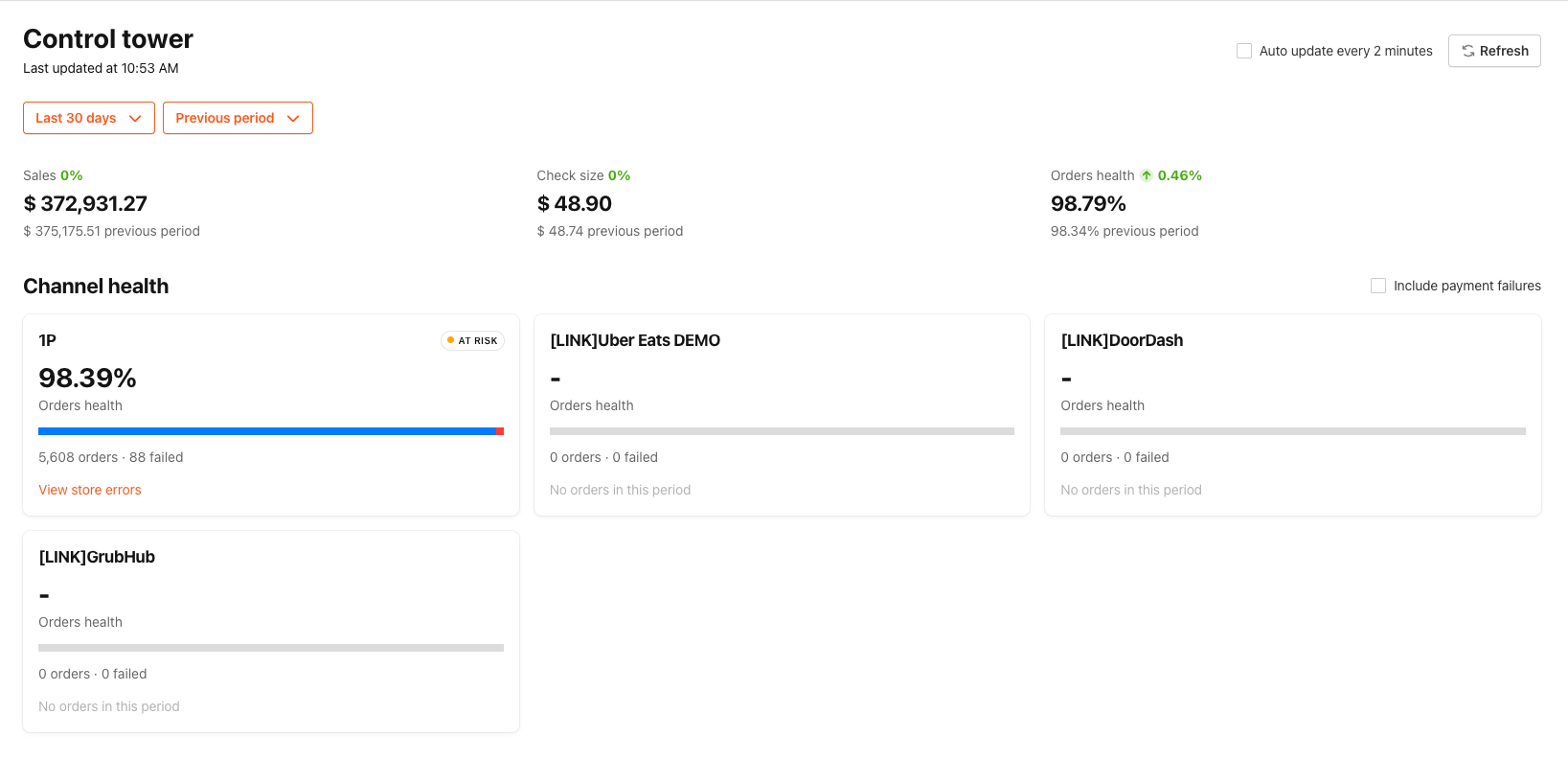
Operators can now access a new Brand Health Dashboard within the Management Center's Control Tower, providing a centralized view of key brand performance and health metrics to help teams quickly understand overall brand status.
See the following article(s) for more details:
Stay tuned for more updates as we continue to enhance our products and services!
