How to Use Container-Level Propagation
Container-level propagation includes two separate features that reduce repetitive data entry when building a container product with multiple size variants. The first feature copies a container product's name, description, and image to all contained size products in one action. The second feature attaches a modifier group to a virtual container product group once, and that attachment automatically applies to every contained size product on an ongoing basis.
Both features apply to first-level contained products only. If a container is nested inside another container, propagation does not continue past the first level.
Prerequisites
- Brand-level operator access to Management Center. Neither feature is available at the store level.
- For Part 1: the product must be set up as a container product. The Contains Products tab only appears on container products.
- For Part 2: the product group must be set up as a virtual container product group.
Part 1: Propagate Name, Description, and Image
Use this feature when you want all size products inside a container to share the same display name, description, and image. This is a one-time action that runs when you check the box and save. It does not keep the size products continuously in sync with the container after the save.
How it works
When you check Copy name, description, and image to all contained products and save, Management Center copies the container product's current name, description, and image to every first-level size product it contains.
Name handling works differently from description and image:
- On the first propagation for a given size product, the size product's original name (for example, "Latte - Small") is preserved in an internal name field used for POS mapping and reporting. The container's name then replaces the display name.
- On any subsequent propagation, the internal name is not changed again. Only the display name is updated if the container's name has changed.
- If the container's description or image is blank at the time you propagate, that blank value is copied to every contained size product. There is no undo for propagation. If sizes are overwritten unintentionally, you must edit them individually or correct the container and propagate again.
Steps
- In Management Center, navigate to Brand > Menu > Products.
- Open the container product (for example, "Latte").
- Select the Contains Products tab.
If the tab still reads "Upsell to" instead of "Contains Products," the product is not configured as a container product. Confirm the product's container setting before continuing.
-
Confirm that the product's name, description, and image are complete and correct. These are the values that will be copied to all contained size products.
-
Check Copy name, description, and image to all contained products.
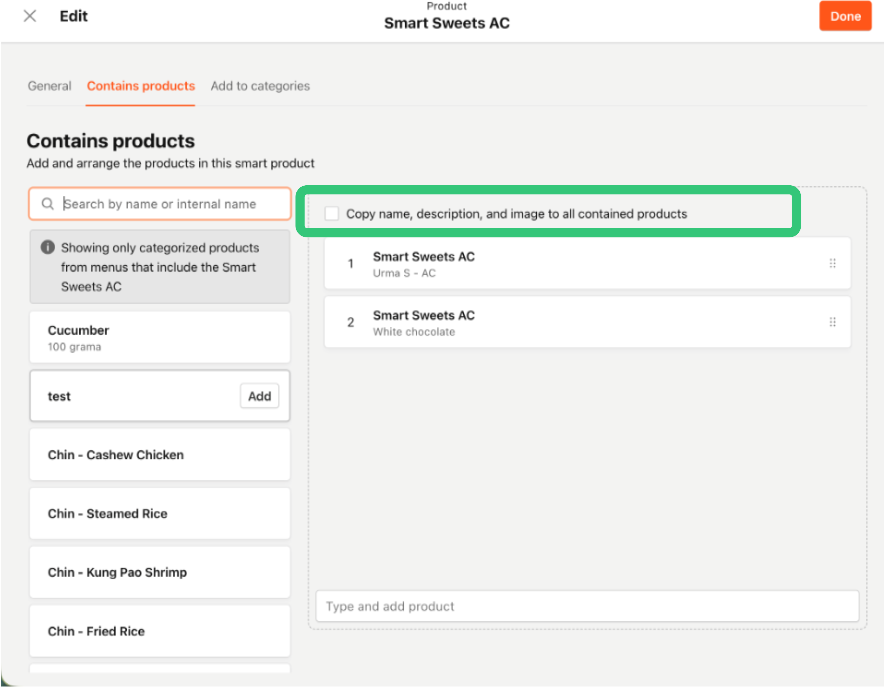
-
Select Save.
Management Center copies the name, description, and image to every size product linked on the Contains Products tab. The original per-size name (for example, "Latte - Small") is preserved in the internal name field for each size product.
Important notes
- This action is not reversible from Management Center. If you need to revert a size product to its original description or image, edit that product individually.
- If you rename the container and want the new name to flow down to all size products, check the box again and save. The internal name for each size product is not affected by subsequent propagations.
- If you manually edit a size product's description after a propagation, that manual edit will be overwritten the next time you check the box and save on the container.
Part 2: Assign Inherited Modifier Groups
Use this feature when you want a modifier group to apply to every size product inside a virtual container product group. Unlike name and image propagation, modifier group inheritance is a live, ongoing relationship. When you add a new size product to the container after setting up inheritance, it automatically inherits the modifier group without any additional steps.
How it works
When you add a modifier group to a virtual container product group's propagation list and save, Management Center attaches that modifier group to every first-level member product. The attachment is marked as Inherited on each size product, which means:
- The modifier group appears on each size product with an Inherited tag.
- The remove control for that modifier group is disabled at the individual product level. To remove an inherited modifier group from all sizes, you must remove it at the container product group level.
- If a size product is removed from the container, it loses all inherited modifier groups from that container. Any modifier groups attached directly to that product are not affected.
- If a modifier group is both inherited from the container and directly attached to a specific size product, the product displays it with an Inherited + added directly tag. It is not shown as a duplicate entry.
Steps
- In Management Center, navigate to Brand > Menu > Product Groups.
- Open the virtual container product group (for example, the "Latte" product group that contains your size variants).
- Select the Contains Products tab.
- In the Show in list filter at the top of the tab, select Product groups.
The default filter shows individual products. Switching to Product groups displays the modifier groups available to add to the propagation list.
-
In the library on the right, find the modifier group you want to apply to all size products (for example, "Milk Options").
-
Add the modifier group to the Modifier groups applied to all products panel.
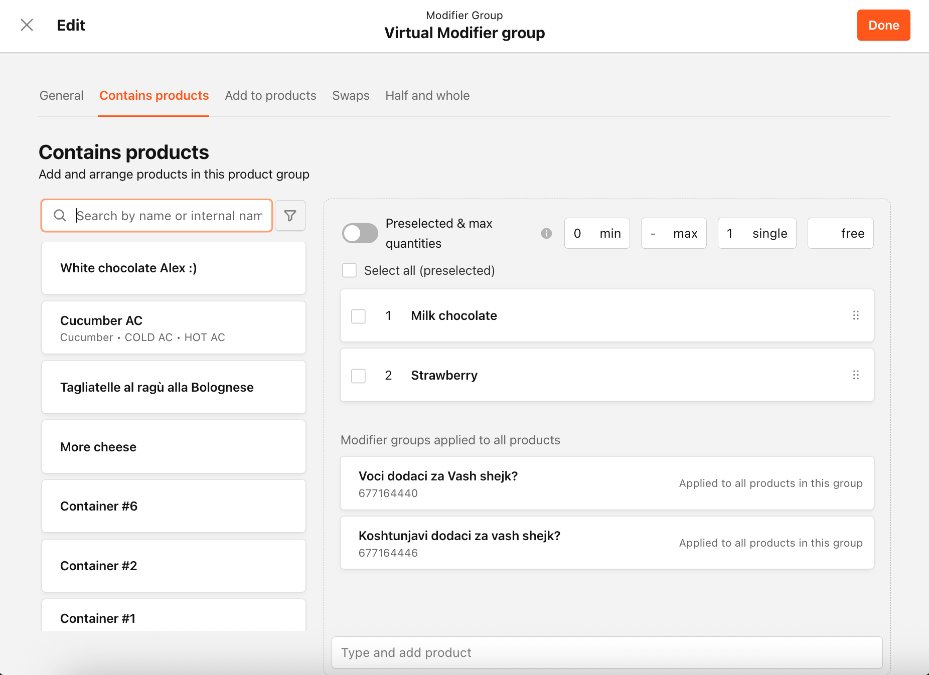
-
Select Save.
Management Center attaches the modifier group to every first-level member product of the container. Each size product now shows the modifier group with an Inherited tag.
Important notes
- Inherited modifier groups can only be removed at the container product group level. Removing an inherited-only modifier group directly from a size product is blocked by design.
- If you add a new size product to the container after setting up inheritance, that size product automatically inherits all modifier groups currently propagated from the container. You do not need to re-save the propagation list.
- A modifier group cannot be propagated from a container into itself. If a circular dependency is detected for a specific size product during propagation, that product is skipped and a notification appears. All other size products still receive the modifier group.
How These Two Features Work Together
Both features are available on a container product, but they operate independently and through different parts of Management Center.
| Feature | Where you configure it | How it applies | Stays in sync automatically? |
|---|---|---|---|
| Name, description, and image propagation | Product page, Contains Products tab | One-time copy at save | No. Requires manual re-propagation |
| Modifier group inheritance | Product group page, Contains Products tab | Ongoing live relationship | Yes. New and removed members update automatically |
A typical workflow for a new container product uses both: propagate name, description, and image once to set up consistent display details across all sizes, then set up modifier group inheritance on the product group so that shared customization options (like milk choices or add-ins) are always present on every size without additional maintenance.
Troubleshooting
- A size product's name, description, or image does not match the container after propagation Confirm that the name, description, and image on the container product were complete and correct before you propagated. If the container's description or image was blank, the blank was copied to all contained size products. Correct the container product, check the box on the Contains Products tab, and save again.
- The "Copy name, description, and image" checkbox is not visible This checkbox only appears on container products edited at the brand level. If you are editing at the store level, the checkbox is not shown. Confirm you are viewing the brand-level product and that the product is configured as a container.
- A size product's original name (used in POS mapping or reporting) appears to be missing The original size name is preserved in the internal name field the first time propagation runs. Check the internal name field on the size product. If it is blank and the size product has been propagated before, contact PAR support.
- A modifier group cannot be removed from a size product If the modifier group displays an Inherited tag on the size product, it can only be removed at the container product group level. Navigate to the virtual container product group, open the Contains Products tab, switch the filter to Product groups, and remove the modifier group from the propagation list. This removes it from all contained size products.
- A newly added size product is missing inherited modifier groups Confirm that the new size product was added as a member of the virtual container product group, not just created as a standalone product. Modifier group inheritance only applies to products that are members of the container product group.
- The container product group is not visible in the Product Groups view Confirm that the product group is configured as a virtual container product group. Only virtual container product groups support modifier group inheritance.
FAQ
- Can I propagate name, description, and image to containers nested inside a container? No. Propagation applies to first-level contained products only. If a container is nested inside another container, the inner container's size products are not affected.
- Can I undo a propagation? No. There is no undo option for name, description, and image propagation. If size products were overwritten unintentionally, you must edit them individually or correct the container product and propagate again.
- Will manually edited size product descriptions be overwritten the next time I propagate? Yes. If you propagate again from the container, the container's current description overwrites whatever is on each size product at that time, including manual edits. Name handling is different: the internal name (the original per-size name) is preserved and not overwritten on subsequent propagations.
- What happens to inherited modifier groups if I remove a size product from the container? The removed size product loses all modifier groups it inherited from that container. Any modifier groups attached directly to the size product are not affected.
- Can a modifier group be both inherited and directly attached to the same size product? Yes. If you attach a modifier group to a size product directly and that same modifier group is also inherited from the container product group, it appears as a single entry with an Inherited + added directly tag. It is not duplicated.
- Does propagation work at the store level? No. Name, description, and image propagation is only available when editing at the brand level. Modifier group inheritance is also set at the brand level on the virtual container product group.
