Punchh Platform Release Notes - 25 August 2026 Deployment
The updates described in these release notes and the affected/linked documentation will not be available in the Punchh platform until the target deployment date.
Loyalty
New Feature: Tier Boost
Tier Boost lets your team temporarily elevate a member's loyalty tier without requiring them to earn their way there. Use it to drive engagement at the right moments: near-tier progression, win-backs, onboarding, or VIP recognition.
Gifted tiers are always temporary and never affect a member's earned status. When a gift expires or is revoked, the member's tier returns to their earned status automatically.
You can gift tiers to individual members from the Guest Timeline, to a full segment via bulk CSV upload, or automatically as a Challenge Campaign reward. All gifting activity is tracked on the Guest Timeline with the tier, duration, reason, and who issued it. (LPE-2100, LPE-2130, LPE-2102, PDOC-4180)
Action Required: Tier Boost requires your brand to have Membership Tiers enabled. To enable Tier Boost, contact your PAR representative. Note: Tier Boost is not yet available on the mobile framework.
See the following article(s) for more details:
Offers
Line Item Selector Listing Page Redesign
The Line Item Selector (LIS) has been redesigned with a more structured and intuitive interface, improving the overall offer creation experience. The new layout improves navigation, simplifies configuration, and helps you create and review offer criteria more efficiently. (OMM-2185, PDOC-4344)
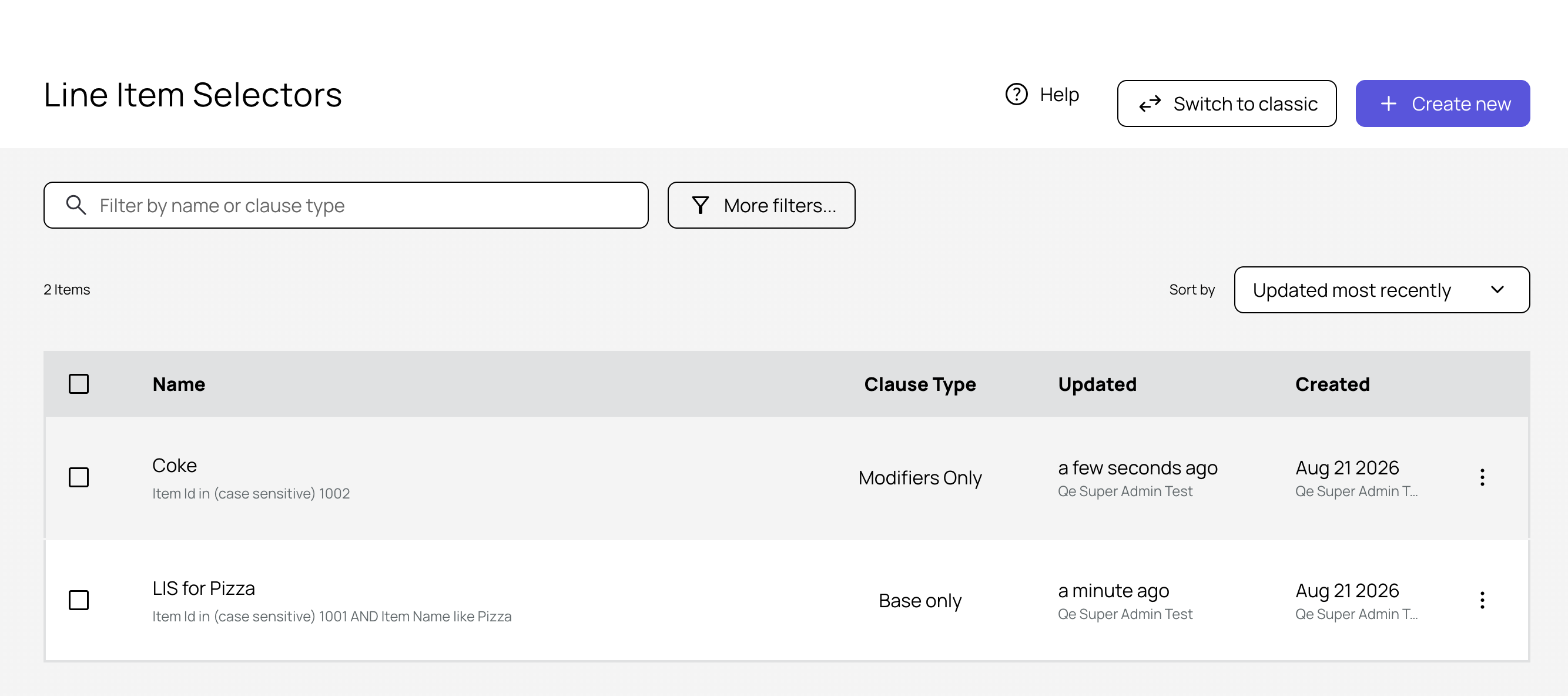
See the following article(s) for more details:
Buy X Get Y Promotions in Qualification Criteria
Support for Buy X Get Y (BXGY) promotions is now available, so you can configure offers such as B2G1, B2G2, B3G1, B3G2, and other quantity-based reward structures. (Note: Maximum is 5, B5G5) This makes it easier to launch basket-building promotions that drive higher redemption rates, increase average order value, and encourage repeat purchases. (OMM-2120, OMM-2154, PDOC-4343)
See the following article(s) for more details:
Wallet and Passes
Offer Smart Pass QR Codes Support POS Redemption
Offer Smart Passes now embed structured data in the QR code, making it faster and easier for POS and kiosk vendors to support in-store redemption. This update enables you to unlock Smart Pass redemption at the POS once your vendor completes integration. (CAM-7474, CAM-7327, CAM-7540)
Action Required: This feature requires integration with your POS vendor. Please contact your POS vendor directly with questions.
Campaigns
Send in Time Zone Campaign Delivery
You can now deliver mass offer and message campaigns to guests at the right time, in their local time zone. With a single checkbox in the campaign scheduler, a campaign that you set for 12:00 PM reaches guests in New York at noon Eastern, guests in Chicago at noon Central, and guests in Los Angeles at noon Pacific — all from one campaign.
This is especially useful for day-part marketing. Whether you are promoting breakfast, lunch, or a happy hour deal, your message arrives when it is relevant to each guest — not hours too early or too late. (CAM-7485, CAM-7497, CAM-6573, PDOC-4346, PDOC-4347)
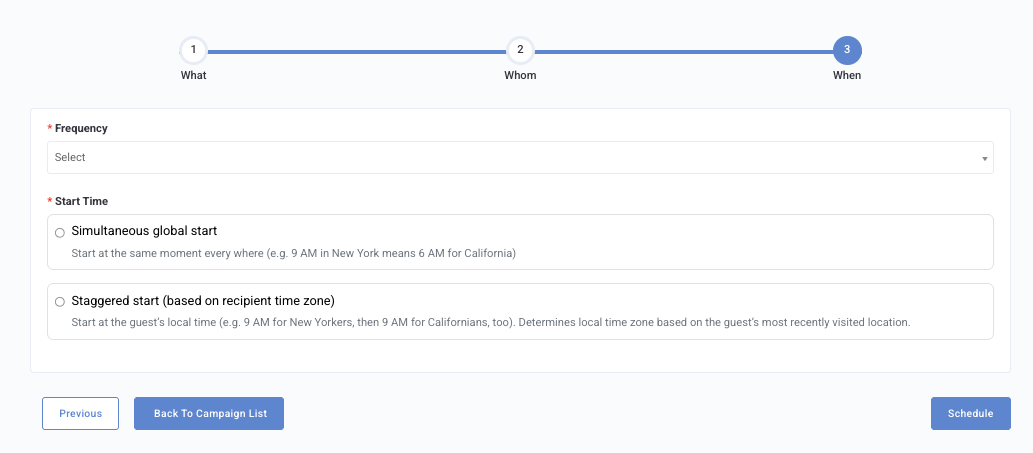
See the following article(s) for more details:
Digital Collectibles Expanded to Five Campaign Types
You can now reward members with Digital Collectibles across five additional campaign types: Mass Campaigns, Profile Update, Referral, Recall, and Anniversary. This expands collectible gifting beyond Challenge campaigns, making it possible to deliver gamified, collectible-based rewards at scale — whether you are running a large promotional send, encouraging members to complete their profile, driving word-of-mouth referrals, re-engaging lapsed guests, or celebrating member milestones.
Collectibles can be configured as the primary reward or layered on top of an existing reward. All existing campaign behavior remains unchanged. (CAM-7335, CAM-7435, CAM-7469, PDOC-4330)
See the following article(s) for more details:
- Mass Offer Campaigns
- Profile Update Campaigns
- Referral Campaigns
- Recall Campaigns
- Anniversary Campaigns
Segments
Challenges: Segment Auto-Enrollment Visibility Fix
Resolved an issue where segment auto-enrollment challenges could incorrectly appear in a guest's Available Challenges list before the guest was enrolled in the associated segment, which could result in failed opt-in attempts. Challenges with segment auto-enrollment will now display in the Available section only once the guest meets the segment criteria and is enrolled. (EPS-11839)
Custom List Segment: Add/Remove Error Resolved
Fixed an issue where adding or removing a guest from a Custom List segment via the guest profile's Segments tab was returning an error due to archived segments appearing in the selection list. Archived segments are no longer displayed, ensuring only active segments are available for membership updates. (EPS-11757)
Subscriptions (Now Memberships)
Memberships Rename and Plan Setup Improvements
The Memberships feature has been updated with a set of improvements across the Punchh Dashboard. "Subscriptions" has been renamed to "Memberships" throughout the dashboard — including navigation, page headers, setup flow, and notification templates — for a consistent, unified experience.
The multi-benefit membership plan setup flow has been refreshed with clearer labels, updated descriptions, and improved configuration guidance. Members now receive more detailed receipt summaries in their Membership Purchase, Renewal, and Renewal Reminder notifications, including a breakdown of the plan price, applicable tax, and payment card details when on file. (CAM-7442, CAM-7522, PDOC-4333)
Note: This rename is the first part of a broader terminology update across the Punchh Platform. If you use both Memberships (subscription-based plans) and Membership Tiers, be aware that these are two distinct products and this change applies to the Memberships (subscriptions) product only. Changes will be coming to the Membership Tiers feature at a later date.
If your brand has both features enabled, your PAR Punchh representative will reach out before and after this change to walk through what is different and ensure a smooth transition.
See all membership articles in this article for more details:
Platform Integrations
Loyalty DAU and MAU Billing Metrics Separated
Billing metrics for loyalty programs now report Daily Active Users (DAU) and Monthly Active Users (MAU) separately. The existing "Active Users" billing fact is renamed to Loyalty DAU, and Loyalty MAU is included once per month on the final billing run of each calendar month. There are no customer-facing UI or configuration changes. (INT-3786, EC-1157)
Passkey Sign-In for Guest Identity Service
Guests can now sign in using a passkey (Face ID, fingerprint, or device PIN) with no password to remember and no OTP code required. Passkeys are phishing-resistant, and the guest's private key never leaves their device. Enrollment is optional and takes one tap after a normal sign-in; guests can always fall back to their existing password, OTP, or social login. (INT2-3227, INT2-3218)
Action Required: Passkeys are off by default and enabled per brand. To enable passkeys for your brand and configure whether they appear as the preferred or optional sign-in method, contact your PAR Punchh representative.
Reporting and Analytics
Upcoming Database Schema Changes, August 30 - Data Type
As a part of database maintenance on August 30, 2026, we are updating the data type of two columns from 'int' to 'bigint'. Review the Database Schema and Data Field Change Announcements for the complete list. (PDOC-4345)
Experiential Loyalty
The following features, announced in our July 21 Release Notes, are now available to all brands.
Points Saved for Swag Redemption Now Visible on Guest Timeline
Admins can now see a member's current points saved for swag redemptions directly on the guest timeline. The balance appears under the Saved Points for Swag card alongside the configured swag threshold, making it easier to assess a member's redemption eligibility at a glance. (LPE-2238)
See the following article(s) for more details:
Redeemable, Collectible, and Swag Management Permission Updated
The "Redeemable & Collectible Management" permission has been renamed to "Redeemable, Collectible & Swag Management" to reflect its expanded scope. Admins with this permission can create, edit, and delete redeemables, collectibles, and swag items, along with their inventory. No action is needed — admins who currently hold this permission retain the same access, and the updated name and description appear consistently wherever the permission is referenced in the Dashboard. (LPE-2183)
See the following article(s) for more details:
Developers Corner
New Dashboard API for Listing Swag Items
A new Dashboard "Get Swags" API endpoint (GET /api2/dashboard/swags) is now available to retrieve a business’s swag items. The business admin must have the necessary permissions to call the API. (PDOC-4301, LPE-2207)
The API supports pagination using page and per_page, and filtering swag items by status using the status parameter. The supported status values are active, draft, expired, deactivated, scheduled, and all. By default, only active swag items are returned.
The response includes swag item details such as status, availability, points, redemption limits, fulfilment method, redeeming locations, and receipt rules. It returns an empty data array when no swag items are available for the business.
See the following article(s) for more details:
- Get Swags (Developer Portal)
New Mobile API for Fetching Swag Locations
A new API, "Fetch Swag Locations" (GET /api2/mobile/swag_locations), is now available to retrieve the approved locations where a specific swag item can currently be redeemed or fulfilled. The "Save points for swag" feature must be enabled for the business. Contact your Punchh representative to update this Punchh platform configuration. (PDOC-4280, LPE-2255)
-
Returns only approved locations where the swag is currently available and has inventory.
-
Supports different inventory configurations, including:
-
Global availability for a single location.
-
Global availability for a location group.
-
Global availability across all business locations.
-
Location-based inventory.
-
-
Excludes locations where the swag is unavailable, unapproved, or out of stock.
-
Returns locations in alphabetical order.
-
Supports pagination when multiple locations are returned.
-
Returns an empty list when no eligible locations are available.
Benefits
Use the API to identify the locations where a user can redeem or collect a specific swag item. This allows mobile and web applications to display only locations that are currently eligible and have inventory available. For complete inventory configuration rules, request parameters, response details, and JSON examples, see the "Fetch Swag Locations API" documentation in the Developer Portal.
See the following article(s) for more details:
- Fetch Swag Locations (Developer Portal)
- Update User's Save Points for Swag Settings (Developer Portal)
- Get User's Save Points for Swag Settings and Balance (Developer Portal)
- Fetch Available User's Swag (Developer Portal)
- Redeem Swag (Developer Portal)
- Get Swag Shipping Details (Developer Portal)
New API for Fetching User's Save Points for Swag Settings and Balance
A new Get API, "Get User's Save Points for Swag Settings and Balance" (GET /api2/mobile/user_banking_preferences), is available to fetch a user's Save Points for Swag configuration and swag balance. It returns save_points_for_swag, saved_swag_points_threshold, and swag_balance.
Both parameters have also been added to the existing Update API response, "Update User's Save Points for Swag Settings" (PUT /api2/mobile/user_banking_preferences), allowing integrations to read and manage this configuration programmatically. (PDOC-4177, LPE-2181)
See the following article(s) for more details:
- Get User's Save Points for Swag Settings and Balance (Developer Portal)
- Update User's Save Points for Swag Settings (Developer Portal)
- Fetch Swag Locations (Developer Portal)
- Fetch Available User's Swag (Developer Portal)
- Redeem Swag (Developer Portal)
- Get Swag Shipping Details (Developer Portal)
Gifted Tier Details in Mobile and Online Ordering API Responses
If your brand offers gifted membership tiers (Tier Boost), your mobile or web app can now access additional details about a member's active gift directly through the API. In the Mobile Program Meta API, when membership_tier_boost is set to enabled or disabled_keep_active, the Account Balance APIs include gifted membership tier information in the account_balance_details object.
The APIs return two new response parameters: gifted_tier and membership_tier_expiry_at to indicate the member’s qualifying gifted tier and its expiry date. (PDOC-4278, LPE-2178, LPE-2276)
New Response Parameters
gifted_tier— Returns which tier has been gifted to the member.membership_tier_expiry_at— Returns when the active gift expires.
These response parameters return a value only when the gift is actually providing the loyalty member a benefit — meaning it is higher than the tier they have already earned. If a loyalty member has no active gift, or their gifted tier does not offer anything above what they have already earned, these parameters return no value. This makes it easier to surface accurate, up-to-date gift status in your app experience.
Affected APIs
The following API endpoints now support gifted tier information in the account_balance_details object:
- api/auth/checkins/balance
- api/auth/users/balance
- api2/mobile/users/balance
- api2/mobile/checkins/account_balance
- api2/mobile/checkins/barcode
- api2/mobile/checkins/qrcode
- api2/mobile/checkins/receipt_image
- api2/mobile/checkins/transactions
Note: This update applies to Mobile and Online Ordering APIs only. Point-of-sale (POS) integrations are not affected by this release.
Membership Tier Boost Status Added to Meta API Response
Added a new string parameter, membership_tier_boost, to the Program Meta API (GET api2/mobile/meta.json) response. This parameter indicates the current Membership Tier Boost status configured for the business and can return values such as enabled, disabled, and disabled_keep_active. When enabled, it allows business admins to grant members a temporary promotional tier upgrade via manual gifting, campaigns, or automated triggers. (PDOC-4230, LPE-2098)
See the following article(s) for more details:
- Mobile Program Meta (Developer Portal)
- Online Ordering Fetch Account Balance of User (Developer Portal)
- Online Ordering Fetch User Balance (Developer Portal)
- Mobile Fetch User Balance (Developer Portal)
- Mobile Account Balance (Developer Portal)
- Mobile Create Loyalty Check-in by Barcode (Developer Portal)
- Mobile Create Loyalty Check-in by QR Code (Developer Portal)
- Mobile Create Loyalty Check-in by Receipt Image (Developer Portal)
- Mobile Transaction Details (Developer Portal)
New API to Force Expire an Active Tier Gift
A new Dashboard API, Force-Expire an Active Tier Gift (DELETE /api2/dashboard/users/revoke_active_tier), is now available to allow administrators to force-expire a loyalty member's active membership tier gift for a specified user. This gives integrators a reliable, permission-controlled way to manage tier gifts programmatically, without relying on manual dashboard actions. (PDOC-4233, LPE-2161)
The API requires two mandatory parameters: a user_id, which identifies the user whose active tier gift should be revoked, and a reason, which provides the reason for revoking the membership tier gift.
Before processing the request, the API verifies that the specified user exists and has an active tier gift. When all validation checks pass, the active tier gift is immediately expired. It returns 200 OK with a success message when the tier gift is successfully expired. When the user cannot be found, the user has no active tier gift, a required parameter is missing, or authentication fails, the API returns an appropriate error response.
To call the API, the business admin must have "Dashboard API access" and "Gift & force redeem" permissions. Additionally, the "Membership Levels" and "Membership Tier Boost" features must be enabled for the business. Contact your Punchh representative to update this Punchh platform configuration.
See the following article(s) for more details:
- Force-Expire an Active Tier Gift (Developer Portal)
Asynchronous Support Gifting API Now Supports Membership Tier Boost
The Asynchronous Support Gifting API (POST /api2/dashboard/users/support_gifting) now supports gifting a membership tier to a user for a specified duration, in addition to existing gift types. To call the API, the business admin must have "Dashboard API access" and "Gift & force redeem" permissions. Additionally, the "Membership Levels" and "Membership Tier Boost" features must be enabled for the business. Contact your Punchh representative to update this Punchh platform configuration. (PDOC-4279, LPE-2134)
This enhancement allows administrators to gift a temporary membership-tier boost to users directly through the Asynchronous Support Gifting API. The API now accepts two new request parameters: tier_id, which specifies the membership tier to be gifted, and duration, which specifies the gift duration in days. The specified tier must be a valid, active tier configured under the program. The gift duration must be within the program's configured minimum and maximum gift duration limits.
All existing parameters and behavior remain unchanged. On success, the gift is applied immediately, with the expiry calculated as the start time plus the specified duration. The loyalty member's effective tier is recalculated immediately to reflect the gifted tier.
See the following article(s) for more details:
- Asynchronous Support Gifting API (Developer Portal)
Offer Smart Pass QR Codes Now Use JSON-Formatted Payloads
Offer Smart Passes now embed structured JSON data in their QR codes, making it easier for POS and kiosk systems to parse and support in-store redemption of rewards and redeemables. (PDOC-4338, CAM-7474)
Reward offer pass QR codes use a JSON payload containing reward_id, while redeemable offer pass QR codes use a JSON payload containing redeemable_id and user_as_qrcode. The user_as_qrcode value is included in redeemable pass payloads because the POS User Look-up API does not support redeemable_id as a user look-up parameter. POS systems can use this value to look up the guest during the same scan and redeemable_id to identify and redeem the redeemable.
We have updated the Apple Wallet and Google Wallet POS Quickstart documentation with the new QR code format and examples to include information about how POS systems should interpret the QR code payload for Reward and Redeemable offer passes.
QR Code Payloads
- Reward offer pass: "reward_id":"REWARD_ID_GOES_HERE"}
- Redeemable offer pass: {"redeemable_id":"REDEEMABLE_ID_GOES_HERE", "user_as_qrcode":"USER_QR_CODE_STARTING_WITH_P_GOES_HERE"}
See the following article(s) for more details:
- Implement Apple Wallet Pass Integration With POS (Developer Portal)
- Implement Google Wallet Pass Integration With POS (Developer Portal)
- User Look-up and Fetch Balance (Developer Portal)
API Documentation Update
Find User (Redemption 2.0) API Update
We have updated developer documentation for the "Find User" (Redemptions 2.0) API (GET /api/pos/users/find) to include an optional redemption_code request parameter that will contain a coupon or promo code recognized by Punchh. We have also updated the Anonymous Guest Flow to explain that specifying "none" for the lookup_field parameter, "anonymous" for the lookup_value parameter, and a valid code for the redemption_code parameter creates a new guest user in Punchh. The API response returns the generated user ID and a dummy email address. If an invalid code is specified for redemption_code, the anonymous guest user is not created. (PDOC-4339, OMM-2192)
See the following article(s) for more details:
- Find User (Redemptions 2.0) (Developer Portal)
Auth API for Retrieving or Creating Anonymous Users
We have updated the developer documentation to include a new Auth API endpoint, "Find User" (GET /api/auth/users/find), for retrieving or creating anonymous users. Both lookup_field and lookup_value are passed as request parameters to look up the user account. The response includes user profile information in addition to the user ID. (PDOC-4159, OMM-2062)
See the following article(s) for more details:
- Find User (Redemptions 2.0) (Developer Portal)
