Punchh Platform Release Notes - 21 July 2026 Deployment
The updates described in these release notes and the affected/linked documentation will not be available in the Punchh platform until the target deployment date.
Offers
New Qualification Criteria Redesign
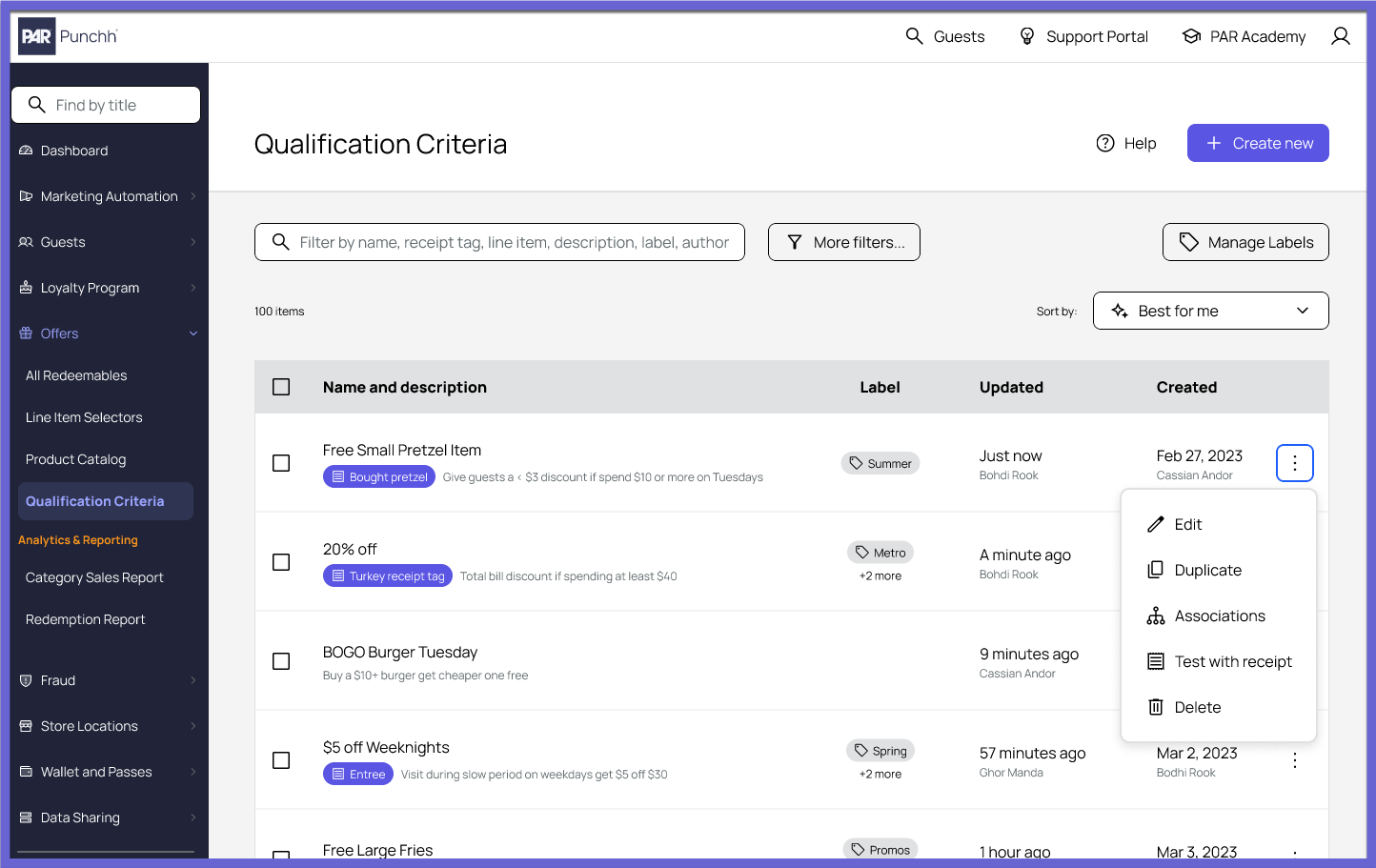
We are excited to introduce a redesigned Qualification Criteria (QC) experience that makes creating and managing qualification criteria more intuitive, structured, and efficient. (OMM-2205, PDOC-4243)
Guided QC Creation and Management
- A redesigned workflow for creating new Qualification Criteria.
- The same streamlined experience is now available when duplicating or editing an existing QC, providing a consistent and intuitive workflow across all key actions.
Enhanced QC Listing Page
- Assign labels to Qualification Criteria for easier organization.
- Delete Qualification Criteria directly from the listing page.
Use New Filters To Quickly Locate Qualification Criteria
Based on attributes such as:
- Processing method
- Created by
- Updated by
- Additional QC attributes introduced as part of the redesigned experience...plus more!
Automatic Migration
- All existing Qualification Criteria are automatically available in the redesigned experience, with no migration effort required from administrators.
Switch to Classic
- Administrators can switch back to the legacy QC experience at any time using the "Switch to Classic" option.
- While the legacy experience remains available during the transition period, we encourage all users to adopt the redesigned experience, as the classic interface will be deprecated in the coming weeks.
Benefits
- Faster and more intuitive QC creation and editing.
- Improved discoverability with enhanced filtering and organization.
- A consistent user experience across QC management workflows.
- A seamless transition with automatic migration of existing Qualification Criteria.
No Action Required
This feature is being rolled out in a controlled manner. If you do not see the redesigned Qualification Criteria experience in your dashboard yet, do not worry. It will be enabled for your account as part of the phased rollout, to be fully completed by July 31.
See the following article(s) for more details:
- Qualification Criteria (Support Portal)
Referral Reward Redemption Limits Now Configurable
This feature, previously announced on June 30th, will be fully available to brands on July 25.
You can now configure referral reward redemption limits in the Punchh Platform to reduce referral program abuse and manage loyalty liability. Two controls are available: a frequency limit that restricts how many referral rewards a guest can redeem within a rolling window of up to 30 days, and an annual limit that caps the total number of referral rewards a guest can redeem per calendar year. Note: Redemption counts begin tracking from the date this feature is enabled for your brand; any historical redemptions will not count toward the configured limits.(OMM-2075, PDOC-4078)
Action Required
Contact your Punchh representative to have this feature configured for your brand.
See the following article(s) for more details:
Experiential Loyalty
Points Saved for Swag Redemption Now Visible on Guest Timeline
Admins can now see a member's current points saved for swag redemptions directly on the guest timeline. The balance appears under the Saved Points for Swag card alongside the configured swag threshold, making it easier to assess a member's redemption eligibility at a glance. (LPE-2238, PDOC-4235)
See the following article(s) for more details:
- Swag Management (Support Portal)
- Guest Profile: Timeline (Support Portal)
Redeemable, Collectible, and Swag Management Permission Updated
The "Redeemable & Collectible Management" permission has been renamed to "Redeemable, Collectible & Swag Management" to reflect its expanded scope. Admins with this permission can create, edit, and delete redeemables, collectibles, and swag items, along with their inventory. No action is needed — admins who currently hold this permission retain the same access, and the updated name and description appear consistently wherever the permission is referenced in the Dashboard. (LPE-2183, PDOC-4236)
See the following article(s) for more details:
- Permissions (Support Portal)
Loyalty Program
Phone Numbers Standardized to 10 Digits in BMU Uploads
Phone numbers submitted through BMU uploads — whether via single API, bulk API, or CSV upload — are now standardized to a maximum of 10 digits. When a normalized phone number exceeds 10 digits, only the last 10 digits are saved to the phone field, while the complete original number is preserved separately for reference. (LPE-2200, LPE-2112, PDOC-4179)
See the following article(s) for more details:
- Awaiting Migration (Support Portal)
Schedule Management Now Offers Safer Controls
The delete option has been permanently removed from the Schedule Management UI, so schedules can no longer be deleted from the Dashboard. In its place, a new Deactivate a Schedule permission lets brand admins grant deactivation access to trusted users only. Users with this permission see a deactivate option on schedules, while others see no action button. Because deactivating a schedule can have significant downstream impact, assign this permission carefully. (LPE-2139, PDOC-4234)
See the following article(s) for more details:
- Schedules (Support Portal)
- Permissions (Support Portal)
Barcode Search Now Supports Time Zone Selection
You can now select a preferred time zone when searching barcodes by date and time, ensuring results are always interpreted and displayed in the correct time. (LPE-2105, EPS-11332, LPE-1656, PDOC-4237)
See the following article(s) for more details:
- Barcode Lookup (Support Portal)
Consumer Experience
Logo Now Displays in iframe With GIS Auth
The logo now displays in the iframe when using Advanced or Basic Auth (Guest Identity Services). Previously, the logo appeared only with the legacy sign-up and login flows. (CX-3038)
Location-Specific Secondary Ordering Provider Field Added
The "Use Direct Link for Secondary Ordering Provider" appears as a new field on the Location record screens under the Mobile tab when the secondary ordering provider is enabled at the brand level. This field is used for brands that support a second online ordering provider in their Punchh app such that the app routes and opens to the correct online ordering experience for each location. (CX-3036, PDOC-4224)
Action Required
Reach out to your Punchh representative to enable this feature for your brand.
See the following article(s) for more details:
- Store Locations (Support Portal)
Admins Able to Edit Apple Relay Email
PAR Punchh platform admin users will be able to update email addresses for users with Apple private relay email IDs. This reverts changes previously made that were preventing admin users from properly supporting these users who may want to update their private relay email IDs to their true email address. (EPS-11769, CX-3021)
Platform Integrations
External Email Adapter Flag Now Hidden
We have deprecated our Aegaeon external email service as it is no longer in use. Any configuration flags in the platform have been hidden. (INT1-2244, DEVOPS-19520)
Sign Up Directly at PAR POS and Toast POS
Guests can now join your loyalty program right at the register on PAR POS with a simple SMS opt-in. The same experience is coming to the Toast Guest Facing Display soon. (PD-6195, PDOC-3381)
Action Required
Please contact your Punchh representative to enable this for your brand.
See the following article(s) for more details:
Developers Corner
Guest Identity Service Now Supports Passkey Authentication
The Guest Identity Service (GIS) now supports passkey authentication, allowing guests to sign in using Face ID, fingerprint, or their device PIN instead of a password or one-time passcode. Passkeys provide a faster, phishing-resistant sign-in experience while remaining completely optional. (PDOC-4217, INT2-3218, INT-3227, INT2-3049)
Guests can enroll a passkey after signing in with their existing credentials and use it for future sign-ins. Four new /api2/passkey/* endpoints have been added to support passkey registration and authentication. Passkeys are supported for sign-in only and do not replace the existing account registration flow. Authentication returns the standard access and refresh tokens, requiring no downstream integration changes.
Passkey authentication is disabled by default and can be enabled on a per-brand basis. Brands can configure passkeys as either the preferred or optional sign-in method. If passkeys are disabled, previously registered passkeys are automatically deactivated, and guests continue using their existing sign-in methods. Before enabling passkeys, businesses must configure their relying party (RP) ID and allowed origins. Contact your PAR representative to complete this configuration.
Updated Meta APIs
The GET /api2/mobile/meta.json and now returns passkey (enable_passkeys, login_mode) and external identity provider (enable_external_idp) configuration settings. Integrators should use these values to determine whether to display passkey and external IdP sign-in options. Because these settings can change at any time, clients should retrieve the configuration at the start of each app or web session.
Impact: This is a non-breaking enhancement. Existing authentication flows continue to work without modification.
See the following article(s) for more details:
- Passkey Authentication Guide (Developer Portal)
- Passkey API Overview (Developer Portal)
- Get Passkey Registration Options (Developer Portal)
- Complete Passkey Registration (Developer Portal)
- Get Passkey Sign-In Options (Developer Portal)
- Complete Passkey Sign-In (Developer Portal)
- Program Meta (Developer Portal)
Swag API Updates
New Mobile API: Get User Save Points for Swag
A new Get User Save Points for Swag API endpoint (GET /api2/mobile/user_banking_preferences) is introduced to retrieve the loyalty guest's "Save Points for Swag" banking preferences, including the save-points opt-in status, configured threshold, and the number of points currently accumulated toward swag redemption. These values are returned in the save_points_for_swag_enabled, saved_swag_points_threshold, and swag_balance response parameters. This endpoint is available only for businesses that have the "Save Points for Swag" feature enabled in the Punchh platform. Contact your Punchh representative to update this Punchh platform configuration.(LPE-2181, PDOC-4177)
Updated Mobile API: Save Points for Swag
Additionally, the save_points_for_swag_enabled, saved_swag_points_threshold, and swag_balance parameters have been added to the existing "Save Points for Swag" API endpoint (PUT /api2/mobile/user_banking_preferences) response, which was previously empty, allowing integrators to verify updated "Save Points for Swag" settings without making a separate GET request.
New Dashboard API: Export Redeemed Swag Shipping Details
Brands can now fetch redeemed swag shipping details for any date range through a new dashboard API endpoint, Get Swag Shipping Details (GET /api2/dashboard/swag_shipping_details). The API returns order information including swag name, guest details, and shipping address, and supports two response formats: JSON for in-app display, or a password-protected CSV delivered to the requesting admin's inbox. JSON responses are paginated for in-app consumption, while CSV exports include all records within the specified date range in a single file. (LPE-2016, PDOC-4176)
See the following article(s) for more details:
- Get Swag Shipping Details (Developer Portal)
- Get User's Save Points for Swag Settings and Balance (Developer Portal)
- Update User's Save Points for Swag Settings (Developer Portal)
- Redeem Swag (Developer Portal)
- Fetch Available User's Swag (Developer Portal)
New Generic SMS Partner Integration Guide
Published a new "Generic SMS Partner Integration Guide" with the Webhooks Manager documentation for businesses that use a third-party SMS Partner to manage SMS messaging, compliance, opt-in/opt-out workflows, and subscription status updates. In this integration model, Punchh does not send SMS messages. The SMS Partner is responsible for managing SMS consent, double opt-in and opt-out workflows, and updating SMS subscription status in Punchh through in-bound webhooks. (PDOC-4090, INT-3744)
The guide covers:
- Guest sign-up
- Guest create and update webhook events processing
- SMS consent evaluation
- Double opt-in workflow and subscription management
- SMS subscription status update webhooks
- Phone number update handling
- Social sign-up considerations
- Error handling scenarios
See the following article(s) for more details:
- Generic SMS Partner Integration Guide (Developer Portal)
