Referrals
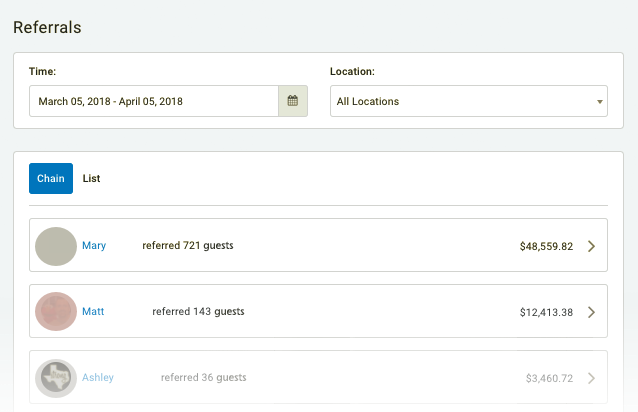
The Referrals dashboard displays a list of some of your most valuable guests; those who have spread word-of-mouth about your business/loyalty program by referring their friends to sign up for your mobile app. Navigate to Guests > Referrals in your left navigation toolbar to view the Referrals dashboard.
Referral reward redemption limits are available behind a feature flag and are not enabled by default. To enable this feature for your loyalty program, contact your Punchh Representative.
Actions
You can perform the following actions in the Referrals dashboard:
Referrals dashboard actions
- Click the Calendar icon next to the Time field to define a time range to filter your referrals
- Click the Location drop-down to filter your referrals by location or location group.
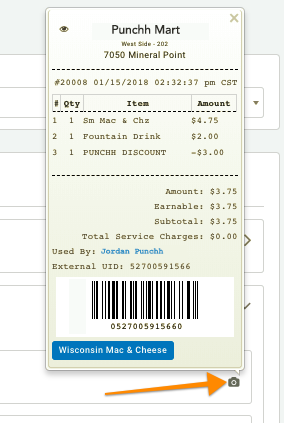
- Click on the Camera icon to the far-right of a guest's name to view their most recent check.
- Click on a guest's name to open their guest profile.
Chain View
In Chain view, top-referring guests are shown along with the total amount of money their referrals have netted your company (their "referral total"). Click on a guest's tab while in Chain view to open a nested view displaying all of their referrals (and their referrals' referrals).
Referral Total Calculation
The Referral total for a guest is determined by the total spend of their referrals + the total spend of their referrals' referrals + the total spend of their referrals' referrals' referrals, and so on (the "referral chain"). In this way, if guests continue to refer new guests who refer new guests, the original referrer's total will increase exponentially. This is how it's possible for some guests to have hundreds of referrals and a referral total of thousands of dollars.
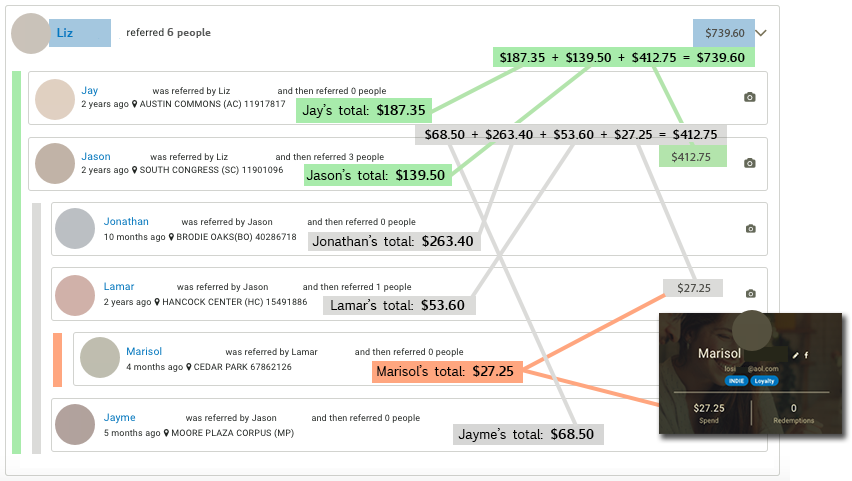
In the example above, we see that:
- Liz referred 6 people, and the total spend of all of her referrals + the total spend of all of their referrals adds up to $739.60.
Jay (187.35) + Jason ($139.50) + Jason's referrals ($412.75) = $739.60. - Jason referred 3 people, and the total spend of all of his referrals + the total spend of all of their referrals adds up to $412.60.
Jonathan ($263.40) + Lamar ($53.60) + Lamar's referrals ($27.25) + Jayme ($68.50) = $412.60. - Lamar referred 1 person, and the total spend of all of his referral adds up to $27.25.
List View
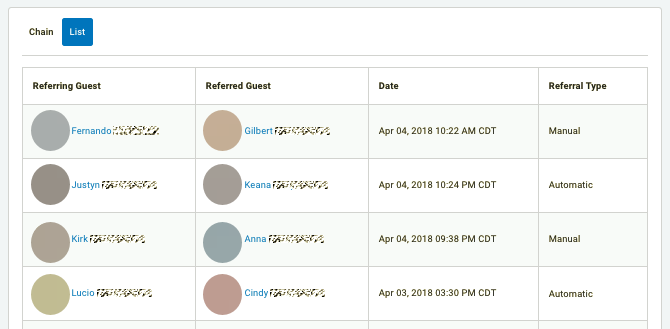
The List view displays all referrals starting from the most recent at the top. The referring guest and the guest they referred are shown, along with the referral type, described below.
Referral types
- Automatic referrals
If a guest invites a friend to sign up for your program by selecting a friend from their Facebook friends list (and the friend follows through and signs up), this is counted for the referrer as an "automatic" referral. - Manual referrals
When a new user signs up for the program, it will ask them if they have an invite code from another guest. If the new user provides an invite code, this is counted for the referrer as a "manual" referral.
Referral Reward Redemption Limits
This feature is coming soon and will be fully available by July 25th.
Referral reward redemption limits give you greater control over your referral program by restricting how many referral rewards a guest can redeem within a given time period. These controls help reduce referral program abuse and manage loyalty liability. To have referral reward redemption limits configured for your loyalty program, contact your Punchh representative.
Two types of limits are available:
- Referral Reward Redemption Frequency Limit: Restricts how many referral rewards a guest can redeem within a rolling time window (e.g., a maximum of 3 referral rewards every 30 days). The maximum supported rolling window is 30 days.
- Annual Referral Reward Redemption Limit: Restricts the total number of referral rewards a guest can redeem within a calendar year (e.g., a maximum of 20 referral rewards per year).
This options limit how many times that referral reward can be redeemed at the business level. You can also limit how often a referer can be gifted overall thorough a Referral Campaign. See the Referral Campaign article for details.
Supported Values
| Limit Type | Field | Minimum | Minimum |
|---|---|---|---|
| Frequency Limit | Number of rewards | 1 | 1,000 |
| Frequency Limit | Rolling time window (days) | 1 | 30 |
| Annual Limit | Number of rewards per calendar year | 1 | 1,000 |
Example: If your brand configures a maximum of 1 referral reward every 15 days and a maximum of 20 referral rewards per calendar year, a guest who reaches 20 redemptions in the calendar year cannot redeem additional referral rewards until the following year — regardless of whether the 15-day interval has passed.
Note: Redemption counts begin tracking from the date this feature is enabled for your brand. Referral reward redemptions that occurred before the feature was activated are not counted toward the configured limits.
