Punchh Platform Release Notes - 22 April 2025 Deployment
The updates described in these release notes and the affected/linked documentation will not be available in the Punchh platform until the target deployment date.
Campaigns
Alignment Issue Within Campaign Workflow
Some alignment issues were fixed for the search bar filter in the content library and all email editor touchpoints when creating a campaign. (EPS-10125)
Loyalty
Removed Irrelevant Configurations From Membership Tier
In an effort to make the user experience better, we have removed redundant configurations from the Membership Tier interface. This includes removing configurations that are not pertinent to a specific program type. For example, if your loyalty program does not utilize banked currency, those fields will no longer show up in the Membership Tier interface. (LCM-2685, PDOC-2997)
See the following article(s) for more details:
- Membership Tiers (Support Portal)
Size Restriction on Loyalty Groups
The Location edit page now prevents the removal of a location group if there is only one location in the group; a location group cannot have zero locations. (LPE-1089, PDOC-2996)
See the following article(s) for more details:
- Location Groups (Support Portal)
Expired Rewards Excluded From Guest Timeline
To enhance system performance and optimize data loading, expired rewards will no longer be displayed by default on the guest timeline. Previously, all expired or perished rewards were loaded when a guest timeline was opened, leading to performance issues, especially for brands with high reward distribution leading to high reward expiration for guests: (LPE-1121, PDOC-2993)
- Expired rewards will be excluded from the guest timeline to improve response times.
- This update ensures deduplication and establishes the 'Rewards' tab as the primary source of information for all reward statuses.
- There is no loss of information. Expired rewards remain accessible under the 'Rewards' tab in the guest profile.
See the following article(s) for more details:
- Guest Profile: Timeline (Support Portal)
- Archiving-of-Expired-Rewards (Support Portal)
Hint Messages Added to eClub Upload Page
On the eClub upload page, we have added hint messages for the following: (LPE-1113)
- Effective Locations drop-down menu: If the Effective Location dropdown is left blank, ALL locations will be automatically assigned as connected locations for each guest.
- Source field: Specify the channel or campaign where this list originated. Example: “Albany Store Grand Opening Email Signups” or “Holiday Promo Website Form Submissions.”
Marketing Email and Push Notification Options Added to Business Migration User Configuration
When creating a business migration user, businesses will now be able to select the value of Marketing Email Subscription and Marketing PN (Push Notification) Subscription through the drop-down menu. This will be in parity with the Create Business Migration User API endpoint. (LCM-2388, PDOC-3014)
See the following article(s) for more details:
- Awaiting Migration (Support Portal)
- Create Business Migration User API (Developer Portal)
Fixed Receipt View Issue Within Guest Timeline
Previously, when viewing a receipt on the guest timeline, it was difficult to get a full view of all items listed within the receipt. We have now implemented a new navigation system so that the full receipt can be easily scrolled through. (EPS-9940)
Segments
Enhanced Searching From Segment Type Search Bar
The enhanced search now allows admins to find segment types and associated attributes within the segment type search bar. Search results are displayed in a single view, improving discoverability and usability. (SB-3394, PDOC-2998)
See the following article(s) for more details:
- Segments (Support Portal)
New Smart Segment Templates
We have introduced the use of smart segment templates, enabling admins to modify rules to better align with their marketing needs. (SB-3442, PDOC-2990)
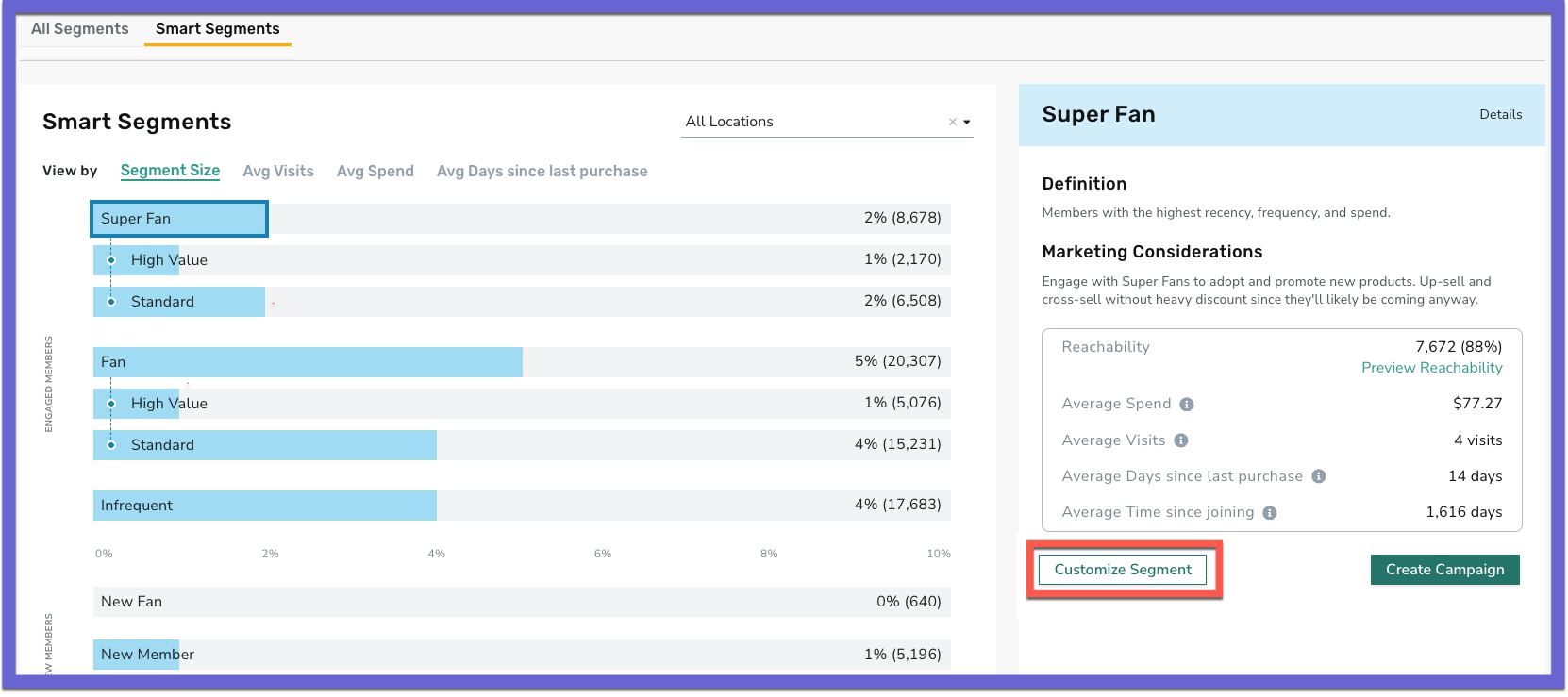
See the following article(s) for more details:
- Smart Segments (Support Portal)
Exclusion of Deactivated Guests
We have enhanced segmentation logic to exclude deactivated guests from segment evaluation. (SB-3427)
Improved Campaign Sorting
We have improved the 'Guests Targeted from a Campaign' drop-down list to sort campaigns by 'newest first' and display the 'last active/used' date for better clarity. (SB-3425)
Reporting and Analytics
UX Improvements on Admin Users Interface
The Admin Users > Edit page has been updated with the following changes to improve usability, align functionality with current workflows, and provide a more intuitive user experience: (DP1-1659, PDOC-2995)
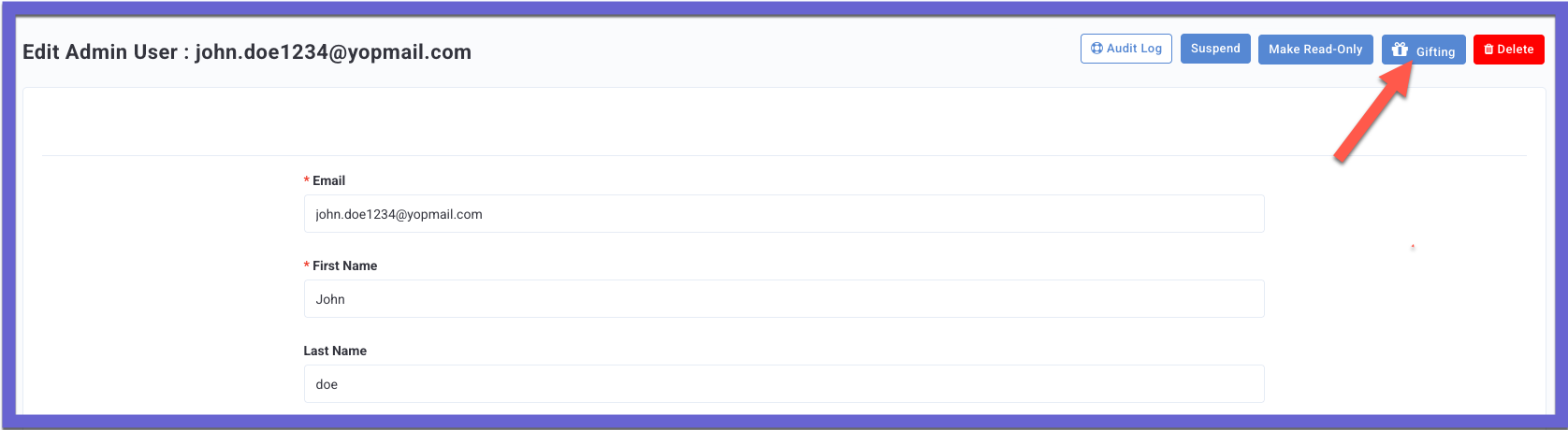
- The original Edit and Activities navigation options have been deprecated.
- The Activities button has been renamed to Gifting and repositioned to the utility menu in the top-right corner alongside other action buttons for better accessibility and consistency.
- The Admin Gifting History is now accessible via the new Gifting button.
See the following article(s) for more details:
- Admin Users and Roles (Support Portal)
- Gifting Metrics (Support Portal)
Database Schema - New Columns
A new column 'split_percentage' has been added to the 'mass_giftings' table. (CAM-5776, PDOC-2928)
See the following article(s) for more details:
- Database Schema and Data Field Change Announcements (Support Portal)
Upcoming Database Schema Changes, April 30th - Data Type
As a part of database maintenance on April 30, 2025, we are updating the data type of several columns from 'int' to 'bigint.' Review the Database Schema and Data Field Change Announcements for the complete list. (EDDBA-470, PDOC-3007)
Platform Integrations
Enhanced mParticle Adapter Support
We have enhanced mParticle adapter to support sending delta attributes (i.e., to only trigger attributes based on their changes as part of guest events). For other events, if enabled, this would mean not sending user attributes by default as part of every event to avoid sending duplicate data attributes. This will be a flag-based functionality and can be enabled from the dashboard. By default, this flag is set to NO, ensuring that the existing functionality remains unchanged. Please contact your Punchh representatives with questions. (INT-3062)
Correction to Issue with Webhooks Account-Expiry-Reminder Event
For loyalty programs using the Reset-Based-on-Inactive-Days expiry strategy, when publishing the account-expiry-reminder event to webhooks, "ExpiringUntilDate" and "ExpiringDate" were publishing a day ahead rather than the actual expiry date. The Reset-Based-on-Inactive-Days expiry strategy has now been corrected to avoid this issue. (For more details on expiry strategies, refer to Membership Tier Reset Strategies.) (EPS-9987)
Action Required: This fix can affect brands using the Reset-Based-on-Inactive-Days expiry strategy in their loyalty program. If your brand is experiencing this problem, please contact your Punchh representative to enable the fix for your business.
Developers Corner
Online Ordering API Endpoint To Unlock the Discount Basket
The api/auth/discounts/unlock Online Ordering API endpoint has been added for Redemptions 2.0 implementations. Businesses using multiple redemptions for the Online Ordering channel can use this API to manually unlock the discount basket for a guest. The unlock API was already available for POS; support is extended to provide the manual unlock feature for Online Ordering. (OMM-1248, PDOC-2992)
See the following article(s) for more details:
- Unlock Discount Basket (Redemptions 2.0 - Online Ordering) (Developer Portal)
- Unlock Discount Basket (Redemptions 2.0 - POS) (Developer Portal)
- Redemptions 2.0 - Discount Basket Locking (Developer Portal)
Added Two Response Parameters in the Redeemables Webhook Event Payload
The expiry_days and end_time parameters have been added to the response of the Redeemables webhook event. They provide information about when the redeemable will expire. (INT-3102, PDOC-3018)
See the following article(s) for more details:
- Event - Redeemables (Developer Portal)
