Membership Tier Reset Strategies
This article was previously titled "Decoupling Checkin Expiry and Membership Tiers Resets."
As a part of a Membership Tier program, a guest's point value and/or membership level can be reset annually. This can be useful to avoid point balances sitting unused and incentivize guests to continue to visit your business routinely.
Reset Strategies
You can choose which date will trigger a guest account re-evaluation for your business:
- Annually on a specific date
- Guest Inactivity
- Annually on the guest’s signup anniversary
- Annually on the guest’s membership bump anniversary
There are two basic strategies to reset a guest's membership tier:
Reset Based On Points Earned
With this strategy, at the time of re-evaluation, guests *maintain their membership level,*but their points are reset to zero. Their membership level for the next year is based on the points they earn till the next account re-evaluation.
For this strategy, Punchh displays the Lifetime (operative) membership level on the guest's timeline, which is the highest membership level before the reset. If generating a segment targeting the guest's current membership level, it will come in as the lowest membership tier after reset.
When creating a segment, you will see two options under the Membership tier drop-down:
- Current: The effective (lowest) membership tier, calculated based on guest interaction with the brand within a set timeframe.
- Lifetime: The operative membership tier, calculated based on total points that contribute to the status. This does not reset every year, but updates at the time of membership re-evaluation based on the highest achieved tier status within the last evaluation period. The Lifetime tier can move up or down, depending on the number of points earned in that timeframe and what tier that number puts them in.
Overall, Punchh recommends using the Lifetime option when creating your segments.
Step Down To Previous Level
With this strategy, you have some more flexibility at the time of re-evaluation. Guests can be taken down to the previous member level and/or have their points reset. You will have two additional fields on the membership level page to set up your configuration: Points Reset Strategy and Retention Threshold. See Membership Tiers for details on how to configure these fields.
Decoupling Points Expiry and Membership Tier Resets
As described above, Punchh's basic membership tier functionality is limited to resetting tiers and usable points together based on a selected strategy: a specific calendar date every year, guest inactivity, signup anniversary of the guest, or membership tier bump anniversary of the guest. Therefore, sometimes usable points of guests would be reset to zero whenever the membership tier was re-evaluated and reset, leaving the guest with no points to redeem.
Punchh offers an additional configuration to have usable loyalty points expire separately (decoupled) from the membership tier reset strategy. For example, your brand may want unused points to expire 180 days from when earned and membership tiers to reset at the end of every year, but when tiers are reset, the usable points should be unimpacted.
Supported Programs and Combinations
This feature is only available for brands with a Reset Based On Points Earned reset strategy.
The following programs are supported for decoupled checkin expiry and membership tier reset:
- Points Unlock Redeemables
- Points Based Rewards
- Points Based Currency
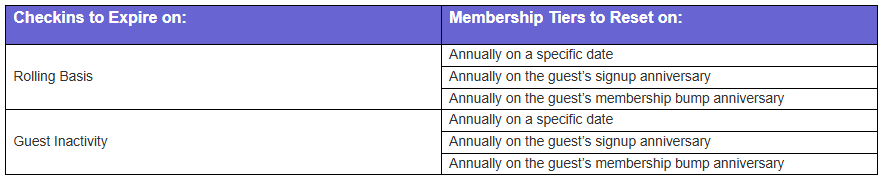
The following combinations of Decoupled Checkin Expiry and Membership Tier Resets are available. Contact your Punchh representative for more details on how to configure this for your business.
Related Documentation:
