Archiving of Expired Rewards
Expired Rewards
Some expired rewards data within the Punchh Platform has been archived to improve the platform's overall performance.
Segments
The below details apply to the segment type Rewards, with the selected attribute as Reward Status Equal to Expired.
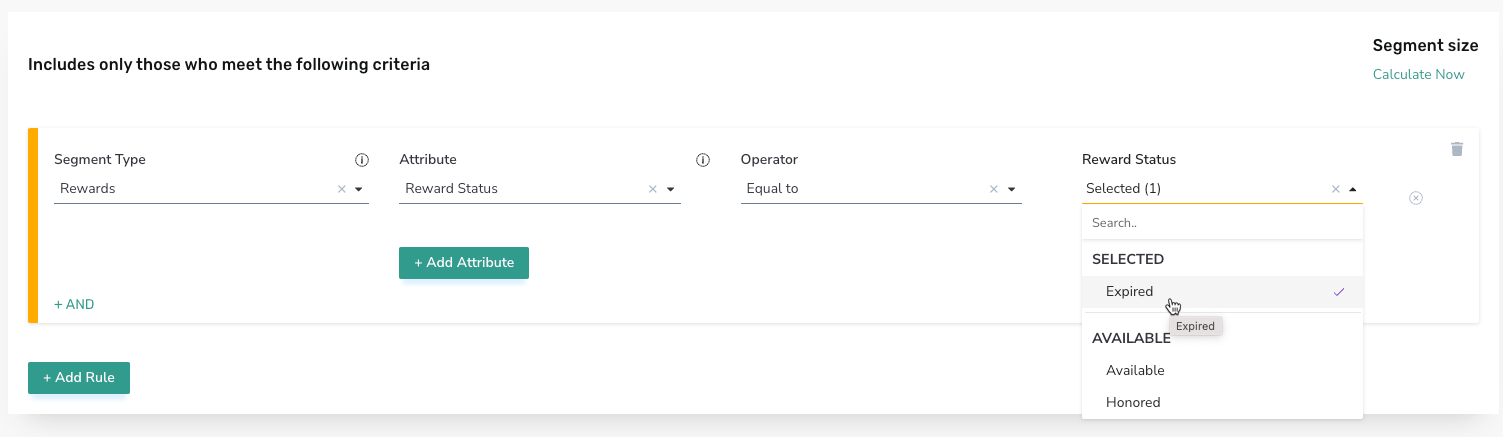
- This change affects all transactional or trigger-based campaigns. When using a segment based on Reward Status Equal to Expired as part of a transactional campaign, such as a Post Check-In Campaign, the campaign will trigger if a guest has had the selected reward expire within the last 30 days. If a guest previously had the selected reward in their account but the reward had expired before the last 30 days, the campaign will not trigger for that guest.
- This change does NOT impact mass campaigns. When using a segment based on Reward Status Equal to Expired as part of a Mass Notification or Mass Gifting Campaign, the campaign will trigger for all guests with the selected reward that has expired, regardless of whether the reward expired within the last 30 days or before the last 30 days.
- When a guest views their account history on the web or in the mobile app, the history of expired rewards in their profile (as applicable) will be displayed up to the last 30 days.
- Access to expired rewards data history for analytics/reporting purposes remains unchanged. Full historic data lookback is available via any Punchh product reports, exports, and data pipelines where this data is used.
Relevant Product Documentation
Trigger-based Campaigns:
Guest Data
The Timeline tab of the guest's profile does not display any expired rewards. The Account History and Rewards tabs of the guest's profile in the Punchh Platform, as well as the Account History API, display expired rewards for the last 30 days. If you need to access expired rewards beyond 30 days navigate to Data Sharing > Data Export > Archive Rewards Data.
Note: The date range selection for the Archive Rewards Data Export considers the creation date of the reward, rather than the date of expiry or archival.

Relevant Product Documentation
