Punchh Platform Release Notes - 6 February 2024 Deployment
The updates described in these release notes and the affected/linked documentation will not be available in the Punchh platform until the target deployment date.
Loyalty
Guest Profile: Registration Date for Migrated Guests
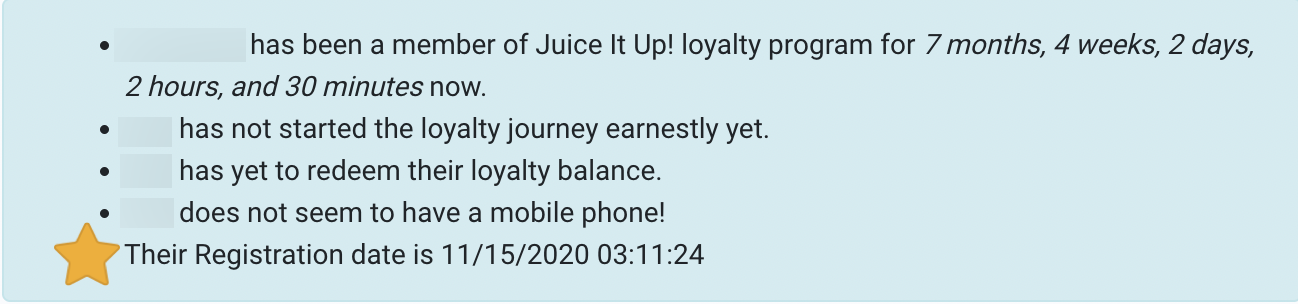
Addressing the current challenge of identifying the migration date and the creation of a loyalty account for guests, we have added the guest's registration date, when applicable, to the guest timeline, under the guest snapshot. (LPE-727)
See the following article(s) for more details:
- Guest Profile: Timeline (Support Portal)
Guest Profile: Additional Confirmation Messaging
We have provided clearer messaging within the platform when deleting a guest profile. In order to indicate to all users that deleting a guest profile is irreversible, the following message will appear: "Are you sure you want to delete this guest? Account deletion, once initiated, is irreversible and it cannot be forcefully halted." Upon clicking the Submit button, the guest profile will be tagged for deletion and will be removed once the deletion process is completed. A similar message will appear in the Reactivate User mobile API (api2/dashboard/users/reactivate). (LPE-734, EPS-7458)
Before proceeding with the removal of a guest from the platform, it's essential to verify thoroughly, as the Punchh Engineering and Support teams cannot halt or undo this action.
See the following article(s) for more details:
- Guest Profile: Edit Profile (Support Portal)
Enhanced error messages have been introduced for the guest profile reactivation flow when the guest had been formerly deactivated. The system will now present specific reasons or validations (for instance, "Error reactivating user: Please enter a valid postal zip code") as error messages, providing clear information about what is preventing a profile from being reactivated. (LPE-745)
Learn More! What's the difference between deactivating, banning, and deleting a guest?
Guest Profile: Bulk Update Improvements
To avoid any accidental triggers of the Bulk update & Change Password and Unlink Device features, an additional layer of confirmation has been added. (LPE-738)
- Confirmation Message for Bulk update & Change Password section: "This operation will initiate a Bulk Password Reset and Force Logout for all guests listed in the uploaded CSV. Are you certain you want to proceed with resetting passwords and logging out users in bulk?"
- Confirmation Message for Unlink Devicessection: "This operation would delete all device associations linked to a guest account. Are you certain you want to proceed with the unlinking devices action for all guests listed in the uploaded CSV?"
The Bulk Update feature, located under Guests > Bulk Update, previously experienced a bug leading to the duplication of error messages. We have addressed this issue to improve the overall user experience. You will no longer encounter duplicate error messages. (LPE-741)
Locations: Enhanced Location Filters
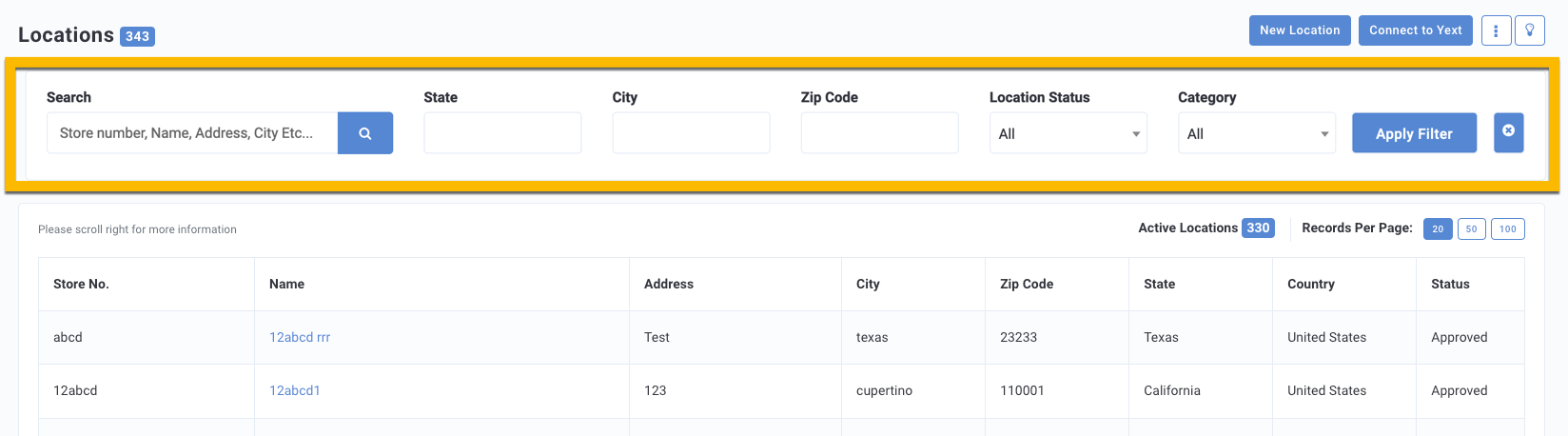
On the Locations listing page, under Settings > Locations, locations can now be filtered based on state, city, and zip code. The introduction of these new filters aims to streamline the process of filtering locations when creating a location group. (LPE-751)
See the following article(s) for more details:
- Locations (Support Portal)
Segments: 'Opened' and 'Action Taken' Attributes for Email Segmentation
Added the ability to segment guests based on whether a guest opened an email or took action on an email. This option is available via the Engagement segment type. The Opened attribute will filter for guests who opened an email campaign. The Action Taken attribute will categorize guests who performed an intended action after opening an email campaign. (SB-2729, SB-2593)
See the following article(s) for more details:
- Segment Types, Attributes, and Timeframe Definitions (Support Portal)
Segments: Segmentation Based on User Relations
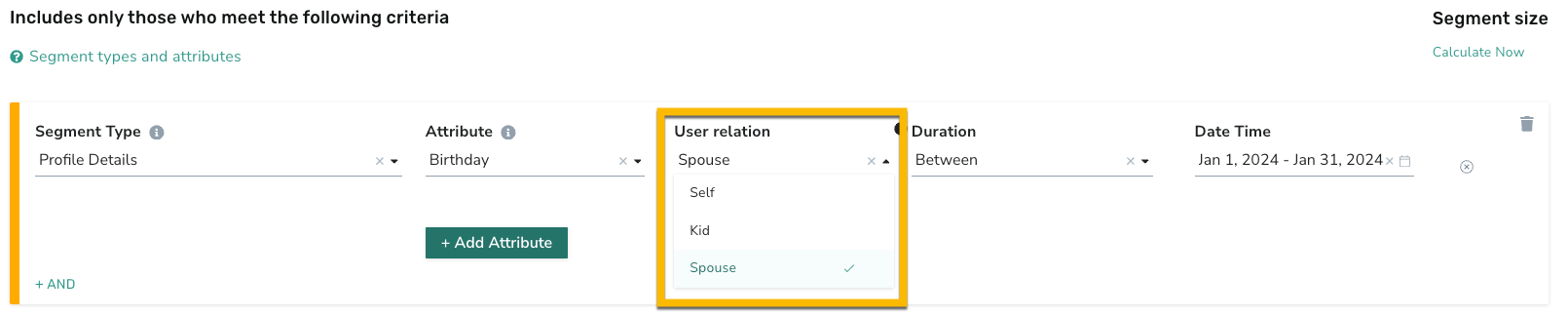
Added the ability to segment guests based on their relations' birthdays. Explore this segmentation capability within the Profile Details segment, Birthday attribute. If you do not have guest relations enabled as part of guest profiles in your app experience, an app update is required to utilize this feature.(SB-2093)
See the following article(s) for more details:
- Segment Types, Attributes, and Timeframe Definitions (Support Portal)
- Guest Profile: Edit Profile (Support Portal)
Campaigns
Campaigns Status Tracker Now Accessible on the Campaign Performance Page
Our new Campaign Status Tracker is now available for all Mass Gifting campaigns on the Campaign Performance Page. With this tool, you can see all of the processing sub-stages, their current status, and detailed processing information. (CAM-4661)
See the following article(s) for more details:
- Campaign Status Tracker (Support Portal)
Reporting & Analytics
Fixed 'Awaiting Guest Migration' Data Export
This includes a fix to populate the missing migrated business user identifier on the Awaiting Guest MigrationData Export. Going forward, the missing value on the 'migration user id' field will now be populated with the associated business user identifier. (DP1-1107)
Developers Corner
Recurring Payments: Gift Card Auto Reload
The Gift Card Auto Reload feature is available for the Heartland Gift Card Adaptor. (INT-2019)
See the following article(s) for more details:
- Gift Cards (Support Portal)
Events Framework: New Braze Adaptor Feature
Customers now have the option to send only the fields that are updated in user profiles to Braze, saving costs for our customers. This feature is not enabled by default. Reach out to your Punchh representative for additional information. (INT-2192)
See the following article(s) for more details:
- Webhooks Manager (Support Portal)
Events Framework: Changes to Expired Reward Event
In our ongoing efforts to enhance the efficiency and customization of our services, we are updating how events are managed in Amplify. Moving forward, the "Expired" value for the "Status" attribute of the Rewards event payload has been deprecated. Reach out to your Punchh representative for additional information. (INT-2320)
See the following article(s) for more details:
- Event - Rewards Expiry Reminder (Developer Portal)
- Event - Reward Notification (Developer Portal)
- Event - Rewards (Developer Portal)
