Punchh Platform Release Notes - 5 March 2024 Deployment
The updates described in these release notes and the affected/linked documentation will not be available in the Punchh platform until the target deployment date.
Loyalty
Filter Locations by Store Properties
A new filter on the Locations page (Settings > Locations) enables you to filter locations using the Store Properties tag. (LPE-793)

See the following article(s) for more details:
- Locations (Support Portal)
New Migration Strategy for Businesses With Membership Tiers
We have released a new migration strategy intended for businesses migrating to Punchh with membership tiers.
Using this strategy, when guests migrate, there will be separate balances for points accrued toward membership tier progression and points available to redeem. Points earned subsequent to migration will contribute to a guest's progress toward the guest's next membership tier starting from the balance of points accrued toward membership tier progression, and not starting from the available points balance to spend on redemptions. This strategy is currently limited to the "Points Unlock Redeemable" program type and the "Reset Based on Points Earned" tier reset strategy. (LCM-2316)
Guest Profile: New Permission Setting for Bulk Update
The new "Bulk Update" permission allows admins to access the Bulk Update feature, enabling them to trigger bulk operations such as resetting passwords, forcing logout, and unlinking devices from a guest account. After deploying this permission into production, only super admins will be able to see the Bulk Update feature, located under Guests > Bulk Update. For business admins, roles and permissions are controlled via Settings > Admin Users,and this section is visible only to a super admin or a business admin with advanced permission/roles and permission management. A super admin or a business admin with advanced permission can assign "Bulk Update" permission to any role. Any business admin with that role will be able to view and access the "Bulk Update" feature. (LPE-739)
See the following article(s) for more details:
- Permissions (Support Portal)
Fixed an Issue With Forced Redemption of Points
A bug related to points-based currency and rewards program types has been fixed, addressing a discrepancy in the current points balance displayed on the dashboard points meter and in the account history. This issue occurred specifically when performing a forced redemption of punches or unbanked points via the dashboard or the API. The bug prevented the subtraction of force-redeemed points from the current points balance, resulting in a mismatch between the total available/usable points in the account history and the dashboard points meter. (LPE-720)
Segments Progress Bar
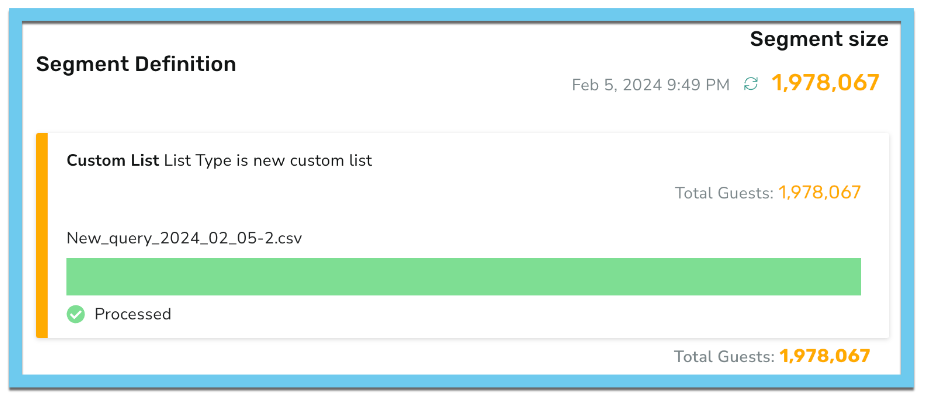
A new progress bar on the segment view page enables you to track the progress and status of custom CSV file uploads effectively. (SB-2707)
See the following article(s) for more details:
- Segments (Support Portal)
Segment Insights
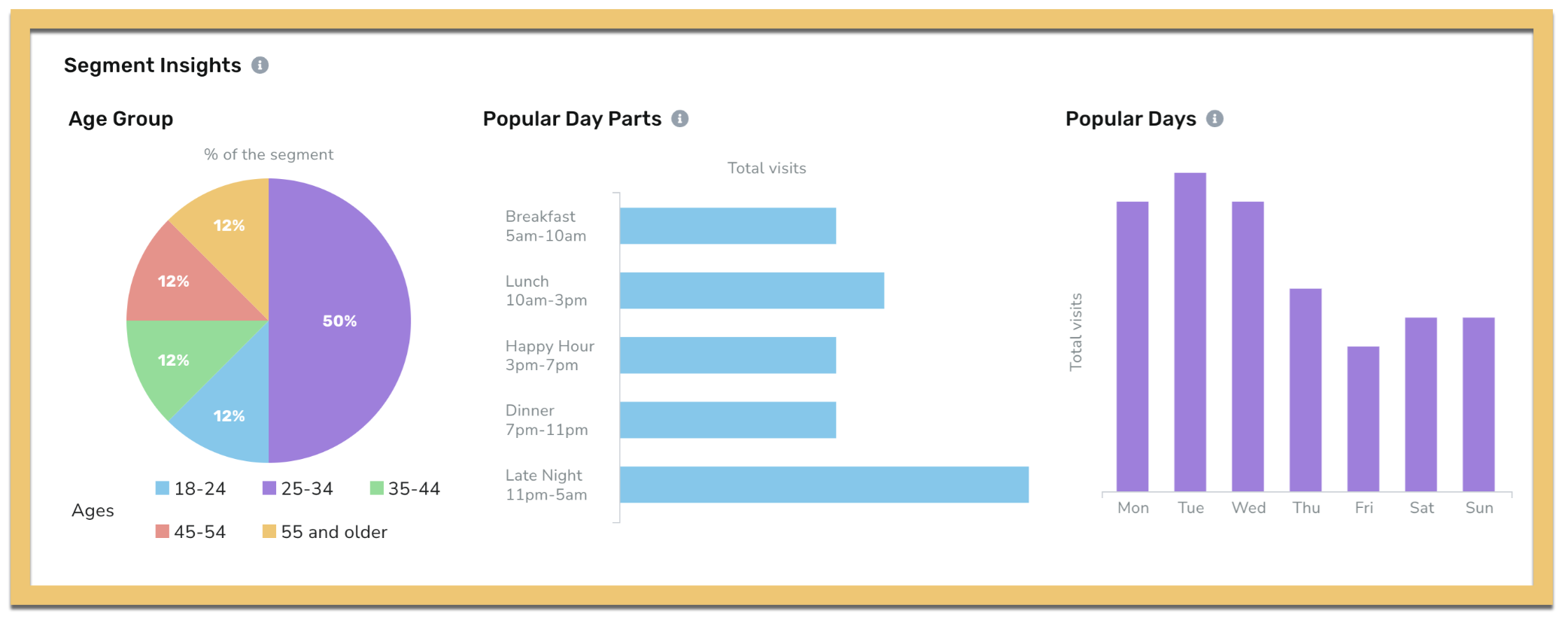
The new Segment Insights tab enables you to make informed decisions by learning about the 'Day of the week' and 'Time of the day' for guest visits, as well as the age distribution of the segment. (SB-2665, SB-2664, SB-2663)
Try it out! Navigate to Guests > Segments, and click the name of the segment to open the Segment Overview Page.
See the following article(s) for more details:
- Segments (Support Portal)
Segmentation of Guests Based on Membership Tier
We have introduced a new way of segmenting guests based on their membership tier, enabling more precise and personalized marketing campaigns. This feature allows for segmentation of guests based on the current and lifetime points balances of guests as the definition of a tier, rather than segmenting just by whether a guest's profile status is tied to a particular tier. (SB-2626)
See the following article(s) for more details:
- Segment Types, Attributes, and Timeframe Definitions (Support Portal)
Campaigns
Repeating Campaigns
When visiting the campaign performance page (CPP) for a repeating campaign, you will no longer be taken to the first instance of this campaign. Instead, you will now be taken to the most recent instance of the campaign being run. (CAM-4859)
Subscriptions
Single-Use Subscriptions
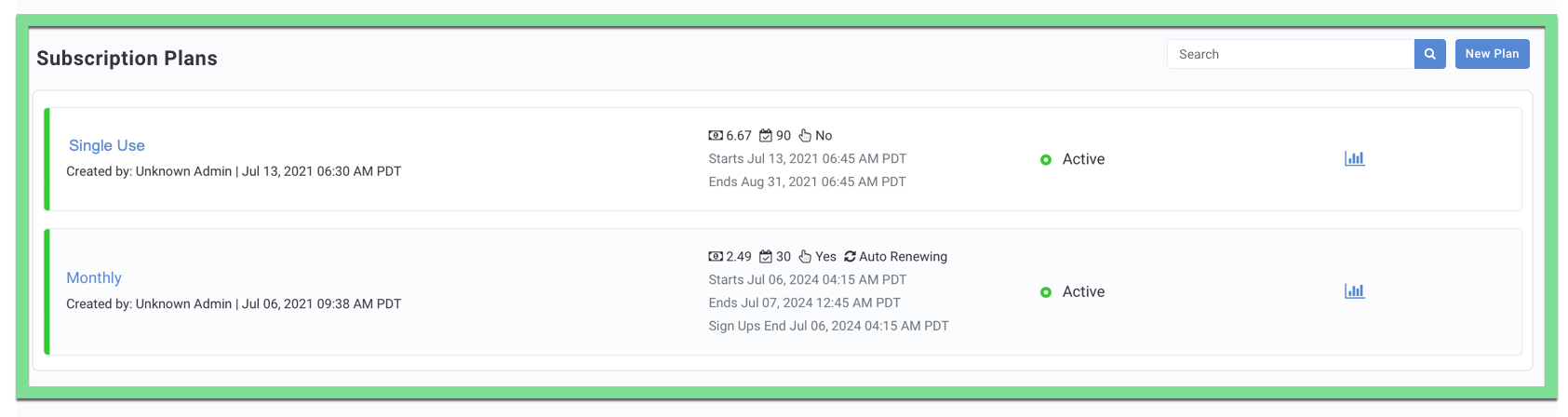
In order to differentiate between auto-renewing and single-use subscriptions, we have updated the Subscription Listing page and introduced the “Auto Renewing” status for subscriptions that renew for guests automatically on a set cadence. Going forward, all subscriptions that renew automatically for guests will have the “Auto Renewing” status shown on the subscription plan listing page. This allows marketers to quickly review which subscription plans renew automatically and which subscription plans are single-use. (LS-419)
See the following article(s) for more details:
- Subscription Plans (Support Portal)
Active Subscriber Capping
To achieve the use case of real-time data in active subscriber capping, the Active Subscriber Count Schedule is automatically created when the Subscriptions feature is enabled for a business. If the Subscriptions feature is disabled for the business, this schedule is automatically deleted. If the Subscriptions feature is re-enabled, a new schedule will be created automatically. (LS-474)
See the following article(s) for more details:
- Schedules (Support Portal)
- Subscription Plans (Support Portal
Consumer Experience
Unlocked Redeemables in iFrame
For customers on a "Points Unlock Redeemables" program using the Punchh iFrame for loyalty in-web, users will now be able to see any unlocked redeemables in the iFrame. This will provide more visibility to users on their points progress and offers that they are able to work toward. (CX-2222)
Developers Corner
Redemptions 2.0: Auto-Redemption for Individual Offers
The new "auto_select" response parameter has been added to several Redemptions 2.0 API endpoints for POS and online ordering, as well as a couple of mobile API endpoints, to indicate whether or not an individual offer is enabled for auto-redemption. If auto-redemption is enabled for a discount type in a business, then a marketer can select at the individual offer level for the offer to be auto-applied or not. This provides the marketer with the flexibility to select the offers that should be automatically applied. Instead of making the entire category of offers automatically applicable, the business can define a more granular auto-application strategy. (OMM-774)
See the following article(s) for more details:
- Redemptions 2.0 API (POS) (Developer Portal)
- Redemptions 2.0 API (Online Ordering) (Developer Portal)
- Fetch User Balance (Mobile) (Developer Portal)
- List All Deals (Mobile) Developer Portal)
Redemptions 2.0: Auto-Redemption Strategy
The new "auto_select_strategy" response parameter in the Program Meta mobile API indicates one or more categories of discount types (offers or subscriptions) chosen for automatically applying discounts. The auto-redemption strategy selected by the business can be consumed by the mobile app to identify the offers that will be auto-applicable. This enables guests to have visibility on their available offers, which can be automatically applied on their discount basket during a transaction if their discount basket qualifies for auto-applicable offers. (OMM-732)
See the following article(s) for more details:
- Program Meta (Mobile) (Developer Portal)
User Subscription History
The new "has_any_subscriptions" response parameter has been added to the subscription API to indicate whether or not a user's account currently has an active subscription or has ever had an active subscription. This parameter can be used by developers to customize the app experience as per the needs of the business. (LS-475)
See the following article(s) for more details:
- Fetch Subscription Plans for a User (Mobile) (Developer Portal)
- Fetch Subscription Plans for a User (Online Ordering) (Developer Portal)
Membership Qualification Points
The new "membership_qualification_points" response parameter has been added to various fetch user account balance API endpoints to indicate the value of points earned toward progress across membership tiers. This is related to the new migration strategy that allows businesses to "Consider Only Initial Points for Tier Migration". Currently, support for this parameter is limited to program type Points Unlock Redeemables, Membership Re-evaluation Strategy: Reset Based on Points Earned and Account Re-evaluation Strategy of Guest Inactivity. (LCM-2354)
See the following article(s) for more details:
- Fetch Account Balance of User (Online Ordering) (Developer Portal)
- Fetch User Balance (Online Ordering) (Developer Portal)
- Account Balance (Mobile) (Developer Portal)
- Fetch User Balance (Mobile) (Developer Portal)
Events Framework: Changes to Perished Reward Event
In our ongoing efforts to enhance the efficiency and customization of our services, we are updating how events are managed in Amplify. Moving forward, the "Perished" value for the "Status" attribute of the Rewards event payload has been deprecated. Reach out to your Punchh representative for additional information. (INT-2345)
See the following article(s) for more details:
- Event - Rewards Expiry Reminder (Developer Portal)
- Event - Reward Notification (Developer Portal)
- Event - Rewards (Developer Portal)
Bulk Add/Delete Custom Segments
New Platform Functions API endpoints enable the bulk addition/deletion of users in custom segments using CSV upload. (SB-2179)
See the following article(s) for more details:
- Bulk Add Users to a Custom Segment (Platform Functions) (Developer Portal)
- Bulk Remove Users From a Custom Segment (Platform Functions) (Developer Portal)
