Punchh Platform Release Notes - 30 April 2024 Deployment
The updates described in these release notes and the affected/linked documentation will not be available in the Punchh platform until the target deployment date.
Loyalty
Improved Segmentation Details in Campaign Logging
We have enhanced segmentation details in campaign logging, aimed at providing you with greater insight into segment reachability. With this update, we have expanded the logging details to include information about the reachability of segments, empowering you to better understand the distinction between targeted guests and reachable guests. (SB-2881)
Events Halted for Deactivated Guests
As an enhancement, Punchh will manage how events are generated for all active guests in the system. (INT-2046)
Campaigns
Campaign Performance Page - New Updates
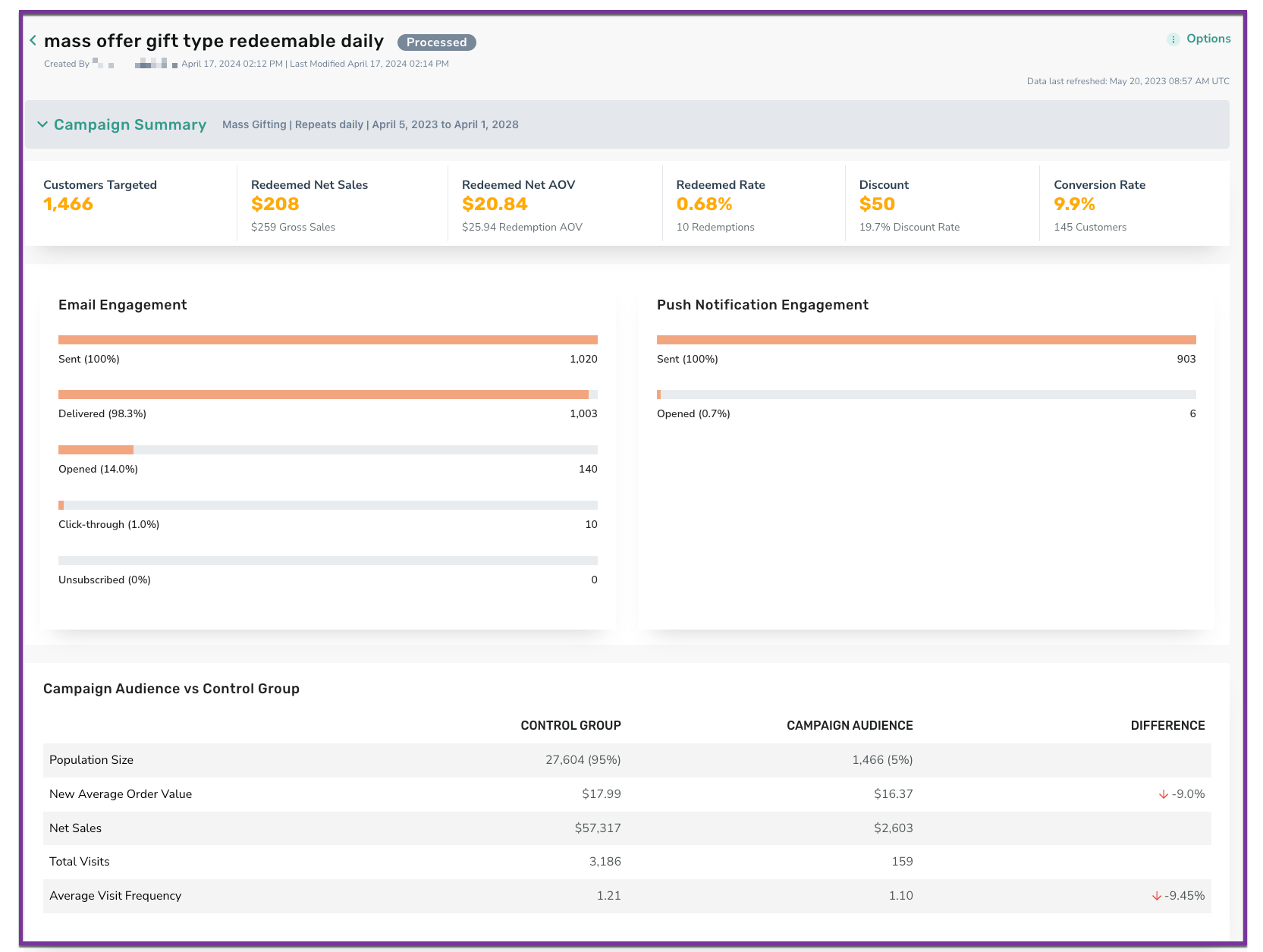
When you view the Campaign Performance Page KPIs on Redemption Rate, Conversion Rate, and Discount Rate, it shows 0.0%. With this update, you will see an additional decimal point. If it is less than .01, it will show as <.01 instead of rounding the value to 0.0%. (CSR-1430)
We have moved the engagement analytics to appear higher on the Campaign Performance Page (CPP). We also updated the behavior to show analytics only for channels that were used. (CSR-1410)
See the following article(s) for more details:
- Campaign Performance Page (Support Portal)
Offers
Removed Restrictions for Editing Mass Campaigns
Previously, if a mass campaign was scheduled to start within 24 hours of the expiration of a redeemable (as per the end time defined in the redeemable), you were not able to edit/view the redeemable definitions. Now, you will be able to edit/view the redeemable definition if a mass campaign is scheduled to start within 24 hours of the redeemable's expiration time. (OMM-899)
Important! Currently, you can only view or edit the redeemable details while the campaign is in a "scheduled" status and the redeemable has an expiration date via the End Time field (if Expiry Days is filled in, this will not apply). If the redeemable is attached to any other campaign type that is currently running or scheduled to run, you will not be able to view/edit the redeemable.
See the following article(s) for more details:
- Redeemables (Support Portal)
- Mass Offer Campaign (Support Portal)
Webhooks Manager
New Filters on Webhooks Manager Home Page
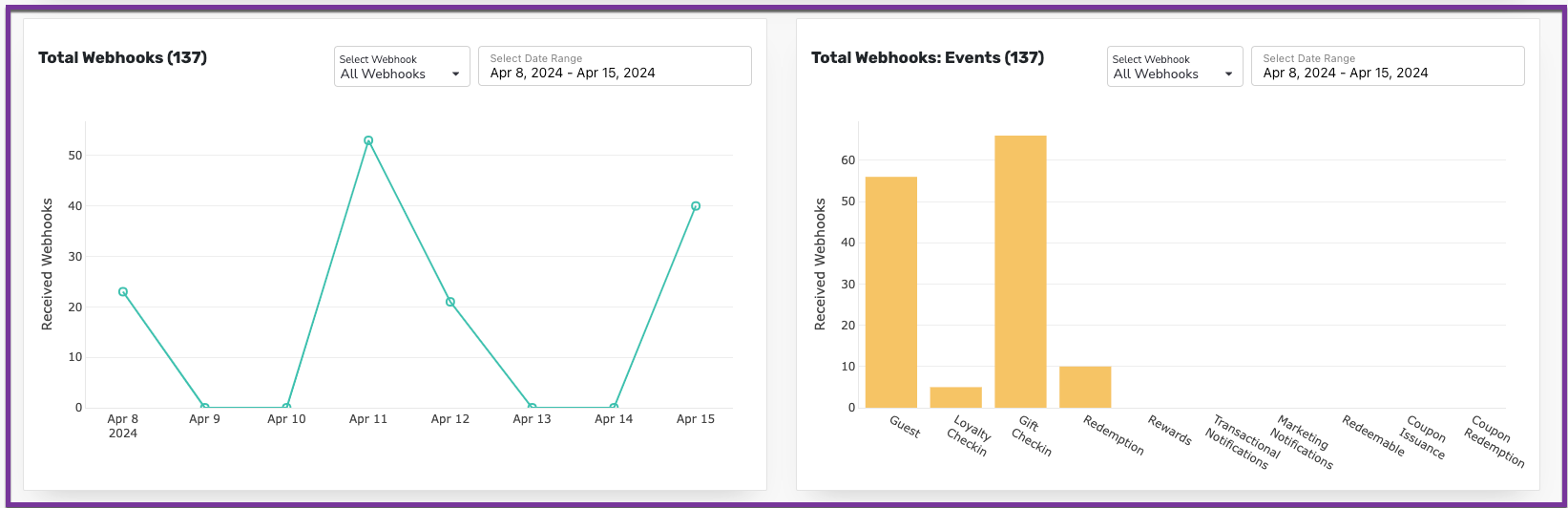
Webhooks events filtering on the home page graph was unavailable. To address this, we have integrated a drop-down menu into the first two graphs, presenting a selection of webhooks. You can choose any webhook from the list, and the graph will dynamically update to display data pertinent to the selected webhook. (INT-2386)
See the following article(s) for more details:
- Webhooks Manager (Support Portal)
Reporting & Analytics
Data Export Modifications for Redemptions and Campaigns
We have combined the Redemption List Export under the Support > Redemption Codes section with the Redemption Data Export under the Reports section. With this merger, you will be able to schedule and export the ”First Name”, ”Last name”, “User Email“, “Points/Amount Requested", and “Discount Amount“ fields along with other redemption attributes all through Data Exports. (DP1-1209)
Try it out! Redemption code export schedules will no longer be accessible under Support > Schedules. All of your existing daily, weekly, and monthly Redemption Export List schedules will be moved under Data Exports. If you want to run an ad-hoc or immediate export, you will need to use the Redemptions Data, Data Export schedule. A detailed explanation of how to do this can be found in the Data Export support article, listed below.
We have added the new Root Campaign End Date attribute to the Campaign Data Export to include the accurate end date of the root campaign. The new Root Campaign End Date field is now available on the Campaign Data Export selection screen. Root Campaign End Date contains the accurate end date of a root or parent campaign when the root campaign is present or the Campaign Root ID is not blank. The presence of a Root Campaign End Date distinguishes a root or parent campaign from a campaign. (DP1-1153)
See the following article(s) for more details:
- Data Export (Support Portal)
Resolved Issue on Data Pipeline Data Selection Screen
An issue on the Data Pipeline data selection screen caused duplicate table names to be displayed occasionally. The Data Pipeline data selection screen will no longer display duplicate entries. Individual table names will appear only once, thereby simplifying the selection process. (DP1-1181)
Punchh POS Control Center
Punchh POS Control Center (PPCC) is designed to easily manage a brand’s POS configurations, Proxy updates, and more across all of their stores. The new POS Control Center section has been added under Settings and will be visible if enabled for the business. (PPCC-1024)
See the following article(s) for more details:
- POS Control Center (Support Portal)
Developers Corner
New Age Verification Parameter
The age_verified_status parameter has been added to various Punchh API endpoints for user sign-in, user sign-up, and user update. This parameter is used if Koupon Media is selected as the age verification adapter for the business in the Punchh platform. Reach out to your Punchh representative for additional information. (PPCC-987)
