Punchh Platform Release Notes - 28 May 2024 Deployment
The updates described in these release notes and the affected/linked documentation will not be available in the Punchh platform until the target deployment date.
Loyalty
Membership Is Not Set for eClub Guests
We have optimized the platform code to ensure that eClub guests are not assigned a membership tier; eClub guests will not earn anything toward tier progress because they are not loyalty users. (LCM-2406, PDOC-2337)
See the following article(s) for more details:
- Memberships (Support Portal)
Segment Insights Updates
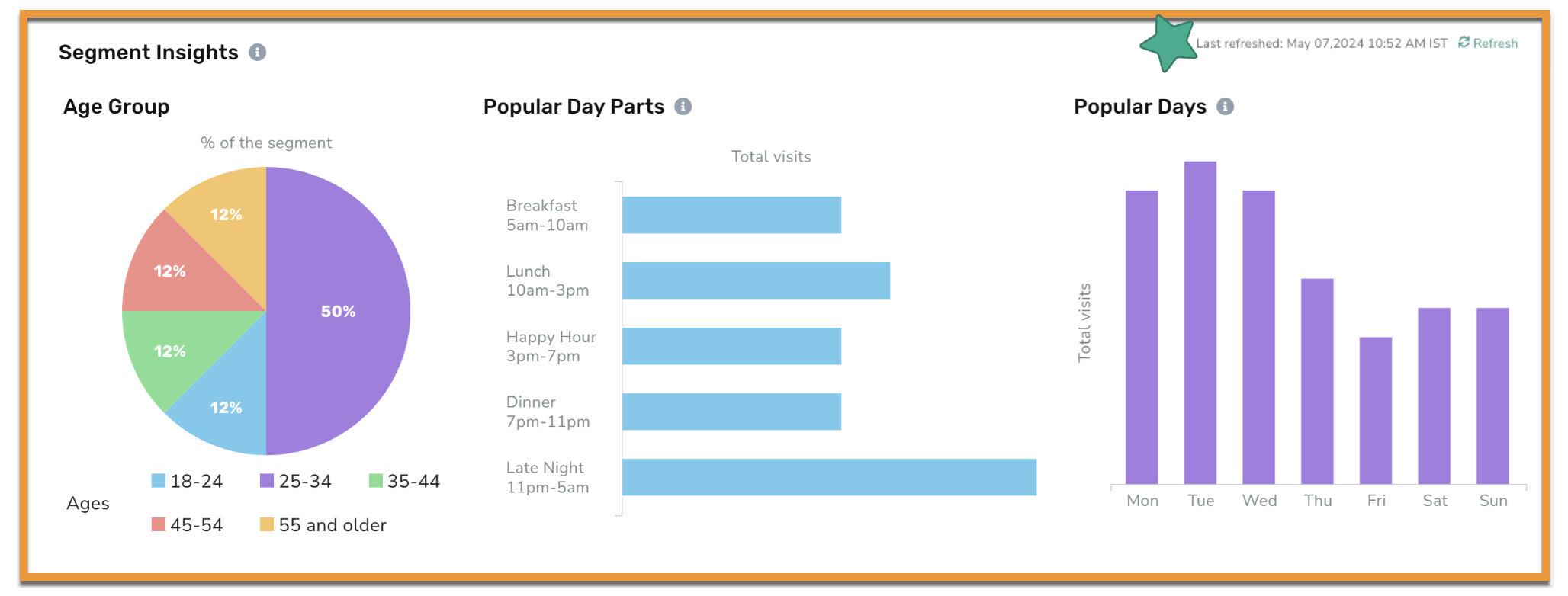
The data for Segment Insights will now be fetched as per the business time zone. (SB-2963, PDOC-2358)
We have added a refresh button to Segment Insights to ensure you can access the most updated data. This data will automatically refresh every three days, and you can manually refresh it at any time by clicking the Refresh button. (SB-2902, PDOC-2366)
See the following article(s) for more details:
- Segments (Support Portal)
Campaigns
Campaign Performance Page
Enhancements
Currently, there are many efforts being made to deepen the adoption of the Campaign Performance Page (CPP) and to work toward the deprecation of the classic page. In a recent user group session with loyalty marketers, we received specific feedback on the validity of the CPP. While we have work left to do, we are excited to move forward with what is ready today:
- Clear and consistent hover tooltips (CSR-1409)
- Channel marketing (email, push, rich, SMS) shows higher on the page and will show only those channels that were configured for the campaign. (CSR-1447)
- The page will refresh data every 12 hours for all campaign types (previously only once per day).
- Additionally, Mass offer/message campaigns will now have six data refreshes (every four hours) in the 24 hours following a campaign being processed, then move to the 12-hour standard.
- Timestamps will be added for the last refresh and next refresh so it is clear how recent the data is. (CSR-1401)
- The campaign performance section will be minimized as a default. We will be tracking how often this section is used so we can continue to make more data-driven decisions. (CSR-1410)
Repeating Campaigns
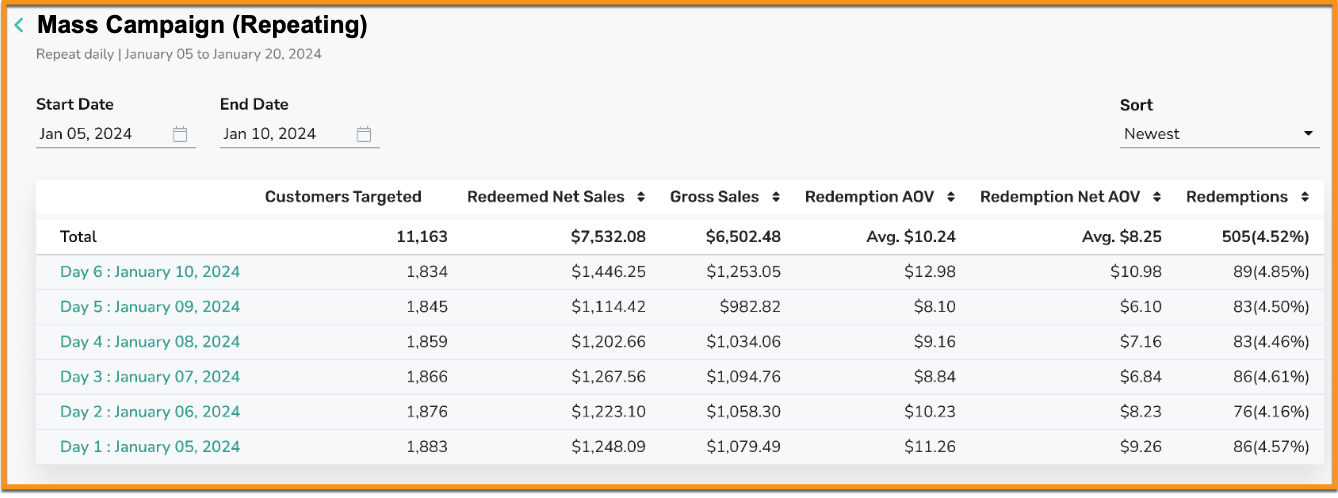
For repeating campaigns, an offer and/or a message will now have an aggregate performance page. You will no longer need to review one occurrence of a repeating campaign at a time. The aggregate performance page shows the total performance of the campaign in addition to a table that breaks down the individual performance of each campaign occurrence. You can also filter by dates, and view offer distribution/redemption to channel analytics. (CSR-1459, PDOC-2343)
See the following article(s) for more details:
- Campaign Performance Page (Support Portal)
Campaign Template Tags
Campaigns marked as templates previously created within the classic homepage will now show the tag "template" within the new Campaign Management page. This will make it easy to find all template campaigns. (CAM-5213)
Post Redemption Campaigns Now in Business Time Zone
Previously, post-redemption campaigns would operate in the UTC time zone. Now, they will align with the business time zone for a more seamless execution. (EPS-8261)
Offers
View Mode for Redeemable
Previously, if a mass campaign was scheduled to start within 24 hours of the expiration of a redeemable (as per the end time defined in the redeemable), you were not able to edit/view the redeemable definitions. You are now able to view the redeemable details while the campaign is in the "processing" status, along with being able to edit/view the redeemable definition if a mass campaign is in a "scheduled" status. (OMM-923, PDOC-2357)
Important! Currently, you can only view or edit the redeemable details if the redeemable has an expiration date via the End Time field (if Expiry Days is filled in, this will not apply). If the redeemable is attached to any other campaign type that is currently running or scheduled to run, you will not be able to view/edit the redeemable.
See the following article(s) for more details:
- Redeemables (Support Portal)
Bug Fix for Redemptions
If fuel discounts were applied in the transaction and the quantity of fuel purchase was a fractional value, then the receipt was returning only the integer value of purchased fuel quantity. The discounted line item value on the receipt will return the correct quantity of fuel purchased - fractional or integer. (OMM-886)
Webhooks Manager
Export Option for Webhook Counts
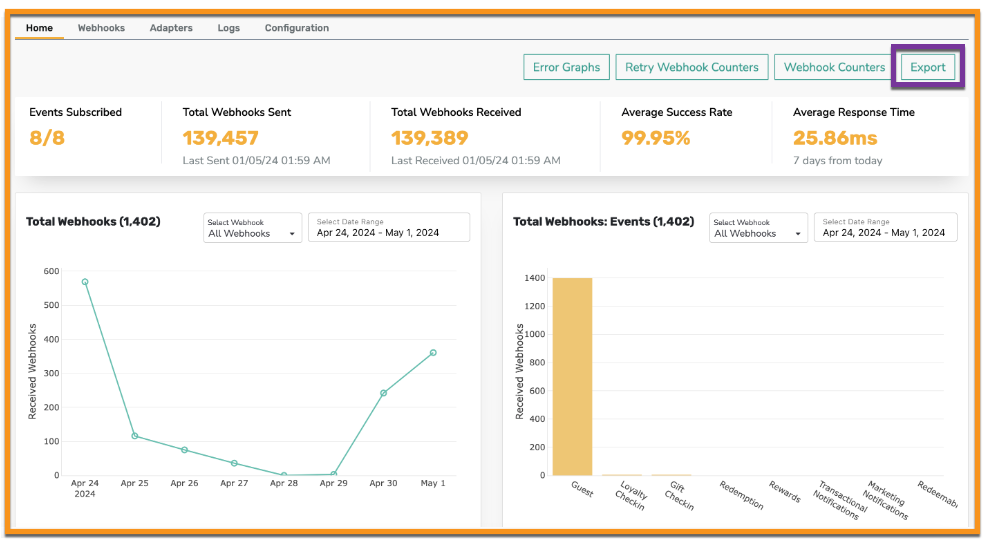
Now a business can export its webhook counts via an export option available within the Webhooks Manager section in the dashboard. (INT-2200, PDOC-2341)
See the following article(s) for more details:
- Webhooks Manager (Support Portal)
Reporting & Analytics
New Data Exports for Liability Reporting
The following reports have been added to Data Export:
- User Level Liability Data - Enables a business to assess liability or obligation to individual customers as a result of its loyalty program. The export includes metrics based on the cumulative loyalty points earned and spent by a customer, along with the associated rewards/currency/visits converted, redeemed, and expired up to a point in time. (DP1-1122, PDOC-2355)
- Location Level Liability Data - Enables a business to assess liability resulting from its loyalty program in driving customer engagement and redemptions, at a location level. The export includes metrics based on the cumulative loyalty points earned and spent, along with the associated rewards/currency/visits converted, redeemed, and expired points at each location, up to a point in time. (DP1-1121, PDOC-2356)
Try it out! Navigate to Reports > Data Export to set up a new data export template with these reports. Schedules associated with these new exports can be found in the platform under Support > Schedules > Schedule Type - Data Export Schedules.
See the following article(s) for more details:
- Data Export (Support Portal)
