Punchh Platform Release Notes - 16 December 2025 Deployment
Features marked with ** were added retroactively on May 6, 2026.
The updates described in these release notes and the affected/linked documentation will not be available in the Punchh platform until the target deployment date.
Wallet and Passes
New Smart Passes Feature
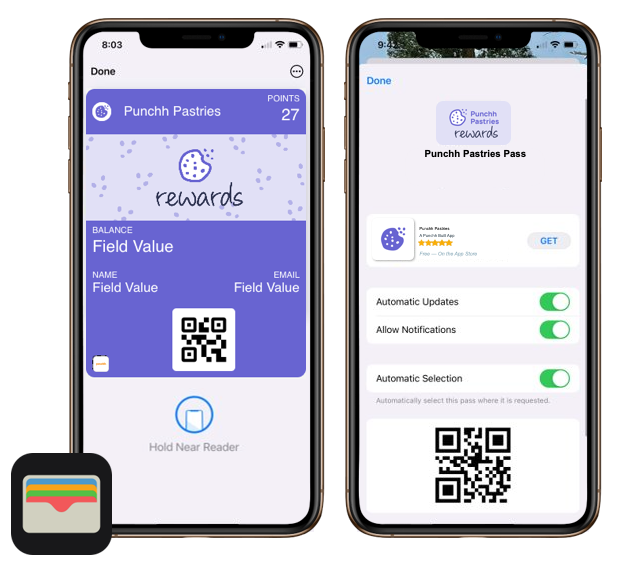
Introducing Smart Passes, a mobile wallet-native loyalty solution designed to make loyalty enrollment and engagement seamless with no app required. Living directly in Apple Wallet and Google Wallet, Smart Passes allows guests to earn, redeem, and join your loyalty program all at the POS. With this first roll-out, we are excited to offer Apple Loyalty and Google Loyalty Passes, allowing guests to enjoy the full perks of your loyalty program without the need to download the app. These loyalty passes act as a digital membership card stored in Apple Wallet or Google Wallet that provides real-time updates on customer profiles, points, and rewards. It eliminates the need for a physical card or app download, offering easy enrollment and one-click addition to digital wallets. Loyalty Passes can include links for ordering, supported QR codes or NFC, and can be distributed via SMS, email, QR codes, or websites. They enable seamless in-store redemption by surfacing rewards at the POS and serve as a convenient, engaging tool for driving customer loyalty and repeat purchases. (CAM-6823, CAM-6892, PDOC-3426, PDOC-3433)
See the following article(s) for more details:
- Smart Passes: Overview (Support Portal)
- Apple Passes (Support Portal)
- Google Passes (Support Portal)
- Implement Apple Pass Integration With POS (Developer Portal)
- Implement Google Pass Integration With POS (Developer Portal)
Subscriptions
New Subscription Taxation Page
We’ve introduced a powerful new Subscriptions Taxation page designed to streamline tax configuration and enhance accuracy across subscription purchases. (CAM-6678, PDOC-3335)
Key capabilities include:
- Bulk CSV Upload for Location-Level Tax Updates
- Brand admins with Subscription Advance permissions can now upload a CSV file to efficiently update subscription sales tax at the location level—reducing manual effort and improving scalability.
- Location Tracking for Subscription Purchases
- Subscription purchases now capture and return the location where the plan was purchased, enabling accurate origin tracking for loyalty guests.
- Location-Level Tax Configuration
- Brand admins can configure subscription tax rates for individual locations, ensuring precise tax application based on each location’s specific rate.
- State-Level Tax Configuration
- Admins can define subscription tax rates at the state level across supported countries. Locations mapped to those states will automatically inherit the defined rates, improving consistency and reducing manual setup.
- Centralized Tax Rules Management
- A new Tax Rules tab allows admins to define how sales tax is applied to subscription plans—at the location, state, or business level—ensuring centralized control and consistent taxation strategies.
Action Required If you have the Subscriptions module enabled, please contact your Punchh representative to enable the taxation feature for your brand.
See the following article(s) for more details:
- Subscription Taxation (Support Portal)
Loyalty
New Dynamic Tag for Current Year
A new dynamic tag {{current_year}} is now available across all template editors (notification templates, email templates, and campaigns). The tag will follow UTC time zone. The tag dynamically resolves to the current calendar year based on the system date. Example: In 2025, {{current_year}} renders as 2025. (LPE-1453, PDOC-3420)
See the following article(s) for more details:
- Dynamic Fields & Message Tags (Support Portal)
Challenge Campaign Opt-In/Out Options
We’re excited to introduce enhanced flexibility and control for members participating in Challenge Campaigns. Brands can now allow members to explicitly opt in to challenge campaigns that are relevant to them, rather than automatically enrolling all qualifying guests. This helps reduce clutter in the app, ensures guests engage only with challenges they care about, and increases authentic participation and completion rates. Admins can also opt in members on their behalf from the Punchh Platform, and coming in 2026, members will be able to opt in directly from the mobile app.
This release also introduces the ability for guests (and admins) to opt out of a challenge at any time. Importantly, if a guest opts out after making progress, their progress will be preserved and will seamlessly resume if they decide to opt in again later. No challenge progress is deleted on opt-out. This ensures a more forgiving and consumer-friendly experience while maintaining accurate campaign reporting for brand teams. (Mobile updates are coming in 2026.)
To support these capabilities, we’ve added back-end settings that allow brands to enable or disable guest opt-in and opt-out behavior, new API capabilities to manage enrollment status, expanded audit logging for full traceability, and UI updates within the platform. These enhancements give brands greater control, improve consumer experience, and help ensure more meaningful and accurate engagement across challenge-based campaigns. (LPE-1363, PDOC-3434)
See the following article(s) for more details:
- Challenge Campaigns (Support Portal)
- Guest Profile: Challenges (Support Portal)
Segment and Campaign Naming Convention Update
You can now reuse names from deleted segments and campaigns. Previously, names had to be unique, even if the original item was deleted. This update makes it easier to keep your naming conventions consistent. (EPS-10934)
Reporting and Analytics
New Additional Schedule Export Options for Data Export
We’ve introduced a new ‘Additional Scheduled Export’ tab under Data Export to make managing reports easier. This update brings all export types into one centralized place, so you can schedule both one-time and recurring exports without confusion. Whether you need a single report or multiple schedules, everything is now streamlined for quick setup and easy access. (INT1-1934, PDOC-3412)
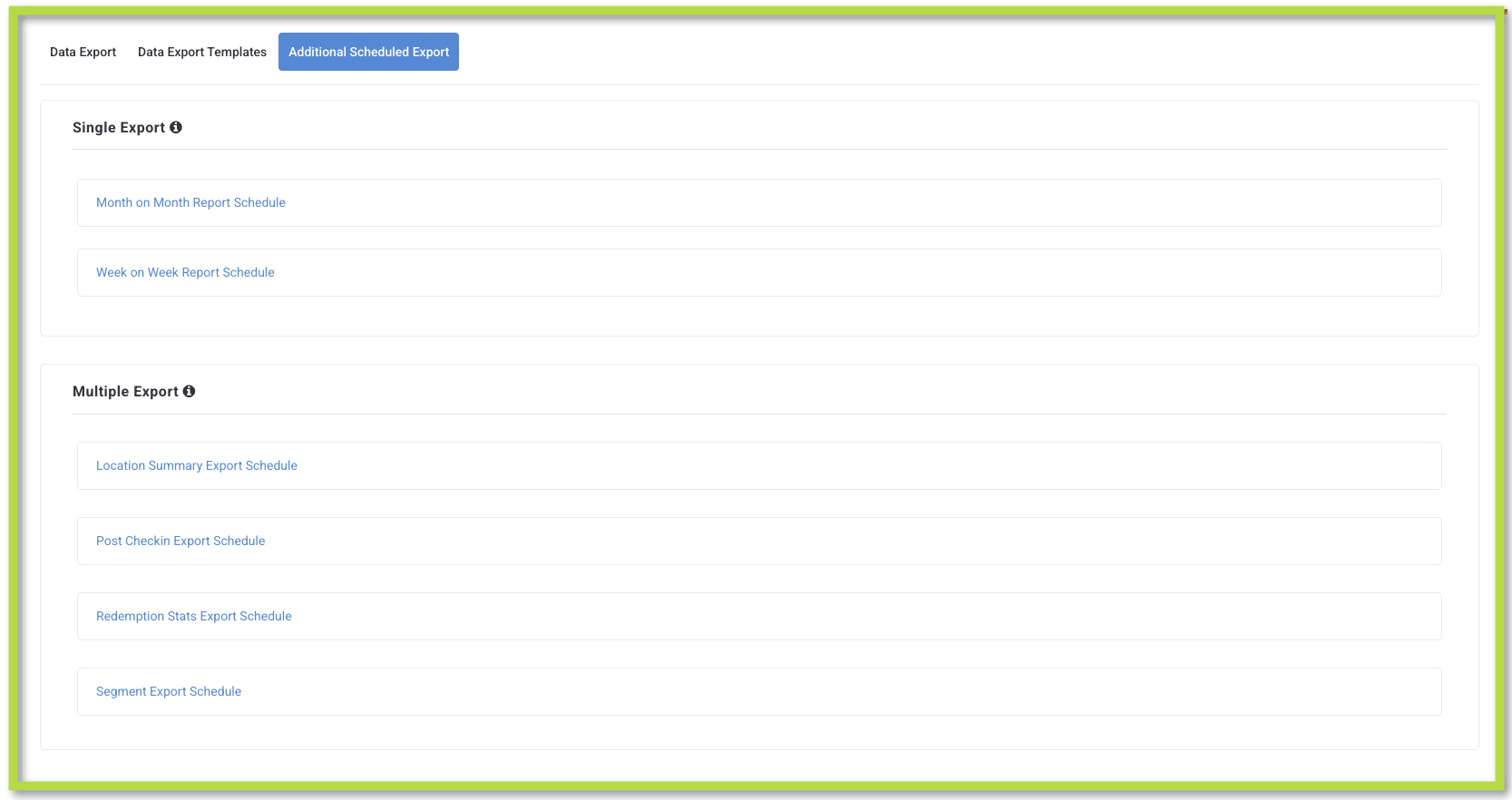
Action Required To enable this feature for your brand, please contact your Punchh representative. This feature will not be enabled by default.
See the following article(s) for more details:
- Data Export (Support Portal)
Data Schema - New Columns**
A new column 'preferences' has been added to the 'qualification_criteria' table. (OMM-1322)
See the following article(s) for more details:
- Database Schema and Data Field Change Announcements (Support Portal)
- Data Pipeline - Data Dictionary (Support Portal)
**A new column 'redemption_state' has been added to the 'redemptions' table. (OMM-1563)**
See the following article(s) for more details:
- Database Schema and Data Field Change Announcements (Support Portal)
- Data Pipeline - Data Dictionary (Support Portal)
Offers
New Operator Options in Qualification Criteria
You can now define discounting criteria in offers using an 'OR' operator within Qualification Criteria > Line Item Filter Conditions and Qualification Criteria > Item Qualifier Conditions, by selecting the "Logical Operator Strategy – All/Any". When Any is selected under the Line Item Filter Conditions, the system will evaluate line items based on the chosen Discount Evaluation Strategy – Max/Min, allowing you to create offers where any qualifying item on the receipt can be eligible for the discount. By selecting Any under the Item Qualifier Conditions, an offer will qualify a guest if any of the specified eligibility conditions are met. (OMM-1535, OMM-1322, PDOC-3419)
See the following article(s) for more details:
- Qualification Criteria (Support Portal)
- How do I use the Logical Operator Strategy field when building a Qualification Criteria (QC)? (Support Portal)
Enhancements to Stage Multiple Redemption Codes
The Processable Redemption code per Guest setting has been extended to all program types, allowing your brand to stage multiple redemption codes at a time to improve the front-end guest experience. Based on the input value, guests will be able to stage multiple loyalty offers at a time. (This will be applicable only if the Exclude Staged offers from Redemption Wait Period setting is selected for the business.) (OMM-1524)
Updates to Redemption Wait Period
The Redemption Wait Period setting is used to restrict the redemption of offers as per the defined time period. The current validation checked redeemed, expired, and staged offers. This meant that if a guest had staged an offer, they had to wait for the redemption period before staging another one (if they want to replace the staged offer). Or if a guest stated an offer that then expired before use, they still had to wait the full redemption period for staging a new offer.
As part of this enhancement, the Redemption Wait Period will consider only 'redeemed' offers in the validation. Additionally, a feature flag Exclude staged offers from Redemption Wait Period has been introduced to allow your brand to exclude staged offers from this validation. If this flag is selected, then staged offers will not be considered in the Redemption Wait Period validation. (OMM-1517)
Developers Corner
New Parameter for Subscription Taxation Support Added to Program Meta API
A new boolean response parameter enable_subscription_taxation_support has been added to the Program Meta API (GET /api2/mobile/meta.json). Mobile apps can now use this parameter to dynamically control the display and behavior of subscription tax line items during check-out without requiring app updates. Contact your Punchh representative to update this Punchh platform configuration. (CAM-6681, PDOC-3347)
See the following article(s) for more details:
- Program Meta (Developer Portal)
Introducing Short Code-Based Loyalty Identification for Drive-Thru
We’re introducing a new 4-digit short code-based loyalty identification flow designed specifically for drive-thru experiences. This enhancement allows loyalty members to generate a short code in the mobile app and share it verbally at the drive-thru window, enabling faster and more convenient account look-up for store operators. You need to call the new Generate a Drive-Thru Short Code API endpoint (POST /api2/mobile/drivethru_code) in the mobile flow to generate the short code. The short code is only for loyalty account identification (earn/burn eligibility). It is not linked to the Single Scan Flow (SSF) or payment initiation. Brands currently using SSF will continue using the QR-based flow until short code and payment support are introduced. (LPE-1544, PDOC-3396)
To enable this capability, brands must:
- Update to the latest POS integration version that supports the new short code look-up parameter.
- Use the mobile APIs to design and implement the short code generation UI in their mobile applications.
See the following article(s) for more details:
- Generate a Drive-Thru Short Code (Developer Portal)
Enhancements to Program Meta API for Drive-Thru Identification
We have enhanced the Program Meta API (GET /api2/mobile/meta.json) by adding two new response parameters: enable_loyalty_identification_at_drive_thru and drive_thru_location_level_strategy. (LPE-1551, PDOC-3438)
enable_loyalty_identification_at_drive_thruindicates whether the user can generate the 4-digit numeric/alphanumeric short code in the mobile app.drive_thru_location_level_strategyindicates whether the drive-thru short code should be generated from the location-level pool.
See the following article(s) for more details:
- Program Meta (Developer Portal)
- Generate a Drive-Thru Short Code (Developer Portal)
New drive_thru_code Parameter in the User Look-up and Fetch Balance API
We have updated the User Look-up and Fetch Balance API (GET /api/pos/users/search) to include a new drive_thru_code parameter that accepts a 4-digit short code. This parameter allows the POS to identify the loyalty guest and retrieve the guest's corresponding balance. The short code is generated by the user in the brand’s mobile app. (LPE-1547, PDOC-3397)
See the following article(s) for more details:
- User Look-up and Fetch Balance (Developer Portal)
- Generate a Drive-Thru Short Code (Developer Portal)
- Single Scan Flow (Developer Portal)
New Challenge Opt-in and Opt-out Parameters Added to Program Meta API
We’ve enhanced the Program Meta API (GET /api2/mobile/meta.json) by adding two new boolean response parameters that control guest participation options for challenge-based activities: enable_guest_challenge_opt_in and enable_guest_challenge_opt_out. The values of these parameters (true or false) reflect the challenge settings configured at the business level in the Punchh platform. Opt-in must be enabled for challenges in the Punchh platform if Opt-out functionality is required. Contact your Punchh representative to update this configuration setting. (LPE-1363, PDOC-3428)
See the following article(s) for more details:
- Program Meta API (Developer Portal)
New APIs Added for Challenge Opt-in and Opt-out
We have added two new APIs: Opt In to Challenge (PUT /api2/mobile/challenge_opt_in) and Opt Out of Challenge (PUT /api2/mobile/challenge_opt_out) to allow loyalty users to join or leave a challenge directly from the mobile app. By default, both opt-in and opt-out functionalities are disabled at the business level. Please contact your Punchh representative to enable these configuration settings. (LPE-1487, PDOC-3435, PDOC-3436)
See the following article(s) for more details:
- Opt In to Challenge (Developer Portal)
- Opt Out of Challenge (Developer Portal)
Enhancement to Fetch Challenge Details API
We have enhanced the Fetch Challenge Details API (GET /api2/mobile/challenges/{id}) by adding a new opted_in response parameter. This parameter indicates whether the loyalty user has opted in to the challenge. (LPE-1380, PDOC-3437)
The opted_in status enables the mobile app to determine which action button to display on the challenge card:
- If
opted_inis true, the mobile app displays the Opt Out button. - If
opted_inis false, the mobile app displays the Opt In button.
This update ensures that the challenge card UI always reflects the user’s current participation status.
See the following article(s) for more details:
- Fetch Challenge Details (Developer Portal)
