Punchh Platform Release Notes - 30 September 2025 Deployment
The updates described in these release notes and the affected/linked documentation will not be available in the Punchh platform until the target deployment date.
Campaigns
Fixed Issue With Campaign Currency Expiry Logic
You can now set campaign currency to expire on the same day by entering '1' in the Expiry (In Days) field. For example, if a campaign is scheduled to deliver on 9/15/25 and a '1' is entered, the currency will expire on 9/15/25 at 11:59 PM. (EPS-10685, PDOC-3261)
See any Offer campaign type article(s) for more details. For example:
- Mass Offer Campaign (Support Porta)
Loyalty
Location and Location Groups Management
We’ve introduced bulk location group creation capability to make managing location groups faster and easier: (LPE-1536, PDOC-3266)
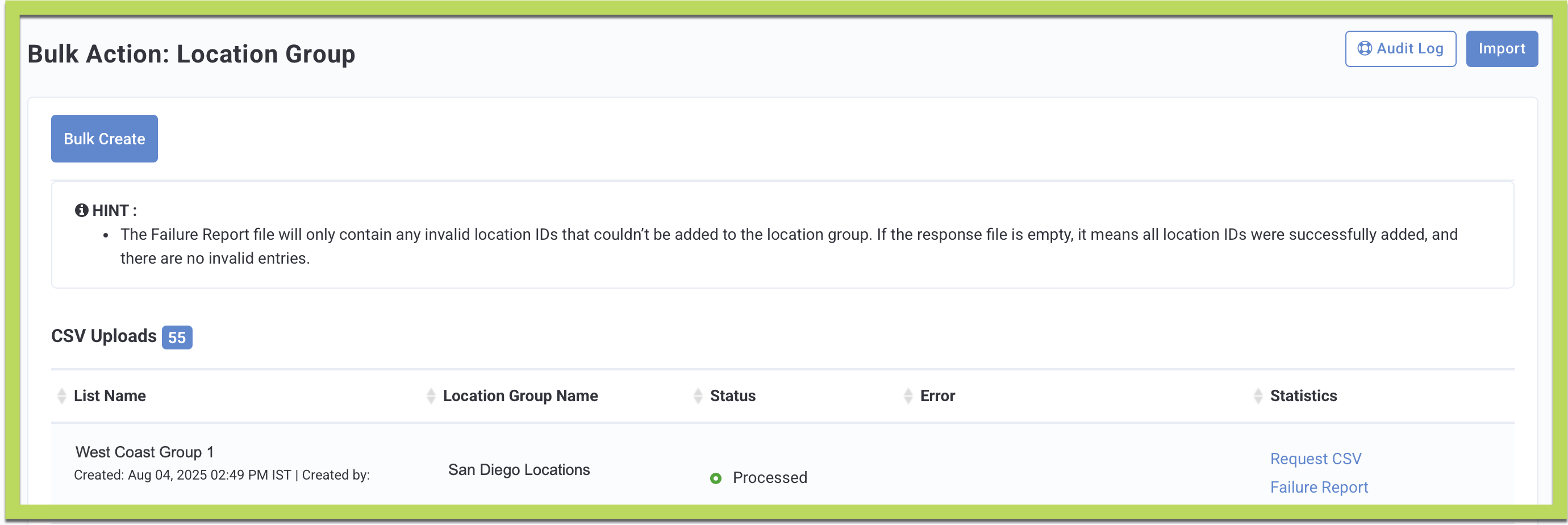
- Bulk Create Location Groups: A new Bulk Action button is available on the Location Group screen. Brand Admins can upload a CSV file to quickly create location groups, rather than adding them manually one by one.
- Export Location List: On the All Store Locations screen (under the 3-dot drop-down), Brand Admins can download a CSV of all locations (location_id, store_id, name, status) directly from the dashboard.
- Improved Validation and Feedback: Clear email notifications are sent after CSV uploads (success, partial success, or failure), with attached CSV reports listing invalid or restricted location IDs.
- Franchisee Admin Access Control: Franchisee Admins can only view bulk uploads created by themselves or other admins from the same franchise.
In addition, Brand Admins with location creation permissions can now upload a CSV file to bulk-create multiple locations at once. (LPE-1537, PDOC-3289)

Key Capabilities:
- Upload a CSV file (≤15 MB) to create multiple locations in one action.
- Invalid rows (e.g., duplicate names, invalid franchise/location group IDs) are skipped, while valid rows are processed.
- Admins receive email notifications after upload with status: Success, Partial Success, or Failure.
- A downloadable error file (CSV) is included in the email if some rows fail.
- Franchisee admins can only access/download location IDs for their assigned franchises.
This enhancement saves time and ensures data security by preventing manual entry errors and restricting access to franchise-specific data.
See the following article(s) for more details:
- Store Locations (Support Portal)
- Location Groups (Support Portal)
Gift Points Now Excluded From Tier Progression Qualification
We have introduced a new configuration that enhances the accuracy and fairness of tier progression by excluding gifted points from tier qualification. Previously, all earned points—including gifted points—were counted toward tier movement, which could result in unintended tier upgrades. With this update, only spending-based transactional activity will influence a guest’s tier status. (LPE-1538, PDOC-3139)
- Default Behavior: All gifted points across channels (e.g., support gifting, point multiplier campaigns, program restructure adjustments, promotional gifting, etc.) will be excluded from tier calculations by default.
- Support Gifting Flexibility: While using the Punchh Dashboard, admins will have the option to include gifted points in tier progression only when awarding points for a failed check-in or similar operational needs.
- Forward-Looking Impact: If enabled in the middle of a re-evaluation cycle, gifted points awarded after enablement will no longer count toward tier progression. Previously gifted points will remain included in historical tier evaluations.
Benefits
- Ensures tier progression reflects true customer spending and engagement, not system-awarded gifts.
- Provides greater program integrity and fairness for loyalty members.
- Maintains admin flexibility for exceptional cases like failed check-ins.
Action Required: For brands that already have live membership tiers, this feature will remain OFF by default. If you would like to take advantage of it, please reach out to your Punchh representative, who can guide you through the next steps. No changes are being made to your loyalty program without your consent.
See the following article(s) for more details:
- Membership Tiers (Support Portal)
- Guest Profile: Message/Gift (Support Portal)
Reporting and Analytics
Clarification for Guest Awaiting Migration Data Export
Added a clarification in the Guests Awaiting Migration data export: Date range filter and location filter are not applicable to Guests Awaiting Migration data. This update ensures better transparency and avoids confusion while using this export. (INT1-1804, PDOC-3285)
See the following article(s) for more details:
- Data Export (Support Portal)
Data Schema - New Column
A new column 'franchisee_id' has been added to the 'bulk_guest_activites' table. (LPE-1389, PDOC-3267)
See the following article(s) for more details:
- Database Schema and Data Field Change Announcements (Support Portal)
Platform Integrations
PAR POS Systems Enhancements
We have introduced a flag, dark_flag_stop_duplicate_vendor_transaction, to stop all duplicate transactions coming from PAR POS, PAR, and BRINK. (INT-3382)
Action Required: Please reach out to your Punchh representative with questions and to discuss enabling this for your brand.
This new business setting helps prevent duplicate vendor transactions from PAR POS systems. When enabled, this feature will validate incoming transactions and block duplicates before processing, preventing duplicate receipt submissions from PAR POS systems and improving transaction accuracy. If a duplicate receipt is detected within 12 hours, users will receive an error message: "You cannot use the same receipt more than once." (INT-3381)
Developers Corner
Redemption API Update – Qualification Criteria in Failed Responses (Phase 2)
As part of Phase 2 of our Redemptions API improvements, the system now returns all qualification criteria (receipt-level and line-item) for submitted offers that fail in the responses of the Batch Redemption Process 2.0 APIs for Online Ordering and POS. Redemptions 1.0 API endpoints were updated in the September 9 release, and Redemptions 2.0 API endpoints will be released on September 30. This feature is available only when enabled for the brand in the Punchh platform. Brands must contact their Punchh representative to update this Punchh platform configuration. (CAM-6565, PDOC-3292)
With this enhancement, when a redemption request fails, the response will now include all qualifiers for the offer (both receipt-level and line-item). While the overall status will remain “failed”, this enhancement enables loyalty marketers and digital teams to:
- Build logic across online and in-store ordering to understand why an offer did not qualify.
- Deliver custom messaging that helps improve order conversion after failed offer redemptions.
The responses of the Batch Redemption Process 2.0 APIs for Online Ordering and POS now include a new response parameter, the qualifying_conditions object, which lists the failed qualification criteria for submitted offers.
See the following article(s) for more details:
- Batch Redemption Process - POS (Redemptions 2.0) (Developer Portal)
- Batch Redemption Process - Online Ordering (Redemptions 2.0) (Developer Portal)
Campaign Name Tracking in Redemptions APIs
We’ve enhanced the Redemptions APIs (Redemptions 1.0 and Redemptions 2.0) to include the associated campaign_name in the API. The response parameter is returned under the discount_details object in Redemptions 2.0 APIs. This enables businesses to track the originating marketing campaign whenever an offer (Redeemables, Rewards, Coupons, or Promos) is redeemed through POS, Online Ordering, or the Mobile App. The enhancement provides greater visibility into campaign performance and ensures redemptions can be traced back to their source. (OMM-1341. PDOC-3280)
See the following article(s) for more details:
- Possible Redemptions - POS (Redemptions 1.0) (Developer Portal)
- Create Redemption - POS (Redemptions 1.0) and Online Ordering (Redemptions 1.0) (Developer Portal)
- Discount Lookup - POS (Redemptions 2.0) (Developer Portal)
- Auto Redemptions - POS (Redemptions 2.0) and Online Ordering (Redemptions 2.0) (Developer Portal)
- Batch Redemption Process - POS (Redemptions 2.0) and Online Ordering (Redemptions 2.0) (Developer Portal)
- Add Selection to Discount Basket - POS (Redemptions 2.0), Online Ordering (Redemptions 2.0), and Mobile (Redemptions 2.0) (Developer Portal)
- Remove Item From Discount Basket - POS (Redemptions 2.0), Online Ordering (Redemptions 2.0), and Mobile (Redemptions 2.0) (Developer Portal)
- Get Active Discount Basket - POS (Redemptions 2.0), Online Ordering (Redemptions 2.0), and Mobile (Redemptions 2.0) (Developer Portal)
New Redemption Look-up API in Platform Functions
We’ve introduced a new Platform Functions API that allows businesses to retrieve detailed redemption information for transactions processed through Online Ordering or Point-of-Sale (POS) channels. By providing order-level visibility into applied offers and discounts, this API supports accurate reconciliation across platforms, improves reporting and analytics, and ensures consistency in backend systems and on customer receipts. (CAM-6551, PDOC-3263)
This API gives brands:
- Direct visibility: POS/Admins can query Punchh to identify which offers were redeemed for a given transaction.
- Comprehensive details: The API response returns full details about discounts applied, including discount type (coupon, promo, reward, redeemable, subscription, or currency), discount IDs, redemption IDs, and offer metadata (name, description, image, start/end dates, value, points, etc.).
- Improved clarity: Removes ambiguity of generic receipt labels like “Punchh/Loyalty Discount.”
- Better accuracy: Supports more precise reporting, reconciliation, and customer-facing receipts.
See the following article(s) for more details:
- Redemption Look-up (Developer Portal)
