Data Pipeline - FAQs
General FAQs
Where can I find all the documentation related to the Data Pipeline?
Expand
You can access the complete documentation below:
- Data Tables and Dictionary: Data Pipeline - Data Dictionary
- Setup Guide: Data Pipeline - Overview
- FAQs: Data Pipeline - FAQs
How is participation rate % calculated?
Expand
The Participation Rate is a stat that signifies how many Loyalty Guests are utilizing the program. The information below will lay out how the Participation Rate is compiled:
- Participation Rate consists of the Percent of POS transaction made by Loyalty Members who checked in
- If they did not check-in but are part of the loyalty program, they are not counted.
- To ensure outliers don't skew data, locations with participation rates greater than 90% are not considered.
- The Participation Rate can be filtered by Date and Location.
- The Participation Rate can be found on the landing page and the Scoreboard.
- When viewed on the Scoreboard the Participation Rate is displayed by Location.
Formula: (Total Loyalty Receipts/Total Receipts In POS) *100
What’s the difference between “Rewards” and “Redeemables”?
Expand
- Redeemables contain the master list of reward types.
- Rewards record user-level reward entries, which appear only after a guest is targeted or activated in a campaign.
(Future or inactive campaigns will not appear in the Rewards table until activation)
How long does it take to start using the Data Pipeline after signing the contract?
Expand
Once the contract is signed and legal formalities are complete, the CSM will enable the Data Pipeline for your business (or coordinate with our team to do so).
This typically takes 24–48 business hours.
Do I need to do anything on my end after signing the contract?
Expand
Yes. Before data delivery can begin, you’ll need to set up your data pipeline destination — i.e., your storage account on Microsoft Azure, AWS, or GCP.
This will serve as the location where you’ll receive data from Punchh.
A detailed setup guide is available on Salesforce.
Setup Guide: Data Pipeline - Overview
How often does the database or schema change?
Expand
We follow a monthly release cycle:
- ~80% of changes involve new column additions.
- ~20% of changes may potentially impact existing integrations.
For impactful updates, we always provide a five-week notice to ensure your ETL processes remain unaffected.
We want to ingest all Punchh data into our data warehouse. Is Data Pipeline a good option?
Expand
Yes. The Data Pipeline offers a fast, automated, and scalable solution to transfer Punchh data into your data warehouse.
It eliminates manual effort, ensures consistency and completeness, and delivers ETL-ready data, making integration and maintenance much easier.
Why is there a cost to access our own data, and how is it determined?
Expand
The Data Pipeline involves continuous infrastructure, engineering, and maintenance to securely collect, process, and deliver high volumes of data in near real-time.
The cost supports secure, accurate, and reliable data delivery, without the need for you to build or manage these systems internally.
Pricing depends on:
- The number of locations in your business.
- The frequency of data delivery (lower frequency = higher cost).
The users extract in the SFTP container contains PII fields. Can these be excluded?
Expand
At this time, field exclusion (like PII removal) is applied at the tenant level, not per individual business.
Supporting business-specific field filtering would require additional engineering work outside current configuration capabilities.
To meet such requirements, we recommend using the Guest Data Export instead of the Data Pipeline.
The Guest Export allows you to customize your dataset and select only the fields you need, letting you exclude fields such as email, name, phone number, and address.
Is there a field available that indicates the user’s status?
Expand
Regarding a way to track the user status of ' deactivated' we are sending users table to DP 2.0 customer, and it contains all information (for more information around this, please reach out to someone from the loyalty team).
See: Subscription Status Codes
Is there a field available that indicates the user’s status?
Expand
Regarding a way to track the user status of ' deactivated' we are sending users table to DP 2.0 customer, and it contains all information (for more information around this, please reach out to someone from the loyalty team).
See: Subscription Status Codes
Which Punchh Data Table tracks Device Type Per User?
Expand
Guest Data export will be able to provide the device type informaton for each user.
Are Punchh audit log events part of the Data Pipeline events that are sent to a client? Use case: Brand wants to monitor in their environment sign in events, config changes, etc. having the logs within the Punchh.
Expand
Yes, the audit log event (version) table is part of Data Pipeline 2.0.
In this, you can get details like business config changes and many other table data changes. But this will not save when the user sign-in/sign-out.
In Data Pipeline, what does USERS.UNSUBSCRIBED refer to? “Users.unsubscribed” field, does that refer to unsubscribes by the user from all channels (Email, SMS etc.) or is it only push notifications?
Expand
Subscription codes denote a combination of opt-in/out statuses (email, PN, SMS, e-receipt) and user status (banned or archived). A full list of codes can be found at the bottom of article.
Does Data Pipeline 2.0 Include POS Line Item Detail?
Expand
Data Pipeline standard set includes receipt_details (including line item details) and receipt_stats tables. Both these tables contain loyalty transactions.
Does either data exports or Data Pipeline include non-loyalty receipt data?
Expand
Data pipeline is sending all the data from the tables subscribed by the brands. In most cases it is only loyalty data, however we have some tables like receipts and users which include both.
How is the data stored in the storage location? Is it a single parquet/json file or multiple?
Expand
- Structure of Data file in destination: <bucket/container>/<table><year>/<month>/<day>/part_file.<file_format>
- Multiple Parquet files are stored within each location, not just a single file.
Table Specific FAQs
This list serves as 'how-to' guide and includes answers to some frequently asked questions
| Table Specific Questions | Answers |
|---|---|
| Businesses | |
| What can I expect to see on Businesses table? | You will find your business details only |
| Campaigns | |
| Why is the redeemable_id missing for certain campaigns in the campaigns table? | In post-redemption campaigns, two key values determine campaign behavior:
|
| Checkins | |
| I noticed that this table contains a lot of "gift" rows where guests were gifted/spent 10000+ points. Is this table a receipt-based transactional table, or more of a points collection kind of table? | The gift rows are from migration |
| Feedback | |
| How is sentiment analysis for feedback performed? | The documentation can be found here - Feedback Sentiment |
| Free_Punchh_campaigns | |
| Is Free_Punchh_Campaigns related to campaigns table in any way? How is it different? | There are three main tables that store different types of campaigns - MASS_GIFTINGS which records all the meta data for mass gifting campaigns. FREE_PUNCHH_CAMPAIGNS which records all the meta data for Post Checkin campaigns. CAMPAIGNS which records all the meta data for all campaigns that are not Mass Gifting or Post Checkin. For understanding each campaign type in details, please refer to the help section on the portal or reach out to CS Team @ Punchh |
| Games | |
| How do I utilize this table? | "Games" table will be populated if "Games" module is enabled for your business |
| Locations | |
| How can I select a set of locations or stores to study characteristics such as guest behavior, participation rate, online ordering etc? | If you want to group locations by a characteristic, you can use location group feature. For detailed explanation on how to create location groups, please contact CS/Product Teams @ Punchh |
| Loyalty_Cards | |
| How do I connect loyalty cards to loyalty members? | LOYALTY_CARDS has user_id field. You may use it to join with USERS table on id field to get the User information |
| Membership_level_histories | |
| What’s the granularity of data? Is this a Type 2 SCD table? | "The granularity of data for membership_level_histories is business_id + user_id + membership_level_id The table stores entry per every membership level every user has had or is having for the brand under consideration A type 2 SCD retains the full history of values. When the value of a chosen attribute changes, the current record is closed. A new record is created with the changed data values and this new record becomes the current record Therefore, membership_level_histories is a Type 2 SCD table " |
| Program_benefits | |
| What is qualification_criterion_id? | Detailed explanation of qualification criterion can be found on the platform - Qualification Criteria |
| Qualifying_expressions | |
| In the qualifying_expressions table, what do the values in the expression_type field mean? | The expression_type field defines the type of logic used for item qualification. Below are the possible values and their meanings:
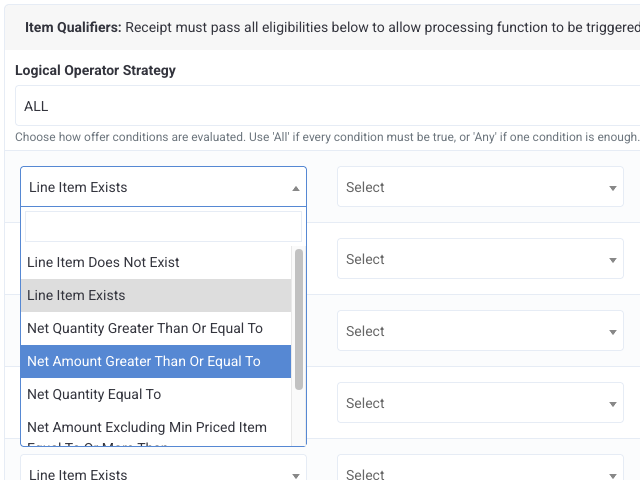 |
| Receipt_data | |
| pos_type column populating with "null" value in the receipt_data table | From a product perspective, we can confirm that the POS Type in Punchh can only be obtained in the transaction received through POS APIs, not through Online Ordering. |
| Receipt_details | |
| What’s with the menu_items column and redeemed_menu_items in the redemption_codes table? They are hard to parse Why is receipt_time an integer instead of a datetime? Can I assume user_id is the correct analog to Loyalty_ID? Who can provide more details about revenue_code? | Menu_items column and redeemed_menu_items column details have to be parsed out. There is no other option *** RECEIPT_DETAILS.receipt_time is a HHMM value. If you need receipt date time, you should use RECEIPT_DETAILS.receipt_datetime which is a date time stamp *** No, user_id is not synonymous with loyalty_id. Even eClub users who have not converted yet to loyalty will have a user_id *** For all revenue code related questions please talk to the POS/Product team at Punchh through your CSM |
| Receipt_stats | |
| What are the use cases for the max/min columns? These columns are not always populated. Is this data inclusive of all fuel/dual/inside transactions? | Max/min columns are used in Lift Report on the platform (https://dashboard.punchh.com/lift\_report) All receipt amounts, unless explicitly mentioned, are NET. Meaning the amounts are reported after removing discounts. |
| Redemption_codes | |
| What is the difference between the redemption_codes and redemptions tables? They seem to contain similar identifiers, with different columns. How to utilize these tables the right way? | "Every time a loyalty user attempts to generate a code against the offer/reward in the account, an entry is created in REDEMPTION_CODES. It doesn’t matter whether that generated code is successfully applied or if it expires – an entry is created in REDEMPTION_CODES irrespectively. If you want to pull REDEMPTON_CODES records that were successful, use the condition status = ‘processed’ It is important to note that records in REDEMPTION_CODES does NOT have USER_ID. But it does have the amount details of the redemption and the redeemed menu items " |
| Redemptions | |
| What is the difference between the redemption_codes and redemptions tables? They seem to contain similar identifiers, with different columns. How to utilize these tables the right way? | "REDEMPTIONS table attributes an attempt of redemption to a USER_ID. In other words, the (almost all) redemption attempts stored in REDEMPTION_CODES can be tied back to the records in REDEMPTIONS using REDEMPTIONS.REDEMPTION_CODE_ID = REDEMPTION_CODES.ID In addition, REDEMPTIONS table also records events where a loyalty user transfers the offer in their account to an other loyalty user. You can check this with the condition of REDEMPTIONS.TYPE = ‘RewardRedemption’ and REDEMPTIONS.TRANSFERRED_TO_TYPE = ‘User’. You will find that there will be no corresponding entries in REDEMPTION_CODES for this type of records in REDEMPTIONS table. (For more details on Loyalty Transfer feature, please talk to Product @ Punchh to showcase the feature). REDEMPTIONS table also holds the key information related to the reward_id against which the redemption is made. Note that not all records in REDEMPTIONS have a non-null reward_id field. This is especially true of Loyalty Rewards in the case of Point Unlock Redeemable Program structure It is important to note that “almost all” redemption attempts stored in REDEMPTION_CODES can be tied back to the records in REDEMPTIONS. Anecdotally, we found less than 0.05% of records in REDEMPTION_CODES for which no corresponding transactions/redemptions are found by the application job and are therefore orphaned" |
| What’s the difference between ‘RedeemableRedemption’ and ‘Redemption’ in the Redemptions data? |
|
| Reward_credits | |
| What data is included in the reward_credits table? | The reward_credits table contains information about all reward balances credited to a user through earning points. This table tracks all currency-based gifts or rewards that a loyalty user earns or receives. It also records reward credits(banked_reward_value) generated from user subscriptions, for example, when a user buys a subscription, this table is updated with credits earned at each subscription threshold. “Reward balances” represent the total reward value currently available to a user, essentially, what’s been credited to their account but not yet redeemed. |
| How do I utilize this table? | This table records all currency based gifts/rewards earned by/gifted to the loyalty user. It also records the credits (banked_reward_value) coming from user subscriptions (when a user purchases a subscription, REWARD_CREDITS table gets populated) against each threshold within the user subscription. |
| Is the reward_credits value represented in currency, points, or rewards? | The reward_credits table accounts only for banked rewards. |
| Reward_debits | |
| How do I utilize this table? | REWARDS_DEBITS table gets populated when a user debits their subscription based rewards against each threshold. In the context of your business, for the subscription based rewards that were credited against a user subscription for each threshold, corresponding debit events are attributed. In other words, you can find out how each of the subscription credit was debited |
| Segment_definitions | |
| How do I leverage the data in segment_definitions? | SEGMENT_DEFINITIONS table records the metadata of the segments created and used in campaigns. You can find documentation on segments here - Segments |
| Subscription_discounts | |
| What’s the granularity of data? *** Is this a transactional table? *** How to tie this transaction back to ‘checkin_id’ or ‘receipt_detail_id? *** How do I find the Gallons consumed by a user in a loyalty transaction |
The granularity of data for subscription_discounts table is business_id + user_id + user_subscription_id (which has a subscription_plan_id attached to it) + program_benefit_id + discounting_rule_id The table stores entry per every threshold level discount sanctioned to a user subscription It is worthy to note that a user_subcription always has only one program_benefit_id attached. Therefore, for all practical purposes it can be omitted without affecting the granularity of data, while calculating aggregations *** If you consider user_subscriptions as a transactional table, then subscription_discounts is also a transactional table However, an entry in subscription_discounts is not a TRUE transaction, the same way creation of an entry in user_subscription is not a TRUE transaction Whenever a user subscription is created, user is given discounts in advance for each threshold within the subscription plan attached. Therefore, this table is a record of all the available discounts given to the user subscription, one for each threshold level. This table is NOT a record of the events of actual discounts being claimed against the user subscription *** As mentioned in the above section, the entries in the subscription_discounts are NOT a record of the events of actual discounts being claimed against the user subscription Having said that, if you would like to track the events of successful discount claimed against the user subscriptions and tie them back with receipt_details (receipt_detail_id) and checkins (checkin_id), here is how you can do it: Find all successful subscription redemptions in the REDEMPTIONS table by using type = ‘SubscriptionRedemption’ and (inner) join it with REDEMPTION_CODES table on redemption_code_id in REDEMPTIONS table = id in REDEMPTIONS table and status in REDEMPTION_CODES = ‘processed’ For all these entries, left join it with RECEIPT_DETAILS table, with join on user_id, location_id and transaction_no column (which are present in both REDEMPTION + REDEMPTION_CODES data set and RECEIPT_DETAILS) Important Note: For close to 97% of the entries you will see that there are successful matches between REDEMPTION+REDEMPTION_CODES data set and RECEIPT_DETAILS. However, for the remaining 3% of the entries there will be no matches. Reasons include, but not limited to, the redemption transactions not being identified by user a loyalty transaction (meaning no checkin is made against that transaction) *** if you would like to find the Gallons consumed by a user in a loyalty transaction, you can find it in the column MENU_ITEMS in the RECEIPT_DETAILS table Each menu item is separated by a carat (^). For each menu item, the string between the first and second pipe contains the quantity information. For example, this is an entry: 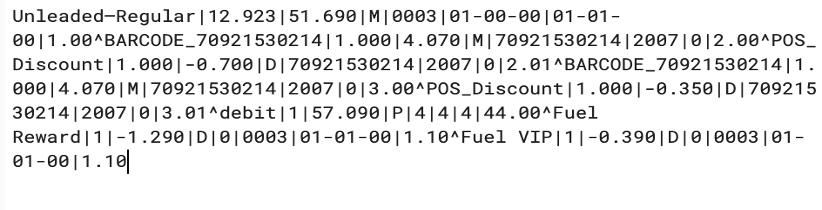 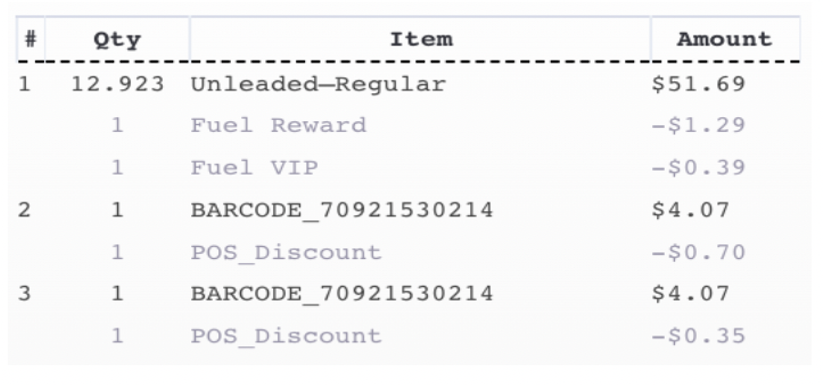 |
| Subscription_plans | |
| What can I expect to see on subscription_plans table? | You will only find the subscription plans that is defined for your business |
| User Coupon Redemptions | |
| What's the difference between user coupon redemptions and the redemptions table? | There are two places where redemptions are stored in the Punchh database - (1) REDEMPTIONS (+ REDEMPTION_CODES) This table stores the redemptions made against offers that are item based with a redeemable ID. In general most of the offers are of this type. (2) USER_COUPON_REDEMPTION - This table stores the redemptions made against coupons that are of type amount/percent discounts |
| User_favorite_location | |
| How do I determine user favorite location? | User favorite location is determined thru' the opt-in that they provide as an input |
| User_subscriptions | |
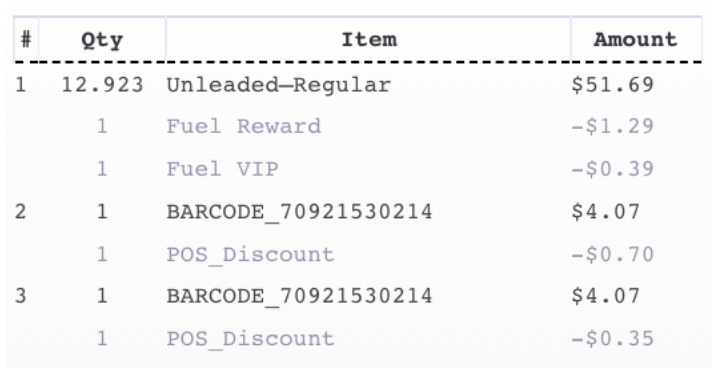
| How do I utilize this table? Is the data aggregated by user_id? | USER_SUBSCRIPTIONS table records the details of each individual subscription made by a user. Note that one user may have multiple subscriptions and each of the subscription is stored as one row. It is NOT an aggregated table. It records details of each and every individual subscription made by a user, with the granularity of one subscription per row
 |
| Why is there no SubscriptionNum column? | USER_SUBSCRIPTIONS table records the details of each individual subscription made by a user. Note that one user may have multiple subscriptions and each of the subscription is stored as one row. With this explanation in place, you will find that you can track a subscription by a user without any problem. |
| Is this all aggregated by user_id? | As explained above, USER_SUBSCRIPTIONS is not an aggregated table. It records details of each and every individual subscription made by a user, with the granularity of one subscription per row. |
| Users | |
| How can I map subscription_status to a user opt-ins? *** Is there a table that contains subscription_status code definitions? | Refer to the appendix for subscription_status codes. |
Punchh Platform Events and Queries
Note:
- This event list in NOT exhaustive
- The queries are to be used only as a guide to the logic. Please modify the syntaxes as per your database
- Tables referenced in the queries may NOT be a part of the pipeline offering. New table/additional data requests may incur additional charges and require SOW changes.
Fundamental Events
- Campaign Events: The event of users getting targeted/qualified by a campaign, along with a record of what happened to the offer (when was the offer given, when was the offer redeemed), that was awarded as part of the campaign, if any
- Loyalty Transaction Events: The event of users making loyalty transactions, including menu items purchased in the transaction
- Offer Events - The event of user receiving an offer (either as a loyalty reward or a campaign reward) and what happens to the offer. It also includes offers received as part of Promo and Coupon campaigns
Derived Events
- User Location Tagging: Tags a consumer to a location. Tags are NOT influenced by date range
- User Membership Tagging: Tags a consumer based on his/her membership on a given day for a date range
For further information see, Queries for Fundamental and Derived Events on Punchh Platform in the Files section at the end of this article.
Subscription Status Codes
Legend:
- 0 - Unsubscribed
- 1 - Subscribed
| Subscription Status | Description | Opt-in For E- Receipt | User Archive | SMS | Banned | PN | |
|---|---|---|---|---|---|---|---|
| 0 | User not subscribed to any communication channel. User is neither Archived nor Banned. User did not opt in for e-Receipt | 0 | 0 | 0 | 0 | 0 | 0 |
| 1 | User subscribed only to Email. User is neither Archived nor Banned. User did not opt in for e-Receipt | 0 | 0 | 0 | 0 | 0 | 1 |
| 2 | User subscribed only to Push Notifications. User is neither Archived nor Banned. User did not opt in for e-Receipt | 0 | 0 | 0 | 0 | 1 | 0 |
| 3 | User subscribed to Email and Push Notifications, but not to SMS. User is neither Archived nor Banned. User did not opt in for e-Receipt | 0 | 0 | 0 | 0 | 1 | 1 |
| 4 | User not subscribed to any communication channel. User is not Archived but is Banned. User did not opt in for e-Receipt | 0 | 0 | 0 | 1 | 0 | 0 |
| 5 | User subscribed only to Email. User is not Archived but is Banned. User did not opt in for e-Receipt | 0 | 0 | 0 | 1 | 0 | 1 |
| 6 | User subscribed only to Push Notifications. User is not Archived but is Banned. User did not opt in for e-Receipt | 0 | 0 | 0 | 1 | 1 | 0 |
| 7 | User subscribed to Email and Push Notifications, but not to SMS. User is not Archived but is Banned. User did not opt in for e-Receipt | 0 | 0 | 0 | 1 | 1 | 1 |
| 8 | User subscribed only to SMS. User is neither Archived nor Banned. User did not opt in for e-Receipt | 0 | 0 | 1 | 0 | 0 | 0 |
| 9 | User subscribed to Email and SMS, but not to Push Notifications. User is neither Archived nor Banned. User did not opt in for e-Receipt | 0 | 0 | 1 | 0 | 0 | 1 |
| 10 | User subscribed to Push Notification and SMS, but not to Email. User is neither Archived nor Banned. User did not opt in for e-Receipt | 0 | 0 | 1 | 0 | 1 | 0 |
| 11 | User subscribed to Email, Push Notification and SMS. User is neither Archived nor Banned. User did not opt in for e-Receipt | 0 | 0 | 1 | 0 | 1 | 1 |
| 12 | User subscribed only to SMS. User is not Archived but is Banned. User did not opt in for e-Receipt | 0 | 0 | 1 | 1 | 0 | 0 |
| 13 | User subscribed to Email and SMS, but not to Push Notifications. User is not Archived but is Banned. User did not opt in for e-Receipt | 0 | 0 | 1 | 1 | 0 | 1 |
| 14 | User subscribed to Push Notification and SMS, but not to Email. User is not Archived but is Banned. User did not opt in for e-Receipt | 0 | 0 | 1 | 1 | 1 | 0 |
| 15 | User subscribed to Email, Push Notification and SMS. User is not Archived but is Banned. User did not opt in for e-Receipt | 0 | 0 | 1 | 1 | 1 | 1 |
| 16 | User not subscribed to any communication channel. User is Archived but not Banned. User did not opt in for e-Receipt | 0 | 1 | 0 | 0 | 0 | 0 |
| 17 | User subscribed only to Email. User is Archived but not Banned. User did not opt in for e-Receipt | 0 | 1 | 0 | 0 | 0 | 1 |
| 18 | User subscribed only to Push Notifications. User is Archived but not Banned. User did not opt in for e-Receipt | 0 | 1 | 0 | 0 | 1 | 0 |
| 19 | User subscribed to Email and Push Notifications, but not to SMS. User is Archived but not Banned. User did not opt in for e-Receipt | 0 | 1 | 0 | 0 | 1 | 1 |
| 20 | User not subscribed to any communication channel. User is Archived and is Banned. User did not opt in for e-Receipt | 0 | 1 | 0 | 1 | 0 | 0 |
| 21 | User subscribed only to Email. User is Archived and is Banned. User did not opt in for e-Receipt | 0 | 1 | 0 | 1 | 0 | 1 |
| 22 | User subscribed only to Push Notifications. User is Archived and is Banned. User did not opt in for e-Receipt | 0 | 1 | 0 | 1 | 1 | 0 |
| 23 | User subscribed to Email and Push Notifications, but not to SMS. User is Archived and is Banned. User did not opt in for e-Receipt | 0 | 1 | 0 | 1 | 1 | 1 |
| 24 | User subscribed only to SMS. User is Archived but not Banned. User did not opt in for e-Receipt | 0 | 1 | 1 | 0 | 0 | 0 |
| 25 | User subscribed to Email and SMS, but not to Push Notifications. User is Archived but not Banned. User did not opt in for e-Receipt | 0 | 1 | 1 | 0 | 0 | 1 |
| 26 | User subscribed to Push Notification and SMS, but not to Email. User is Archived but not Banned. User did not opt in for e-Receipt | 0 | 1 | 1 | 0 | 1 | 0 |
| 27 | User subscribed to Email, Push Notification and SMS. User is Archived but not Banned. User did not opt in for e-Receipt | 0 | 1 | 1 | 0 | 1 | 1 |
| 28 | User subscribed only to SMS. User is Archived and is Banned. User did not opt in for e-Receipt | 0 | 1 | 1 | 1 | 0 | 0 |
| 29 | User subscribed to Email and SMS, but not to Push Notifications. User is Archived and is Banned. User did not opt in for e-Receipt | 0 | 1 | 1 | 1 | 0 | 1 |
| 30 | User subscribed to Push Notification and SMS, but not to Email. User is Archived and is Banned. User did not opt in for e-Receipt | 0 | 1 | 1 | 1 | 1 | 0 |
| 31 | User subscribed to Email, Push Notification and SMS. User is Archived and is Banned. User did not opt in for e-Receipt | 0 | 1 | 1 | 1 | 1 | 1 |
| 32 | User not subscribed to any communication channel. User is neither Archived nor Banned. User opted in for e-Receipt | 1 | 0 | 0 | 0 | 0 | 0 |
| 33 | User subscribed only to Email. User is neither Archived nor Banned. User opted in for e-Receipt | 1 | 0 | 0 | 0 | 0 | 1 |
| 34 | User subscribed only to Push Notifications. User is neither Archived nor Banned. User opted in for e-Receipt | 1 | 0 | 0 | 0 | 1 | 0 |
| 35 | User subscribed to Email and Push Notifications, but not to SMS. User is neither Archived nor Banned. User opted in for e-Receipt | 1 | 0 | 0 | 0 | 1 | 1 |
| 36 | User not subscribed to any communication channel. User is not Archived but is Banned. User opted in for e-Receipt | 1 | 0 | 0 | 1 | 0 | 0 |
| 37 | User subscribed only to Email. User is not Archived but is Banned. User opted in for e-Receipt | 1 | 0 | 0 | 1 | 0 | 1 |
| 38 | User subscribed only to Push Notifications. User is not Archived but is Banned. User opted in for e-Receipt | 1 | 0 | 0 | 1 | 1 | 0 |
| 39 | User subscribed to Email and Push Notifications, but not to SMS. User is not Archived but is Banned. User opted in for e-Receipt | 1 | 0 | 0 | 1 | 1 | 1 |
| 40 | User subscribed only to SMS. User is neither Archived nor Banned. User opted in for e-Receipt | 1 | 0 | 1 | 0 | 0 | 0 |
| 41 | User subscribed to Email and SMS, but not to Push Notifications. User is neither Archived nor Banned. User opted in for e-Receipt | 1 | 0 | 1 | 0 | 0 | 1 |
| 42 | User subscribed to Push Notification and SMS, but not to Email. User is neither Archived nor Banned. User opted in for e-Receipt | 1 | 0 | 1 | 0 | 1 | 0 |
| 43 | User subscribed to Email, Push Notification and SMS. User is neither Archived nor Banned. User opted in for e-Receipt | 1 | 0 | 1 | 0 | 1 | 1 |
| 44 | User subscribed only to SMS. User is not Archived but is Banned. User opted in for e-Receipt | 1 | 0 | 1 | 1 | 0 | 0 |
| 45 | User subscribed to Email and SMS, but not to Push Notifications. User is not Archived but is Banned. User opted in for e-Receipt | 1 | 0 | 1 | 1 | 0 | 1 |
| 46 | User subscribed to Push Notification and SMS, but not to Email. User is not Archived but is Banned. User opted in for e-Receipt | 1 | 0 | 1 | 1 | 1 | 0 |
| 47 | User subscribed to Email, Push Notification and SMS. User is not Archived but is Banned. User opted in for e-Receipt | 1 | 0 | 1 | 1 | 1 | 1 |
| 48 | User not subscribed to any communication channel. User is Archived but not Banned. User opted in for e-Receipt | 1 | 1 | 0 | 0 | 0 | 0 |
| 49 | User subscribed only to Email. User is Archived but not Banned. User opted in for e-Receipt | 1 | 1 | 0 | 0 | 0 | 1 |
| 50 | User subscribed only to Push Notifications. User is Archived but not Banned. User opted in for e-Receipt | 1 | 1 | 0 | 0 | 1 | 0 |
| 51 | User subscribed to Email and Push Notifications, but not to SMS. User is Archived but not Banned. User opted in for e-Receipt | 1 | 1 | 0 | 0 | 1 | 1 |
| 52 | User not subscribed to any communication channel. User is Archived and is Banned. User opted in for e-Receipt | 1 | 1 | 0 | 1 | 0 | 0 |
| 53 | User subscribed only to Email. User is Archived and is Banned. User opted in for e-Receipt | 1 | 1 | 0 | 1 | 0 | 1 |
| 54 | User subscribed only to Push Notifications. User is Archived and is Banned. User opted in for e-Receipt | 1 | 1 | 0 | 1 | 1 | 0 |
| 55 | User subscribed to Email and Push Notifications, but not to SMS. User is Archived and is Banned. User opted in for e-Receipt | 1 | 1 | 0 | 1 | 1 | 1 |
| 56 | User subscribed only to SMS. User is Archived but not Banned. User opted in for e-Receipt | 1 | 1 | 1 | 0 | 0 | 0 |
| 57 | User subscribed to Email and SMS, but not to Push Notifications. User is Archived but not Banned. User opted in for e-Receipt | 1 | 1 | 1 | 0 | 0 | 1 |
| 58 | User subscribed to Push Notification and SMS, but not to Email. User is Archived but not Banned. User opted in for e-Receipt | 1 | 1 | 1 | 0 | 1 | 0 |
| 59 | User subscribed to Email, Push Notification and SMS. User is Archived but not Banned. User opted in for e-Receipt | 1 | 1 | 1 | 0 | 1 | 1 |
| 60 | User subscribed only to SMS. User is Archived and is Banned. User opted in for e-Receipt | 1 | 1 | 1 | 1 | 0 | 0 |
| 61 | User subscribed to Email and SMS, but not to Push Notifications. User is Archived and is Banned. User opted in for e-Receipt | 1 | 1 | 1 | 1 | 0 | 1 |
| 62 | User subscribed to Push Notification and SMS, but not to Email. User is Archived and is Banned. User opted in for e-Receipt | 1 | 1 | 1 | 1 | 1 | 0 |
| 63 | User subscribed to Email, Push Notification and SMS. User is Archived and is Banned. User opted in for e-Receipt | 1 | 1 | 1 | 1 | 1 | 1 |
