Prevent Double Points Earning for Online Orders
Use the following steps if your brand is experiencing double-earning issues between your Online Ordering Application and POS Application.
Requirements for Enabling this Functionality
- Your online ordering vendor is natively integrated with Punchh (i.e., Orders placed online with the vendor while signed in with an SSO user identity
are sent directly to Punchh). - The online ordering vendor can send to the POS ONLY a menu item that identifies when a logged-in user placed the online order vs. a guest that is not logged into the shared online ordering/Punchh user ID.
Outline of Functionality and Method To Implement
You will work through the following steps with your Punchh representative.
Step 1
You will set up two user context menu items (Loyalty Member and Guest) in their POS database. These items will be added by the Online Ordering provider when the orders are sent to the location's POS systems. These items don't need to be sent to the kitchen. These items should not be generally accessible to staff on the POS system.
Example (While the item name used is irrelevant, remember that this item is customer-facing when it is the printed POS receipts):
- Loyalty Member - Item ID 123456
- Guest - Item ID 123457
Step 2
Request your online ordering vendor to activate the user context feature and provide them the Registered User and Non-Registered User menu item IDs created in the POS database.
Once this feature is activated, complete the following test:
- Verify that the Loyalty Member status menu item is added to ALL online orders sent to the POS when the online order sends in an accrual request for the loyalty user.
- Verify that the Guest status menu item is added to ALL online orders sent to the POS and the online order sends in NO accural request for the loyalty user.
- Verify that the Loyalty Member AND the Guest status menu item is NOT ADDED to the order sent from the online ordering vendor directly to Punchh (If the Loyalty Member menu item is sent to both systems, the rules created above will block ALL earnings in the order online AND at the POS)
Step 3
In the Punnchh Platform, create a new line item selector for the Loyalty Member menu item under Offers > Line Item Selectors.
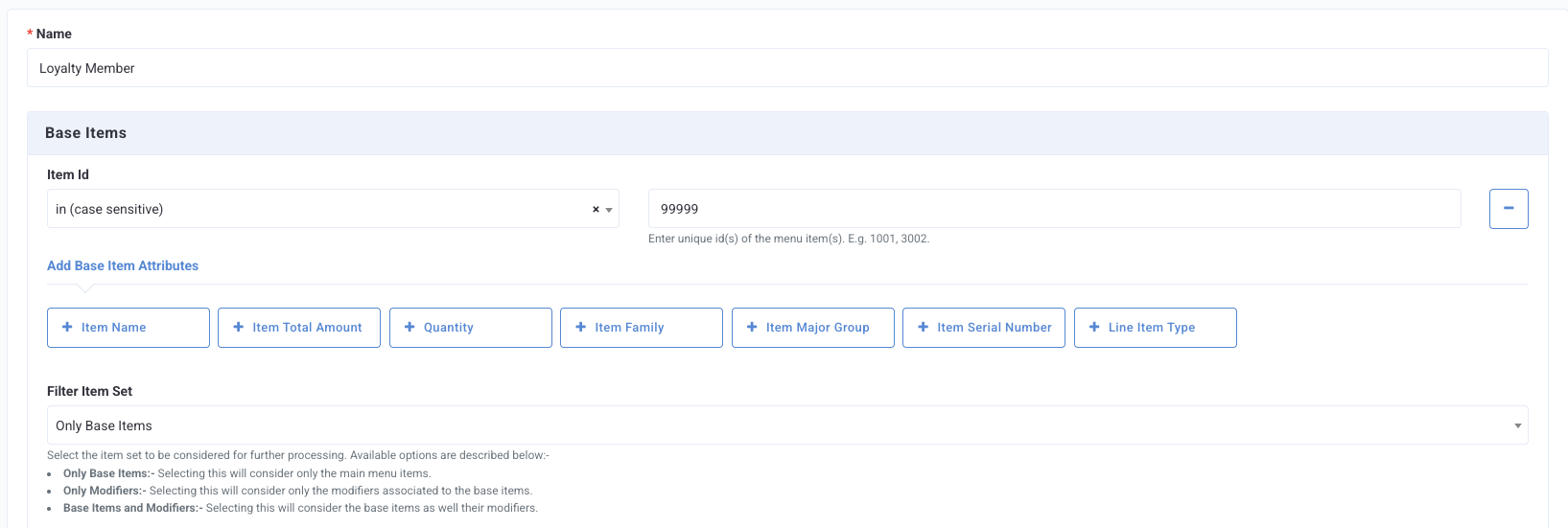
- Select Item Id and enter the ID number that was created in Step 1.
Note: There is no need to add a line item selector for the Guest user. This menu item does not require any Punchh side setup in rules or line item selectors. It is only added to Online Ordering guest user orders sent to the POS to provide context between the status of the user checkout on ALL online orders. Since the default behavior of Punchh is to allow earning (based on the assigned Earning Qualifying Criteria Rule), there is no special processing required for non-registered user orders.
Step 4
The new line item selector will need to be added to ALL assigned Earning Qualifiers for the brand. Work with your Punchh representative or Punchh Support to identify the active Qualification Criteria (QC) set up for earning. If you do not have any active earning QCs, a new one will need to be created. Each active earning QC will need to have the new Loyalty Member Line Item Selector added to the Item Qualifiers section as "Line Item Exists."
Step 5
Perform a test to ensure the new rules are working as intended.
- Manually add the Loyalty Member menu item to a check on the POS.
- Verify that when the POS guest check barcode is scanned, the new rule(s) work to prevent checkin earning on the POS check.
IMPORTANT NOTES
- This functionality will NOT suppress bar code printing or duplicate receipt submission on most POS integrations
- The POS would need to build business logic around suppressing duplicate receipt submissions.
- This functionality WILL WORK to prevent double earning whether the check-in attempt is made via scanning the receipt barcode OR via Guest lookup in the POS.
- While this feature will prevent the double earning, it will not prevent the user when picking up the order from adding a POS or Punchh discount on the POS version of the check, resulting in the guest from earning points online for the full order price. This is a known issue and cannot be prevented at this time.
