Punchh Platform Release Notes - 5 August 2025 Deployment
The updates described in these release notes and the affected/linked documentation will not be available in the Punchh platform until the target deployment date.
Guest Data
Advanced Authentication
We are excited to introduce Advanced Authentication, a major upgrade that brings Passwordless Sign-In using One-Time Passcodes (OTP) to your digital experiences, powered by our new, scalable Identity Service. This update enables frictionless and secure guest login across all digital channels, eliminating the need for traditional passwords. Guests can now sign in effortlessly using a secure OTP sent via SMS or Email.
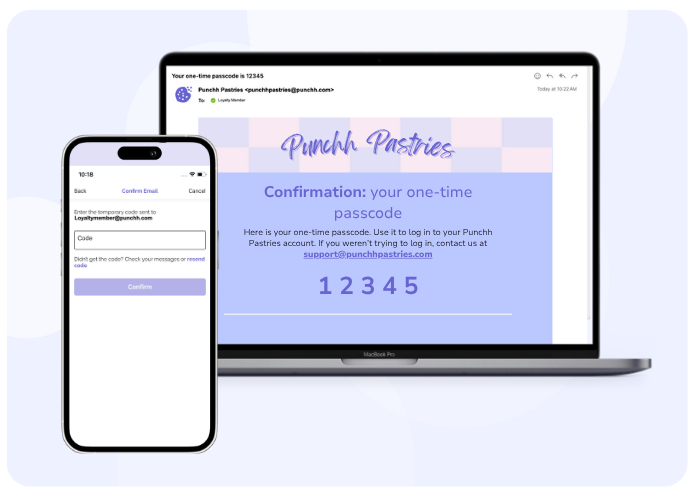
Passwordless Login Options
- SMS OTP Login: Guests receive a secure code on their phone to sign in.
- Email OTP Login: Alternatively, users can get their OTP via email.
- Brand-Level Control: Businesses can enable or disable passwordless login by contacting their Punchh representative.
Enhanced Security With PKCE
- Every OTP request is protected by Proof Key for Code Exchange (PKCE), adding a strong layer of defense against interception and replay attacks.
Smarter Token Lifecycle Management
- After OTP verification, users receive secure JWT-based access, refresh, and ID tokens.
- Tokens are optimized for both mobile and web sessions, with built-in expiration policies for added security.
Interested in Advanced Authentication for your business? Reach out to your Punchh representative to get started!
See the following article(s) for more details:
- Advanced Authentication: Overview (Support Portal)
Loyalty Program
Decoupled Points Expiry and Membership Tiers
Punchh offers an additional configuration to have usable loyalty points expire separately (decoupled) from the membership tier reset strategy. Previously, when a guest’s tier reset, their unspent points earned through check-ins and gifting expired too. That often led to surprise point loss and frustrated guests. With this configuration, expiry of points and tier resets are now managed independently. Tiers still reset based on your chosen strategy (anniversary, sign-up date, etc.), but unspent point balances are not impacted. Instead, you have flexible options for how points expire, like Rolling or Inactivity-Based Expiry. (LCM-2208, PDOC-2031, EC-125, PDOC-3188)
Note: This only applies to programs using the “Reset Based on Points Earned” strategy. Want to enable this for your brand? Reach out to your Punchh representative to get started.
See the following article(s) for more details:
- Membership Tier Reset Strategies (Support Portal)
Offers Management
Selection of Multiple Locations for Qualification Criteria
You can now select multiple locations/location groups in the drop-down list in the Effective Location field while defining qualification criteria. (LCM-2706, PDOC-3120)
See the following article(s) for more details:
- Qualification Criteria (Support Portal)
Database Schema - New Columns
A new column 'unified_debts' has been added to the 'accounts' table. (OLF-263, PDOC-3136)
See the following article(s) for more details:
- Database Schema and Data Field Change Announcements (Support Portal)
Developers Corner
Selection of Multiple Locations for Qualification Criteria
Marketers can now select multiple locations in the drop-down list in the Effective Location field while defining qualification criteria. The format of the effective_location request parameter in the api2/dashboard/offers/qc API endpoints has been updated to support the selection of multiple locations. (LCM-2706, PDOC-3120)
See the following article(s) for more details:
- Create Qualification Criteria (Developer Portal)
- Update Qualification Criteria (Developer Portal)
Support for Passwordless Sign-in on Web and Mobile Applications
Punchh now supports Advanced Authentication for user login on both web and mobile applications. Advanced Authentication APIs provide secure, efficient, and user-friendly login experiences. Businesses can enable or disable passwordless login by contacting their Punchh representative. Note: Advanced Authentication supports both web and mobile platforms. Therefore, these APIs can be used to access both Online Ordering and Mobile APIs. (INT2-1950, PDOC-2579, PDOC-3173)
Integration With Advanced Authentication
When integrated with web and mobile applications, Advanced Authentication enables users to log in using a secure OTP sent to their email or phone number. Upon successful OTP verification, Punchh returns:
- An access token (used to authorize access to Punchh Mobile APIs)
- An ID token (used to identify the user)
- A refresh token (used to generate new tokens when they expire)
Access Punchh APIsTo access Punchh APIs that require authorization, include:
- The
access_tokenin theAuthorizationheader (asBearer ACCESS_TOKEN) - The
id_tokenin theid-tokenheader
New Response Parameter in Program Meta APIThe Program Meta API response will include a boolean parameter, enable_advance_auth,to indicate whether Advanced Authentication is enabled for the business.
See the following articles for more details:
- Advanced Authentication Overview (Developer Portal)
- Send OTP (Developer Portal)
- Verify Token (Developer Portal)
- Refresh Token (Developer Portal)
- Program Meta (Developer Portal)
