Advanced Authentication: Overview
Advanced Authentication is currently in BETA. Some features described below are not yet available. Advanced Authentication is an added module available for an additional cost. Please reach out to your Punchh representative to learn more.
Advanced Authentication is a robust and flexible authentication system that helps users sign into apps and websites safely and easily, using modern login methods like one-time codes or passwordless access. It helps protect user accounts while making the login process easier and more flexible. With support for cross-platform access and compliance with global standards, it ensures both security and convenience. Your brand benefits from flexible workflows, improved user experience, and increased protection against threats like phishing. Supported methods like one-time passwords (OTP) via email and SMS, passwordless options, and multi-factor authentication (MFA) make it a comprehensive solution for modern authentication needs.
Features
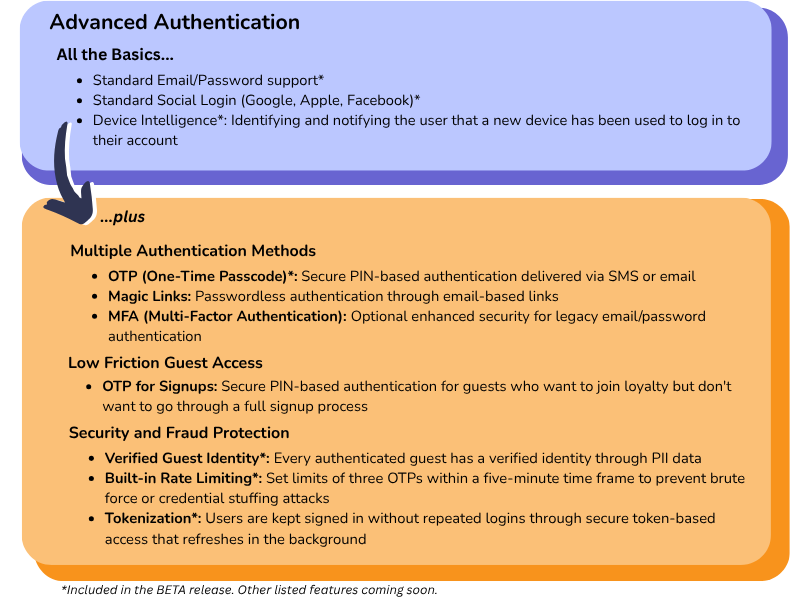
Configuration
Platform
Advanced Authentication offers an easy integration workflow handled directly by Punchh. Contact your Punchh representative for more information on how to enable this feature for your brand.
Have developer-related questions? Refer to our Advanced Authentication documentation on the Developer Portal for more details.
Mobile
An update to Mobile Framework Version 4.0 is required for your Punchh-built app. Please reach out to your Punchh representative to request/schedule an app update.
Use Cases
One-Time Passcode at Login (Available Now)
A loyalty member pulls up to the drive-thru, ready to earn rewards, but they’ve forgotten their password. Instead of missing out, they receive a secure one-time code via email and check in instantly. No delays or no hassle; just a seamless, secure experience that keeps the line moving and the points flowing. It's as easy as 1-2-3:
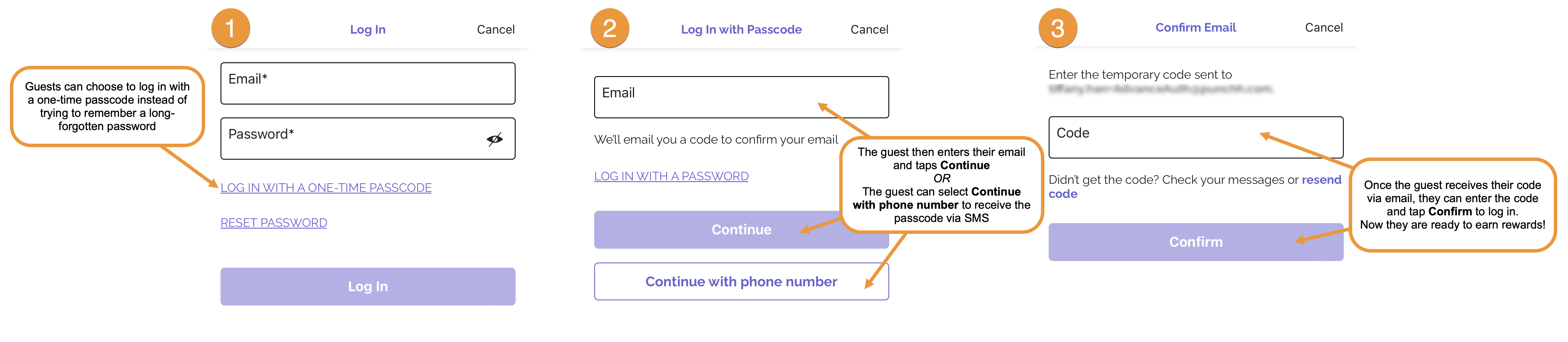
Note: The above mobile experience is a generic example of a one-time passcode flow. Your brand's setup may differ based on your settings and preferences.
FAQs
How is Advanced Authentication different from your legacy authentication setup?
Advanced Authentication is our modern, unified identity platform that simplifies how your guests log in. Unlike our legacy, product-specific login systems, Advanced Authentication is centralized and decoupled, supporting Email/SMS OTP, social logins, traditional email-password, and even SAML-based enterprise IDPs. It’s security, flexibility, and future-readiness, rolled into one.
Do we need to change our current login flow to use Advanced Authentication?
Some updates are needed. To fully experience passwordless magic, your frontend will need UX tweaks, and your backend will need to plug into our new APIs with refresh logic. We’ll guide you through every step.
Can we use our existing Identity Provider, like Okta or Azure AD?
Yes! With Advanced Authentication’s upcoming phases, SAML-based IDPs like Okta and Azure AD will be supported. Your guests will be able to log in using your choice of IDP credentials (if the one supports SAML), while we handle identity mapping under the hood.
What's the benefit of Advanced Authentication for our guests?
Guests get what they care about: speed, security, and a smooth experience. Whether logging in via OTP or social login, the process feels quick, branded, and trustworthy.
What security protocols do you follow?
We follow the gold standard, JWT tokens, TLS encryption, CSRF protection, IP throttling, and JWKS token validation. Every login is also logged for traceability and compliance.
Where is guest data stored, and how secure is it?
Guest data is protected using best-in-class security: encryption at rest and in transit, strict access controls, and regular token rotation handled by our centralized Identity Service.
Can you help us enforce MFA for legacy (email/password) authentication?
Yes, but in a later phase of Advanced Authentication. We're building it right to be secure and flexible when it’s released.
Do you support social logins like Apple, Google, or Facebook?
Yes! These are supported both in legacy and Advanced Authentication flows. You can turn them on or off anytime from your brand's dashboard.
Can we show onboarding after login?
Absolutely! Once onboarding flows are ready, you can prompt users to share valuable info like ZIP, DOB, or even brand-specific fields right after login, perfect for segmentation.
Do you offer APIs to integrate login into our mobile app or kiosk?
Yes. Our REST APIs let you handle OTP generation, verification, session tokens, and refresh, all secured and fully documented.
How does session management work in Advanced Authentication?
Once a guest is authenticated, we issue JWT-based tokens (access and ID) that your systems can use across web or mobile channels through the corresponding API.
Is Advanced Authentication compliant with data protection laws?
Yes. We follow strict data handling practices, activity logging, encryption, and support for data residency rules aligned with compliance policies.
Will this impact our current loyalty users?
Not at all. It’s a behind-the-scenes upgrade. Guests will simply enjoy faster, smarter logins with no learning curve.
Can we make changes to our auth setup without calling engineering?
Yes, we’re building a self-serve admin UI (coming with future releases) so your brand can manage login method preferences, onboarding flows, and more. But only if your backend supports the same.
How do you ensure availability and uptime for authentication?
We monitor everything with dashboards and alerts. Our ops and engineering teams are notified instantly to act on issues before you feel them.
Do you provide a developer portal for our tech team?
Yes! Our Advanced Authentication documentation includes guides, examples, response samples, and everything developers need to integrate Advanced Authentication confidently.
What format is the API response in?
All APIs return standardized JSON responses, complete with success flags and descriptive error codes, making integrations easy to debug and scale.
Is there a limit on API usage?
Yes, for your security. OTP generation, for example, is currently capped at three attempts in a five-minute window to prevent abuse.
Can your team help us onboard this system?
Absolutely. We work closely with your tech and product teams, providing everything from API keys to implementation walkthroughs. We’re in this together.
Is enrichment mandatory for every brand?
Not at all. It’s fully configurable.
