PAR Games: Automated Play Bank
The Punch Card game mechanic allows guests to earn game plays for completing certain actions, such as purchasing a specific item. For this to work smoothly, the Punchh platform needs to use the Play Bank integration to notify the PAR Games dashboard (powered by CataBoom) whenever the guest has completed an action so a play can be added to their play bank. This is done by creating a Post Checkin Campaign and connecting it to the Punch Card game.
Prerequisites
Before setting up the campaign in Punchh, you will need the following:
- The Punch Card game created in the PAR Games dashboard
- The Punch Card game type can be found under the Content game category when creating a new game

- The Punch Card game type can be found under the Content game category when creating a new game
- The game's API Key
- This is located on the Mechanic tab in the Game Data section
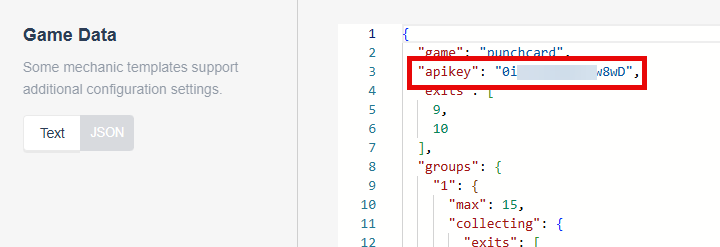
- This is located on the Mechanic tab in the Game Data section
- The game's Collect API
- This is located on the Mechanic tab in the API URLs section

- This is located on the Mechanic tab in the API URLs section
The API Key and Collect API are unique for each game and are generated when the game is created. The API Key and Collect API shown here are for demo purposes only and will not match the API Key and Collect API for your game.
Creating the Campaign
The PAR Games Play Bank integration is available for two campaign types:
- Post Checkin Offer Campaign
- Post Checkin Message Campaign
If you are using Punchh for messages, you can choose either campaign type. If you are using a third-party messaging tool (like Braze), use the Post Checkin Offer Campaign. Refer to the Post Checkin Offer Campaign and Post Checkin Message Campaign articles for basic configuration information.
Create the Post-Checkin Campaign you wish to use. Define your campaign settings (name, dates, targeting, etc.) as you normally would. For Step 1: What and Step 2: Whom, there are additional actions you should take.
Step 1: What (Post Checkin Offer Campaign Only)
Typically, we do not want to send the guest a reward before they play the game. Since the Post Checkin Offer Campaign must include some reward or offer, we will gift a collectible instead. It is recommended to create and use a generic, non-descriptive collectible that does not give away the game or any potential prizes.

Why this works
| Scenario | How the Collectible is Handled |
|---|---|
| Brand uses the Punchh app | The collectible can be surfaced in-app as a visible stamp, badge, or sticker — giving the guest something to see without revealing the prize. |
| Brand uses a third-party app (e.g., Bounteous) | The collectible can be left unsurfaced — it exists in the background silently, satisfying the campaign requirement without showing anything to the guest |
| Brand uses Braze or another messaging tool | No Punchh-owned message is sent; PAR Games handles the play grant and the brand's messaging partner handles guest communication |
Step 2: Whom
It is important to set the Segment and Qualification Criteria in a way that prevents the guest from earning more plays than they should. Coordinate with your Punchh representative as needed to set the correct frequency rules for your use case.
Locate the Configure PAR Game? toggle at the bottom of the page. Enable the toggle and fill in the following fields:
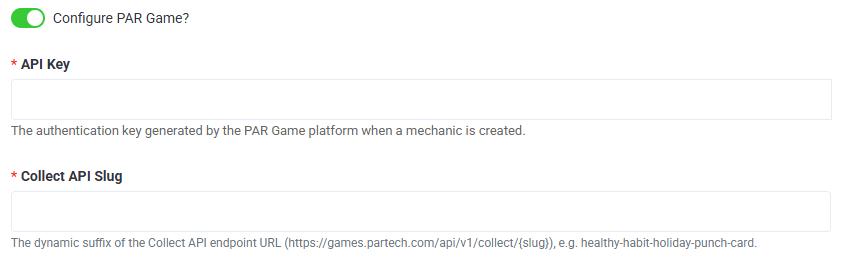
- API Key: Paste the game's API key here
- Collect API Slug: Paste the full Collect API URL here
Double-check the values before activating the campaign. Once the campaign is set to Active, these fields are locked and cannot be edited.
Activating the Campaign
After configuring the rest of the campaign as normal, click Save as Draft. You can activate the campaign once the game has been set to Live. Once the campaign is activated, every guest who meets the campaign's qualifying conditions will trigger a real-time notification to PAR Games to add a play to their Play Bank.
Frequently Asked Questions
Q: What happens if the API call fails?
The integration includes retry logic. Failed calls are retried automatically — plays are not silently dropped.
Q: Can I update the API Key after the campaign goes live?
No. Once the campaign is set to Active, the Configure PAR Game? fields are locked. Update the API Key before launching, or work with Managed Services to adjust before going live.
Q: Can a guest earn multiple plays in one day?
Only if frequency limits are not set/are allowed. You must configure segmentation or qualifier conditions at the campaign level to cap plays per guest per day.
Q: Why do I not see the Configure PAR Game? toggle in my campaign settings?
PAR Games may not be enabled for your business. Reach out to your Punchh representative.
Q: Is this integration available for campaign types other than Post Checkin?
Currently, this integration supports Post Checkin Offer and Post Checkin Messaging campaigns only.
Q: The game board is loading but not showing the correct personalized board for each guest — what's wrong?
This is likely a JWT payload field name mismatch. Punchh sends user_id in the JWT token, but the PAR Games dashboard may be configured to expect AccountID. Contact your Punchh representative to confirm the JWT account identifier setting is set to accept user_id. This is a PAR Games-side configuration and does not require changes in Punchh.
Q: Can this integration be used with other PAR Games game mechanics, like Collect and Win?
Not as of Q4 2026. The current implementation was built specifically for the Punch Card mechanic. Plans are in place to expand this integration for other game mechanics in the future. Reach out to your Punchh representative for the latest on availability.