System Messages: Gift Card
This article was previously titled "Gift Card Notification Templates".
System Messages: Gift Cards are a part of the Digital Stored Value with Gift Cards module, available for an additional cost. To learn more, contact your Punchh representative.
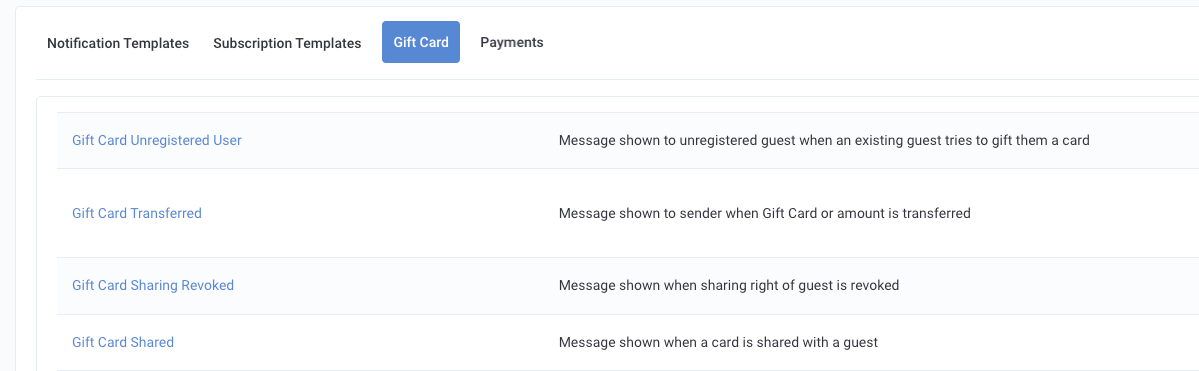
The System Messages Gift Card tab (Loyalty Program > System Messages > Gift Card) contains all notification templates that deal with gift cards. When a guest purchases, receives, reloads, shares, or transfers a gift card they will receive a message via email, SMS, or push notifications.
Notifications and Triggers
Below are the message types currently available under the Gift Cards tab.
| Message | Trigger | Notification Method(s) | Example |
|---|---|---|---|
| Eligible Gift Card Pre Auto Reload Messaging | Guest will receive this message right before the system attempts to auto-reload their gift card, based on their Gift Card Auto-Reload Preferences. | Email; Push Notification; SMS | Hi {{{user_name}}}, We are pleased to inform you that, as per your preferences, your gift card {{{gift_card_number}}} is about to be reloaded with a pre-decided amount of ${{{gc_user_auto_reload_default_amount}}}. Thanks! {{business_name}} |
| Gift Card Auto Reload Payment Error | Guests will receive this message if there is a system error when attempting to auto-reload their gift card based on their Gift Card Auto-Reload Preferences. | Email; Push Notification; SMS | Hi {{{user_name}}}, We're sorry, but an error occurred while processing your Gift Card Auto Reload payment for this gift card {{{gift_card_number}}}. Please try again later or contact customer support for assistance. {{business_name}} |
| Gift Card Auto-Reload Preference Updated | This message is sent to guests after they update their Gift Card Auto-Reload Preferences. This message should fire, when a user updates a GC Auto-Reload preference or when an admin updates a GC auto-reload preference. | Email; Push Notification; SMS | Hi {{{user_name}}}, When turned ON: Great news! Auto-Reload is now ON for your gift card {{{gift_card_number}}} 🎉 Enjoy seamless shopping! When turned OFF: We wanted to let you know that your gift card's {{{gift_card_number}}} Auto-Reload has been turned OFF. In order to ensure a seamless shopping experience, we recommend turning ON the auto-reload feature for your gift card. Feel free to reach out if you have any questions or need further assistance. Happy shopping! {{{business_name}}} |
| Gift Card Gifted | When a guest purchases a virtual Gift Card through the mobile app, they are prompted to provide the email address of another user in your loyalty program they want to send it to. If the payment has been processed and the gift card recipient is part of your program, then the gift card will be added to their account. At that time, the purchaser will receive a message alerting them of their successful purchase. However, if the recipient's email is not associated with your program, the gift card will instead be added to the purchaser's account, and they will receive an unsuccessful message explaining why and how to remedy the issue. | Email; Push Notification; SMS | Hi {{{user_name}}}, If successful: {{#gifting_successful?}} You just gifted a Gift Card worth {{{amount}}} to {{{receiver_email}}}. {{/gifting_successful?}} If unsuccessful: {{#gifting_unsuccessful?}} You just tried to gift a Gift Card worth {{{amount}}} to {{{receiver_email}}} which does not exist in our system. A Gift Card with {{{amount}}} has been added to your account. Please ask {{{receiver_email}}} to join our program and then transfer the Gift Card to their account. {{/gifting_unsuccessful?}} Payment ID for your reference is {{{payment_id}}}. {{business_name}} |
| Gift Card Post Payment Error | If a system error occurs for a guest purchasing a virtual gift card through the mobile app, preventing either their or a recipient's gift card account from being credited with the proper amount, they will receive this message. It should be noted that this is a post-payment error, meaning their payment was successfully processed, but an issue with the app has caused an unexpected error when updating the balance of the gift card in the app. | Email; Push Notification; SMS | Hi {{{user_name}}}, You made a transaction of {{{amount}}} which did not go through, as we are facing technical issues right now. Your Gift Card balance will be updated within 24 hours. Otherwise, your amount will be credited back to the original payment method. |
| Gift Card Purchased | Some guests will purchase virtual gift cards to add credit to their account. This is often done if the guest wants to use their mobile app for payment instead of carrying cash or another form of payment. When a guest successfully purchases a virtual gift card for their account, they will receive this message. | Email; Push Notification; SMS | Hi {{{user_name}}}, You just purchased a Gift Card for yourself. Gift Card Number: {{{gift_card_number}}} Available Balance: {{{gift_card_balance}}} Payment ID for your reference is {{{payment_id}}}. {{business_name}} |
| Gift Card Received | When a guest successfully purchases a virtual gift card to send to another user in your loyalty program, the gift card recipient will receive this message. | Email; Push Notification; SMS | Hi {{{user_name}}}, {{{sender_name}}} just sent you a Gift Card {{{gift_card_number}}} of {{{amount}}}. {{business_name}} |
| Gift Card Redeemed | If a guest has received a virtual gift card as a redeemable reward (maybe for completing a card or a challenge), they will receive this message once the card has been redeemed (the guest makes a payment using the gift card at the POS). | Email; Push Notification; SMS | Hi {{{user_name}}}, Redeemed Gift Card {{{gift_card_number}}} of {{{amount}}}. {{business_name}} |
| Gift Card Reloaded | If a gift card has been shared with another guest, either guest can reload (add cash) to the card. When this happens, each guest will receive this message, alerting them that the card has been reloaded, by whom, and for what amount. | Email; Push Notification; SMS | Hi {{{user_name}}}, {{{reloader_name}}} has just reloaded Gift Card {{{gift_card_number}}} with {{{reloaded_amount}}}. Payment ID for your reference is {{{payment_id}}}. {{business_name}} |
| Gift Card Shared | The owner of a virtual gift card may choose to share usage of their card with another member of your loyalty program. When this occurs, the recipient of the shared card will receive this message. | Email; Push Notification; SMS | Hi {{{user_name}}}, {{{owner_name}}} has just shared a Gift Card with you. Gift Card Number : {{{gift_card_number}}} Gift Card Value : {{{gift_card_balance}}} Please go to your cards to find the new card. {{business_name}} |
| Gift Card Sharing Revoked | The owner of a virtual gift card may choose to share usage of their card with another member of your loyalty program. At any time after sharing has begun, the owner (and only the original owner) may choose to revoke access to the card from the recipient. When this occurs, the recipient will receive this message. | Email; Push Notification; SMS | Hi {{{user_name}}}, {{{owner_name}}} has stopped sharing Gift Card {{{gift_card_number}}} with you. This card has been removed from your cards. {{business_name}} |
| Gift Card Transferred | The owner of a virtual gift card may transfer either the partial or full balance of their card to another guest in your loyalty program. This is different than sharing. When transferring a partial amount, the sender (owner) will retain the remaining balance on the original card, still visible and available for use in their app. The recipient will receive the transferred amount as if it were a totally new gift card, for which they become the sole owner. For a successful partial transfer, the sender will receive the partial transfer message, while the recipient will receive the "Gift Card Received" message as shown above. When transferring the full amount of a card, the sender relinquishes their ownership of the gift card, meaning it will no longer be visible for them in-app. Upon transfer, the sender will receive the full transfer message, while the recipient will receive the "Gift Card Received" message as shown above. | Email; Push Notification; SMS | Hi {{{user_name}}}, For partial transfer: {{#partial_transfer?}} You just transferred {{{amount}}} from Gift Card {{{gift_card_number}}} to {{{receiver_name}}}. Your updated balance for this card is {{{gift_card_balance}}}. {{/partial_transfer?}} For full transfer: {{#full_transfer?}} You just transferred Gift Card {{{gift_card_number}}} with {{{amount}}} to {{{receiver_name}}}. You will no longer see this card in your cards. {{/full_transfer?}} {{business_name}} |
| Gift Card Unregistered User | When a guest attempts to gift, share, or transfer a virtual gift card to a user who is not part of your loyalty program, the intended recipient will receive this email message, prompting them to join. | Email; SMS | Hi {{{receiver_email}}}, {{{sender_name}}} just tried to gift you a Gift Card worth {{{amount}}}. Join your friend in using our program and start using our Gift Cards. {{business_name}} |
Related Documentation: System Messages
