How to Gift Bonus Points Based Only on the QC Menu Items
If you're setting up a Post Checkin Offer Campaign that gifts bonus loyalty points to your members, you have the option to check a box labeled Use qualification criteria processed value for earn calculation? This checkbox is useful if you want to give bonus points (i.e., double points or triple points) only for specific menu items. For example, you might want to give double points only on a certain burger, not on the entire order. However, if you decide to use this checkbox, there are several important things to consider to make sure it works as intended. Be sure to review all the following details before enabling it.
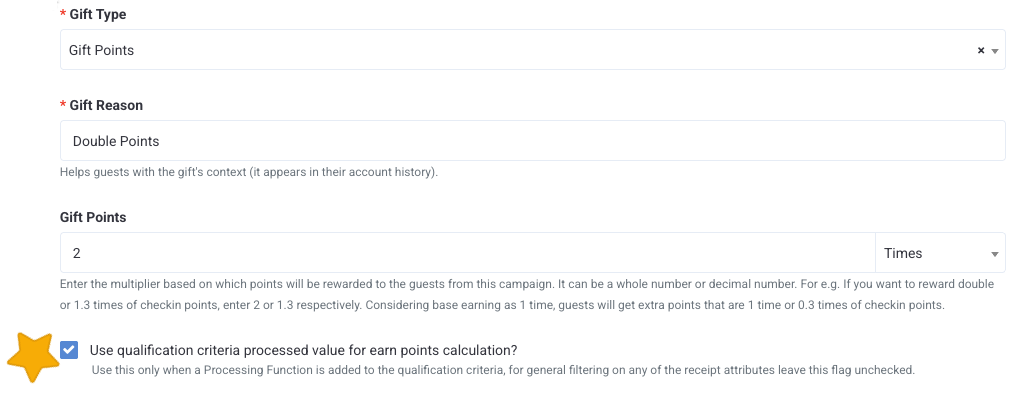
When do I select the QC checkbox?
The QC checkbox is intended to limit your campaign to gift points based only on the item(s) within the qualification criteria. You can use the checkbox to promote specific menu items by awarding more points on those items only, instead of the entire receipt. However, this only applies to and will work with the Sum of Amounts processing function in the QC; other processing functions are not recommended. There are some QC configurations when you would not be able to use this checkbox.
If your QC has:
- any other processing function than Sum of Amounts,
- a specific time set (for example, only allows for earning between 4-9 PM),
- or receipt quailifers,
...then you CANNOT use the QC checkbox.
I selected the QC checkbox, now what?
If you determine that your campaign requires the use of the QC checkbox, you will then need to factor in your brand's base conversion rate. If your base conversion rate is $1=1 point, no adjustments are needed. However, when the conversion rate is more than 1 point in the earning criteria, a different calculation is required to determine the number you will enter in the Gift Points field.
When the conversion rate is more than 1 point in the earning criteria, it gifts additional points according to the earning QC processed value and does not only use your brand's conversion rate as it normally would. Therefore, to determine the amount to enter to get the expected results, use the following formula:
1 + (Z *(Y - 1)) = X
Z = Base Conversion Rate to Points
Y = Desired multiplier (2x points, 3x points, etc.)
X = Number you will enter in the Gift Points field
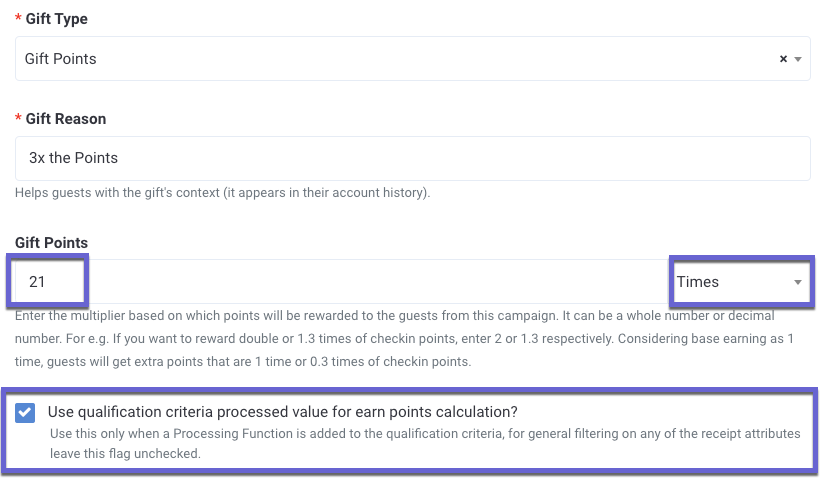
Example: Let's say you want to offer triple points (Y = 3) and your brand's base conversion rate is $1=10 points (Z = 10). The formula would be as follows:
1 + (10 * (3-1) = X
1 + (10 * 2) = X
1 + 20 = 21
In this example, you would enter 21 into the Gift Points field to ensure that guests receive three times the points on the items specified in the qualification criteria.
If your base conversion rate is $1=1 points AND/OR you do not select the QC checkbox and are gifting based on the whole amount, the above formula is not required.
