Olo Promo Specs 2.0 Implementation Guide
Olo's Promotion Specs 2.0 (PS 2.0) define the API specifications for the ordering experience. These API specs will work as a standard across all loyalty vendors for Olo. Loyalty vendors need to send the data in Olo-expected API specifications for integration with the online ordering channel.
Punchh Redemptions 2.0 APIs (R2.0 APIs) have been integrated with Olo PS2.0 to support the adoption of R2.0 APIs across online ordering channels. Thus, Punchh built a middleware to integrate R2.0 APIs with Olo PS2.0. This middleware layer will act as a bridge between Punchh's redemptions engine and Olo's updated promo framework, enabling smoother, more scalable implementations of the latest redemptions logic. This middleware not only ensures future readiness for R2.0 standards, but also simplifies partner integrations, accelerates deployment timelines, and enhances offer accuracy in the digital ordering experience.
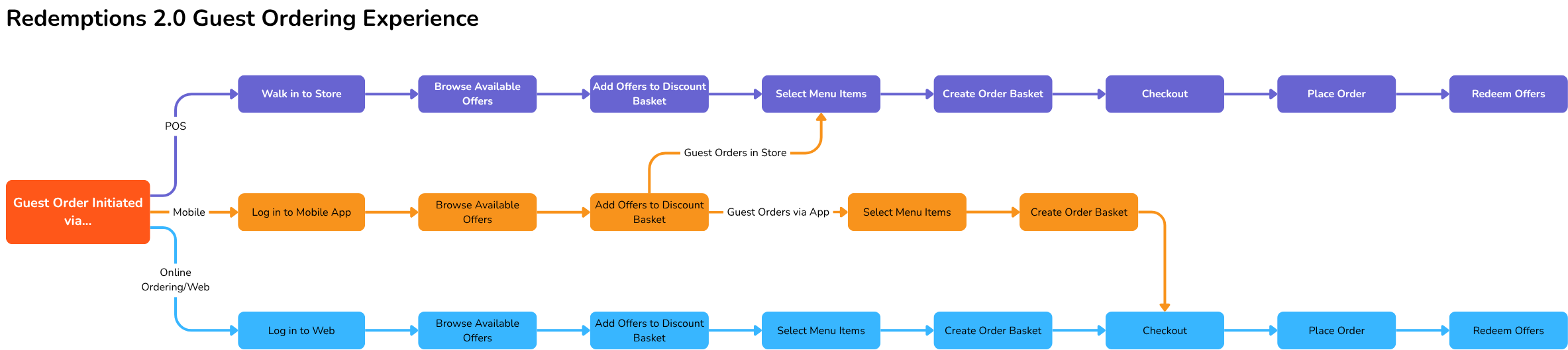
Ordering Workflow
The following is an overview of Olo's user ordering workflow for loyalty rewards:
- Guest logs in via Olo or a third-party OAuth provider.
- Guest adds items to their basket.
- Guest clicks "Proceed to Checkout".
- Guest applies a loyalty reward to their basket.
- Discount received from the loyalty reward is displayed to the guest.
- Guest reviews details and clicks "Place Order".
- The loyalty reward is redeemed, the payment processor is called, and the order is transmitted to the POS.
- The order is prepared in the kitchen, and the user arrives at the store to pick up their order.
- The order is marked as closed, and the user accrues points in their loyalty account for the order.
- Redemptions 2.0 (R2.0) does not support non-loyalty use cases where a guest who is not enrolled in loyalty can redeem multiple coupons during the online ordering flow.
- Promo Specs currently supports basket-level redemption only when all offers in the basket are valid for the user. If a user adds four offers to the basket and two of them are ineligible, the two eligible offers will also be discarded. For Olo, it functions as all-or-nothing validation.
APIs Supported
A similar list of supported APIs can be found on the Olo Promo Specs 2.0: Supported APIs in the PAR Developer Portal. Each API listed below includes a link to the corresponding documentation on the Olo Developer Portal. An Olo login is required to access these links.
Create Account
The Create Account endpoint is used to create a loyalty account in Punchh using user-level information, such as first name, last name, phone number, email, and an external identifier.
Expand for Request and Response Examples
Request:
{
  "firstName": "David",
  "lastName": "Smith",
  "phoneNumber": "19199876543",
  "emailAddress": "david.smith@email.com",
  "externalIdentifier": "abcdef123"
}
Response:
{
  "id": "391528477",
  "status": "active",
  "balance": {
    "quantity": 75,
    "target": 100,
    "unit": "points"
  },
  "rewards": [
    {
      "id": "756134",
      "name": "Free Chocolate Shake",
      "description": "Receive a free chocolate shake when you order any cheeseburger.",
      "quantity": 1,
      "currency": "USD",
      "expiration": "2023-04-15T00:00:00.000Z",
      "reference": {
        "type": "promo",
        "code": "570"
      },
      "type": "redeemable",
      "imageurl": "https://cdn.loyaltypartner.com/rewards/perk-badge.png",
      "customFields": "{ \"campaignId\": \"spring23\", \"isStackable\": true, \"bonusPoints\": 50 }"
    }
  ]
}
Find Account
The Find Account endpoint is used to find a loyalty account in Punchh using a customer's Punchh user_id.
Expand for Request and Response Examples
Request:
{
“accountID”: "243242342"
}
Response:
{
  "id": "391528477",
  "status": "active",
  "balance": {
    "quantity": 75,
    "target": 100,
    "unit": "points"
  },
  "rewards": [
    {
      "id": "756134",
      "name": "Free Chocolate Shake",
      "description": "Receive a free chocolate shake when you order any cheeseburger.",
      "quantity": 1,
      "currency": "USD",
      "expiration": "2023-04-15T00:00:00.000Z",
      "reference": {
        "type": "promo",
        "code": "570"
      },
      "type": "redeemable",
      "imageurl": "https://cdn.loyaltypartner.com/rewards/perk-badge.png",
      "customFields": "{ \"campaignId\": \"spring23\", \"isStackable\": true, \"bonusPoints\": 50 }"
    }
  ]
}
Get Account
The Get Account endpoint is used to retrieve the available rewards from a customer's loyalty account.
Expand for Request and Response Examples
Request:
{
"accountID": "12345678"
}
Response:
{
  "id": "391528477",
  "status": "active",
  "balance": {
    "quantity": 75,
    "target": 100,
    "unit": "points"
  },
  "rewards": [
    {
      "id": "756134",
      "name": "Free Chocolate Shake",
      "description": "Receive a free chocolate shake when you order any cheeseburger.",
      "quantity": 1,
      "currency": "USD",
      "expiration": "2023-04-15T00:00:00.000Z",
      "reference": {
        "type": "promo",
        "code": "570"
      },
      "type": "redeemable",
      "imageurl": "https://cdn.loyaltypartner.com/rewards/perk-badge.png",
      "customFields": "{ \"campaignId\": \"spring23\", \"isStackable\": true, \"bonusPoints\": 50 }"
    }
  ]
}
Validate Promotions
The Validate Promotions endpoint is equivalent to the Possible Redemption Punchh API. The purpose of this endpoint is to validate the Olo basket or order with Punchh to determine a discount amount.
Expand for Request and Response Examples
Request:
{
  "orderId": null,
  "accountId": "391528477",
  "source": "Web",
  "handoff": "delivery",
  "currency": "USD",
  "placed": "2023-02-01T18:00:00.000Z",
  "wanted": "2023-02-01T19:30:00.000Z",
  "storeNumber": "7000",
  "restaurant": "5600",
  "brand": "390",
  "subtotal": 45.5,
  "tax": 5.25,
  "tip": 9,
  "delivery": 2.5,
  "customFees": null,
  "discount": 10,
  "total": 52.25,
  "address": {
    "street": "123 Main St.",
    "city": "Promoville",
    "code": "53210",
    "country": "USA"
  },
  "payments": [
    {
      "tender": "credit",
      "issuer": "visa",
      "suffix": "4060",
      "amount": 52.25
    }
  ],
  "basket": {
    "id": "fb992575-773d-4fa4-aebf-826de2aa9183",
    "rewards": [
      {
        "id": "876412",
        "provider": "The Lively Loyalty Company",
        "level": "item",
        "product": "10508",
        "discount": 5,
        "type": "redeemable",
        "imageurl": "https://cdn.loyaltypartner.com/rewards/perk-badge.png",
        "customFields": "{ \"campaignId\": \"spring23\", \"isStackable\": true, \"bonusPoints\": 50 }"
      }
    ],
    "coupons": [
      {
        "id": "WINTERFIVEOFF",
        "provider": "The Killer Coupon Company",
        "level": "item",
        "product": "10508",
        "discount": 5
      }
    ],
    "entries": [
      {
        "quantity": 1,
        "item": {
          "product": "10508",
          "label": "Chocolate Shake",
          "cost": 5
        }
      }
    ],
    "posEntries": [
      {
        "quantity": 1,
        "posItem": {
          "product": "416509",
          "categories": [
            "987418",
            "361542"
          ],
          "modifiers": [
            {
              "quantity": 1,
              "product": "416509",
              "categories": [
                "761230"
              ],
              "label": "Add Whipped Cream",
              "cost": 1.15,
              "modifiers": null
            }
          ],
          "label": "Chocolate Shake",
          "cost": 5
        }
      }
    ]
  }
}
Response: 200
{
  "transaction": {
    "id": "913526477",
    "promotions": [
      {
        "id": "WINTERFIVEOFF",
        "type": "Coupon",
        "discount": 5.25,
        "reference": {
          "type": "promo",
          "code": "570"
        }
      }
    ]
  }
}
Redeem Promotions
The Redeem Promotions endpoint is equivalent to the Honor Redemption Punchh API. The purpose of this endpoint is to redeem all applied offers in an order with Punchh.
Expand for Request and Response Examples
Request:
{
  "orderId": "15944668866150500",
  "accountId": "391528477",
  "source": "Web",
  "handoff": "delivery",
  "currency": "USD",
  "placed": "2023-02-01T18:00:00.000Z",
  "wanted": "2023-02-01T19:30:00.000Z",
  "storeNumber": "7000",
  "restaurant": "5600",
  "brand": "390",
  "subtotal": 45.5,
  "tax": 5.25,
  "tip": 9,
  "delivery": 2.5,
  "customFees": null,
  "discount": 10,
  "total": 52.25,
  "address": {
    "street": "123 Main St.",
    "city": "Promoville",
    "code": "53210",
    "country": "USA"
  },
  "payments": [
    {
      "tender": "credit",
      "issuer": "visa",
      "suffix": "4060",
      "amount": 52.25
    }
  ],
  "basket": {
    "id": "fb992575-773d-4fa4-aebf-826de2aa9183",
    "rewards": [
      {
        "id": "876412",
        "provider": "The Lively Loyalty Company",
        "level": "item",
        "product": "10508",
        "discount": 5,
        "type": "redeemable",
        "imageurl": "https://cdn.loyaltypartner.com/rewards/perk-badge.png",
        "customFields": "{ \"campaignId\": \"spring23\", \"isStackable\": true, \"bonusPoints\": 50 }"
      }
    ],
    "coupons": [
      {
        "id": "WINTERFIVEOFF",
        "provider": "The Killer Coupon Company",
        "level": "item",
        "product": "10508",
        "discount": 5
      }
    ],
    "entries": [
      {
        "quantity": 1,
        "item": {
          "product": "10508",
          "label": "Chocolate Shake",
          "cost": 5
        }
      }
    ],
    "posEntries": [
      {
        "quantity": 1,
        "posItem": {
          "product": "416509",
          "categories": [
            "987418",
            "361542"
          ],
          "modifiers": [
            {
              "quantity": 1,
              "product": "416509",
              "categories": [
                "761230"
              ],
              "label": "Add Whipped Cream",
              "cost": 1.15,
              "modifiers": null
            }
          ],
          "label": "Chocolate Shake",
          "cost": 5
        }
      }
    ]
  }
}
Response: 200
{
  "transaction": {
    "id": "913526477",
    "promotions": null
  }
}
Void Redemption
The purpose of the Void Redemption endpoint is to reverse a previously successful redemption. This endpoint is invoked when an order fails, is cancelled, or is refunded.
Expand for Request and Response Examples
Request:
{
  "orderId": "15944668866150500",
  "accountId": "391528477",
  "couponCodes": [
    "WINTERFIVEOFF"
  ],
  "rewardIds": [
    "756134"
  ],
  "brand": "390",
  "storeNumber": "7000",
  "restaurant": "5600"
}
Response: 200
{
  "transaction": {
    "id": "913526477"
  }
}
Accrue Points
The Accrue Points endpoint is equivalent to the Create Check-in Punchh API. The purpose of this endpoint is to accrue points for the user's order with Punchh. This endpoint will be invoked when the order is closed.
Expand for Request and Response Examples
Request:
{
  "orderId": "15944668866150500",
  "accountId": "391528477",
  "source": "Web",
  "handoff": "delivery",
  "currency": "USD",
  "placed": "2023-02-01T18:00:00.000Z",
  "wanted": "2023-02-01T19:30:00.000Z",
  "storeNumber": "7000",
  "restaurant": "5600",
  "brand": "390",
  "subtotal": 45.5,
  "tax": 5.25,
  "tip": 9,
  "delivery": 2.5,
  "customFees": null,
  "discount": 10,
  "total": 52.25,
  "address": {
    "street": "123 Main St.",
    "city": "Promoville",
    "code": "53210",
    "country": "USA"
  },
  "payments": [
    {
      "tender": "credit",
      "issuer": "visa",
      "suffix": "4060",
      "amount": 52.25
    }
  ],
  "basket": {
    "id": "fb992575-773d-4fa4-aebf-826de2aa9183",
    "rewards": [
      {
        "id": "876412",
        "provider": "The Lively Loyalty Company",
        "level": "item",
        "product": "10508",
        "discount": 5,
        "type": "redeemable",
        "imageurl": "https://cdn.loyaltypartner.com/rewards/perk-badge.png",
        "customFields": "{ \"campaignId\": \"spring23\", \"isStackable\": true, \"bonusPoints\": 50 }"
      }
    ],
    "coupons": [
      {
        "id": "WINTERFIVEOFF",
        "provider": "The Killer Coupon Company",
        "level": "item",
        "product": "10508",
        "discount": 5
      }
    ],
    "entries": [
      {
        "quantity": 1,
        "item": {
          "product": "10508",
          "label": "Chocolate Shake",
          "cost": 5
        }
      }
    ],
    "posEntries": [
      {
        "quantity": 1,
        "posItem": {
          "product": "416509",
          "categories": [
            "987418",
            "361542"
          ],
          "modifiers": [
            {
              "quantity": 1,
              "product": "416509",
              "categories": [
                "761230"
              ],
              "label": "Add Whipped Cream",
              "cost": 1.15,
              "modifiers": null
            }
          ],
          "label": "Chocolate Shake",
          "cost": 5
        }
      }
    ]
  }
}
Response: 200
{
  "transaction": {
    "id": "913526477"
  }
}
Void Accrual
The Void Accrual endpoint is equivalent to the Void Check-in Punchh API. The purpose of this endpoint is to reverse a previously successful accrual. This endpoint will be invoked when an order is refunded after the order has been closed.
Expand for Request and Response Examples
Request:
{
  "orderId": "15944668866150500",
  "accountId": "391528477",
  "brand": "390",
  "storeNumber": "7000",
  "restaurant": "5600"
}
Response: 200
{
  "transaction": {
    "id": "913526477"
  }
}
API Invocations: High-Level Diagram
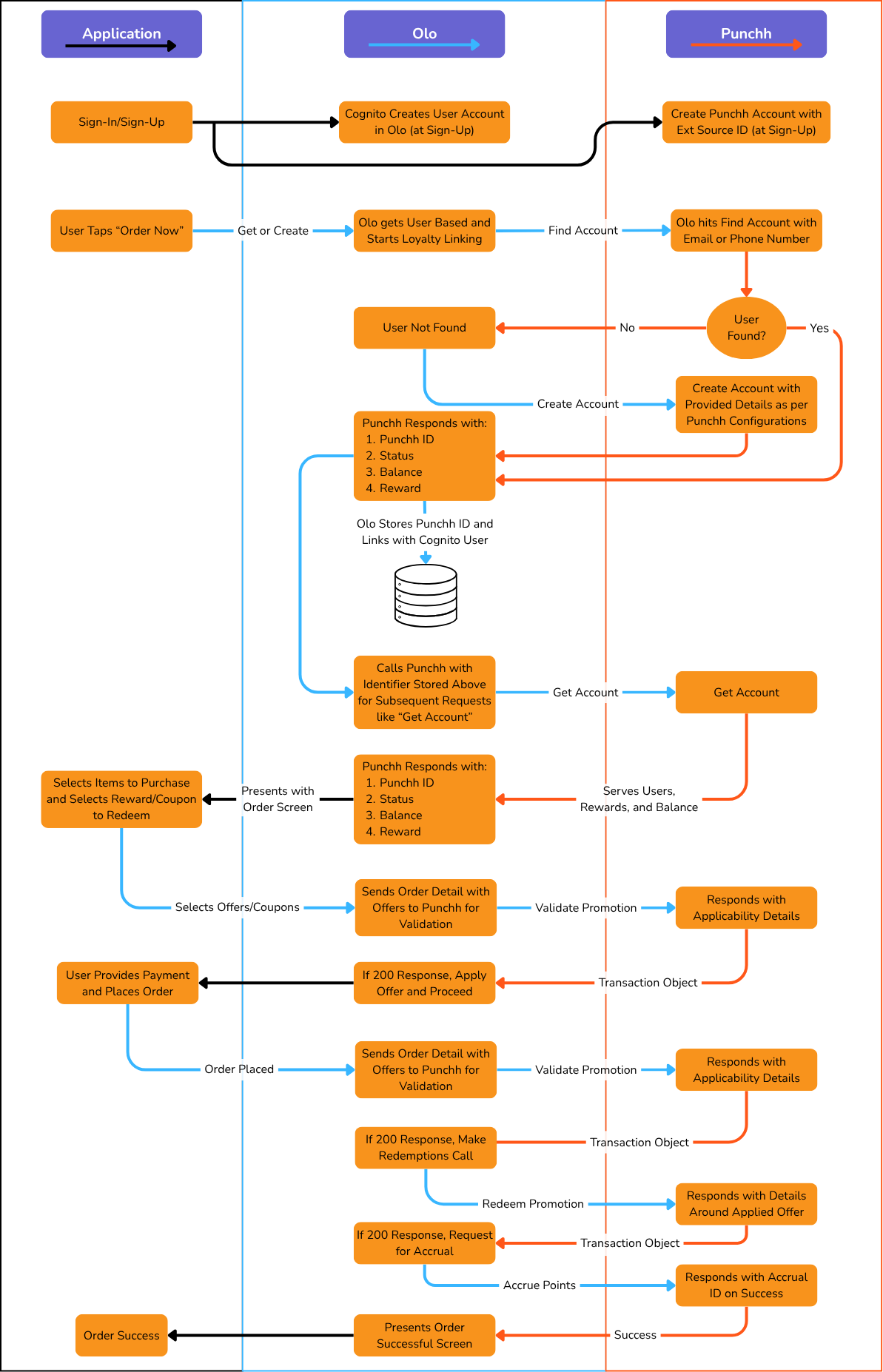
Description
Olo makes calls to Punchh at the following points in the workflow (Olo login required to access links):
- If the user has a loyalty account, upon logging in, Olo will call the Get Account endpoint to retrieve the user's loyalty account details from Punchh. Primarily, Olo expects Punchh to return the loyalty rewards available to the user and, optionally, the user's point balance. This allows Olo to show the user what rewards they have available that can be applied to their basket.
- When a user applies an offer to their basket, Olo will call the Validate Promotions endpoint to send Punchh the details of the user's basket contents (including the applied loyalty reward IDs and the user's loyalty account ID if applicable). Punchh then uses this information to determine the validity of the offers and calculate a discount amount for the basket, which is returned to Olo in the response. Olo then displays the discount amount to the user and updates the basket's subtotal. If there is an error validating the offers, Olo will display an error message to the user; either a generic error message based on the error's status code/details or a customer-facing error message which is returned by Punchh.
- Any time additional offers are applied, Olo will again call the Validate Promotions endpoint to alert Punchh of the updates. Olo expects Punchh to perform the same action as when the basket was first validated (determining validity and calculating a discount). Multiple invocations of the Validate Promotions endpoint with no changes to the basket should have the same results.
- When the user places their order, Olo will call the Validate Promotions endpoint once more with the user's order contents to ensure the final validity of the order before redemption. This call can be differentiated from previous invocations of Validate Promotions because, in this case, the
orderIDwill be provided. If there is an error validating offers, Olo will display an error message to the user; either a generic message based on the error's status code/details or a customer-facing error message which is returned by Punchh. This prevents unnecessary payment refunds if the promotion is no longer valid for the order. - After the order is validated, Olo will call the Redeem Promotions endpoint to send Punchh the details of the user's order contents (including applied loyalty reward IDs and the user's loyalty account ID if applicable). Punchh then uses this information to redeem offers in their platform. Olo expects Punchh to respond with a unique identifier for this redemption. If there is an error redeeming offers, Olo will display an error message to the user: either a generic error message based on the error's status code/details or a customer-facing error message which is returned by Punchh.
- If the user has a loyalty account, upon the order closing in Olo's system, Olo will call the Accrue Points endpoint to send Punchh the details of the user's closed order contents (including the applied loyalty reward IDs and the user's loyalty account ID). Punchh then uses this information to calculate the amount of points the user should accrue for the order and apply those points to the user's loyalty account. Olo expects Punchh to respond with a unique identifier for this redemption.
- If, for whatever reason, the order is canceled or otherwise refunded, Olo will call the Void Redemption endpoint to inform Punchh that a previous redemption has been voided and include in the request the redemption's ID from the step 5 response, the order ID, and any redeemed loyalty reward IDs.
- If, for whatever reason, the order is refunded after the order has been closed, Olo will call the Void Accrual endpoint to inform Punchh that a previous accrual has been voided and include in the request the accrual's ID from the step 6 response.
