Micros RES Deployment Checklist
The document is a quick checklist that should be used by Punchh Support or a Brand's POS Manager to validate the settings required for a functional Punchh integration
PMS/SIM Interface Configuration
General Tab
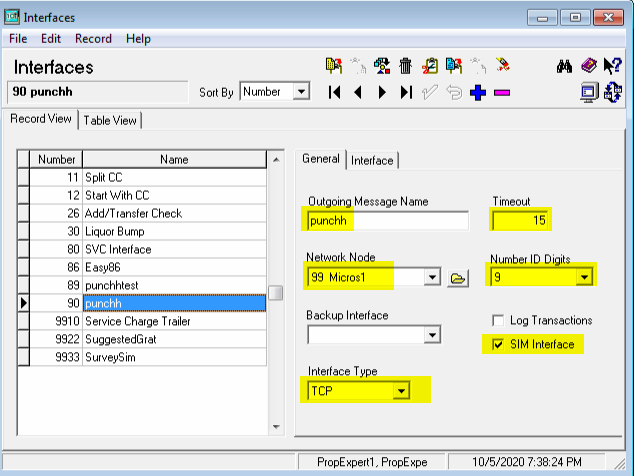
-
Outgoing message
Make sure it is spelled correctly ("punchh"), note the double "h" -
Network Node
Make sure it points to the BOH node. Incorrect selection will trigger "IFS error status -20" -
Interface Type
Select TCP -
Timeout
Enter 5-15 seconds, that is the delays you will experience when printing checks only if Punchh service is not running. -
Number ID Digits
That has to be 9. Any other value will will break Punchh -
Log Transactions
That is optional. If enabled then Micros will produce punchh.log in MICROS\Res\Pos\Etc -
SIM Interface
That has to be enabled -
Interface Number
That is the number marked in blue on the left of the screenshot above.
Here it is magnified: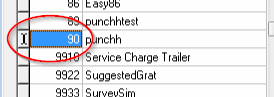
The default value is 90. If you have to change it then make sure same value is specified in Punchh Configurator > Micros.cfg
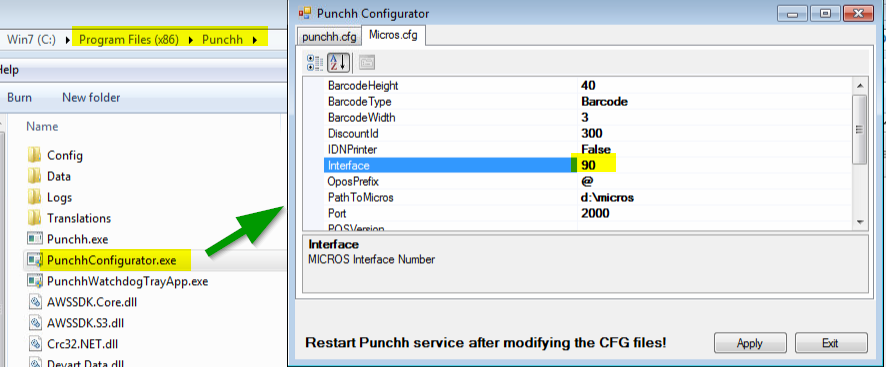
Interface Tab
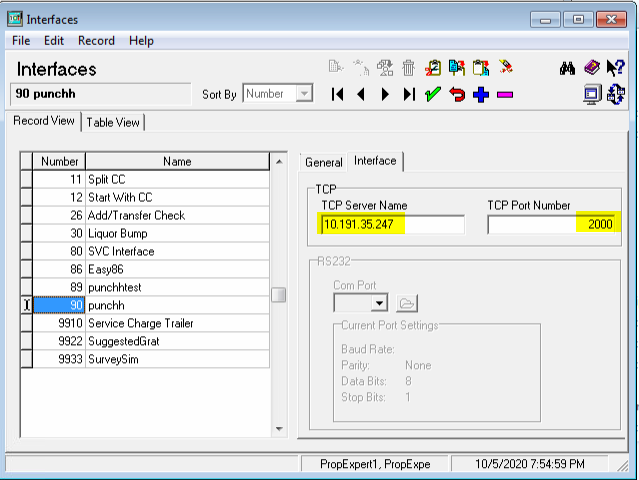
-
TCP Server Name
Set this value to one of the following:- Windows computer name of the BOH computer. You can find it in POS Configurator > Network Node > <Select BOH> > Computer Name
- IP address of the BOH computer
- localhost
- 127.0.0.
We recommend to use either #1 or #2 above
-
TCP Port Number
The default value to use is 2000. If that port is in use then you can choose any port between 1025 and 65535. If you change it then make sure same port is specified in Punchh Configurator > Micros.cfg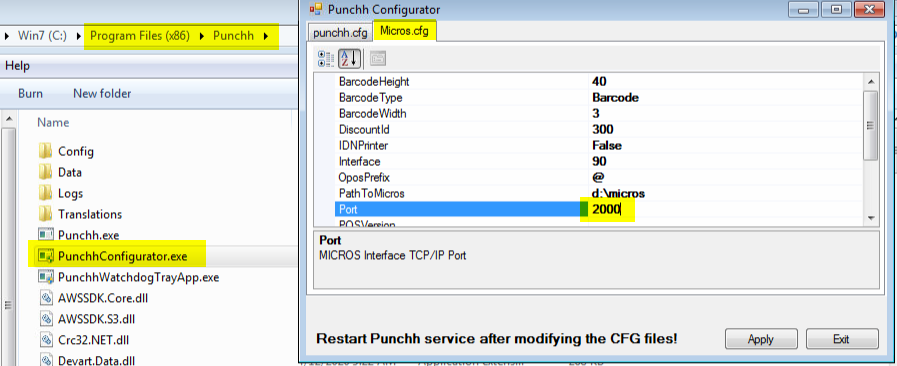
Typical Issues
Micros CAL Service Is not Running
Sometimes Micros CAL service might fail to start. That will prevent Punchh scripts from being installed on the Micros terminals. You'll see that terminal that is started on BOH works fine with Punchh while none of the workstations do. They will display "Missing ISL file" error if this is initial Punchh installation. In case of upgrades the ISL files will not upgrade on terminals.
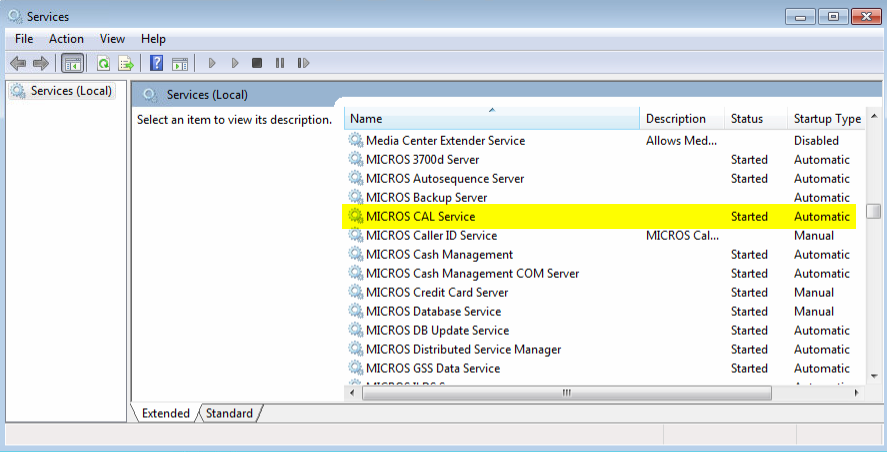
Note that this issue will prevent Punchh from being able to update Punchh receipt messages from the Punchh dashboard that that requires us to update ISL files.
Punchh Integration Is Working but It Is Extremely Slow
Check if LevelUp is installed on the same system. Certain versions of LevelUp turn on extreme global logging by setting global ISL/SIM variable @SHOW_PMS_MESSAGES to 1. That is causing one line of log to be created for each character that any integration sends via TCP IP Interface from Micros. Punchh messages might be thousands of bytes.
To detect that situation check MICROS\Res\Pos\Etc\3700d.log, you will see endless lines of logging like this:
Mon Sep 21 02:27:45 2020 | COUNTER02 | OPS | 0 | isl[2]
Mon Sep 21 02:27:45 2020 | COUNTER02 | OPS | 0 | isl[2]:0 |
Mon Sep 21 02:27:45 2020 | COUNTER02 | OPS | 0 | isl[2]:0 |
Mon Sep 21 02:27:45 2020 | COUNTER02 | OPS | 0 | isl[2]:0 |
Mon Sep 21 02:27:45 2020 | COUNTER02 | OPS | 0 | isl[2]:0 |
Mon Sep 21 02:27:45 2020 | COUNTER02 | OPS | 0 | isl[2]:0 |
Mon Sep 21 02:27:45 2020 | COUNTER02 | OPS | 0 | isl[2]:0 |
Mon Sep 21 02:27:45 2020 | COUNTER02 | OPS | 0 | isl[2]:0 |
Mon Sep 21 02:27:45 2020 | COUNTER02 | OPS | 0 | isl[2]:0 |
Mon Sep 21 02:27:45 2020 | COUNTER02 | OPS | 0 | isl[2]:2 |
Mon Sep 21 02:27:45 2020 | COUNTER02 | OPS | 0 | isl[2]:p |
Mon Sep 21 02:27:45 2020 | COUNTER02 | OPS | 0 | isl[2]:u |
Mon Sep 21 02:27:45 2020 | COUNTER02 | OPS | 0 | isl[2]:n |
Mon Sep 21 02:27:45 2020 | COUNTER02 | OPS | 0 | isl[2]:c |
Mon Sep 21 02:27:45 2020 | COUNTER02 | OPS | 0 | isl[2]:h |
Mon Sep 21 02:27:45 2020 | COUNTER02 | OPS | 0 | isl[2]:h |
That issue can be confirmed byu uninstalling LevelUp. If levelup is required to run with Punchh, other brand will need to contact LevelUp for an updated version that will not cause this behavior..
