Braze Implementation
This article covers implementation on the Punchh side for integration with Braze. For any configuration within Braze, please work directly with your Braze representative.
Overview
Braze is a Customer Engagement Platform that powers customer-centric interactions between consumers and brands in real-time. The Punchh and Braze integration allows your brand:
- Ingest loyalty data from Punchh and Braze in real time and listen to your customers across multiple touchpoints.
- Build dynamic audiences with real-time data including loyalty and transactional-based events that change as your customers do.
- Leverage powerful segment/audience data from Braze to deliver even more meaningful and dynamic, cross-channel experiences
Integrating Braze with Punchh requires the use of a specific Braze within the Webhooks Manager. This article will allow you to understand the setup and configuration around the Braze adapter, along with ingesting external identifiers in Punchh as hashed email. This involves integrating Braze with external source ID ingestion and publishing this data to Braze. The data in Braze will be used for segmentation and synced back to Punchh through webhook templates in Braze to associate them with Punchh campaigns.
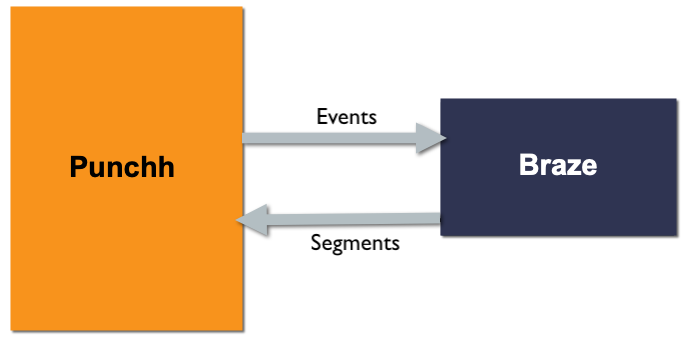
What's different about the Braze adapter in the Punchh Platform?
With Braze, only specific webhook events data are supported:
- Guest
- Loyalty Checkin
- Gift Checkin
- Redemption
- Rewards
- Transactional Notification
- Marketing Notification
- Coupon Issuance - Unlock type
- Coupon Redemption
Additionally, the Braze adapter offers Event Mapping. This allows you to subscribe for required events and select fields to remove/modify attribute names while sending them to Braze as part of events data. This can be useful to minimize the amount of data sent from Punchh. (If no event mapping is completed all default values will be sent as part of the payload.)
Supported Events: Punchh to Braze
Refer to the Braze Webhooks Adapter Overview for more details. For overall details on these event types, refer to the Events Framework article in the Developer Portal.
| Event | Description | Payload |
|---|---|---|
| Guest | This includes created/updated events triggered as and when they happen in the Punchh system. | Example Payload |
| Loyalty Checkin | This includes user checkin events triggered as and when they happen in the Punchh system. | Example Payload |
| Gift Checkin | This includes user gift check-in events triggered as and when they happen in the Punchh system. | Example Payload |
| Redemptions | This includes user redemptions created/updated events triggered as and when they happen in the Punchh system. | Example Payload |
| Rewards | This includes events where a user is gifted/issued a reward in the Punchh system triggered as a result of any configuration or activity. | Example Payload |
| Transactional Notifications | This includes transactional-based events such as gift card auto-reload, payments, etc. | Example Payload |
| Marketing Notifications | This includes events that are based on campaigns. | Example Payload |
| Coupon Issuance - Unlock Type | This includes events where a coupon is gifted/issued in the Punchh system. | Example Payload |
| Coupon Redemptions | This includes events where a coupon is redeemed. | Example Payload |
Ingest External User ID in Punchh
Part of the Punchh + Braze integration is sending unique user identifiers stored as external_source in Punchh and the corresponding values to Braze to be used within segmentation. (If there is no identifier selected, then by default, Punchh would send external_source as blank and external_source_id as Punchh user_id under events data payload.)
Create new users in Punchh via sign-up API with external source ID
Punchh allows external identifiers to be sent with the user profiles via sign-up API under the external_source and external_source_id fields. There will be a uniqueness for the value associated, and the same value cannot be associated with multiple profiles. Review the following API documentation on our Developer Portal for more details:
- Mobile Sign-up API and SSO Sign-up API: These allow you to send external identifiers with user profile at the time of sign-up under
external_source(e.g., “customer_id”) andexternal_source_id(e.g., “skjfbvjfbnjdfnsdkncsmb”) value with the string data type.
Update external source ID for existing users
Punchh also allows external identifiers to be added to a profile via a user update endpoint where that value does not exist in Punchh and is not associated with any other profile already to maintain uniqueness. Review the following API documentation on our Developer Portal for more details:
- Mobile User Update API and SSO User Update API: These allow you to update external identifiers with user profile under
external_sourceas “customer_id” andexternal_source_idas “skjfbvjfbnjdfnsdkncsmb” value with the string data type. - Dashboard User Update API: This allows you to update
external_source_idin the Punchh system based on the user ID and email address (if present already). If the user is not present in Punchh, it will return a 404 error.
Platform Configuration
Once data is present in Punchh along with this external_source_id, the Braze adapter can be set up in the platform with endpoint URL and API secret key to trigger events data based on user activity.
After the adapter is set up, you can configure the webhook in the Braze dashboard topass segment data from Braze to Punchh. The webhook would require custom_segment_id and user_id. User_id would be sent from Punchh to Braze as a part of events payload and the custom segment_id would be available once it's created in Punchh. This custom segment can then be associated with campaigns to trigger gifting when a user qualifies.
Note: Contact your Punchh representative to enable the External User Identifier flag within the platform for your brand (if not already enabled).
Webhooks Adapter
- Navigate to Data Sharing > Outbound Webhooks
- Click the Adapters tab.
- Click on Create Adapter to set up an adapter.

- Fill out the following fields:
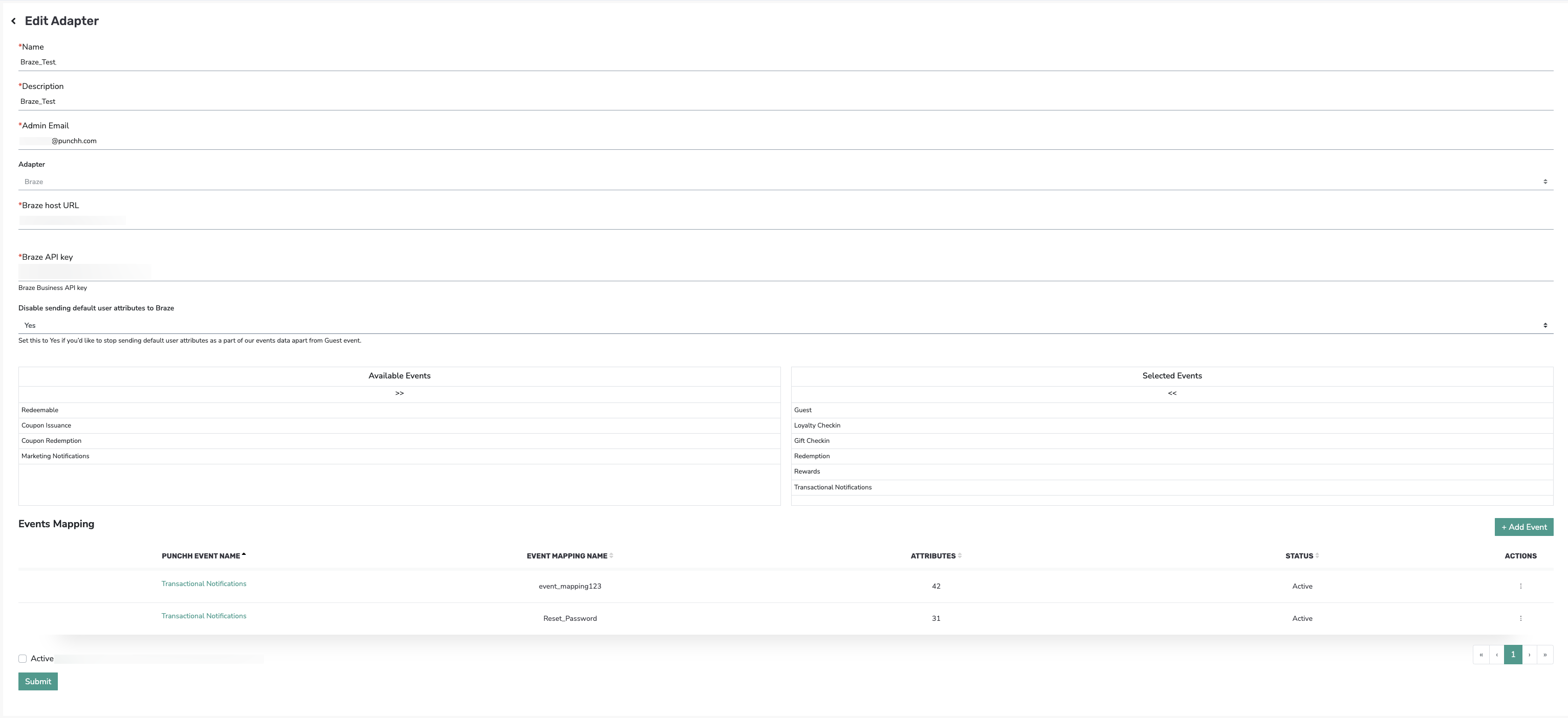
- Name: Enter a name such as "Braze Adapter"
- Description: Enter a description of the adapter.
- Admin Email: Enter your admin's email.
- Adapter: Select Braze from the drop-down menu
- Braze host URL: [provided by Braze]
- Braze API Key: [provided by Braze]
Note: Please connect with your Braze Account Manager to fetch the Braze URL and API Key for configuration in Punchh. Refer to the Braze documentation for managing API keys. - Disable sending default user attributes to Braze: Select Yes or No from the drop-down menu.
- If Yes, then the system will stop sending default user attributes in the events data payload except the Guest event.
- If No, then the system will continue to send default user attributes in the events data payload.
For further details about sample payloads, see the "Exclude User Profile Data from Custom Events" section of the Braze Webhooks Adapter Overview article on the Developer Portal.
-
- Braze Partner Key: punchh
- Under Event Selection, check the box next to the events you wish to includeRefer to the Supported Events section to see which events can be selected.

- The Event Mapping section allows you to subscribe to required events and select fields to remove/modify attribute names while sending them to Braze as part of events data.
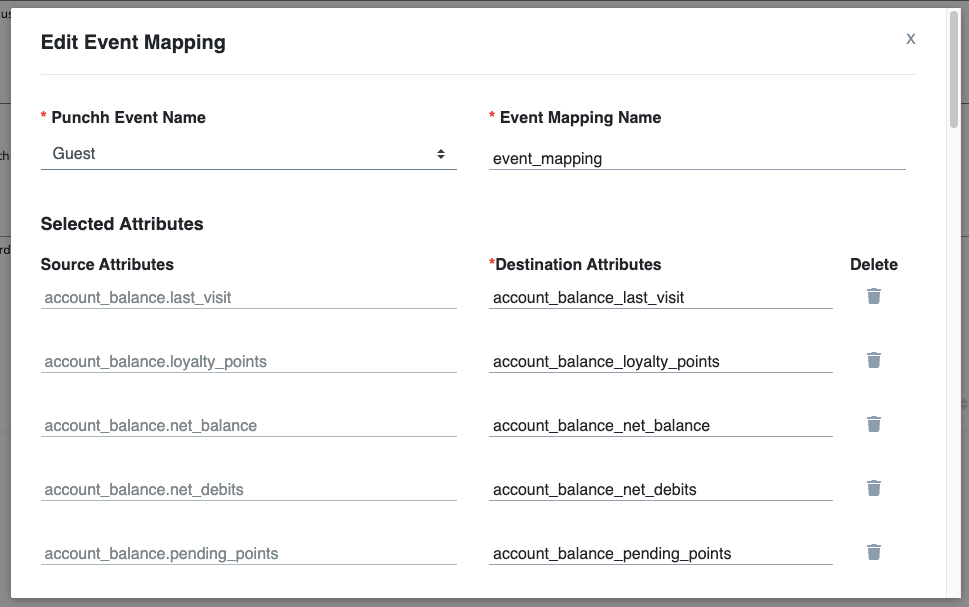
- Click Add Event to create a new event mapping.
- Punchh Event Name: Select the event in the drop-down menu.
- If Transactional Notifications and Marketing Notifications are selected, then select the sub-event type under Punchh Event Type.
- Event Mapping Name: Enter a name for the event mapping.
- Destination Attributes: Modify the attribute names, as needed.
- Delete: Click the trashcan icon to delete any attributes, as needed.
- Click on Submit to enable the Webhook.
Punchh has added support for two coupon-related events with a Braze adapter for outbound: Coupon Issuance and Coupon Redemption. For menu items, an addition flag is introduced under the Data Sharing > Outbound Webhooks > Configuration tab, named Enable Coupon Menu Items which controls whether or not the menu items will be sent with the payload to the Braze adapter. If the Enable Coupon Menu Items checkbox is enabled, the Coupon events (Issuance and Redemption) payload will contain this key "redeemed_menu_items".
Segment Sync Webhook Setup in Braze
There may be necessary configurations within Braze prior to Segment syncing. Please work directly with your Braze representative for details.
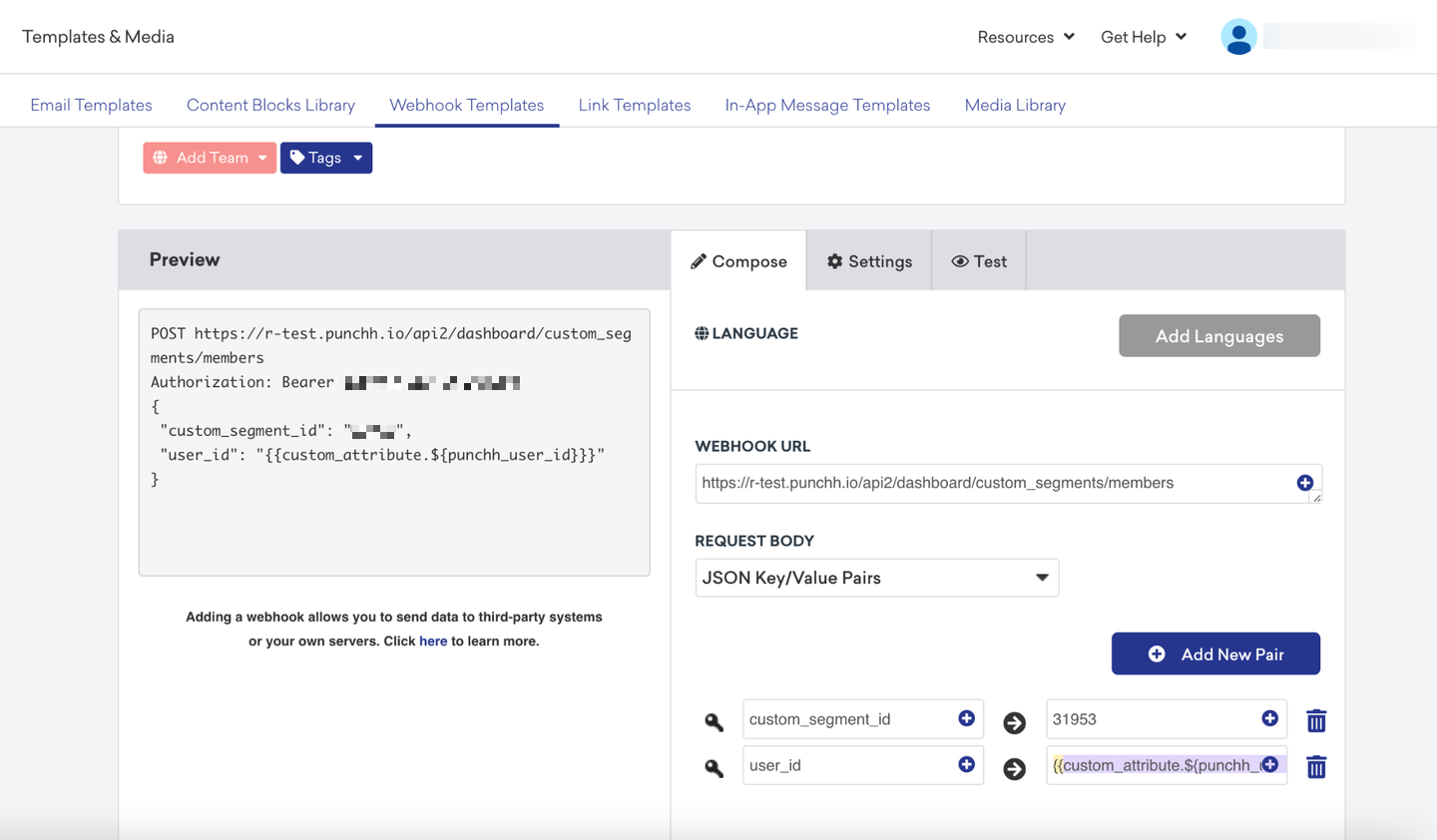
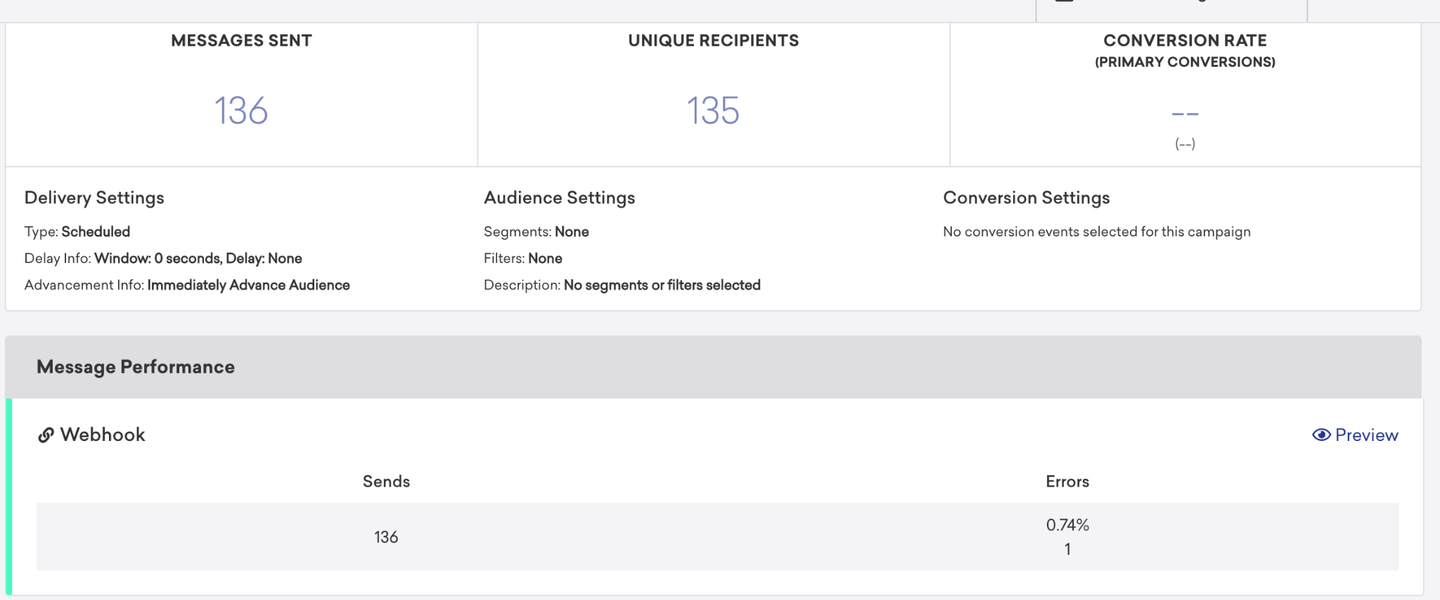
With the Punchh + Braze integration, you have the ability to set up targeting criteria in Braze and expect the corresponding segments in Punchh to be updated with target users. To sync segment data from Braze to Punchh:
- Create a custom segment in Punchh and copy the
segment_idpresent in the URL, as shown below.
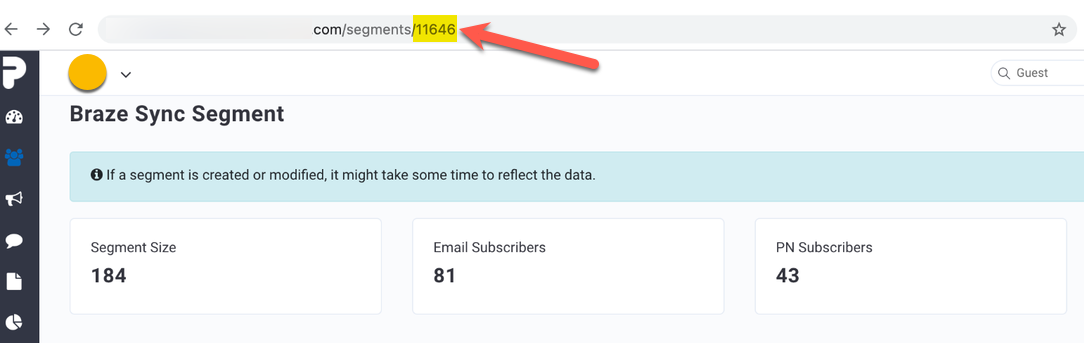
- Based on the
custom_segment_id, you can set up a webhook in the Braze dashboard with the endpoint URL and key-value pairs ascustom_segment_idanduser_id.
- It is then associated with the canvas to produce results to send to the webhook and sync users as shown below.
FAQs
| Question | Answer |
|---|---|
| Is it possible to "filter" Webhook events based on specific criteria in the payload? I only want to receive an event payload from Punchh when certain conditions in the payload data are met. For example, I only want to receive a payload for the Guest event if "action": "create" or if "sms_subscription": true.Is it possible to filter events based on the contents of the payload? If not, what advice do you have for minimizing the amount of data sent from Punchh to my listener? |
As of today, our events can not be filtered based on the specific payload changes. Any change within the Punchh system would trigger the associated event, rather one can filter payload attributes per the event mapping as part of our outbound adapters. The logic to filter events generally resides at the receiving end in case our third-party webhooks receive our data. The current logic within our Punchh system allows us to track any dB changes within the user profile or based on loyalty activity to trigger the subscribed event to the listener. Hence, if there are specific preferences in terms of attributes required by the target system to minimize the amount of data, then it can be customized under the Event Mapping section as part of the setup to receive partial fields and not a full attribute set. Additionally, for Braze, we allow attributes to be sent based on the "previous_changes*"* or delta to stop sending default user attributes as a part of our events data but apart from Guest events. Note: The Guest event would still include some default user attributes as well i.e. dob, email, first name, last name, account_balance etc. |
| What is Braze’s partner key? | punchhThis key was provided by Braze and is hardcoded. |
| Are ‘default attributes’ referring to all attributes in the attributes object? Are there other types of attributes available in Punchh? | Default attributes refer to user attributes object that was sent as part of every event. (No including the user event, which has been updated to only send delta values in case of a user update event.) You have the ability to disable default attributes to stop attribute objects from being sent as part of other custom events. |
Is punchh_user_id from the attributes object also sent to Braze with every event? |
punchh_user_id is sent as part of the user event but for all corresponding custom events, we send external_id as a unique identifier. |
SMS Integration currently NOT SUPPORTED
Please consider the following if your brand uses Braze as an SMS Provider for SMS subscription management:
- Opt-in/Opt-out status: Punchh is not integrated with Braze as an SMS provider. So, the SMS Subscription status won’t be updated in Punchh if Braze is managing them on their end since Punchh doesn’t get any real-time updates from Braze.
- User creation in Punchh: Punchh does not allow any Loyalty user creation from Braze via SMS channel based on phone numbers or email addresses.
- Text-to-Join: This would not be supported if Braze manages user journeys and creates TTJ keywords to allow loyalty opt-ins for its users. There has to be an integrated SMS integration enabled for the same like Twilio or Attentive etc.
- Sending events to Braze: Punchh would send events to Braze that could potentially send event-triggered SMS based on the loyalty activity recorded within the Punchh system as part of events like guest, checkin, redemption, reward, etc. Braze could consume these events( as they’re currently set up as per Braze outbound adapter configuration in Punchh) and then leverage them to send communications to end users via SMS, email, or PN’s from their end.
