Aloha Firewall Site Setup
Network Firewall and Anti-Virus Setup
PUNCHH Firewall rules. Confirm that the following FQDN (Fully Qualified Domain Names) endpoints are properly whitelisted in the site's firewall/router
(PUNCHH DOES NOT SUPPORT FIREWALL RULES USING IP ADDRESSES)
POS DATA FLOW/PROCESS DIAGRAM
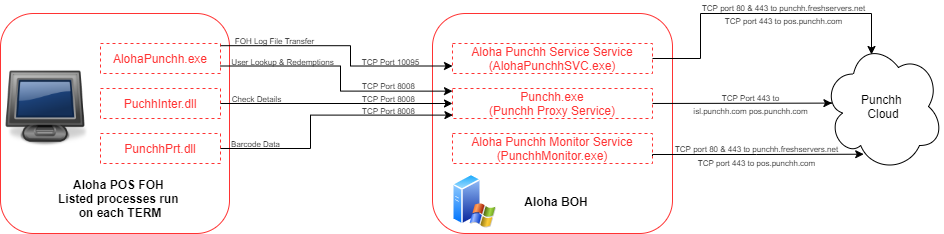
NETWORK FIREWALL CONFIGURATION
ALLOW
TCP using port 443
FROM: POS BOH SERVER
TO:
Punchh Legacy Stack (a.k.a., Mothership 1):
pos.punchh.com - check-in and redemption transactions, check and barcode details
Punchh New Stack (a.k.a., Mothership 2):
pos.us-west.punchh.com - check-in and redemption transactions, check and barcode details
Punchh log file repository:
loguploads.punchh.com -
BY:
Processes on BOH: (Punchh.exe, PunchhMonitor.exe)
ALLOW
TCP using port 443
FROM: POS BOH Server
TO:
punchh.freshservers.net - Punchh application configuration & update server
Process on BOH: (PunchhMonitor.exe)
poscfg-api.punchh.com - New Endpoint for Punchh application configuration & update server
Process on BOH: (PunchhMonitor.exe)
ALLOW
Web Surfing
FROM:
POS BOH File Server
TO:
https://*.punchh.com
ALOHA BOH SOFTWARE FIREWALL and ANTI-VIRUS AND APPLICATION WHITELISTING CONFIGURATION
ALLOW
Downloads of exe & dll files in ZIP files Authorized:
FROM
http://punchh.freshservers.net - Punchh application configuration & update server
https://punchh.freshservers.net - Punchh application configuration & update server
https://poscfg-api.punchh.com - Punchh application configuration & update server
Verify that the following directories and sub-directories are excluded from AntiVirus, real time scanning on the POS BOH Server and also whitelisted in the software application control for the POS terminals. Files in this folder need to be able to be updated and automatically added to the POS BOH PC application whitelist when updated by our update service.
c:\Program Files\Punchh\*
c:\Program Files (x86)\Punchh\*
Processes on BOH: (PunchhMonitor.exe)
Application Whitelist Control - Organizational Whitelisting
If your AV/Application whitelisting system provides the ability to approve applications that are cryptographically signed by specific organizations add:
PUNCHH INC (punchh.com)
as a trusted application provider to ensure updates downloaded to the site are not blocked by your Application Whitelist Control system
POS TRANSACTION FROM FOH TO PUNCHH PROXY SERVICE ON ALOHABOH
ALLOW
ALLOW TCP USING PORT 8008 (default) ← or (PORT designated when running the program: c:\program files (x86)\Punchh\PunchhConf.exe.)
FROM:
ALOHA POS FOH TERMINALS
TO:
ALOHABOH SERVER PROCESS
punchh.exe
POS UPLOAD OF FOH LOGS TO ALOHA PUNCHH SERVICE ON ALOHABOH
ALLOW
ALLOW TCP USING PORT 10095 (default) ← or (PORT designated when running the program: c:\program files (x86)\Punchh\PunchhConf.exe)
FROM:
ALOHA POS FOH TERMINALS
TO:
ALOHABOH SERVER PROCESS
alohapunchhsvc.exe
NETWORK FIREWALL VALIDATION
From the POS BOH PC open a web browser and navigate to the following web pages:
- https://punchh.freshservers.net/punchhapi/ping
- https://poscfg-api.punchh.com/punchhapi/ping
- https://pos.us-west.punchh.com/ping
- https://pos.punchh.com/ping
- https://poslogs.punchh.com/ping
- https://loguploads.punchh.com/ping
Each web page should return a plain white page with OK. If any page doesn't return OK, the firewall needs to be reviewed to ensure the correct FW rules are in place.
