Punchh Platform Release Notes - 29 September 2026 Deployment
The updates described in these release notes and the affected/linked documentation will not be available in the Punchh platform until the target deployment date.
PAR Intelligence
AI Segment Assistant Available for Beta
AI Segments Assistant enables Punchh marketing users to create guest segments in plain English via PAR Intelligence, instead of manually configuring rule builders. PAR Intelligence: Segments Assistant interprets the request, translates it into segment logic, and presents a visual summary for user confirmation before executing. Reach out to your PAR representative if you are interested in beta testing. (AVA-227)

Campaigns
Segment Auto-Enrollment Challenge Campaigns Enforce Eligibility
For Challenge campaigns that use Segment Auto-Enrollment, members can now opt in only if they are currently enrolled in the associated segment. If a member attempts to opt in without being enrolled in the required segment, the opt-in is blocked and a validation message is returned. This keeps campaign enrollment consistent with segment membership, so members only opt into campaigns they are eligible for. (LPE-2339)
Mass Gifting Campaign Deletion Protection
You can no longer delete a Mass Gifting campaign while a live segment still targets it. This prevents a live segment from referencing a campaign that no longer exists. (SB-4471)
Experiential Loyalty
Location-Based Inventory for Swag Management
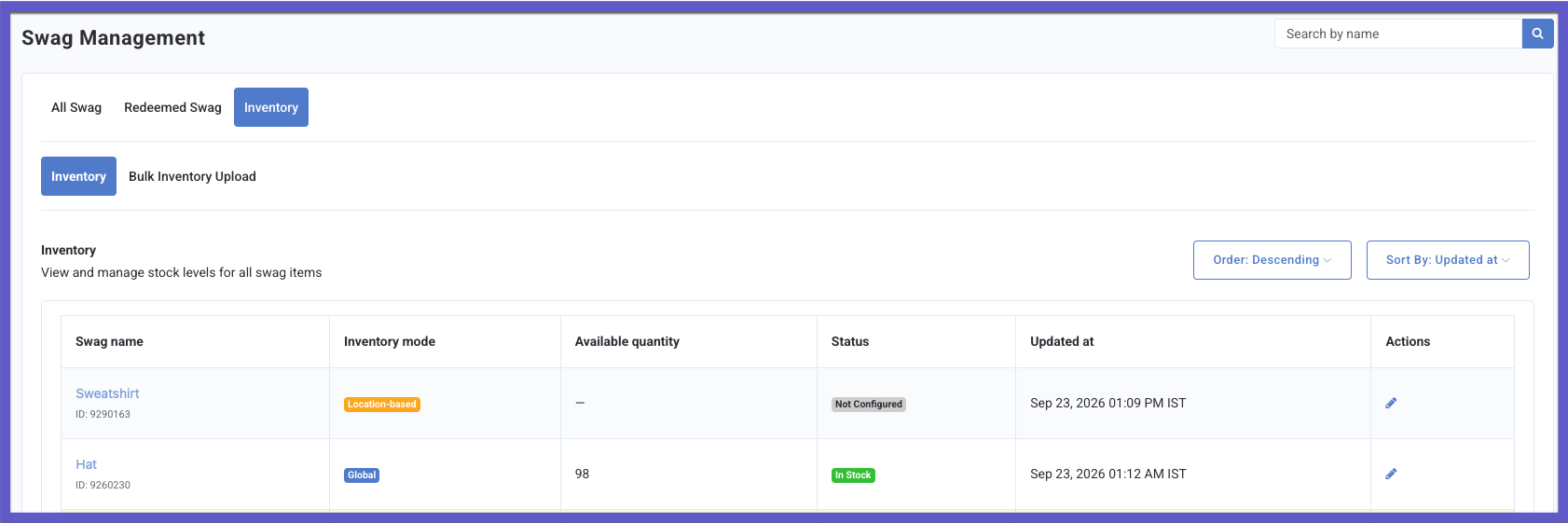
Swag Management now supports location-based inventory. When configuring a swag item, choose between a Global inventory pool shared across all locations or a Location-based mode that tracks stock separately per location.
With location-based mode, stock at one location does not affect availability at others, so you can prevent over-redemption at high-traffic locations and keep inventory accurate across your brand.
This release also includes a revamped Inventory tab, a dedicated view and edit page per swag, and a Bulk Inventory Upload subtab for updating location-level inventory via CSV or S3 URL. (LPE-2270, PDOC-4452)
See the following article(s) for more details:
Inventory Permissions for Swag Management
Two new admin permissions control access to the Inventory tab in Swag Management:
- Inventory (Create and Edit): View the Inventory tab and set or update inventory for new and existing swag.
- Inventory (View Only): View the Inventory tab with no edit access.
Both permissions require the Redeemables permission and appear only for brands with Swag Management enabled. Removing Redeemables also removes Inventory tab access. (LPE-2263, PDOC-4452)
See the following article(s) for more details:
Swag Creation Form Restructuring
This release includes the following changes to the swag creation form:
- Fulfillment Method (Home Delivery, Store Pickup, or Both) is now set in Step 1, when you name your swag.
- The Receipt Rule field now displays a short note explaining when it applies, based on your Fulfillment Method.
- For Home Delivery swags, the "Allow Redemption Code expiry" and "Support gifting" options are hidden automatically.
- The Redeeming Location(s) field has been removed. Manage redemption locations from the Inventory section instead.
Because you choose how the swag is fulfilled before completing the rest of the form, you see only the fields relevant to that choice. You now manage redemption locations from the Inventory section instead. (LPE-2259, PDOC-4452)
See the following article(s) for more details:
Platform Integrations
Audit Logs Mask Encrypted Field Values
Audit logs no longer display the values of changes to encrypted fields. The log now indicates that a field was changed without showing the encrypted value. (INT-3807)
Developers Corner
New API Added: Update Swag Global Inventory
A new Dashboard API endpoint, "Update Swag Global Inventory" (PATCH /api2/dashboard/inventory_items/global), is now available, enabling business admins to update the available inventory for a specified swag item configured with global inventory. To call this API, the "Save Points for Swag" feature must be enabled, and business admins must have swag management permissions. (PDOC-4451, LPE-2206)
The API:
- Allows authorized users to update the available quantity (
inventory_qty) for active, scheduled, expired, or deactivated swag items. - Supports updating inventory at the global level, or restricting scope to specific locations (
location_id) or location groups (tag_id). - Enforces quantity constraints (0 to 999,999), prevents updates on draft swags or non-swag redeemables, and validates business permissions.
- Returns appropriate error responses when the request fails validation, the user lacks the required permissions, or the swag item does not meet the update requirements.
See the following article(s) for more details:
- Update Swag Global Inventory (Developer Portal)
New Mobile API for Fetching Swag Locations
A new Mobile API endpoint, "Fetch Swag Locations" (GET /api2/mobile/swag_locations), is now available to retrieve the locations in alphabetical order where a specific swag item can currently be redeemed. The API accepts a single swag_id along with the standard pagination parameters (per_page and page). The API returns only approved locations where the swag is currently available and has inventory. (PDOC-4280, LPE-2255)
The returned locations depend on the swag item's inventory configuration:
- Global – All Locations: Returns all approved locations when the swag item's global inventory is greater than zero.
- Global – Restricted Locations: Returns only approved locations included in the participating location or location tag/group when the swag item's global inventory is greater than zero.
- Location-Level: Returns only approved locations where store-specific inventory is greater than zero.
The API returns an empty list when no eligible locations or stock are available.
See the following article(s) for more details:
- Fetch Swag Locations (Developer Portal)
- Update User's Save Points for Swag Settings (Developer Portal)
- Get User's Save Points for Swag Settings and Balance (Developer Portal)
- Fetch Available User's Swag (Developer Portal)
- Redeem Swag (Developer Portal)
- Get Swag Shipping Details (Developer Portal)
Send Message to Users API: Reward ID in Response
The response schema of the "Send Message to Users" (POST /api2/dashboard/users/send_message) API endpoint now includes reward_id in the 201 Created response when gifting a redeemable. This eliminates the additional API calls to the "Get User Information" API (GET /api2/dashboard/users/info) to verify whether the specific reward was assigned to the user.
When an admin gifts a redeemable to a user by providing redeemable_id in the request payload and the "Enable Reward ID in Send Message API" backend flag is enabled for the business, the API returns the generated reward_id in the response.
When a redeemable is not included in the request (e.g., sending a text-only message, gifting points/visits using gift_count, gifting banked currency using reward_amount, or crediting challenge progress), the API continues to respond with 201 Created and an empty JSON body ({}).
See the following article(s) for more details:
- Send Message to a User (Developer Portal)
Swag APIs Enhancement
Fetch Available User’s Swag API Updates
We have updated the "Fetch Available User’s Swag" API (GET /api2/mobile/user_swag) to make the location_id an optional request parameter. When provided, the API returns the swag items available at the specified location, provided inventory is greater than zero. The API uses location-level inventory for location-tracked swag and global inventory for globally tracked swag when the location is a participating location. When omitted, the API returns all available swag items for the brand without location filtering, provided inventory is available. (PDOC-4498, LPE-2253)
Note: Following the changes in the previous release, we updated the endpoint path from GET /api2/mobile/user_merch to GET /api2/mobile/user_swag and added the location_id and pagination request parameters in the developer documentation. We also updated API cross-references across projects to use the new endpoint URL.
Redeem Swag API Enhancements
We added conditions to the "Redeem Swag" API (POST /api2/mobile/swag_redemptions) that must be met to process a swag redemption successfully. Before processing a redemption, the system now checks:
- For swag items tracked at the location level, the available inventory for the selected location must be greater than zero.
- For swag items tracked globally, the selected location must be a participating location and available inventory must be greater than zero.
- If location-level redemption approval is enabled for the business in the Punchh platform, redemptions cannot be processed at disabled or disapproved locations.
See the following article(s) for more details:
- Fetch Available User's Swag (Developer Portal)
- Redeem Swag (Developer Portal)