How do I use the Net Amount Excluding Function Strategy field when building a Qualification Criteria (QC)?
This article explains how the Net Amount Excluding Function Strategy field works when building a Qualification Criteria (QC) in the Punchh Platform.
Overview
The Net Amount Excluding Function Strategy field appears in the Item Qualifiers section of a Qualification Criteria (QC) when you select one of the following qualifier types:
- Net Amount Excluding Min-Priced Item Equal To or More Than
- Net Amount Excluding Max-Priced Item Equal To or More Than
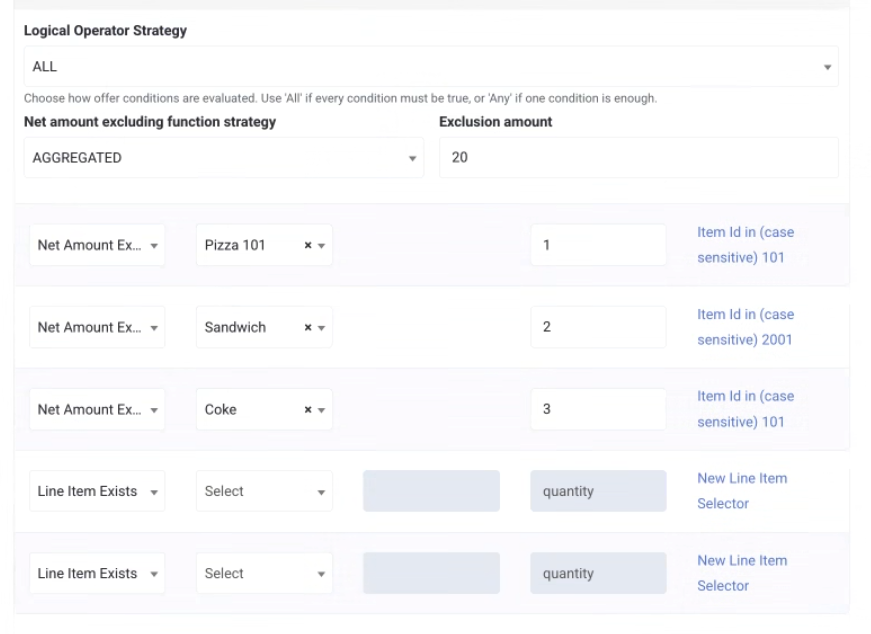
Use this field to control how selected menu items are excluded from the qualifying purchase amount when the system evaluates whether a guest's receipt meets a minimum spend threshold. This is useful for offers where the discounted item itself — or other specific items — should not count toward the required minimum purchase.
For example, for an offer like "Free any size fry with a $5 purchase," you can configure the system to exclude the discounted fry from the $5 minimum, so the guest must spend $5 on other items to qualify.
Note: Delivery fees, taxes, and service charges are not included in the minimum qualifying purchase amount calculation.
Available Strategies
| Strategy | Behavior |
|---|---|
| AGGREGATED | All selected menu items are combined and excluded together as a single group before the minimum purchase requirement is evaluated. An Exclusion Amount field is displayed for you to set the minimum remaining receipt amount required to qualify. |
| INDIVIDUAL | Each selected menu item is evaluated independently against its own configured minimum remaining amount. When this strategy is selected, the Exclusion Amount field is hidden, and a per-item Minimum Amount field appears instead. |
Use Cases
Use Case 1: AGGREGATED Strategy with Defined Quantities
Configuration
- Net Amount Excluding Function Strategy: AGGREGATED
- Exclusion Amount: $20
- Selected menu items:
- Pizza — Quantity: 1
- Sandwich — Quantity: 2
- Coke — Quantity: 3
Behavior
The configured quantities of all selected menu items are excluded from the receipt total as a single combined group. The remaining receipt amount must meet or exceed the configured Exclusion Amount ($20) to qualify.
Example receipt:
| Item | Qty | Amount |
|---|---|---|
| Pizza | 1 | $5 |
| Sandwich | 2 | $10 |
| Coke | 3 | $15 |
| DrinkFiller | 1 | $20 |
| Total | $50 |
Calculation:
| Item | Qty Excluded | Amount Excluded |
|---|---|---|
| Pizza | 1 | $5 |
| Sandwich | 2 | $10 |
| Coke | 3 | $15 |
| Total Excluded | $30 |
Remaining receipt amount: $50 − $30 = $20
Result: The remaining amount of $20 meets the minimum qualifying requirement of $20. The transaction qualifies.
Use Case 2: AGGREGATED Strategy with Blank Quantities
Configuration
- Net Amount Excluding Function Strategy: AGGREGATED
- Exclusion Amount: $20
- Selected menu items:
- Pizza — Quantity: (blank)
- Sandwich — Quantity: (blank)
- Coke — Quantity: (blank)
Behavior
When quantity is left blank, the system excludes all quantities of the selected menu items present on the receipt.
Tip: Leaving the quantity blank means the system excludes all matching quantities present on the receipt, regardless of how many units were purchased.
Example receipt:
| Item | Qty | Amount |
|---|---|---|
| Pizza | 2 | $10 |
| Sandwich | 3 | $15 |
| Coke | 4 | $20 |
| DrinkFiller | 1 | $25 |
| Total | $70 |
Calculation:
| Item | Qty Excluded | Amount Excluded |
|---|---|---|
| Pizza | 2 | $10 |
| Sandwich | 3 | $15 |
| Coke | 4 | $20 |
| Total Excluded | $45 |
Remaining receipt amount: $70 − $45 = $25
Result: The remaining amount of $25 exceeds the minimum qualifying requirement of $20. The transaction qualifies.
Use Case 3: INDIVIDUAL Strategy with Blank Quantities
Configuration
- Net Amount Excluding Function Strategy: INDIVIDUAL
- (Exclusion Amount field is hidden when INDIVIDUAL is selected)
- Selected menu items:
- Pizza — Minimum Amount: $10, Quantity: (blank)
- Sandwich — Minimum Amount: $20, Quantity: (blank)
- Coke — Minimum Amount: $30, Quantity: (blank)
Behavior
Each menu item rule is evaluated independently. When quantities are left blank, all matching quantities of each item are excluded. The remaining receipt amount is compared against that item's configured Minimum Amount.
Example receipt:
| Item | Qty | Amount |
|---|---|---|
| Pizza | 2 | $10 |
| Sandwich | 2 | $20 |
| Coke | 2 | $30 |
| DrinkFiller | 1 | $40 |
| Total | $100 |
Results:
| Rule | Excluded Amount | Remaining Amount | Minimum Required | Result |
|---|---|---|---|---|
| Exclude all Pizza | $10 | $90 | $10 | Qualifies |
| Exclude all Sandwich | $20 | $80 | $20 | Qualifies |
| Exclude all Coke | $30 | $70 | $30 | Qualifies |
Result: All three rules qualify independently. The transaction qualifies.
Use Case 4: INDIVIDUAL Strategy with Defined Quantities
Configuration
- Net Amount Excluding Function Strategy: INDIVIDUAL
- (Exclusion Amount field is hidden when INDIVIDUAL is selected)
- Selected menu items:
- Pizza — Quantity: 1, Minimum Amount: $10
- Sandwich — Quantity: 2, Minimum Amount: $20
- Coke — Quantity: 3, Minimum Amount: $30
Behavior
Each menu item rule is evaluated independently using the configured quantities. Only the configured quantity of that item is excluded, and the remaining receipt amount is compared against that item's configured Minimum Amount. Qualification is determined separately for each rule.
Example receipt:
| Item | Qty | Amount |
|---|---|---|
| Pizza | 2 | $10 |
| Sandwich | 3 | $15 |
| Coke | 4 | $20 |
| DrinkFiller | 1 | $25 |
| Total | $70 |
Calculation:
| Rule | Unit Price | Qty Excluded | Excluded Amount | Remaining Amount | Minimum Required | Result |
|---|---|---|---|---|---|---|
| Exclude 1 Pizza | $5 | 1 | $5 | $65 | $10 | Qualifies |
| Exclude 2 Sandwiches | $5 | 2 | $10 | $60 | $20 | Qualifies |
| Exclude 3 Cokes | $5 | 3 | $15 | $55 | $30 | Qualifies |
Exception: Overlapping Modifier IDs
If the same modifier ID is referenced in multiple exclusion configurations, the system processes each configuration independently and does not deduplicate the overlapping entries. This means the modifier's amount may be excluded more than once.
Example:
- Q1 excludes 1 Sandwich and its configured modifiers (including SandwichMod1 at $3) → Total excluded from Q1: $13
- Q2 excludes all SandwichMod1 items (quantity blank) → Total excluded from Q2: $6
- Because SandwichMod1 appears in both Q1 and Q2, its amount is counted in both exclusions.
- Total aggregated exclusion: $19 (not $16)
Note: This is a configuration issue. The exclusion engine processes each configuration independently and does not automatically deduplicate overlapping modifier exclusions. To avoid double exclusions, do not reference the same modifier ID in multiple exclusion configurations within the same QC.
Qualify Regardless of Excluded Items
The Qualify Regardless of Excluded Items setting works alongside the Net Amount Excluding qualifiers described above (Min‑Priced Item Equal To or More Than / Max‑Priced Item Equal To or More Than). It controls whether the presence of an excluded item on the receipt can affect qualification, separate from the remaining-amount math itself.
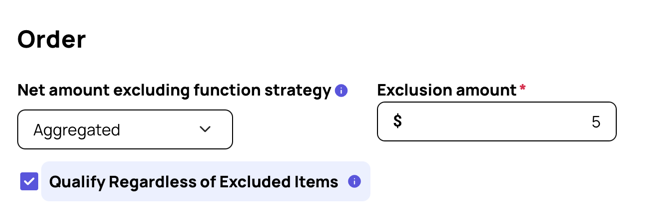
When this setting is enabled, the receipt qualifies whenever the remaining (non‑excluded) amount meets the configured minimum, regardless of whether any, all, or none of the offer's excluded items are also present on that receipt. Excluded items are simply left out of the calculation; their presence never blocks the offer by itself. If the non‑excluded items don't add up to the required minimum, including when the receipt is made up entirely of excluded items, the receipt is correctly declined.
Configuration Example
-
Net Amount Excluding Function Strategy: AGGREGATED
-
Exclusion Amount: $20
-
Qualify Regardless of Excluded Items: Enabled
-
Selected menu items:
- Pizza — Quantity: 1
- Sandwich — Quantity: 2
- Coke — Quantity: 3
Receipt Example: One of the excluded items not present
Receipt:
| Item | Amount Excluded | |
|---|---|---|
| Pizza | 1 | $5 |
| Sandwich | 0 (not on receipt) | $0 |
| Coke | 3 | $15 |
| Total Excluded | $20 |
Remaining receipt amount: $40 − $20 = $20
Result: One of the three configured excluded items, Sandwich, isn't on this receipt at all, so it contributes $0 to the exclusion. Only Pizza and Coke are excluded, leaving a remaining amount of $20, which meets the $20 minimum. The transaction qualifies. Whether one, two, or all three excluded items happen to be on the receipt, the setting only cares that the non-excluded remainder clears the minimum.
Related Documentation
