Punchh Platform Release Notes - 04 November 2026 Deployment
The updates described in these release notes and the affected/linked documentation will not be available in the Punchh platform until the target deployment date.
PAR Intelligence
PAR Intelligence Usage Data and Expanded Q&A Knowledge Agent
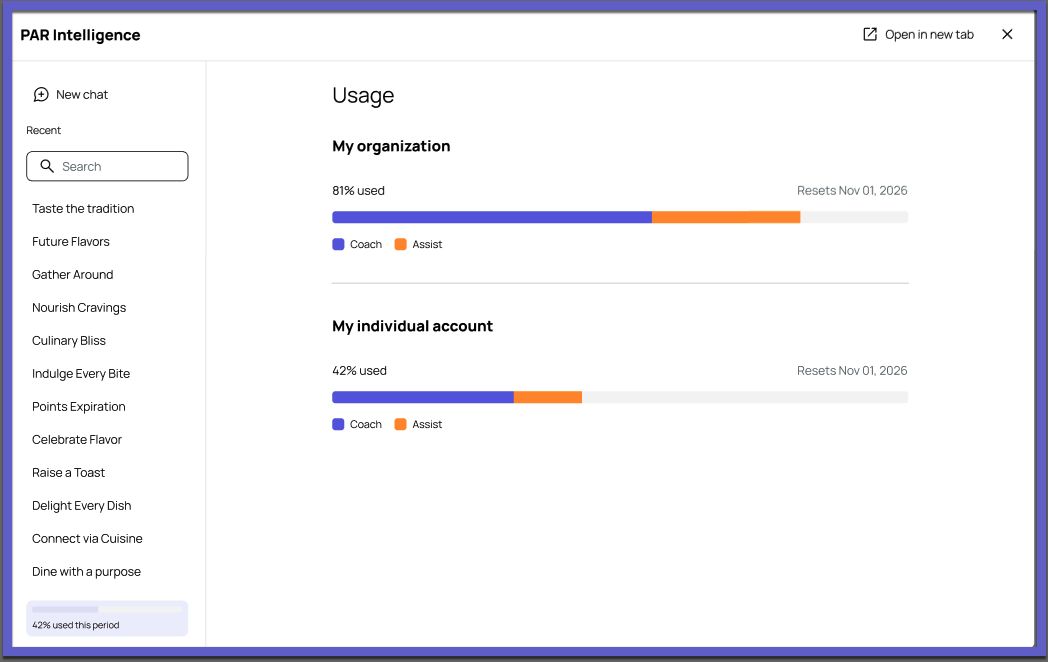
See your AI usage at a glance.
PAR Intelligence AI usage data now appears directly in the PAR Intelligence widget, so you can track how your team uses AI without leaving the page. (AVA-308)
Get answers about PAR POS and PAR Guest360.
The Q&A Knowledge Agent can now answer questions about PAR POS and PAR Guest360 functionality in plain language, so you can find what you need faster. (AVA-281, AVA-192)
Example Prompts
PAR Guest360
How do I create and manage dynamic guest segments in PAR Guest360?
Can you explain how Profile Stitching works when I have guest data from multiple locations or systems?
PAR POS
How do I log in to the PAR POS register for the first time?
How do I perform a cash out from my drawer at the end of my shift?
Loyalty
Schedule Audit Logs for Deactivation Lifecycle
Schedules now include an audit log that captures the full deactivation lifecycle. You can see who requested, approved, rejected, cancelled, or processed a deactivation, and when. (LPE-2278)

- Logs are created automatically as each action happens.
- Logs remain available even if the schedule is later reactivated or deleted.
- Only authorized roles, such as Admin and Auditor, can view them.
See the following article(s) for more details:
Consumer Experience
iFrame Email Fields Now Trim Whitespace
The iFrame now automatically trims leading and trailing whitespace in the email field, reducing friction in the sign-up and log-in flows and cutting down on errors your end users experience. (CX-3074)
Reporting and Analytics
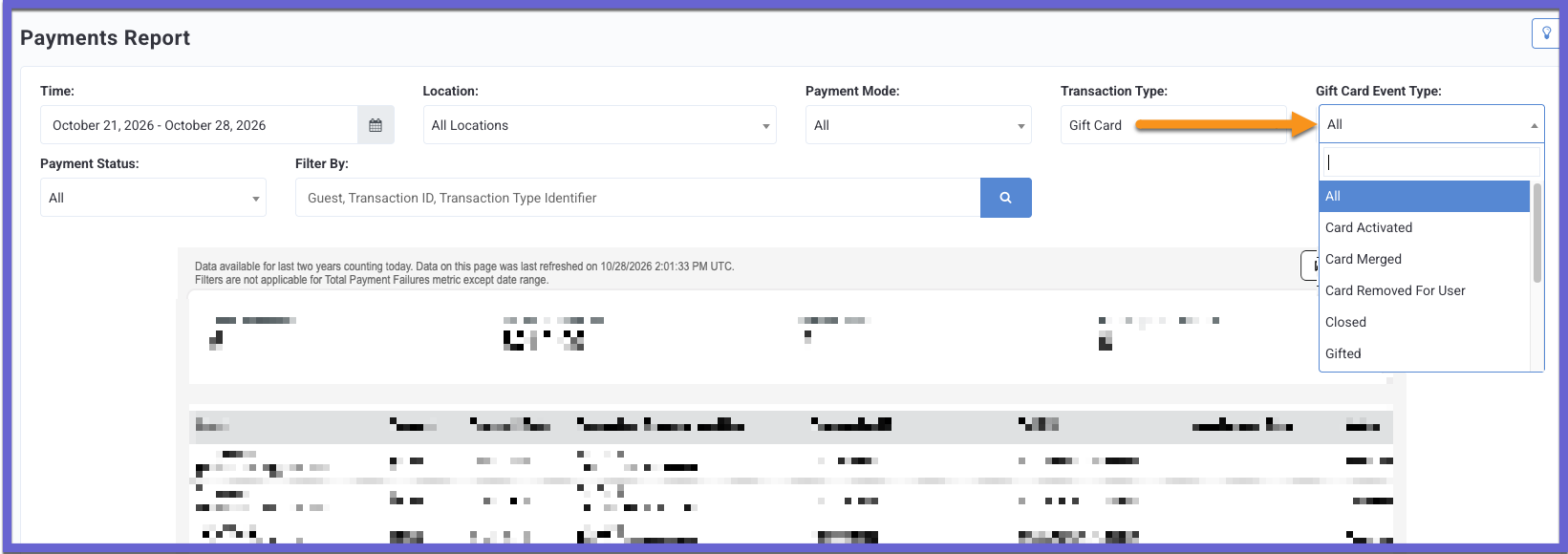
Gift Card Event Type Filter Added to Payments Report
The Payments Report now has a Gift Card Event Type filter, so you can narrow gift card payments to a specific event, such as purchased, reloaded, redeemed, gifted, and more. The filter appears only when Transaction Type is set to Gift Card. For other transaction types, it stays hidden and has no effect on the report. (INT1-2400)
See the following article(s) for more details:
Developers Corner
eClub User Lookup API
We have introduced a new eClub User Lookup API (GET /api2/dashboard/users/email_lookup), which enables integrations, such as PAR Games, to look up a guest by email address within the authenticated business. The response identifies the guest as an eClub member, an existing loyalty member, or not found. A user_id is returned when a matching member is found.
Integrations can use these results to route guests to the appropriate eClub-to-loyalty conversion, existing-member, or new-user registration flow. (PDOC-4611, CAM-7494)
See the following article(s) for more details:
- eClub User Look-up (Developer Portal)
Gift Card Feature Flags for Granular Control
Feature flags are now available to enable or disable individual gift card features for a brand, including reload, purchase, transfer, gifting, sharing, consolidation, and transaction history viewing.
Previously, disabling a feature only hid it from the mobile app UI, while the corresponding operation could still be processed through the backend/API. Now, disabling a feature will also prevent the corresponding operation from being processed through the backend/API, including the mobile app and POS.
Contact your Punchh representative to update this Punchh platform configuration. (PDOC-4636, INT-3820)
See the following article(s) for more details:
- Purchase Gift Card (Developer Portal)
- Reload Gift Card (Developer Portal)
- Transfer Gift Card or Balance (Developer Portal)
- Gift a Gift Card (Developer Portal)
- Share Gift Card (Developer Portal)
- Consolidate Gift Cards (Developer Portal)
- Fetch Gift Card Transaction History (Developer Portal)
Bug Fix: Banked Currency Redemption Restricted to Approved Locations
For the Points to Currency program, a validation check now restricts currency redemption to approved locations only. This safeguards your redemption strategy and helps prevent discount misuse. (OMM-2376, DL-3122, OMM-2403)
Note: This validation is controlled by a feature flag and runs when the location-based redemption validation feature is enabled for the brand in the Punchh platform. Contact your Punchh representative to update this Punchh platform configuration.
See the following article(s) for more details:
- Possible Redemptions (Redemptions 1.0) (Developer Portal)
- Create Redemption (Redemptions 1.0) (Developer Portal)
- Create Online Redemption (Redemptions 1.0) (Developer Portal)