Redeemable Performance Report
You can view the Redeemable Performance Report in Offers > Redeemable Performance Report. The Redeemable Performance Report is comprised of two tabs:
- Redeemable Summary
- Redeemable Detail
The Redeemable Performance Report is accessible only to users who have roles/permissions of Business Owner. This provision is made to ensure that brand-level Redeemable performance is only made available to the right audience with enough privileges. In case user does not have enough privileges, the message “No Data to Show or Insufficient Privileges“ is shown.
Date Range Available
Data is made available for the last two years, not counting today. For example, if today is 2024-Jul-24, the data from 2022-Jul-24 to 2024-Jul-23 is made available in the report.
Why is there a discrepancy between the Segments data and the Redemption data?
It's important to note that:
- The Redemption Performance Report displays data from the past two years and includes all reward redemptions, including both loyalty unlock redeemable and campaign offers.
- Segments, on the other hand, contain lifetime data (or can be customized for a specific duration) but only reflect redemptions related to campaign offers or rewards.
Therefore, you might see a discrepancy between the segment's size (found on the segment's detail page) and the data in the Redemption Report.
Data Refresh Frequency
Data is reported from an aggregated source and refreshed daily once at 7 AM EST. However, it may vary, up to a maximum of 11 AM EST. This can be checked from the latest refresh data time stamp shown on the dashboard.
Redeemable Summary
This tab displays the overall performance (especially the Redemption Rate and Rewards Disbursed) of each Redeemable (Offer) configured and used by the brand, irrespective of which locations the redemptions were made.
In other words, this tab provides a high-level view of a Redeemable’s Performance, in addition to showing the top Redeemable (Offers) based on various metrics such as Total Rewards disbursed, Redemption Rate, and Honored Reward.
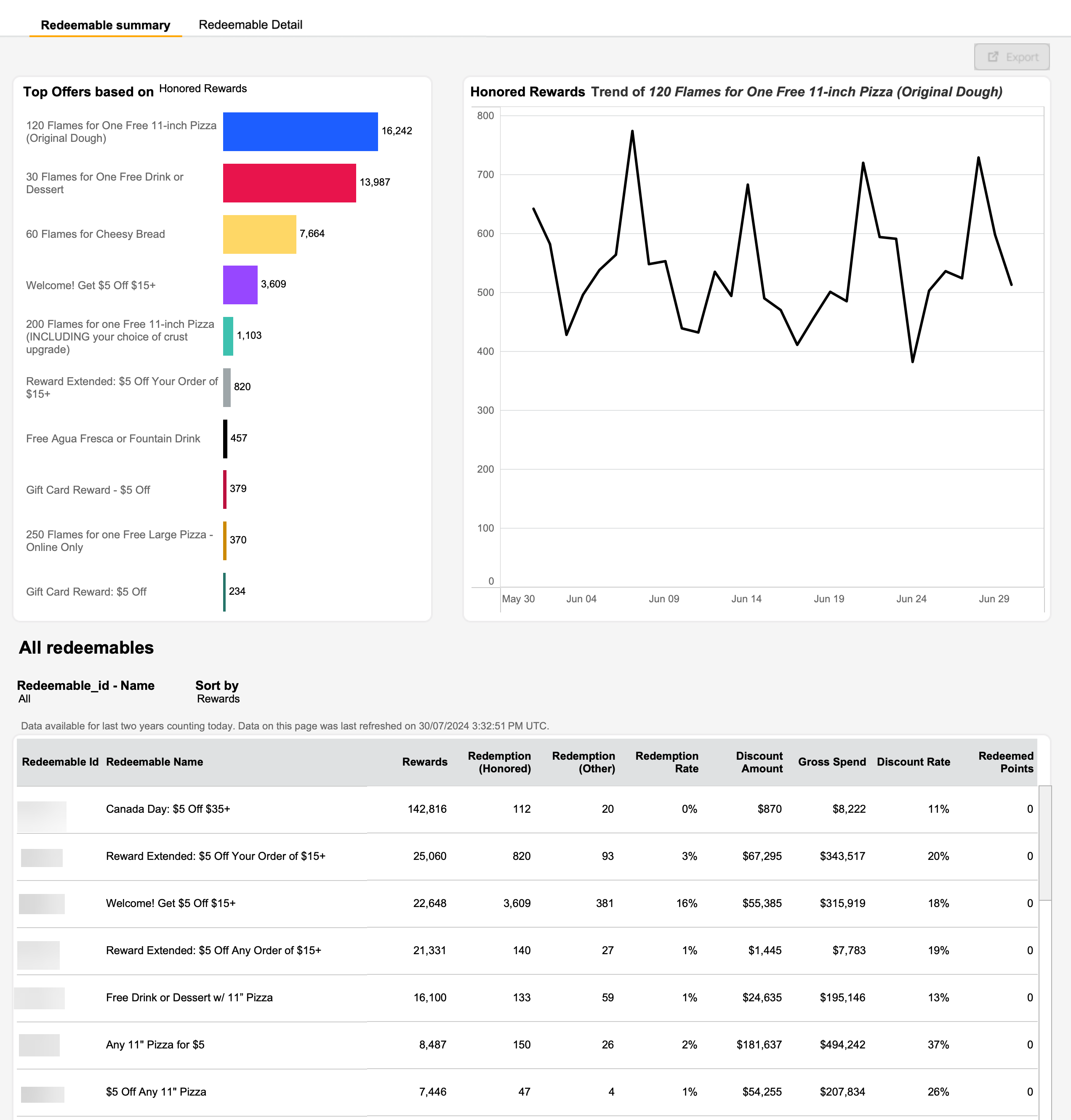
There are three visuals within this tab:
- Top Offers
- Shows Top Redeemables (Offers) based on user-selected metrics. The following are the metrics users can select:
- Redemption Rate
- Total Rewards
- Honored Rewards
- Shows Top Redeemables (Offers) based on user-selected metrics. The following are the metrics users can select:
- Metric Trend
- Shows the time-series trends for redeemable selected (clicked) under Top Offers
- All Redeemables
- Shows the list of all Redeemables and the summary of their performance. The following metrics are shown for each Redeemable:
- Redeemable ID
- Redeemable Name
- Rewards - represents the total rewards that were disbursed for a Redeemable in the selected time period.
- Redemptions (Honored) - represents the count of successful redemptions for a Redeemable in the selected time period.
- Redemptions (Other status) - represents the count of redemptions that are either expired/unsuccessful for a Redeemable in the selected time period.
- Redemption Rate - Redemptions (Honored)/Rewards disbursed for a Redeemable in the selected time period.
- Discount Amount - represents the dollar value of discounts availed by the loyalty users with a Redeemable in the selected time period.
- Gross Spend - represents the total gross sales associated with all the transactions of which successful redemptions were a part.
- Discount Rate - (Discount Amount)/(Gross Spend) expressed as a percentage for a Redeemable in the selected time period.
- Redeemed Points - represents the points redeemed associated with the redemptions for a Redeemable in the selected time period.
- Shows the list of all Redeemables and the summary of their performance. The following metrics are shown for each Redeemable:
Redeemable Detail
This tab displays the performance of redeemables, with one row per campaign/deal/admin gifting/base redeemable for each Redeemable. For example, if a redeemable is used in five different campaigns, and is used in a deal, and also used as a base redeemable, there would be seven rows shown for this Redeemable. Below is a sample screenshot.
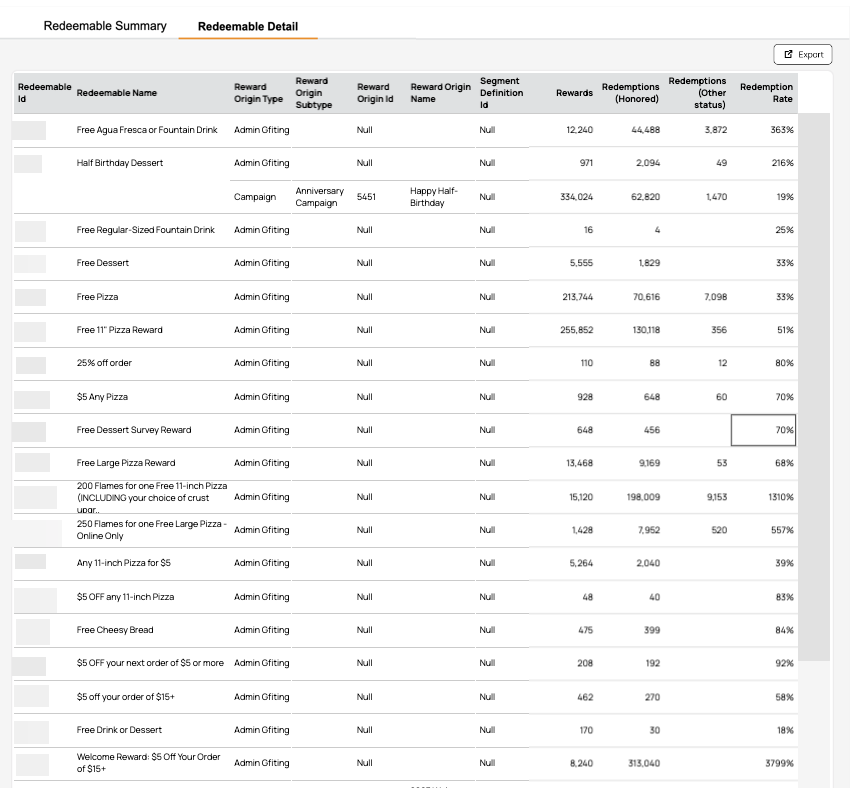
Following are the metrics shown in each row:
- Redeemable ID
- Redeemable Name
- Reward Origin Type - represents whether the Redeemable was gifted through Campaign, Deal, Admin Gifting, or as Base Redeemable. Possible values are
- Admin Gifting
- Campaign
- Deal
- Loyalty
- Loyalty Redeemable Reward
- Others (incl. Business Migration, Membership Level, Gaming Level, etc.)
- Reward Origin Subtype - represents the Campaign type that used the Redeemable. If the Reward Origin Type is not Campaign, then the Reward Origin Subtype is blank.
- Reward Origin Id - represents the Campaign ID that used the Redeemable. If the Reward Origin Type is not Campaign, then the Reward Origin Id is null.
- Reward Origin Name - represents the Campaign Name which used the Redeemable. If the Reward Origin Type is not Campaign, then the Reward Origin Name is blank.
- Segment Definition ID - represents the Segment ID attached to the Campaign which used the Redeemable. If the Reward Origin Type is not Campaign, then the Segment Definition ID is blank.
- Rewards - represents the total rewards that were disbursed for a Redeemable through Campaign/Deal/Admin Gifting/Base Redeemable in the selected time period.
- Redemptions (Honored) - represents the count of successful redemptions for a Redeemable through Campaign/Deal/Admin Gifting/Base Redeemable in the selected time period.
- Redemptions (Other status) - represents the count of redemptions that are either expired/unsuccessful for a Redeemable through Campaign/Deal/Admin Gifting/Base Redeemable in the selected time period.
- Redemption Rate - Redemptions (Honored)/Rewards disbursed for a Redeemable through Campaign/Deal/Admin Gifting/Base Redeemable in the selected time period.
Exporting
Click the Export button on the top right of the page as shown in the screenshots below, and select a sheet to download the data instantaneously to your local machine.
