Games Report
This article was previously titled "Promotional Report."
Added Module: This feature is bundled as part of the Games Module and is available for an additional cost. To enable the Games module, speak to your Punchh Customer Success Manager (CSM) about adding it to your service contract.
The Games Report allows brand marketers to track the performance of all the promotions using the Games feature, along with scratch cards.
Viewing the Games Report
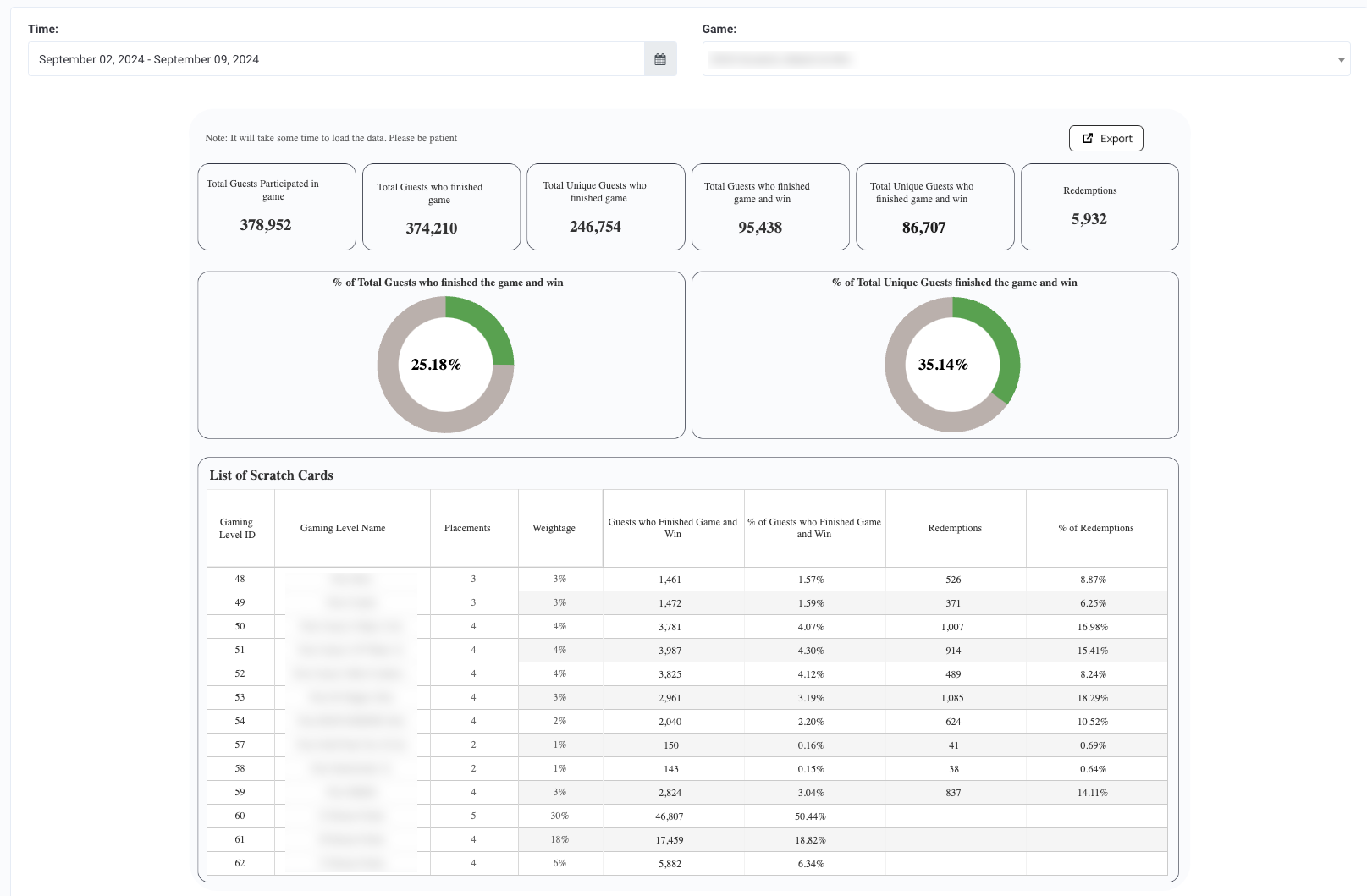
You can check out the Games report in Custom > Games Report. Only brands that have the Games feature along with Scratch cards enabled will have this report in the left navigation.
Games Report has three filters:
- Start Date: The start date of the time period the user is interested in
- End Date: The end date of the time period the user is interested in
- Games: The games that are available in the selected time period. Note that there can be multiple games set up in the time period. Each game can have multiple Game levels, which are reported in the tabular section as explained below
Games Report has two sections:
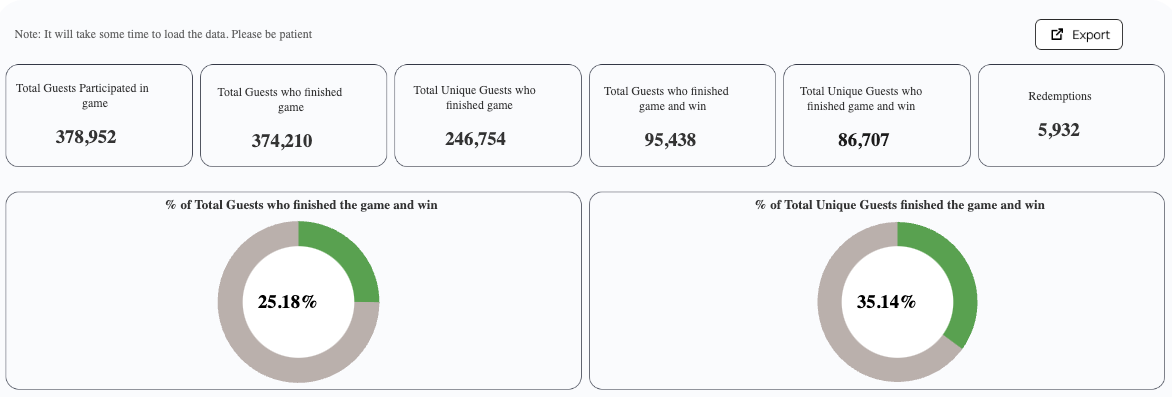
- Summary: This section shows the summary metrics of the Games feature in the selected date range and the game (filters on the top section).
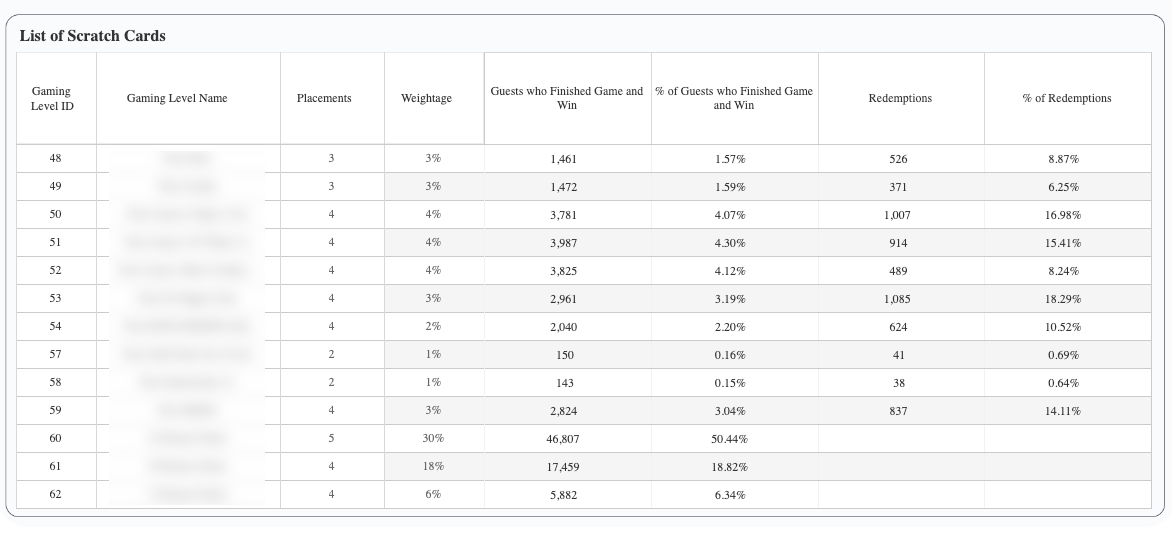
- Details: This section shows metrics for each Game Level Name.
Date Range Available
Data is made available for the last two years counting today. For example, if today is 2024-Jul-05, the data from 2024-Jul-05 to 2022-Jul-05 is made available in the report.
Data Refresh Frequency
Data is reported from a live data source and therefore is always up-to-date.
Metrics, Defined
The Summary section contains the following information:
| Report Metric | Definition |
|---|---|
| Total Guests Participated in the game | The total number of times guests participated in the selected game in the selected time period. Note that this is not counting the unique guests, but the number of times guests participated in the game. |
| Total Guests who finished the game | The total number of times guests participated in the selected game and successfully finished the game in the selected time period. Note that this is not counting the unique guests, but the number of times guests participated and finished the game. |
| Total Unique Guests who finished the game | The total count of unique guests who participated and finished the selected game in the selected time period. |
| Total Guests who finished the game and win | The total number of times guests who participated in the selected game and successfully finished the game and won the game in the selected time period. |
| Total Unique Guests who finished the game and win | The total count of unique guests who participated in the selected game successfully finished the game and won the game in the selected time period. |
| Redemptions | Represents the number of successful redemptions made from the rewards guests received for successfully finishing and winning the game in the selected time period. |
| % of Total Guests who finished the game and win | [Total Guests who finished the game and won] / [Total Guests who Participated in the game] |
| % of Total Unique Guests who finished the game and win | [Total Unique Guests who finished the game and won] / [Total Unique Guests who finished the game] |
The Details section contains the following information:
| Report Metric | Definition |
|---|---|
| Gaming Level ID | The ID of the gaming level within a game. |
| Gaming Level Name | The name of the gaming level within a game. |
| Placements | The placement value is defined in the scratch card for the specific gaming level. |
| Weightage | The weightage value is defined in the scratch card for the specific gaming level. |
| Guests who finished the game and win | Represents the number of times guests who participated in the selected game and successfully finished the game and won the game level in the selected time period. |
| % Guests who finished the game and win | [Total Guests who finished the game level and won] / [Total Guests who Participated in the game level] |
| Redemptions | The total number of successful redemptions made from the rewards guests received for successfully finishing and winning the game in the selected time period. |
| % Redemptions | Represents the % of successful redemptions made from the rewards guests received for successfully finishing and winning the game level in the selected time period. |
Exporting
From the Custom > Games Report page, click the Export button at the top right. A CSV file containing all your Games Report information will be downloaded immediately to your computer.

