Facebook Feedback Settings
This article was previously titled "Viral Message."
Whenever users submit feedback via your mobile app (and choose to share it with Facebook) the post will include marketing language and branding you can set up using the Punchh Platform Administration > Facebook Feedback Settings.
Set your Facebook Feedback Settings
To set the marketing language for feedback and sharing posts from users on your mobile app, first navigate to Administration > Facebook Feedback Settings.
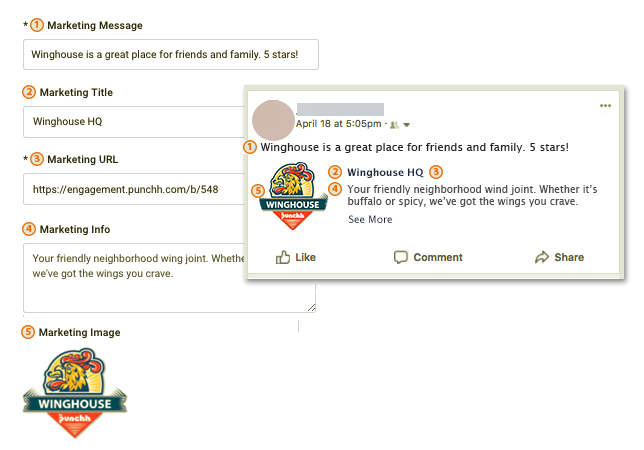
- Marketing Message: This is the default message that will be shown to a user when they are writing a review and is also the default tagline on a Facebook post.
- Marketing Title: The name of the business.
- Marketing URL: Provide a link or social link to your business or your business website.
- Marketing Info: The marketing description that shows up under the name of the business on a Facebook post.
- Marketing Image: Click the Browse button to upload a business image or logo from your computer. This image must be at least 200 x 200 pixels and should be relatively square in shape, or automatic cropping will occur.
