Checkin Failures
The Checkin Failures report provides a clear view of when and why guest checkins were unsuccessful across your locations. By surfacing trends, counts, and detailed failure records, the report helps you identify patterns, spot potential issues in your setup or data flow, and understand how these failures impact the guest experience. This insight allows teams to quickly troubleshoot problems, improve accuracy in checkins, and ensure a smoother overall loyalty experience.
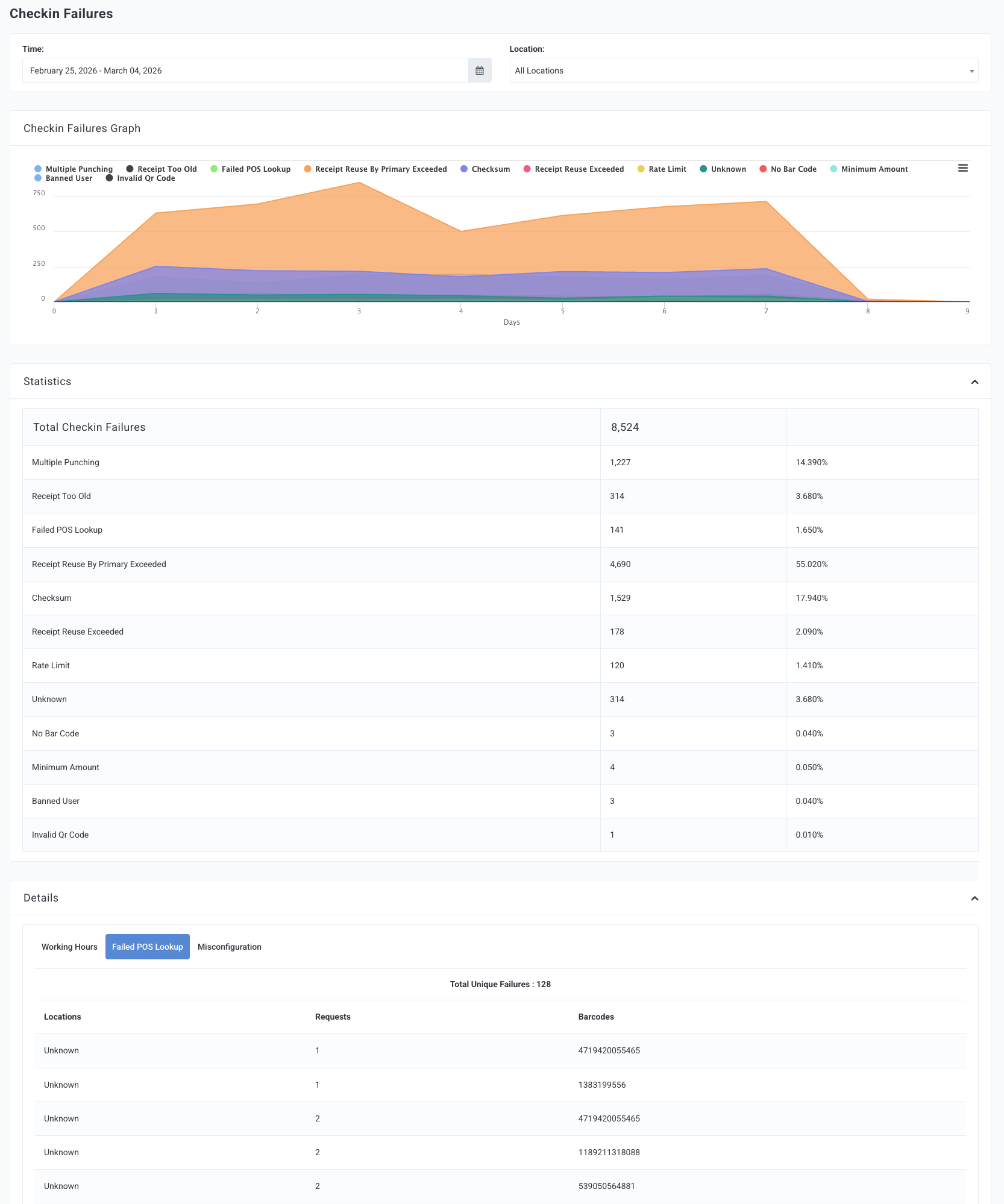
Navigate to Diagnostic > Checkin Failures.
The graph and the statistics table can be filtered by Time (date range) and Location.
Checkin Failures Graph
The Checkin Failures Graph shows a visual representation of failure trends over the chosen date range. The failure types are color-coded within the graph, and a key is located at the top.
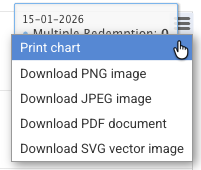
Click the menu icon
 on the right of the graph for various print/download options.
Statistics
The Statistics tables show the types of failures that have occurred for your brand. Some of these failures share similar definitions because they come from different APIs but are caused by the same underlying issue.
Note: You may not see all the listed failures below due to your brand's loyalty program type and configurations.
| Failure Type | Error Code | Definition | Display Message Exampe* |
|---|---|---|---|
| Total Checkins Failures | The total amount of Checkin failures for your brand in the chosen date range. | ||
| Distance Based Error | 101 | User’s GPS position is beyond the location’s configured lookup radius | QR/Bar Code for {{{location_name}}} is too far from your current position. Please check to see if your phone's GPS is enabled. |
| Invalid Qr Code | 111 | The decoded QR Code is not a valid Punchh QR code associated with any receipt | Invalid QR Code |
| Expired Qr Code | 112 | QR code was previously valid but has since expired | This QR Code has been expired for the location |
| Multiple Punching | 121 | The number of checkins has exceeded the number allowed within a certain amount of time, established by the "Global Checkin rate limit" value set in the Punchh cockpit backend | You are only allowed to scan {{{rate}}} receipts within {{{period}}} hours of each other. |
| Rate Limit | 124 | The number of checkins has exceeded the number allowed within one visit, established by the "Scanning rate limit" value set in the Punchh cockpit backend | You aren’t allowed to scan multiple receipts in one visit, please try again later. |
| Minimum Amount | 131 | The total amount of all line items in the receipt that are eligible for earning is less than the "Minimum Checkin Amount" value set on the Punchh cockpit backend | The minimum checkin amount is {{{min_receipt_amount}}} |
| No Lat Long | 141 | GPS coordinates (latitude/longitude) are missing or blank | Unable to determine your distance from {{{location_name}}}. Please check to see if your phone's GPS is enabled and try upgrading your app. |
| Business Sunset | 151 | Business is in wind-down mode and no longer accepting checkins | {{{business_name}}} is not accepting checkins anymore |
| Business Sunset New Card | 152 | Business in wind-down mode; user cannot start a new card | {{{business_name}}} is not accepting checkins anymore, you cannot start a new card |
| Working Hours | 161 | Checkin attempted outside the location’s configured working hours | You can only checkin at this location within working hours |
| No Location | 171 | Location could not be found from the provided data | Location could not be determined |
| Failed Pos Lookup | 181 | The barcode was not found on the Punchh receipt database but the checksum value is valid for a particular location | This bar code is not valid, OR We are looking for your check, but it's taking longer than expected. Once we find it, we'll let you know and add it to your account. |
| Checksum | 182 | The barcode was not found on the Punchh receipt database and does not contain a checksum value that is valid for any location | This bar code is not valid |
| Bad Qr Code | 183 | The barcode is faulty/malformed | You’ve scanned an invalid barcode. Please look for a barcode at the bottom of your receipt. |
| Redis Timeout | 184 | Redis connection timeout during POS receipt lookup | This is taking a little longer than expected. You will be credited soon and notified. |
| All 9 | 187 | Barcode contains all 9s indicating POS connectivity issue | Due to network connectivity issues at the printing location, this Bar Code cannot be scanned. |
| No Receipt Image | 191 | No receipt image provided for image-based checkin | Receipt image must be provided |
| Disapproved Location | 201 | The location has been disabled for checkins | The location {{{location_name}}} has been disabled for checkins. |
| Misconfiguration | 221 | Business POS or validation type is misconfigured | Business is undergoing maintenance currently. Please try later. |
| No Bar Code | 231 | No barcode included in the checkin request | Bar Code not provided |
| Unqualified Receipt | 235 | The receipt items do not meet any of the business's earning qualification criteria configured in the Punchh cockpit backend | Receipt contains unqualified/disqualifying entries which prevent it from getting rewards. |
| Receipt Reuse Exceeded | 241 | The receipt is associated with a checkin from another guest | This receipt has already been scanned by someone else. |
| Receipt Reuse By Primary Exceeded | 242 | The receipt is associated with a previous checkin by the same guest | You cannot use the same receipt more than once |
| No Qr Code | 251 | QR code data not provided or unavailable | QR Code information unavailable |
| Invalid Qr Code Location | 261 | QR code does not match the specific location | (reserved/legacy error code — not actively triggered) |
| Qrcode Frequency Exceeded | 262 | QR code used too many times at the same location | You can not use this QR Code at this location too many times |
| Receipt Too Old | 271 | The receipt date/time is older than the "Receipt Age" value set in the Punchh cockpit backend | This receipt is too old to be accepted |
| Barcode Not Match | 281 | Barcode does not match the expected location | (reserved/legacy error code — not actively triggered) |
| Banned User | 291 | The user account has been banned by an admin and is not allowed to perform checkins | Insufficient privileges to allow checkins |
| Unrecognised Beacon | 301 | Checkin attempted using a beacon (via beacon minor ID), but the beacon minor ID does not match any known location in the system | Unknown Location |
| No User | 391 | User not found in the system | User not found |
| Receipt Cancelled By POS | 395 | The POS system voided/cancelled the receipt | This receipt has been cancelled by the POS |
| Unknown | NULL | A checkin failure occurred but the error_code is null or doesn't match any error code in the PUNCHH_ERROR_CODES dictionary, preventing it from being categorized into a specific error type | Unknown |
*This table shows example display messages only. Some display messages can be customized for your brand. Contact your Punchh representative with questions.
Details
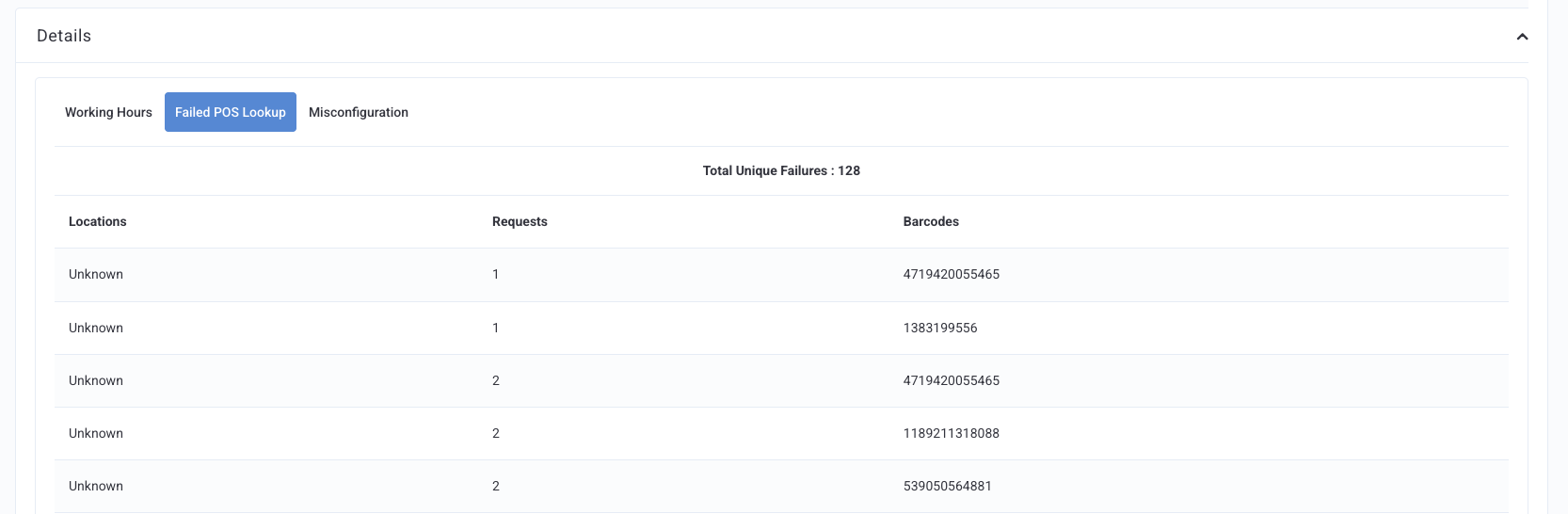
The Details section of the Checkin Failures report provides a breakdown of individual failure events, so you can understand exactly where and why checkins failed. While the main report shows totals, this section lets you drill into specific locations, receipts, and configuration issues. The Details section helps you:
- Quickly diagnose store‑specific issues
- Provide accurate support responses using receipt‑level detail
- Prevent future failures by correcting configuration and data issues
This deeper view ensures your checkins run smoothly and your loyalty program remains reliable for guests.
The Details section is organized into three tabs:
- Working Hours:
Shows checkins that failed because they occurred outside the store’s configured operating hours. You can use these details to update incorrect store hours, fix time‑zone issues, or identify stores missing holiday or temporary hours. - Failed POS Lookup:
Shows failures where Punchh could not match the incoming checkin to a valid location or transaction due to missing or incorrect POS data. You can use these details to verify POS integrations, correct location mappings, and investigate recurring lookup errors tied to specific receipts. - Misconfiguration:
Displays failures caused by incorrect or incomplete setup between Punchh and the POS. You can use these details to identify and resolve issues such as unmapped POS IDs, inactive locations sending data, or incorrect integration settings. Please note that inactive locations are handled under the Disapproved Location failure type and would not be shown under this tab.
