Labor
The Labor tab contains sub-tabs with controls that pertain to employees.
General
Contains various time clock and timecard controls.
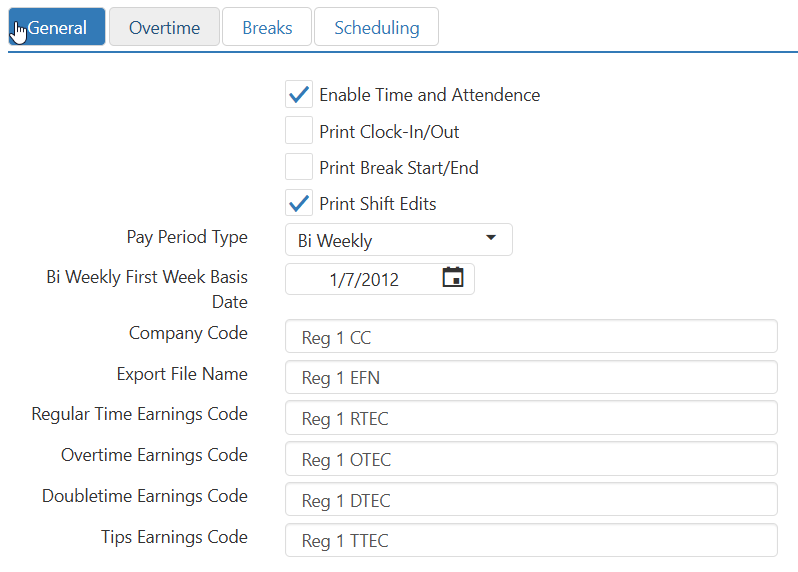
- Enable Time And Attendance: 'Allow Clockout' and 'Start Break' button behaviors.
- Print Clock-In/Out: Print a detail chit each time an employee clocks in or clocks out.
- Print Break Start/End: Generates detailed receipts for employee break start/end times for visibility into break compliance and streamlined adherence to labor regulations.
- Print Shift Edits: Print a detail chit each time a shift is edited.
- Pay Period Type:
- Weekly: Employees are paid one a week.
- Bi Weekly: Employees are paid every other week.
- Bi Weekly First Week Basis Date (required): Determines the pay period start when Pay Period Type is set to Bi Weekly.
- Semi Monthly: Employees are paid twice per month.
- Monthly: Employees are paid once per month.
- Company Code: Included in various labor export formats, issued by payroll provider.
- Export File Name: Name of the file to be produced by the labor export.
- Regular Time Earnings Code: Code included in labor export for time paid at the regular rate, code issued by payroll provider.
- Overtime Earnings Code: Code included in labor export for time paid at 1.5 times the regular rate, code issued by payroll provider.
- Doubletime Earnings Code: Code included in labor export for time paid at 2 times the regular rate, code issued by payroll provider.
- Tips Earnings Code: Code included in labor export for tips declared, code issued by payroll provider.
Overtime
Contains controls allowing you to define overtime periods.
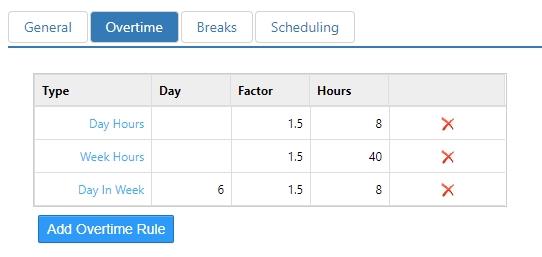
- Overtime Rules:
- Type:
- Day Hours: Overtime is paid when number of hours worked in a day exceeds a certain amount.
- Week Hours: Overtime is paid when number of hour worked in a week exceeds a certain amount.
- Day In Week: Overtime is paid when number of days worked in a week equals or exceeds a given count.
- Day: Number of days worked in a week when overtime is paid.
- Shift Hours: Overtime is paid when the number of hours worked in one shift exceeds a certain amount.
- Factor: Pay rate multiplier when overtime rule is applied.
- Hours: Hours in day, week, or shift after which overtime rule is applied.
- Remove: Press to remove a line from the list.
- Add: Press to add a line to the list.
- Type:
Breaks
Contains settings that pertain to shift breaks.
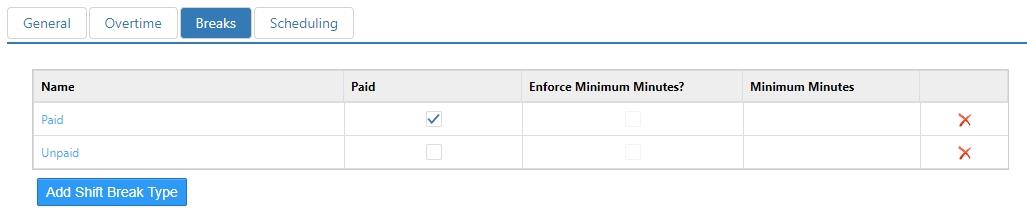
- Name: Name of the break type.
- Paid: Employee is paid for time on break.
- Enforce Minutes Minimum: Employee is unable to clock back in until break has equaled or exceeded number of minutes.
Scheduling
Contains settings that pertain to shift scheduling.
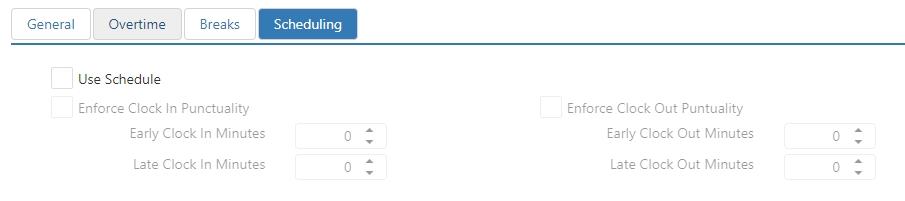
- Use Schedule: Register will enforce selected punctuality rules for employee whose job does not have Exempt from Labor Schedule enabled.
- Enforce Clock In Punctuality: Enforce clock in variance rules.
- Early Clock In Minutes: Maximum number of minutes an employee can clock in before their scheduled time without requiring approval.
- Late Clock In Minutes: Maximum number of minutes an employee can clock in after their scheduled time without requiring approval.
- Enforce Clock Out Punctuality: Enforce clock out variance rules.
- Early Clock Out Minutes: Maximum number of minutes an employee can clock out before their scheduled shift end time without requiring approval.
- Late Clock Out Minutes: Maximum number of minutes an employee can clock out after their scheduled shift end time without requiring approval.
- Enforce Clock In Punctuality: Enforce clock in variance rules.
