Tax Rounding
Taxes Calculated Incorrectly
When it's time to tally taxes, it seems logical that you should be able to take the NET sales and multiply by the tax rate to reach the amount of taxes collected. Because tax total is rounded, this is not the case.
Within PAR POS™, taxes are not calculated as a flat % of sales. They are calculated per order and then rounded based upon how it is setup in Settings Editor. Every order will have a fraction of a cent that is either rounded up or down because, of course, you cannot charge a customer a fraction of a cent.
If you have common orders, the rounding tends to happen one direction more often, which will look like a discrepancy if the tax rate is being multiplied by the NET sales total. The only way to determine that taxes are being calculated correctly would be to pull up every order for the day and calculate taxes for each one and add them all together. Obviously, this is not practical.
PAR POS cannot predict the total sales for the day and therefore cannot break the tax out evenly amongst all orders. To accommodate this, the software takes the subtotal for the order, multiplies by the tax % and then rounds the fractions of a penny up or down. Over time, those fractions add up so that it shows as a difference from what you get by multiplying net sales and the tax rate.
Example
In this example, the most common order in a store is regular beef bowl with white rice. The tax rate for this area is 8.257%. The tax rounds up a fraction of a penny to $0.64.
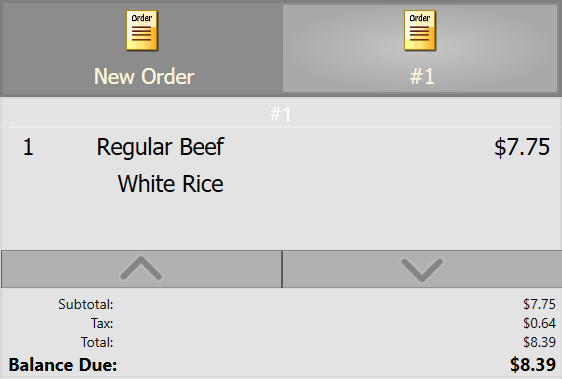
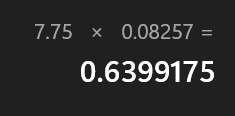
This is the least it could round up, $.001. In other situations, it might be rounding down as much as $.004 or up as much as $.005. Regardless, it will never be more than $0.01 per order.
Common orders can account for as much as 20% of a store's sales. This order alone, in a store that completes 5000 orders a month, would account for up to a plus or minus $10 tax discrepancy.
If every order in 5000 rounded up $0.01, the tax collected would be $50 more than the NET sales x the tax rate. If they all rounded down, it would be $50 less than NET sales x the tax rate. Because it rounds to the nearest cent, it will be somewhere in the middle.
If the dollar value of the discrepancy is more than the # of orders ÷ 100, rounding is not the culprit and the issue should continue to be investigated.
Configure Tax Rounding Options
To configure your tax rounding options in PAR POS:
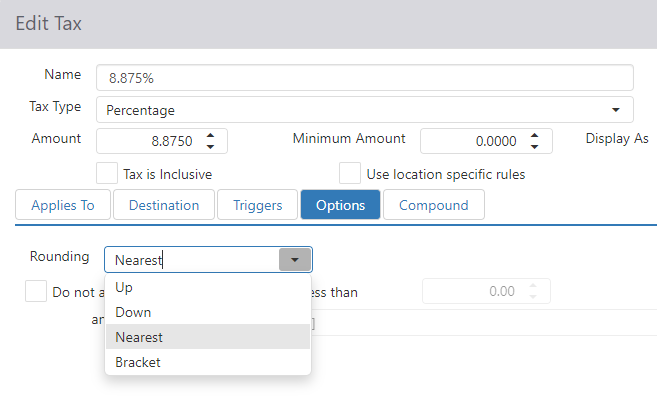
- Log into Settings Editor for the site or groups in question
- Navigate to Taxes
- Select the tax to edit from the list
- Click on the Options tab
- Set rounding to Up, Down, Nearest or Bracket
- Choose Ok when complete
- Publish to lab to test and then publish out to all stores in need of the change
For more information on taxes, refer to the Taxes section of the Admin Portal User Guide. Download it from the Admin Portal in Help > Documentation.
