Sales Summary by Day Part Report
The Sales Summary by Day Part Report is a one-page report which shows net and gross sales, total cash, order statistics, and other such information for a designated location and reporting period sorted into columns by Day Part (as configured on the Day Parts page in Settings Editor). The report is run on the Admin Portal by going to the Reports screen, selecting Sales By Day Part, and then selecting Sales Summary By Day Part.
Example Sales Summary by Day Part Report
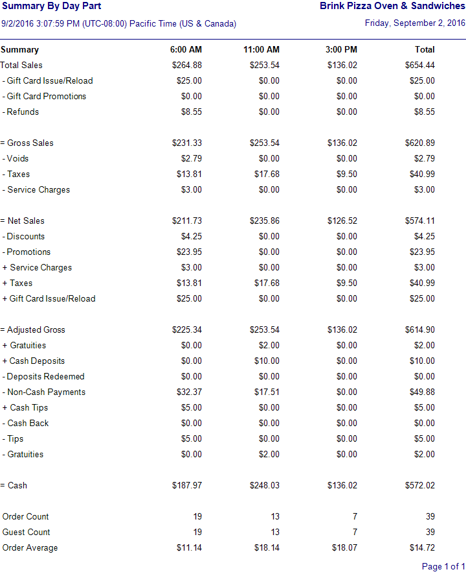
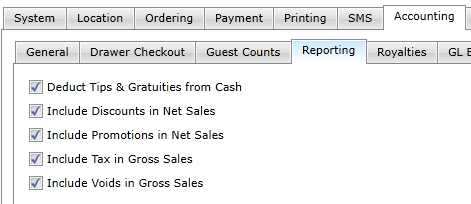
Many of the fields are calculated based on other data in the report, and how those fields are calculated depends on settings that are made in the Settings Editor under Options > Accounting > Reporting.
Accounting > Reporting options
| Option | Description |
|---|---|
| Deduct Tips & Gratuities from Cash | Deducts all tips and gratuities from Total Cash and displays the total in Calculated Cash |
| Include Discounts in Net Sales | Includes the total of the Discounts field in Net Sales |
| Include Promotions in Net Sales | Includes the total of the Promotions field in Net Sales |
| Include Tax in Gross Sales | Includes all taxes collected in Gross Sales |
| Include Voids in Gross Sales | Includes the total of the Voids field in Gross Sales |
Field Calculations
| Field | Calculation |
|---|---|
| Total Sales | The sum of all taxable and non-taxable item sales, including tax and service charges collected. |
| Gift Card Issue/Reload | The total amount of money added to both new and existing gift cards during the reporting period. |
| Gift Card Promotions | The total amount of money discounted from the issuance or reloading of gift cards during the reporting period. |
| Refunds | All amounts returned to customers for orders on prior dates. This includes both item cost and tax. |
| Voids | All amounts returned to customers for orders on the same date. It includes only the costs of items, not any tax. NOTE: If Include Voids in Gross Sales is selected in Options > Accounting > Reporting in Settings Editor, this field is listed below Gross Sales. |
| Taxes | All taxes collected minus any taxes returned because of voided items. NOTE: If Include Voids in Gross Sales is selected in Options > Accounting > Reporting in Settings Editor, this field is listed below Gross Sales. |
| Gross Sales | Total Sales − Gift Card Issue/Reload − Gift Card Promotions − Refunds − Voids (only if Include Voids in Gross Sales is NOT selected) − Taxes (only if Include Taxes in Gross Sales is NOT selected) |
| Discounts | All amounts deducted from the final cost of orders because of discounts. NOTE: If Include Discounts in Net Sales is selected in Options > Accounting > Reporting in Settings Editor, this field is listed below Net Sales. |
| Promotions | All amounts deducted from the final cost of orders because of promotions. NOTE: If Include Discounts in Net Sales is selected in Options > Accounting > Reporting in Settings Editor, this field is listed below Net Sales. |
| Service Charges | Includes all service charges collected during the reporting period. |
| Net Sales | Gross Sales − Voids (only if Include Voids in Gross Sales is selected) − Taxes (only if Include Taxes in Gross Sales is selected) − Discounts (only if Include Discounts in Net Sales is NOT selected) − Promotions (only if Include Promotions in Net Sales is NOT selected) − Service Charges |
| Adjusted Gross | Net Sales − Discounts (only if Include Discounts in Net Sales is selected) − Promotions (only if Include Promotions in Net Sales is selected) + Service Charges + Taxes + Gift Card Issue/Reload |
| Gratuities | Surcharges that represent gratuities paid to staff. NOTE: Gratuities always appears as an added (+) field just below Adjusted Gross. If Deduct Tips and Gratuities from Cash is selected in Options > Accounting > Reporting, it is also listed as a subtracted (−) field just above Cash. |
| Cash Deposits | Includes all cash deposits received for future orders that are to be picked up or delivered on a later date. Does NOT include deposits paid with other tender types. |
| Deposits Redeemed | Includes all deposits for orders that were closed out during the reporting period, regardless of tender type. |
| Non-Cash Payments | All payments received using a non-cash tender type, such as a credit card, gift card, house account, etc. |
| Cash Tips | Includes all cash tips collected during the reporting period. Does NOT include gratuities. Does NOT include tips paid with other tender types. |
| Cash Back | Includes all cash given to customers as part of a "cash back" debit card transaction. |
| Tips | Cash Tips Received + any tips that were added to non-cash transactions with the Adjust Tips function. This item is only displayed if Deduct Tips & Gratuities from Cash is selected in the Accounting > Reporting options. |
| Cash | Adjusted Gross + Gratuities + Cash Deposits − Deposits Redeemed − Non-Cash Payments + Cash Tips − Cash Back − Tips (only if Deduct Tips & Gratuities from Cash is selected) − Gratuities (only if Deduct Tips & Gratuities from Cash is selected) |
| Order Count | The total number of orders for the reporting period. |
| Guest Count | The total number of orders multiplied by a factor defined in Options > Accounting > Guest Counts in Settings Editor. |
| Order Average | Net Sales ÷ Order Count |
