Sales Summary Report
The Sales Summary Report is a multi-page report which shows net and gross sales, total cash, order statistics, labor statistics, gift cards issued, gift cards reloaded, and other such information for a designated location and reporting period. The report is run on the Admin Portal by going to the Reports screen, selecting Sales Summaries, and then selecting Sales Summary.
Many of the fields are calculated based on other data in the report, and how those fields are calculated depends on settings that are made in the Settings Editor under Options > Accounting > Reporting.
Accounting > Reporting options
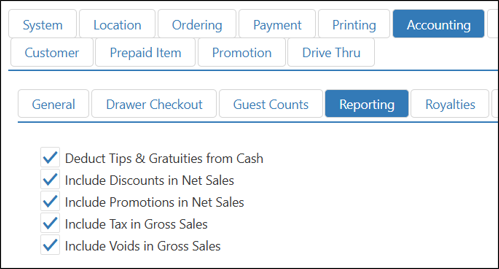
| Option | Description |
|---|---|
| Deduct Tips & Gratuities from Cash | Deducts all tips and gratuities from Total Cash and displays the total in Calculated Cash |
| Include Discounts in Net Sales | Includes the total of the Discounts field in Net Sales |
| Include Promotions in Net Sales | Includes the total of the Promotions field in Net Sales |
| Include Tax in Gross Sales | Includes all taxes collected in Gross Sales |
| Include Voids in Gross Sales | Includes the total of the Voids field in Gross Sales |
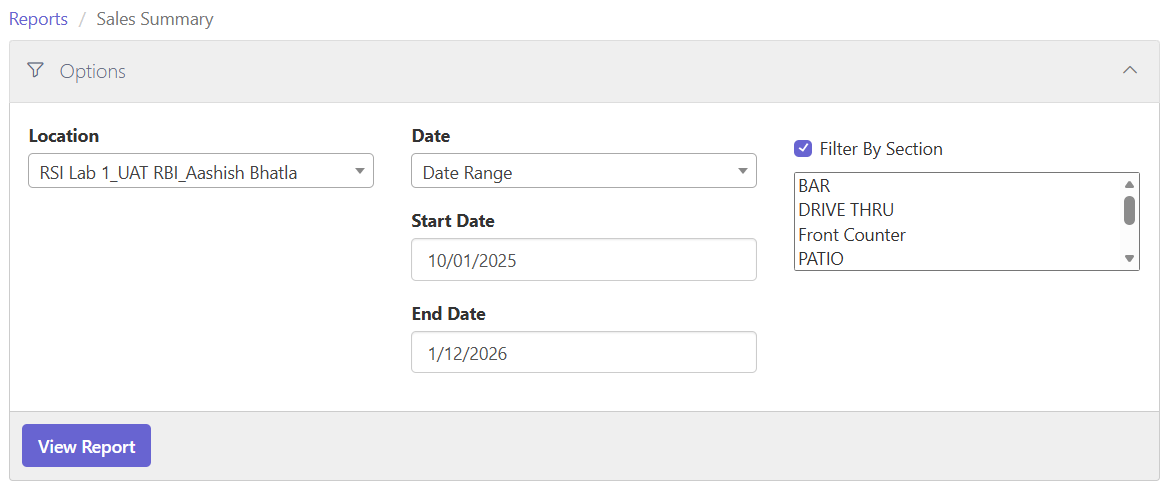
Report Option: Filter by Section
Checking the Filter By Section checkbox narrows the scope of the report to specific item groups. The lists allow multiple selections. Select a range by Shift-clicking. Select multiple individual items in the list by Ctrl-clicking.
Filter by Section check box and selection list
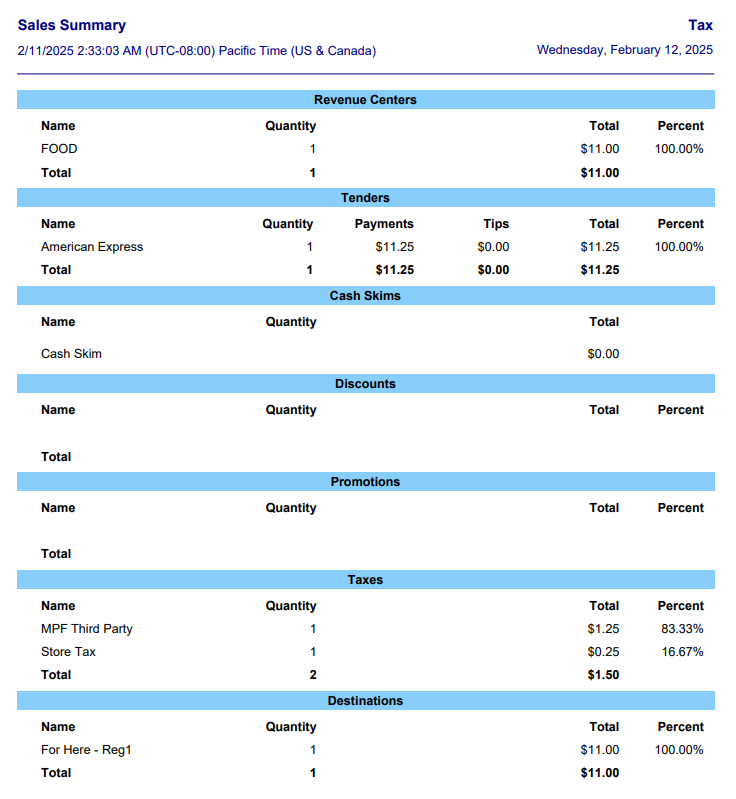
Example Sales Summary Report
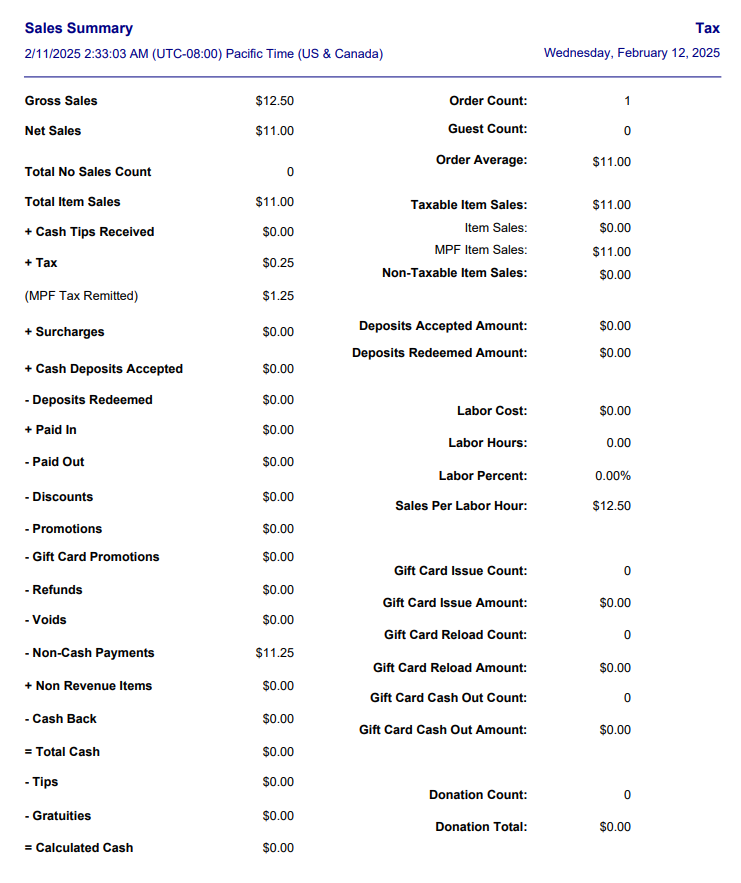
Page 1 Field Calculations
| Field | Calculation |
|---|---|
| Gross Sales | Total Item Sales + Tax (if Include Tax in Gross Sales is selected) + the amount in Surcharges that represents service charges (NOT gratuities) − Refunds − Voids (only if Include Voids in Gross Sales is NOT selected) − Gift Card Issue Amount − Gift Card Reload Amount + Gift Card Cash Out Amount |
| Net Sales | Gross Sales − Tax (if Include Tax in Gross Sales is selected) − the amount in Surcharges that represents service charges (NOT gratuities) − Discounts (only if Include Discounts in Net Sales is NOT selected) − Promotions (only if Include Promotions in Net Sales is NOT selected) − Voids (if Include Voids in Gross Sales is selected) |
| Total Item Sales | Taxable Item Sales + Non-Taxable Item Sales + Gift Card Issue Amount + Gift Card Reload Amount − Gift Card Cash Out Amount + Discounts (only if Include Discounts in Net Sales is NOT selected) + Promotions (only if Include Promotions in Net Sales is NOT selected) + Voids + Refunds |
| + Cash Tips Received | Includes all cash tips collected during the reporting period. Does NOT include gratuities. Does NOT include tips paid with other tender types. |
| + Tax | All taxes collected (excluding MPF Tax) minus any taxes returned because of refunded or voided items. |
| (MPF Tax Remitted) | Sum of MPF Tax Amount. |
| Surcharges | Includes all services charges and gratuities collected during the reporting period. |
| Cash Deposits Accepted | Includes all cash deposits received for future orders that are to be picked up or delivered on a later date. Does NOT include deposits paid with other tender types. |
| Deposits Redeemed | Includes all deposits for orders that were closed out during the reporting period, regardless of tender type. |
| Paid In | All cash added to drawers while they were assigned. |
| Paid Out | All cash removed from drawers while they were assigned. |
| Discounts | All amounts deducted from the final cost of orders because of discounts. |
| Promotions | All amounts deducted from the final cost of orders because of promotions. |
| Gift Card Promotions | All amounts deducted from gift card purchases and reloads because of promotions. |
| Refunds | All amounts returned to customers for orders on prior dates. It includes only the costs of items, not any tax. |
| Voids | All amounts returned to customers for orders on the same date. It includes only the costs of items, not any tax. |
| Non-Cash Payments | All payments received using a non-cash tender type, such as a credit card, gift card, house account, etc. minus the sum of MPF Tax Amount. |
| Cash Back | All cash given as change for a non-cash transaction. For example, cash issued as part of a debit card transaction falls into this category. |
| Total Cash | Total Item Sales + Cash Tips Received + Tax + Surcharges + Cash Deposits Accepted − Deposits Redeemed + Paid In − Paid Out − Discounts − Promotions − Gift Card Promotions − Refunds − Voids − Non-Cash Payments − Cash Back |
| Tips | Cash Tips Received + any tips that were added to non-cash transactions with the Adjust Tips function. This item is only displayed if Deduct Tips & Gratuities from Cash is selected in the Accounting > Reporting options. |
| Gratuities | The amount in Surcharges that represents gratuities paid to staff. This item is only displayed if Deduct Tips & Gratuities from Cash is selected in the Accounting > Reporting options. |
| Calculated Cash | Calculated Cash = Total Cash − Tips − Gratuities − MPF Tax Amount sum. This item is only displayed if Deduct Tips & Gratuities from Cash is selected in the Accounting > Reporting options. |
| Bank Deposits | The total amount of all deposits entered in Accounting > Deposits in the Admin Portal. |
| Cash Under/Over | Total Cash (or Calculated Cash, if displayed) − Bank Deposits = Cash Under; Bank Deposits − Total Cash (or Calculated Cash, if displayed) = Cash Over |
| Order Count | The total number of orders for the reporting period. |
| Guest Count | The total number of orders multiplied by a factor defined in Options > Accounting > Guest Counts in Settings Editor. |
| Order Average | Net Sales ÷ Order Count |
| Taxable Item Sales | The sum of all items ordered during the reporting period that are subject to any kind of tax (including MPF Tax), minus the amount of any taxable items returned to customers because of Refunds or Voids. If Include Discounts in Net Sales and Include Promotions in Net Sales are selected, then the total of Taxable Item Sales will also include the amount of any Discounts or Promotions applied to taxable items.* |
| Item Sales | Total sales of items except MPF Item Sales. |
| MPF Item Sales | Total Sales of Order to which MPF tax is applied. If an order contains both MPF Tax and Store Remittance Tax (Partial MPF), the sale of the order is only included in the MPF Item Sales. |
| Non-Taxable Item Sales | The sum of all items ordered during the reporting period that are not subject to any tax; minus the amount of any non-taxable items returned to customers because of Refunds or Voids. If Include Discounts in Net Sales and Include Promotions in Net Sales are selected, then the total of Non-Taxable Item Sales will also include the amount of any Discounts or Promotions applied to non-taxable items.* |
| Deposits Accepted Amount | Includes all deposits received for future orders that are to be picked up or delivered on a later date. |
| Deposits Redeemed Amount | Includes all deposits for orders that were closed out during the reporting period. |
| Labor Cost | The total cost of labor for the reporting period. |
| Labor Hours | The total number of hours that employees were clocked in during the reporting period. |
| Labor Percent | Labor Cost ÷ Net Sales × 100 |
| Sales Per Labor Hour | Gross Sales ÷ Labor Hours |
| Gift Card Issue Count | The number of new gift cards issued during the reporting period. |
| Gift Card Issue Amount | The total amount of money assigned to all new gift cards issued during the reporting period. |
| Gift Card Reload Count | The number of existing gift cards to which money was added during the reporting period. |
| Gift Card Reload Amount | The total amount of money added to existing gift cards during the reporting period. |
| Gift Card Cash Out Count | The number of gift cards that were cashed out (i.e., their remaining balance refunded) during the reporting period. |
| Gift Card Cash Out Amount | The total amount of money paid out on gift cards that were cashed out during the reporting period. |
| Non-Revenue Item | Sales of this item are not included in gross sales or net sales calculations. |
| Total No Sales Count | Total number of times the cash drawer was opened without a sale being rung up. |
*If an item's cost is reduced to $0.00 through discount or promotion, that item is counted as non-taxable, whether or not the item is normally taxable.
Items on Following Pages
The calculations on the pages following page 1 detail how some of the fields on page 1 are broken down.
Revenue Centers
Revenue Centers details how much of Net Sales is charged to the various revenue centers that are defined under Revenue Centers in Settings Editor.
| Field | Description |
|---|---|
| Name | The name of the revenue center. |
| Quantity | The number of items ordered in each revenue center, with a total at the bottom. |
| Total | The total cost of all items ordered for the revenue center, with a total at the bottom that equals Net Sales. |
| Percent | The percentage of Net Sales that each revenue center's Total represents. |
Tenders
Tenders shows how much was tendered via each payment type for the reporting period.
| Field | Description |
|---|---|
| Name | The name of the tender type. Cash is the sum of Total Cash and Paid Out, minus Paid In. All other tender types are portions of Non-Cash Payments. |
| Quantity | The number of orders paid for with the tender type, with a total at the bottom. |
| Payments | The total amount of money received via the tender type, minus any tips collected, with a total at the bottom. |
| Tips | The total amount of money in tips received via the tender type, with a total at the bottom. |
| Total | Payments + Tips, with a total at the bottom. *MPF Tax Amount is deducted from Total Tender for Third Party Remitted order payments. |
| Percent | The percentage of the total amount collected that the Total of each tender type represents. |
Discounts
Discounts breaks down the Discounts field on page 1 into portions according to the discounts applied to sales for that reporting period.
| Field | Description |
|---|---|
| Name | The name of the discount. |
| Quantity | The number of items times the discount was applied to orders, with a total at the bottom. |
| Total | The total amount that was discounted from orders for each discount, with a total at the bottom that equals the Discounts field on page 1. |
| Percent | The percentage of the total amount of all discounts applied to orders that the Total of each discount type represents. |
Promotions
Promotions breaks down the Promotions field on page 1 according to the promotions applied to sales for the reporting period.
| Field | Description |
|---|---|
| Name | The name of the promotion. |
| Quantity | The number of times the promotion was applied to orders, with a total at the bottom. |
| Total | The total amount that was discounted from orders for each promotion, with a total at the bottom that equals the sum of Promotions and Gift Card Promotions on page 1. |
| Percent | The percentage of the total amount of all promotions applied to orders that the Total of each promotion type represents. |
Taxes
Taxes takes the total of the Tax field and breaks it down according to what kinds of taxes were collected for the reporting period.
| Field | Description |
|---|---|
| Name | The name of the tax. |
| Quantity | The number of items to which the tax was applied, with a total at the bottom. |
| Total | The total amount that was collected for each tax, with a total at the bottom. |
| Percent | The percentage of the total amount of tax collected that the Total of each tax type represents. |
Destinations
Destinations details how much of Net Sales is charged to the various destinations that are defined under Destinations in Settings Editor.
| Field | Description |
|---|---|
| Name | The name of the destination. |
| Quantity | The total orders placed per destination, with a total at the bottom. |
| Total | The amount collected for all items ordered for each destination, with a total at the bottom that is equal to Net Sales. |
| Percent | The percentage of Net Sales that the Total of each destination represents. |
