Hourly Sales Report
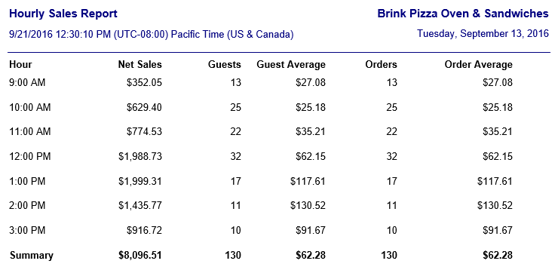
The Hourly Sales report displays gross or net sales, guest, and order data for the reporting period, broken down by hour. It is run by going to Reports > Sales Summaries > Hourly Sales in the Administrator Portal.
Example Hourly Sales report
Report Options
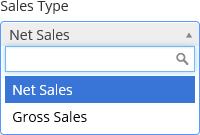
The Sales Type drop-down list allows you to select whether the report shows gross sales or net sales.
Sales Type drop-down list
Fields
| Field | Description |
|---|---|
| Hour | Displays the hour that each line represents. Hours for which there are no sales are not displayed. |
| Gross/Net Sales | Displays the gross sales or net sales reporting during that hour of the day for all days within the reporting period, with a total at the bottom. |
| Guests | The total number of orders multiplied by a factor defined in Options > Accounting > Guest Counts in Settings Editor, with a total at the bottom. |
| Guest Average | Gross/Net Sales ÷ Guests |
| Orders | The total number of orders for that hour of the day during the reporting period, with a total at the bottom. |
| Order Average | Gross/Net Sales ÷ Orders |
