How Do I Tender an Order to Cash?
When a customer wants to pay in cash, their order will need to be tendered to cash to complete the payment process. This guide will show two different methods to tender a customer's order to cash.
Method 1: Use a Pre-Configured Tender Button
-
Once logged in to the register, locate the Pre-Configured Cash Tender Buttons at the bottom of the screen.
-
Select the appropriate button to tender the order to cash
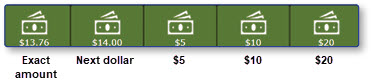
Note: These cash tender options are also available on the tender screen, accessible by selecting the Pay/ Close button in the bottom right corner.
Method 2: Use a Custom Cash Tender Amount
-
Select Pay/Close

-
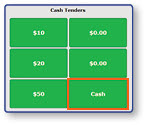
Select Cash
-
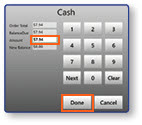
Enter the custom cash tender amount
-
Select Done