How Do I Void an Item from an Order that Has Been Sent to the Kitchen?
Select the Item to be Deleted
- Ensure that the correct item is highlighted on the left panel
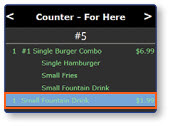
Note: Once the items have been sent to the kitchen, the text in the order window will turn green and an item must be voided by a manager to remove it from the order.
Delete the Item
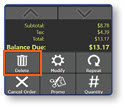
- Select the Delete button to void the item
Select a Reason for the Void
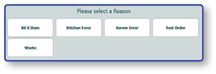
- Select one of the pre-configured void explanations
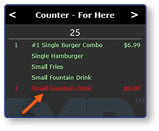
Note: Once the item has been voided, the text in the order window will turn red to indicate its removal.
