Statements
The Statements module provides users with a transparent, month-by-month breakdown of their transaction activity and associated fees. It helps users review the financial details of card payments processed on their behalf.
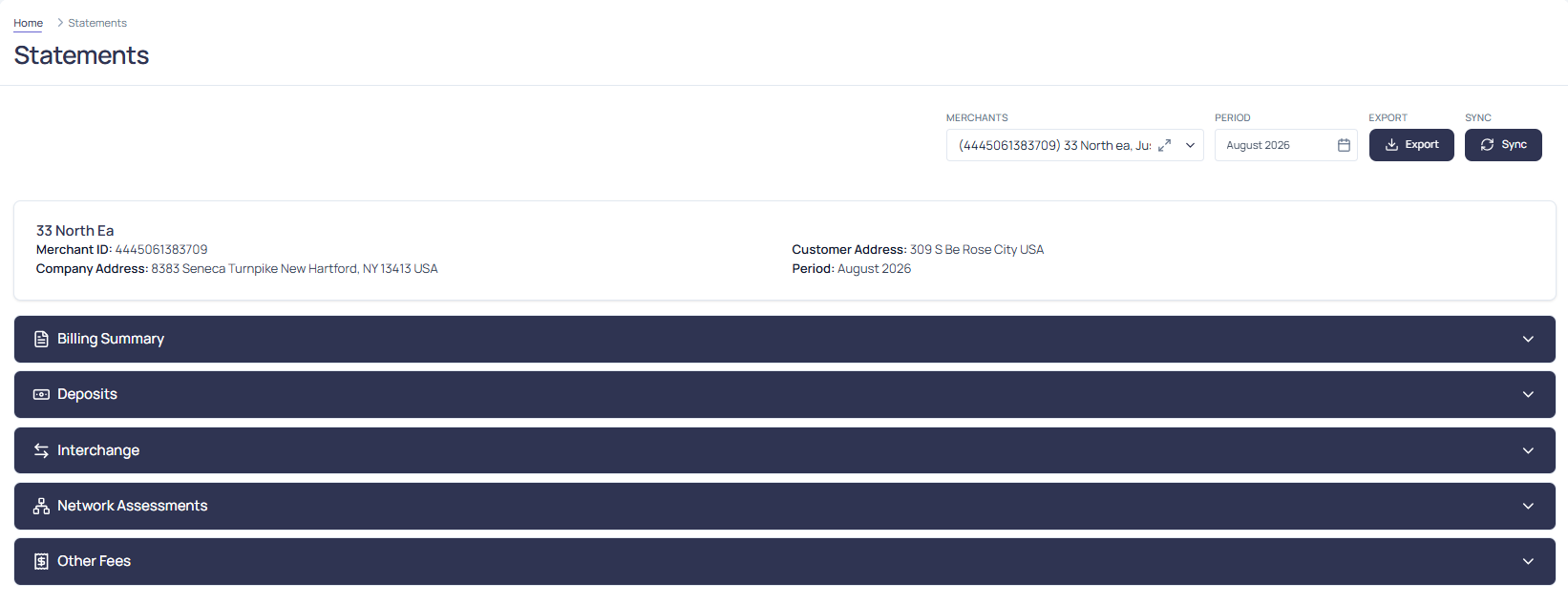
The following tabs offer a specific view of the statement data:
- Billing Summary: Overview of processing volume, fees, and net deposits.
- Deposits: Detailed view of deposit transactions for the selected period.
- Interchange: Breakdown of interchange fees applied to transactions.
- Network & Assessments: Fees charged by card networks and assessment bodies.
- Other Fees: Any additional fees incurred during processing.
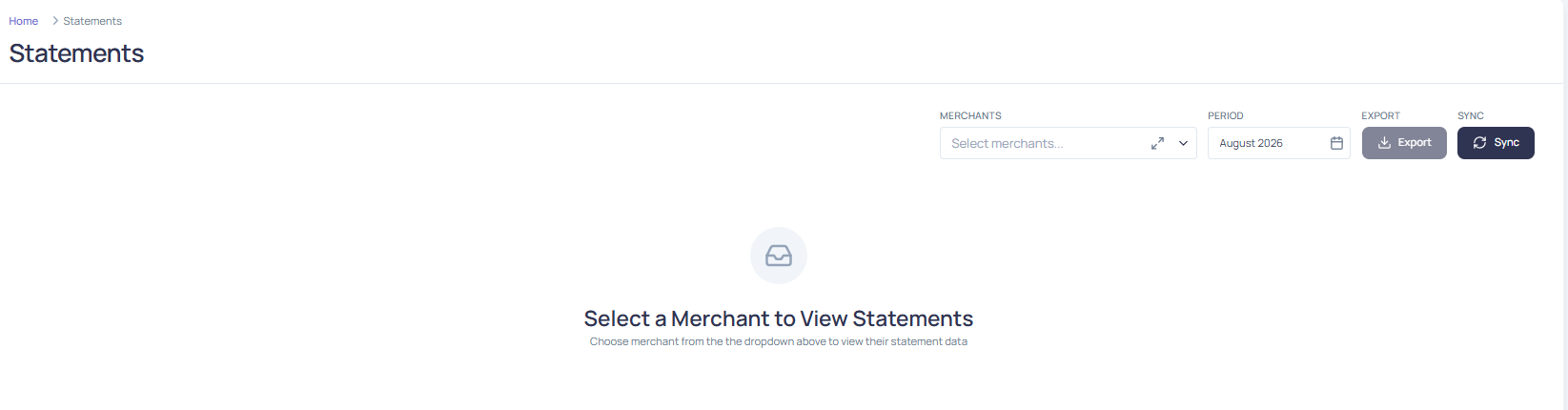
To view statement data, users must first select a merchant from the drop-down menu.
IMPORTANT: The default view displays No records found until a merchant is selected.
Filtering Options
Users can view the statements using filters:
- Month
- Year
- Merchants

Exporting Statements Data
To export a statement:
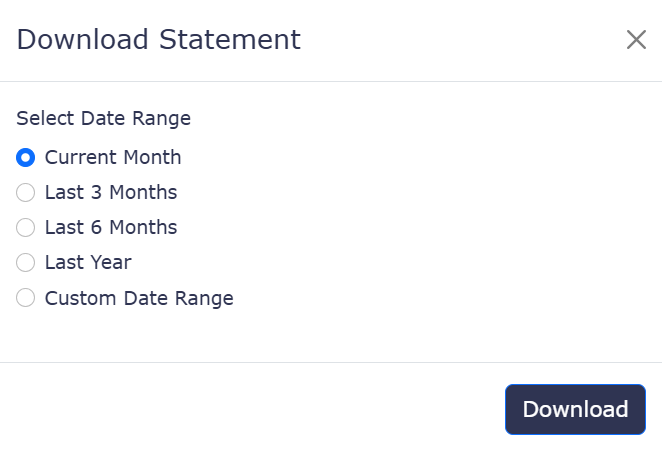
- Click the Export button
- Select the desired Date Range
- Click Download to save the file locally
Billing Summary
The Billing Summary tab displays a breakdown of key fee categories along with their corresponding amounts and totals. The following fields are included:
- Network & Assessments
- Interchange
- Other Fees
This view provides a concise summary of the charges applied during the selected statement period.

Deposits
The Deposits tab provides a detailed breakdown of deposit-related activity for the selected statement period. It displays key metrics related to sales, refunds, chargebacks, and adjustments, along with associated amounts and totals.
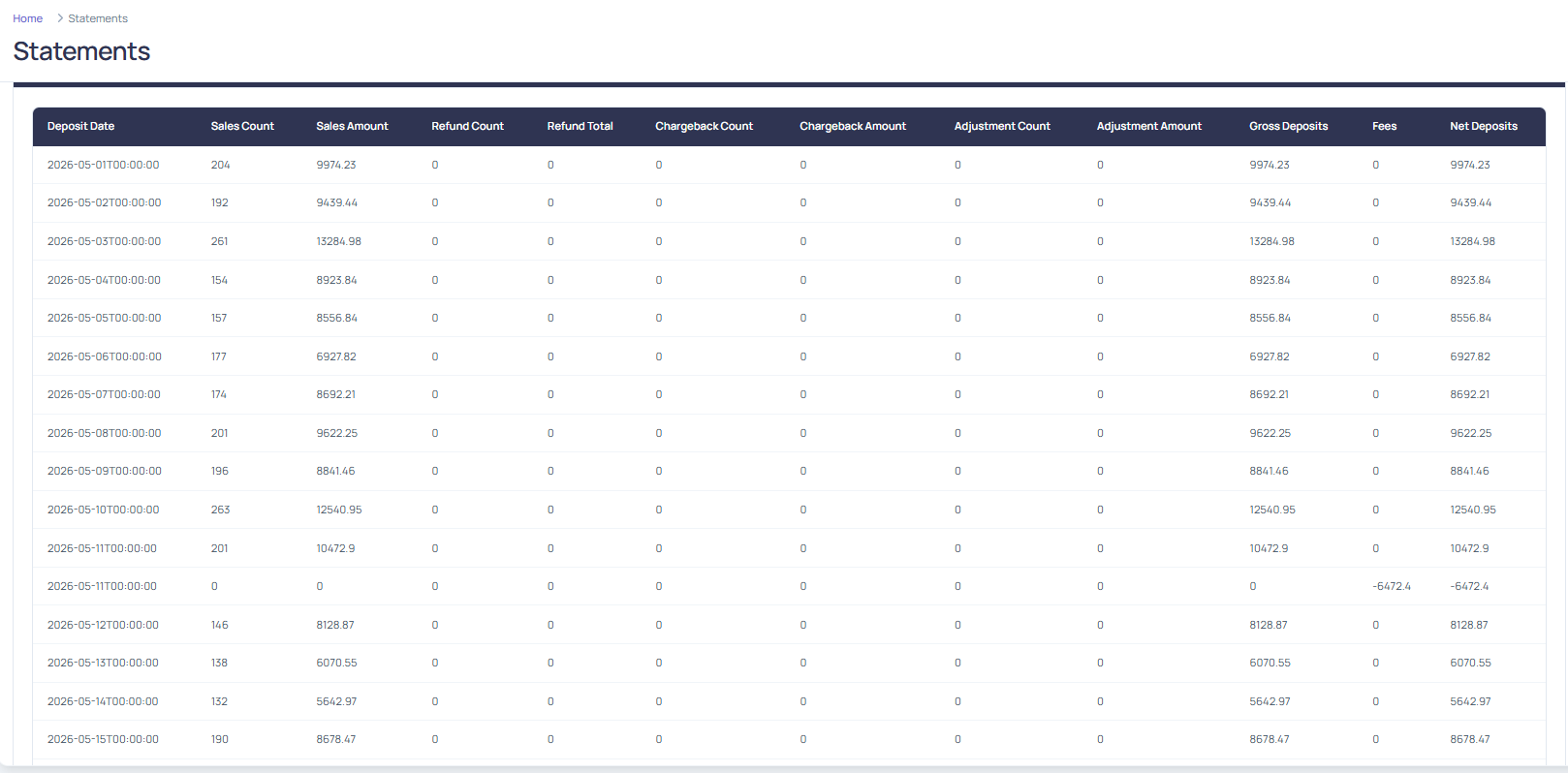
The following fields are displayed:
- Deposit Date: The date on which the deposit was processed or scheduled.
- Sales Count: The total number of sales transactions included in the deposit.
- Sales Amount: The total dollar value of all sales transactions.
- Refund Count: The number of refund transactions processed.
- Refund Total: The total dollar value of all refunds issued.
- Chargeback Count: The number of chargebacks associated with the deposit.
- Chargeback Amount: The total dollar value of chargebacks.
- Adjustment Count: The number of manual or system-generated adjustments applied.
- Adjustment Amount: The total dollar value of adjustments.
- Gross Deposits: The total amount before fees are deducted (includes sales minus refunds and chargebacks, plus or minus adjustments).
- Fees: The total fees deducted from the gross deposits.
Interchange
The Interchange tab displays a breakdown of interchange fees applied to transactions, grouped by card brand. This view helps users understand the cost of processing payments across different networks.
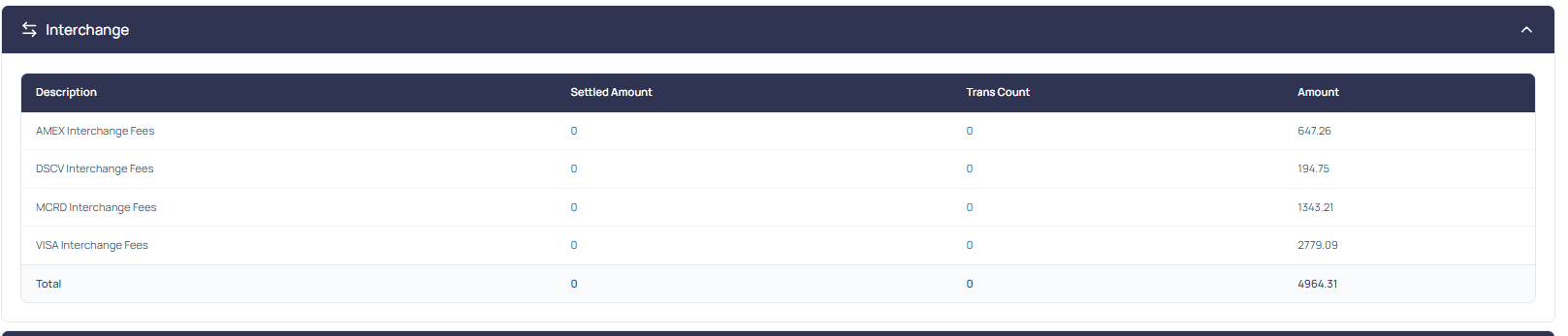
For each card brand (for example, Visa, Mastercard, American Express, Discover), the following fields are shown:
- Description: Specific fee category (for example, Amex Interchange Fees).
- Settled Amount: The total dollar value of transactions settled through the card brand.
- Transaction Count: The number of transactions processed for that brand.
- Interchange Amount: The total interchange fees charged by the card brand.
Network & Assessments
The Network & Assessments tab provides a detailed breakdown of fees charged by card networks and assessment bodies. These fees are typically applied per transaction and vary by card type and network.
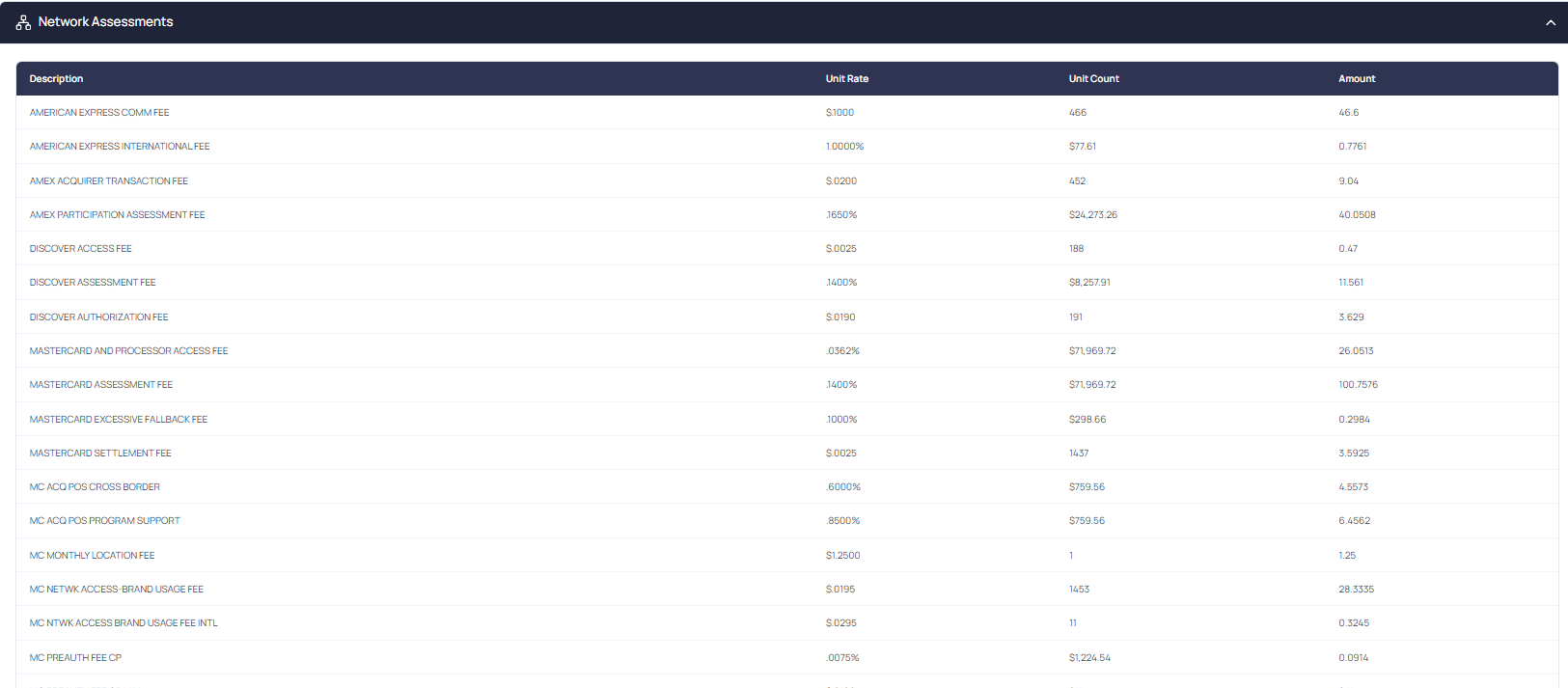
The following fields are displayed:
- Description: The name or type of the fee (for example, Visa Network Fee, Mastercard Assessment Fee).
- Unit Rate: The fee amount charged per unit (for example, per transaction or per dollar processed).
- Unit Count: The number of units the fee was applied to (for example, number of transactions or total volume).
- Amount: The total fee charged for that line item (Unit Rate × Unit Count).
Other Fees
The Other Fees tab displays a breakdown of additional processing fees that are not covered under interchange or network assessments. These fees are typically applied based on merchant setup, compliance status, and transaction activity.
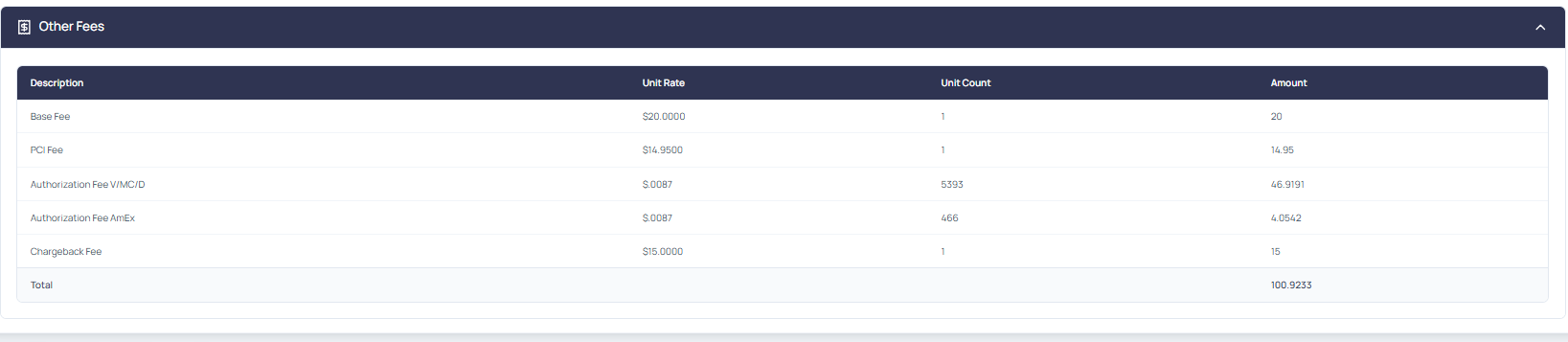
The following fields are displayed:
- Description: The name or type of the fee (for example, Base Fee, PCI Fee, Authorization Fee).
- Unit Rate: The fee amount charged per unit (for example, per transaction, per MID).
- Unit Count: The number of units the fee was applied to.
- Amount: The total fee charged for that line item (Unit Rate × Unit Count).
