Deposit Details
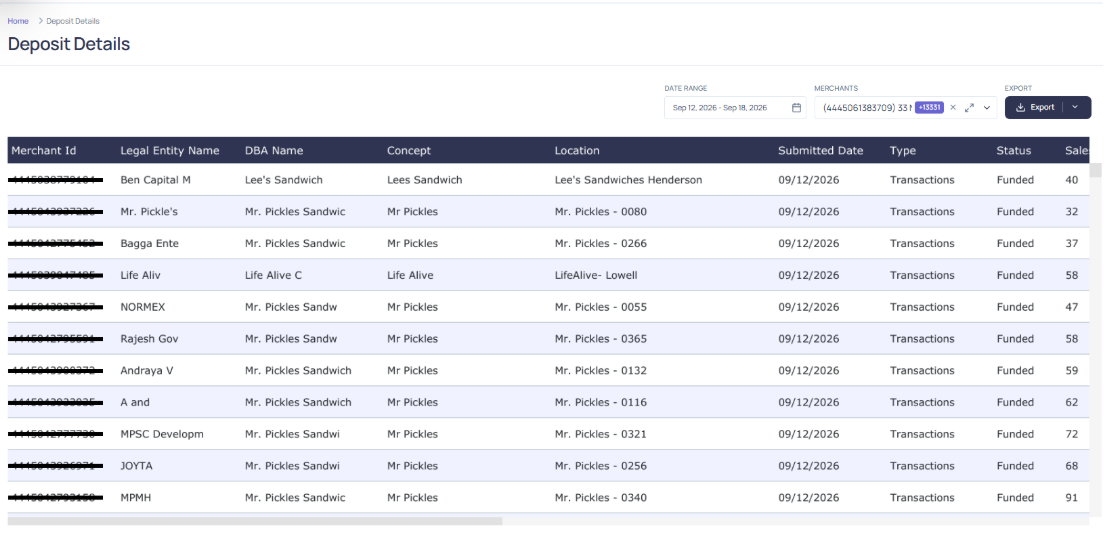
The Deposit Details module provides a detailed view of deposit activity across merchants. It allows users to monitor and analyze key financial data related to sales, refunds, and chargebacks.
Displayed Fields
Each deposit record includes the following information:
- Merchant ID: Identifier for the merchant associated with the deposit.
- Submitted Date: Date the deposit was submitted.
- Type: Category or nature of the deposit.
- Status: Current status of the deposit (for example, funded).
- Sales Count: Number of sales transactions included in the deposit.
- Sales Amount: Total value of sales transactions.
- Refund Count: Number of refund transactions.
- Refund Amount: Total value of refunded transactions.
- Chargeback Count: Number of chargebacks associated with the deposit.
- Chargeback Amount: Total value of chargeback transactions.
- Adjustment Count: Number of adjustments applied to the deposit.
- Adjustment Amount: Total value of adjustments applied.
- Gross Deposit Amount: Sum of sales minus refunds, chargebacks, and adjustments before fees.
- Fees: Total processing fees deducted from the deposit.
- Net Deposit Amount: Final amount deposited to the merchant after fees and adjustments.
- Currency: Currency in which the deposit is processed.
Filtering Options
Users can refine the displayed data using the following filters:
- Submitted Date Range: Select a custom time period.
- Merchant Filter: View deposits for specific merchants. The Merchants filter includes an expand icon to the right of the selected-merchants field. Click this icon to open the full-screen Select Merchants view, which makes it easier to browse, search, and manage large merchant selections.

Sorting Options
All columns in the Deposit Details table can be sorted in ascending or descending order. Simply click on the column header to toggle the sort direction.
Exporting Deposits Data
To export the deposits list:
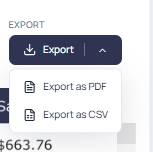
- Click the Export button
- Choose your preferred format: CSV or PDF
- Specify the view, scaling, page size, and orientation options as needed
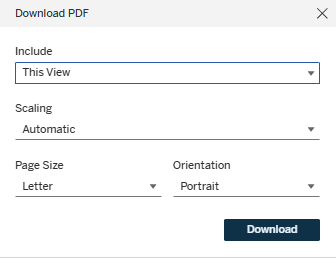
- Click Download to save the file locally
