Registration and Verification of PayPal Business Account
To allow your customers to pay with their PayPal account you need to register for a PayPal Business account and your PayPal e-mail needs to be added to PAR Ordering. This guide will take you through the process of registering & verifying a PayPal Business account.
Step 1: Go to https://paypal.com and click Sign Up

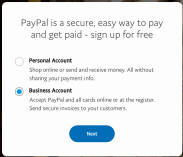
Step 2: Select that you want to create a Business account and click Next.
Step 3: You will send this e-mail to our Support later on to activate PayPal for your Venue
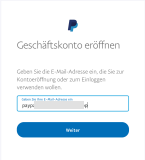
Step 4: Complete the PayPal registration process. The registration process will ask you to provide company and personal details. You should keep the following information at hand for the registration:
- Company name & address
- Business phone number
- Business type / legal form
- Business registration number
- Date of business registration
- ID, Passport or Drivers License
Step 5: After completing the registration process, you’ll receive a verification e-mail from PayPal. You need to verify your e-mail address in order to be able to accept payments. Click on Confirm Your Email and follow the steps on the PayPal page to confirm your e-mail.
Step 6: After confirming your e-mail address, provide your PayPal e-mail (from Step 3) by opening a ticket through one of our open a ticket or contacting your Account Manager to activate PayPal for your Venue.
